
Combining Wake-on-LAN with Automated Shutdown
By Nimrod Yedaya, VP Customer Experience

You walk through an office at 2:00 a.m. The building is empty. The lights are off. Yet every desk glows with the idle screen of a powered-on PC. IT teams leave these machines running because they need them available for patching, remote access, and overnight maintenance. The result is a massive, unmanaged drain on the power grid and your budget. Combining wake on LAN automated shutdown provides the operational fix, but only if you treat it as a policy-driven cycle rather than a simple script. PowerPlug Pro handles this exact WoL plus auto shutdown scenario by building a complete power management cycle. This guide breaks down how to engineer wake and sleep automation that respects maintenance windows, secures endpoints, and actually delivers ROI without angry users.
Reading time: 4 minutes
How to combine Wake-on-LAN with automated shutdown in one workflow
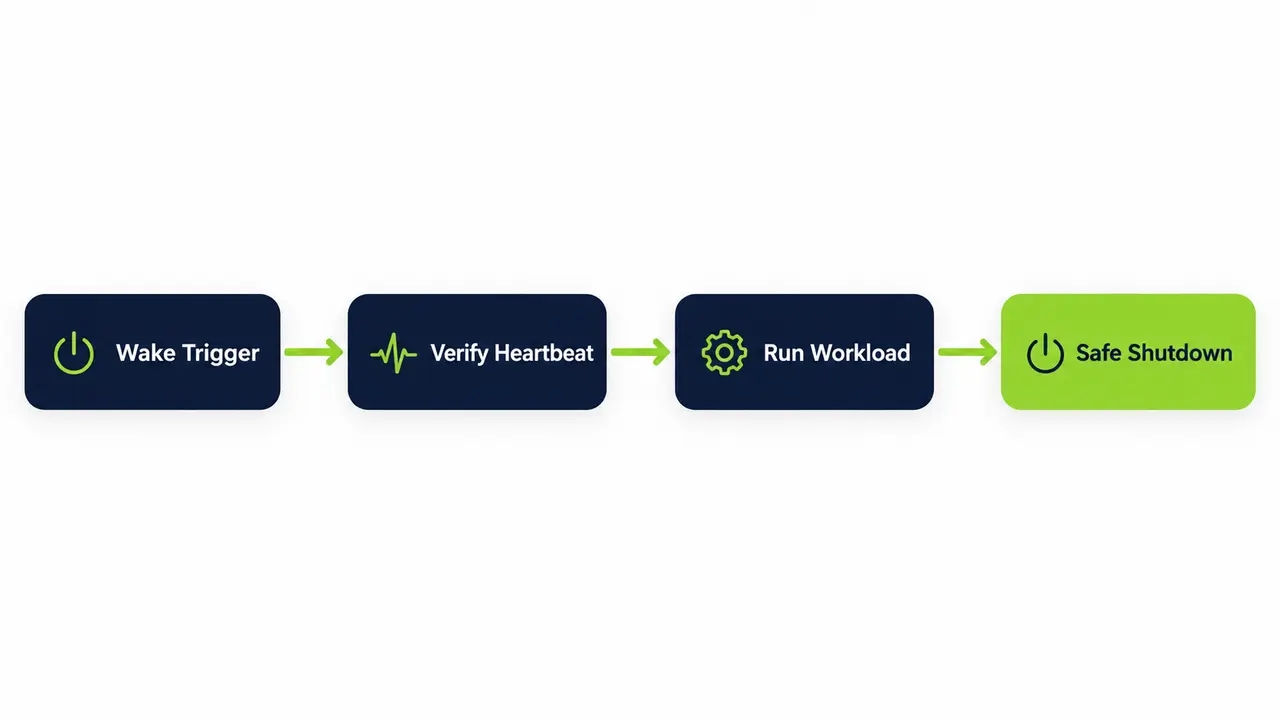
Combining wake on LAN automated shutdown requires four distinct phases. You need a wake trigger, a verification step, a defined availability window for the workload, and finally policy-based shutdown enforcement with user-safe guardrails. Most IT shops fail because they treat these as two separate tasks. They write a script to send magic packets and another script to call shutdown.exe. Neither script knows what the other is doing.
Sending a packet is easy. Guaranteeing the machine is online and ready for an SCCM task sequence is the actual challenge. Scheduling a blind shutdown is dangerous. If a deployment is still running, you break the patch cycle and corrupt the endpoint. The correct approach is an event-driven loop. You wake the fleet, confirm reachability through an agent heartbeat, execute the maintenance workload, verify task completion, and only then return the devices to a low-power state. This prevents two massive failure modes. Machines never stay awake all night burning electricity because a patch window ran long. Blind shutdowns never interrupt active users or critical background processes.
Defining the complete power management cycle for Windows PCs
A complete power management cycle is a repeatable, auditable automation loop. It replaces ad-hoc GPO settings and manual scripts with a structured endpoint power management policy. The cycle begins with policy scope definition, moves into timing and wake method selection, establishes success criteria, triggers workload actions, and enforces exit criteria based on idle rules or task completion.
The enterprise value here is more than the energy savings. It is the auditability. When a security auditor asks why a specific machine was left on overnight, you need a log showing exactly which maintenance window triggered the wake event and when the automated shutdown policy safely powered it down. This repeatability ensures you hit your patch compliance targets while simultaneously reducing after-hours power draw.
Cycle stages that reduce failure rates
Wake orchestration must include staggering and retries to avoid network congestion. Online verification requires a multi-signal check, not just a single ping. Post-task enforcement relies on strict idle rules combined with forced shutdown exceptions for active sessions.
What Wake-on-LAN actually does at the network level
Wake-on-LAN (WoL) sends a magic packet over the network to power on a compatible machine. The target network interface card (NIC) receives this packet, recognizes the specific byte sequence, and signals the motherboard to initiate a boot. This requires firmware, NIC, and OS settings to align perfectly. The role of WoL in enterprise IT is bringing devices online for remote access or scheduled maintenance windows without requiring someone to physically press a power button.
The real-world challenge is rarely about generating the packet. The challenge is network traversal and configuration drift. Standard WoL broadcasts often fail to cross subnet boundaries. Enterprise-grade platforms extend this basic mechanism with more resilient wake-up technology designed for fleets, retries, and verification. Without a dedicated platform, IT teams spend hours troubleshooting why a magic packet stopped at a router instead of waking the target PC.
Wake reliability differences between sleep and full shutdown
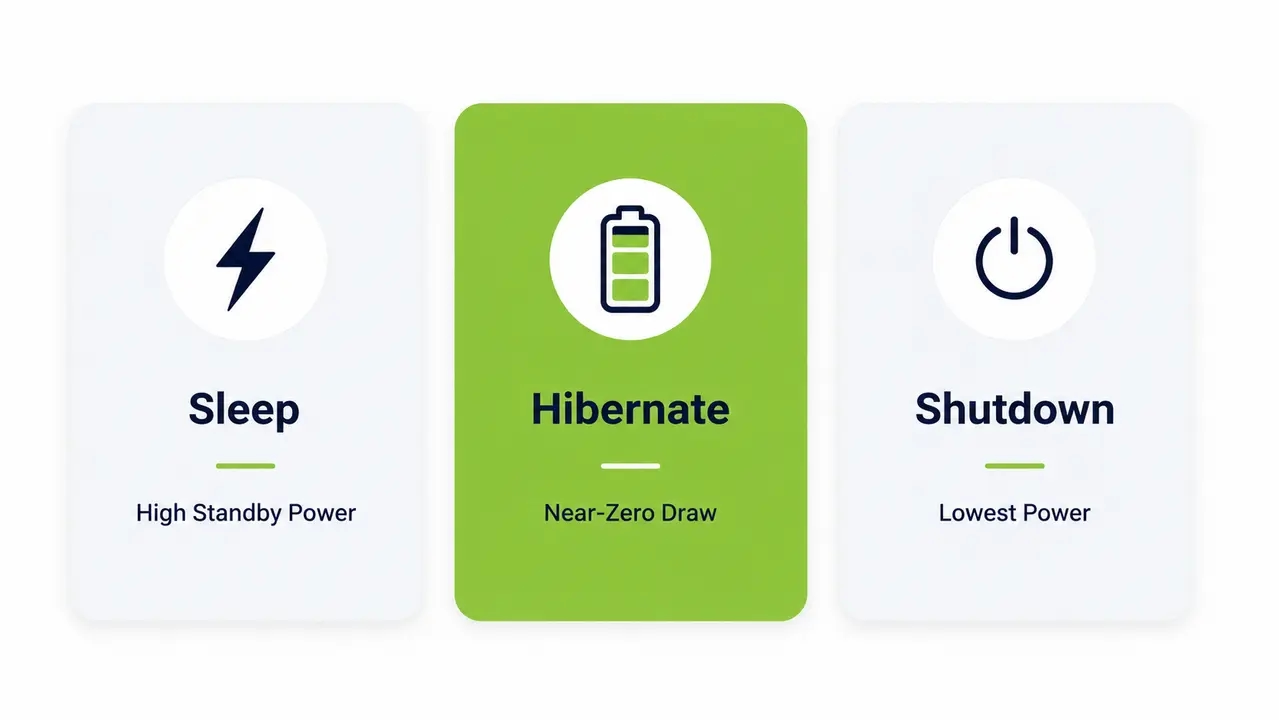
Sometimes WoL wakes a PC from full shutdown. Often it does not. The outcome depends entirely on hardware support, firmware settings, NIC power behavior, and the specific OS shutdown mode. Many fleets wake reliably from sleep or hibernate but experience inconsistent results from full shutdown. This inconsistency usually traces back to Windows fast startup behaviors and BIOS power management settings.
You need to define your target power state based on your specific reliability requirements, security posture, and energy goals. If your hardware reliably supports wake from S5, you can target full shutdowns for maximum energy savings. If it does not, you target hibernate to balance low power draw with maintenance availability.
Choosing the right power state for your fleet
Sleep offers the fastest resume time but maintains a higher standby power draw. Hibernate drops to a near-zero draw and often provides much better wake reliability than a full shutdown. Shutdown provides the absolute lowest power draw but can be the least consistent state for receiving WoL packets depending on the hardware platform.
Why Wake-on-LAN fails after a Windows shutdown
In shutdown-like states, the NIC may not stay armed for wake events. The OS, driver, or firmware might disable wake capabilities to reduce standby power consumption. When you issue a standard Windows shutdown command, the system enters an S5 ACPI state. Many modern network adapters drop power entirely in S5, making them deaf to incoming magic packets. According to Microsoft’s Wake-on-LAN troubleshooting documentation, Windows Fast Startup complicates this further by hybridizing the shutdown process.
Common causes for WoL failure include firmware settings with “wake from S5” disabled, NIC driver power management settings turning off the device, Windows Fast Startup interfering with the boot state, and network infrastructure actively blocking broadcast traffic. The fix requires a standardized configuration baseline. You must push BIOS/UEFI wake on lan enablement, adjust NIC power management settings via Group Policy, and validate compliance with reporting that shows exactly who is compliant and who is not.
The difference between basic WoL and WoL plus auto shutdown
Basic WoL asks a simple question. Can I turn this machine on? WoL plus auto shutdown asks a much more operational question. Can I run my process and guarantee it will not stay on all night? Combining wake on LAN automated shutdown creates an operational pattern where devices wake on demand or schedule, perform their required tasks, and automatically return to a low-power state once work completes.
This distinction is where real savings live. Basic WoL leaves machines running indefinitely after the maintenance window closes. WoL plus auto shutdown enforces a strict power boundary. The commercial value is measurable. You reduce overnight waste, ensure consistent patch readiness, eliminate manual IT tickets for stuck machines, and enforce policies that respect active users.
| Approach | Best Use Case | Failure Points | Scale Readiness |
|---|---|---|---|
| Basic WoL Scripts | Ad-hoc remote access for a few PCs | No verification, fails across subnets | Low |
| WoL plus remote shutdown scripts | Small labs with flat networks | Interrupts active users, no idle checks | Low to Medium |
| Policy-based endpoint power management | Department or site-level rollouts | Requires agent deployment and tuning | High |
| Full cycle automation | Enterprise fleets needing audit trails | Requires integration with existing tools | Very High |
Scheduling wake and sleep automation for patching windows
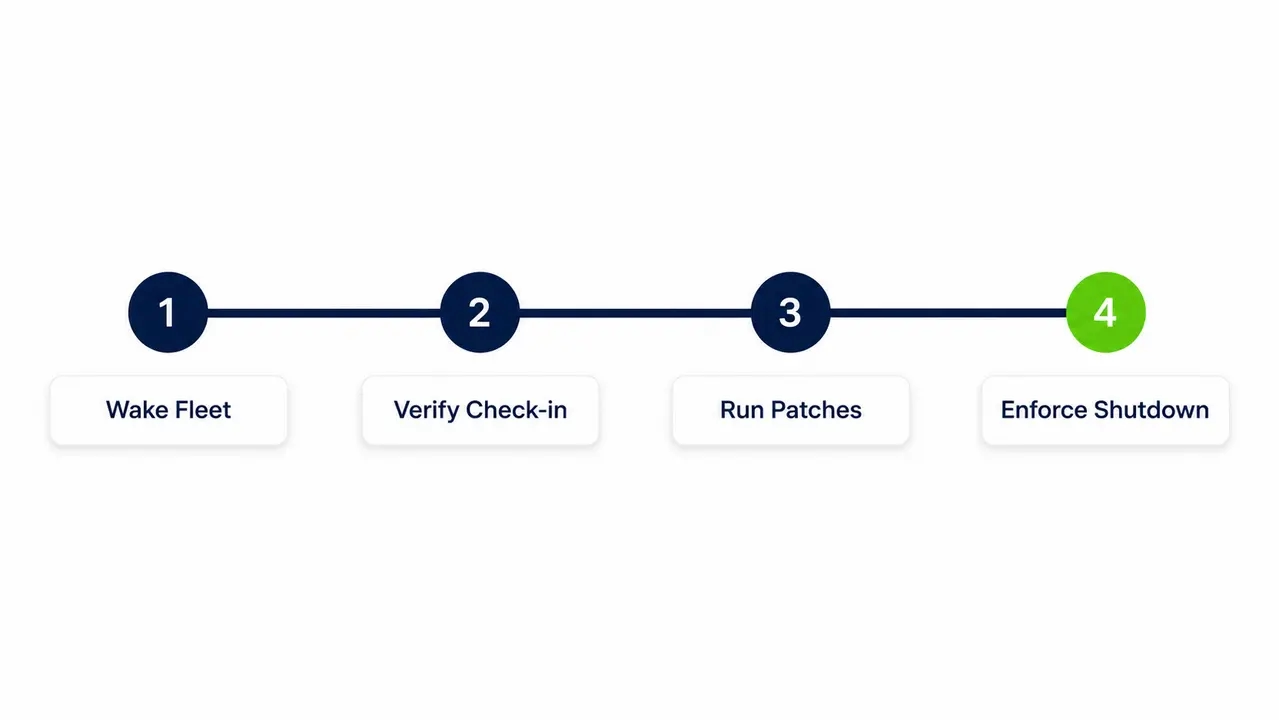
To automate maintenance window automation without disrupting users, you need a strict sequence. Schedule a pre-maintenance wake event, allow time for the machines to check in with SCCM or your endpoint manager, run the updates, confirm completion, and finally enforce a sleep, hibernate, or shutdown after a defined grace period.
A practical patch wake schedule looks like this. Wake the fleet 30 to 60 minutes before the patching window opens. Verify management check-in. Run the task sequence. Once the task sequence reports success, trigger the idle shutdown policy. You must build in deferral logic. The system should never shut down if a user is active. It should never shut down if a critical process is running. Hard rules protect the user experience and prevent data loss.
Exceptions your IT policy must include
Active user session detection is mandatory. You need presentation or meeting mode exceptions to prevent screens from going dark during critical events. Critical workloads like rendering, compiling, or database backups require explicit bypass rules. Device role exceptions must cover kiosks, lab machines, and specialized endpoints that cannot be interrupted.
Verifying a device actually woke up before running tasks
Never rely on a single ping to confirm a machine is ready for maintenance. Pings can be blocked by host firewalls. A response to an ICMP echo request means the network stack is alive, but it does not mean the operating system is ready to accept a remote configuration change. Wake orchestration requires multi-signal verification.
You need network reachability combined with a management check-in and a service or agent heartbeat. The endpoint agent must report back that it is active, logged in, and ready to execute instructions. This verification step prevents what IT teams call shutdown storms. If a device never actually woke up, but your system assumes it did, it will later target that device for a shutdown command it cannot receive. This skews your compliance reporting and leaves machines in an unpredictable state. Remote PC wake and shutdown only works when the verification loop is airtight.
The safest way to automate shutdown without angry users
User-aware policies are the only safe way to enforce after-hours shutdown enforcement. You must notify the user, allow deferral, and enforce the shutdown only when the machine is confirmed idle. Every action must be logged for accountability. A data loss event caused by an automated shutdown will destroy user trust in your IT department permanently.
Enterprise-safe shutdown enforcement requires configurable warnings. A countdown timer gives users time to save their work. Deferral limits allow them to snooze the shutdown once or twice, but eventually, the policy must enforce the low-power state. A “last chance” prompt is effective. Behind the scenes, the system needs a helpdesk-friendly audit trail. If a user complains their PC shut down, the helpdesk should instantly pull a log showing who triggered the policy, what rule initiated it, and exactly why it executed. User notification before shutdown is more than a courtesy. It is a requirement for a deferral snooze shutdown policy to function properly.
Network and security requirements that block automation
Enterprise wake on lan scheduling frequently hits a wall when it encounters network topology. Broadcast limitations, VLAN segmentation, VPN structures, endpoint firewall rules, and least-privilege constraints commonly block reliable automation at scale. WoL magic packets are broadcast frames. Routers do not forward broadcasts by default. Remote PC wake and shutdown requires authenticated, authorized control paths that respect your security posture.
Your solution must work within strict security policies. No shared admin passwords. No brittle, unencrypted scripts sitting on file shares. The platform needs clear role-based access control. It must integrate with Active Directory to ensure only authorized personnel can initiate wake or shutdown events. Audit logging and change control are mandatory for compliance.
Common enterprise constraints to plan for
VLANs and subnets require configured broadcast forwarding or directed packets to traverse L2 and L3 boundaries. Endpoint firewalls must allow specific management ports for the agent heartbeat. The credentialing model must use RBAC and delegated rights. Audit logs for power actions must capture every change to the policy configuration.
Staggering Wake-on-LAN to avoid power spikes
Never wake a fleet of thousands of PCs simultaneously. Waking hundreds or thousands of machines at exactly the same second causes DHCP bursts, switch load spikes, and building power issues. A massive inrush current can trip breakers. Wake orchestration must be staggered.
Wake devices in batches with randomized jitter. Prioritize critical groups first. If you are patching a building, wake the first 100 machines, wait two minutes, wake the next 100, and continue. Retry only the non-responders. Stop the wake process entirely once your compliance threshold is met. If 95 percent of the target machines are online for the patch window, stop hammering the network for the remaining 5 percent. Those stragglers can be handled individually by the helpdesk. A staggered wake-up protects the physical infrastructure of your facilities.
Selecting sleep, hibernate, or shutdown for maximum savings
Target shutdown for maximum savings when you are certain wake-from-shutdown is reliable across your hardware fleet. Target hibernate for low power draw combined with better wake reliability. Target sleep when user experience and fast resume times are your top priority. The reality is that most organizations need a mixed power state management approach.
Implement sleep during the day after a short period of idle time, say 15 minutes. Transition to hibernate after hours when the machine has been idle for an hour. Force a full shutdown for extended inactivity over weekends or holidays. Layer scheduled wakes on top of this for maintenance windows. This mixed approach balances user productivity with aggressive energy savings for PCs. Aligning your OS power settings with these hardware states ensures the machine behaves exactly as the policy dictates.
Preventing PCs from turning back on after shutdown
Unexpected wake events erode trust in your automation faster than failed shutdowns. If users see their PCs turning on by themselves at 3:00 a.m., they will assume the IT team has lost control of the fleet. You must tighten your wake sources. Align OS power settings to ensure scheduled tasks are not configured to wake devices unintentionally. Tighten BIOS/UEFI wake on lan enablement to only accept specific triggers.
Define allowed wake sources explicitly. If wake should only occur for maintenance, disable nonessential wake triggers like USB devices or unmanaged network packets. Document the intended wake schedule for predictability. When a user asks why their PC was on at 6:00 a.m., you need a log showing a scheduled wake event for a security update. Controlling NIC power management settings is the key to stopping random behavior.
What to look for in an enterprise tool for automation
You need a centralized power management console. Managing Windows fleet power management through scattered GPOs and scripts is unsustainable. Your platform must provide reliable wake orchestration, user-safe shutdown controls, and comprehensive reporting across the entire endpoint fleet. Ease of deployment is critical. A platform that takes months to roll out will lose momentum. You need something up and running in hours.
Look for device coverage that handles subnets and VPNs gracefully. Demand wake success rate reporting. The tool must offer scheduling flexibility and reliable exception handling. Integrations with existing endpoint management workflows are essential. Most importantly, the platform must produce measurable outcomes in the form of energy, cost, and carbon reporting. If you are evaluating options for your fleet, it is worth taking the time to speak with a power management specialist to map requirements against real-world deployment constraints.
Buyer-focused evaluation criteria
Policy granularity must extend to specific groups, sites, and roles. Verification and compliance dashboards are non-negotiable. Reporting must be suitable for leadership, highlighting concrete cost and carbon metrics. Operational safety requires user notifications, deferrals, and comprehensive audit logs.
Calculating ROI from combining Wake-on-LAN with automated shutdown
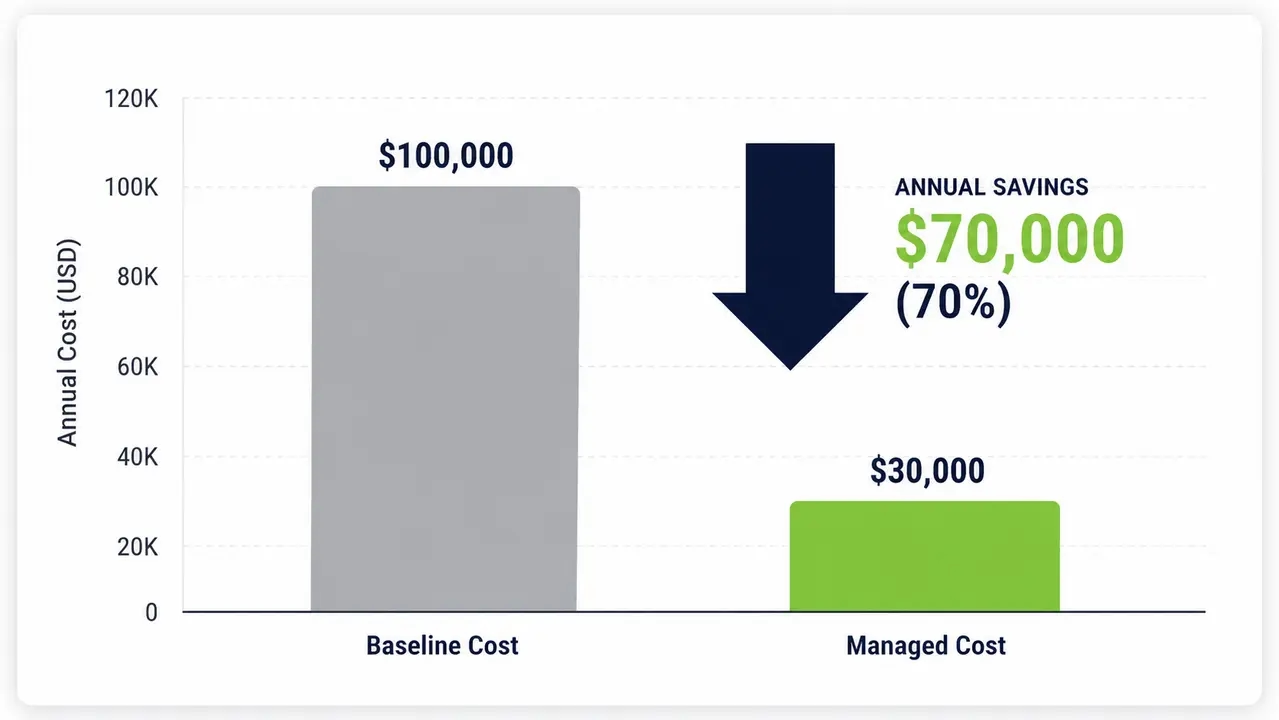
ROI comes from three main sources. You reduce after-hours runtime measured in kWh. You eliminate manual IT interventions and helpdesk tickets. You improve maintenance compliance by ensuring patching success. The math is straightforward. Take your baseline overnight on-hours per device, multiply by your device count, multiply by average wattage, and multiply by your electricity rate. Subtract your new post-policy runtime. That difference is your direct energy savings.
Add the soft savings. Fewer tickets mean less IT overtime. Reduced risk from missed security updates lowers your potential breach liability. For example, a healthcare campus case study demonstrates how staggered wake and enforced shutdown policies reduced after-hours energy consumption while maintaining patch compliance. Organizations using PowerPlug Pro have together saved over $50M and eliminated 200,000+ tons of CO2. You should track metrics like wake success rate by site, devices compliant with power policy, after-hours runtime hours saved, estimated kWh saved, and carbon avoided. Carbon reporting for endpoint fleets is increasingly necessary for ESG compliance frameworks.
See how much you could save
Calculate the direct energy and cost reductions for your specific fleet. Talk to our team to map your requirements to a structured power management cycle.
A practical policy template for a Windows PC fleet
Start with a conservative policy. Enforce idle-based sleep during business hours. Transition to after-hours hibernate or shutdown. Add scheduled wake windows specifically for maintenance. Refine your exceptions using real usage data gathered from the agent. PowerPlug Pro is built around this exact template, providing the infrastructure to enforce these rules without heavy lifting from your internal IT team.
Your template must define business hours explicitly. Set idle thresholds. Enforce after-hours shutdown rules. Define weekend rules. Establish a maintenance wake schedule. Set compliance targets. Identify exception groups like executives or lab machines. Execute a phased rollout plan moving from pilot to department, then site, then global. This structured approach ensures energy savings for PCs without breaking critical business operations.
| Policy Element | Standard Configuration | Operational Goal |
|---|---|---|
| Business Hours Idle | Sleep after 15 minutes | Balance productivity with daytime savings |
| After-Hours Enforcement | Hibernate after 60 minutes idle | Maximize off-hours savings safely |
| Weekend Rules | Full shutdown Friday at 8:00 p.m. | Eliminate weekend standby draw |
| Maintenance Wake | Staggered wake Wednesday 2:00 a.m. | Ensure patch window availability |
| Exception Groups | Executives, Labs, Kiosks | Prevent disruption of critical roles |
Combining wake on LAN with automated shutdown requires treating power management as a structured, policy-driven cycle rather than a pair of disconnected scripts. By verifying wake events, enforcing user-safe shutdowns, and staggering network traffic, you can securely reduce after-hours energy waste without disrupting IT maintenance or user productivity.
Frequently asked questions
How do I combine Wake-on-LAN with automated shutdown?
You combine them by building a full-cycle automation loop. The system sends a wake trigger, verifies the device is online via an agent heartbeat, executes the required maintenance workload, confirms task completion, and then enforces a policy-based shutdown or hibernate state. This prevents machines from staying awake all night and ensures blind shutdowns never interrupt active users.
Can Wake-on-LAN wake a computer from full shutdown?
It depends entirely on your hardware, firmware, and OS settings. While WoL can wake a PC from an S5 shutdown state, many network adapters drop power entirely when fully shut down, making them deaf to magic packets. You must verify BIOS/UEFI settings and NIC power management configurations to ensure wake-from-shutdown reliability.
Why does Wake-on-LAN not work after shutdown on Windows?
WoL often fails after shutdown because the NIC is not armed for wake events in low-power states. Windows Fast Startup can also interfere by hybridizing the shutdown process, blocking traditional wake sources. Standardizing your firmware configurations and disabling Fast Startup on targeted machines usually resolves this.
Does Windows Fast Startup affect Wake-on-LAN?
Yes, Windows Fast Startup affects WoL significantly. Fast Startup puts the kernel into a hibernation state rather than a full shutdown, which can alter how the NIC handles power and wake events. This behavior often blocks magic packets from waking the machine as expected.
How do I schedule Wake-on-LAN for patching and shut down PCs after?
You schedule a pre-maintenance wake event 30 to 60 minutes before your patch window opens. Once the maintenance is verified complete, the policy enforces a sleep, hibernate, or shutdown command. Building in idle detection and deferral rules ensures you never interrupt active users or critical background processes during the patch cycle.

About the author
Nimrod Yedaya
VP Customer Experience
Over 15 years of experience in customer service, technical support, and customer relationships. Nimrod joined PowerPlug in 2012 as Customer Support Manager and was promoted to VP in 2016. He holds an MBA from BIU and a BSc in Communication Systems Engineering from BGU.