
Wake-on-LAN Network Requirements Guide
By Nimrod Yedaya, VP Customer Experience

You walk through the office at midnight. Rows of monitors glow in the dark. The HVAC is running overtime to cool empty cubicles. This is exactly why IT directors look into Wake-on-LAN (WoL) and endpoint power management. Understanding the wake on lan network requirements prerequisites is the only way to turn those idle machines off without destroying your overnight patching windows. Wake-on-LAN looks simple on paper. You send a magic packet, the PC turns on, and the SCCM agent pulls the update. In production across segmented VLANs and remote offices, it fails constantly. Most enterprise rollouts stall because teams overlook the hardware, OS, and network dependencies that make WoL reliable at scale. This guide breaks down the full prerequisites for an enterprise deployment. We cover the exact BIOS settings, driver configurations, and network delivery methods needed to make wake signals work across a massive fleet. Tools like PowerPlug Pro are built specifically to solve these network and prerequisite challenges, but the underlying infrastructure rules apply to any environment.
Reading time: 4 minutes
What are the network requirements and prerequisites for Wake-on-LAN
WoL requires three specific dependencies to function. The endpoint hardware and firmware must support waking from a low-power state. The OS and NIC driver must be configured to allow wake triggers. The network must have a delivery path for the magic packet to reach the target device’s broadcast domain. Most enterprise failures happen at the network delivery layer. Routers and switches do not forward broadcast traffic between subnets by default. The WoL tool itself is rarely broken. The packet just never arrives. You have to engineer a path for that traffic. Meeting the wake on lan requirements means treating this as an infrastructure project, not just a checkbox in a deployment console. Building a reliable endpoint fleet power policy means mapping out these layers before you turn off a single machine.
What is a magic packet in Wake-on-LAN
A magic packet is a specially formatted network frame. It contains the target device’s MAC address repeated in a defined pattern. The network interface card (NIC) recognizes this pattern even while the operating system is asleep or powered off. MAC-based targeting matters because the device has no active IP address when powered down. Broadcast delivery is the common mechanism for reaching the NIC without needing an active IP session. The concept of broadcasting datagrams to all hosts on a local segment is foundational to how networks operate. Getting the magic packet network setup right means ensuring that broadcast stays local to the target segment. Ethernet wake on lan relies entirely on this frame structure.
Why MAC address matters more than IP when the PC is asleep
IP addresses are volatile. When a device powers down, its operating system releases the DHCP lease or drops the ARP cache entry. The MAC address is burned into the NIC firmware. It remains persistent regardless of power state. You target the hardware directly. This is why a reliable wake on magic packet strategy ignores IP addressing and focuses purely on Layer 2 delivery.
Which PC power states allow Wake-on-LAN
WoL reliability depends on whether the NIC retains standby power in the selected power state. Sleep is generally the most reliable state for waking. Shutdown, known as the S5 power state, can work but often needs extra BIOS and driver configuration. Windows defines distinct system power states that dictate exactly which components receive power. An idle PC still draws power in sleep mode to keep the NIC alive. Full shutdown removes most power. If you want energy savings endpoint shutdown, you must verify that S5 wake is explicitly supported by your hardware. You cannot assume a machine will wake from a full power off just because it wakes from sleep.
Why Fast Startup breaks wake behavior
Windows Fast Startup partially hibernates the kernel instead of fully powering down. This hybrid state interferes with expected wake-from-shutdown behavior. The OS thinks it is off, but the hardware is in a weird middle state that often ignores magic packets. Disable Fast Startup via Group Policy before testing any shutdown wake on lan deployment.
How to choose a standard power state policy for a fleet
Pick one supported state as the fleet default. Sleep provides predictable patch-window behavior because the NIC stays energized. Use full shutdown as an opt-in exception path for specific hardware models proven to support wake from s5. Standardizing on sleep state wake reduces help desk tickets during your first month of deployment.
BIOS and UEFI settings required for Wake-on-LAN
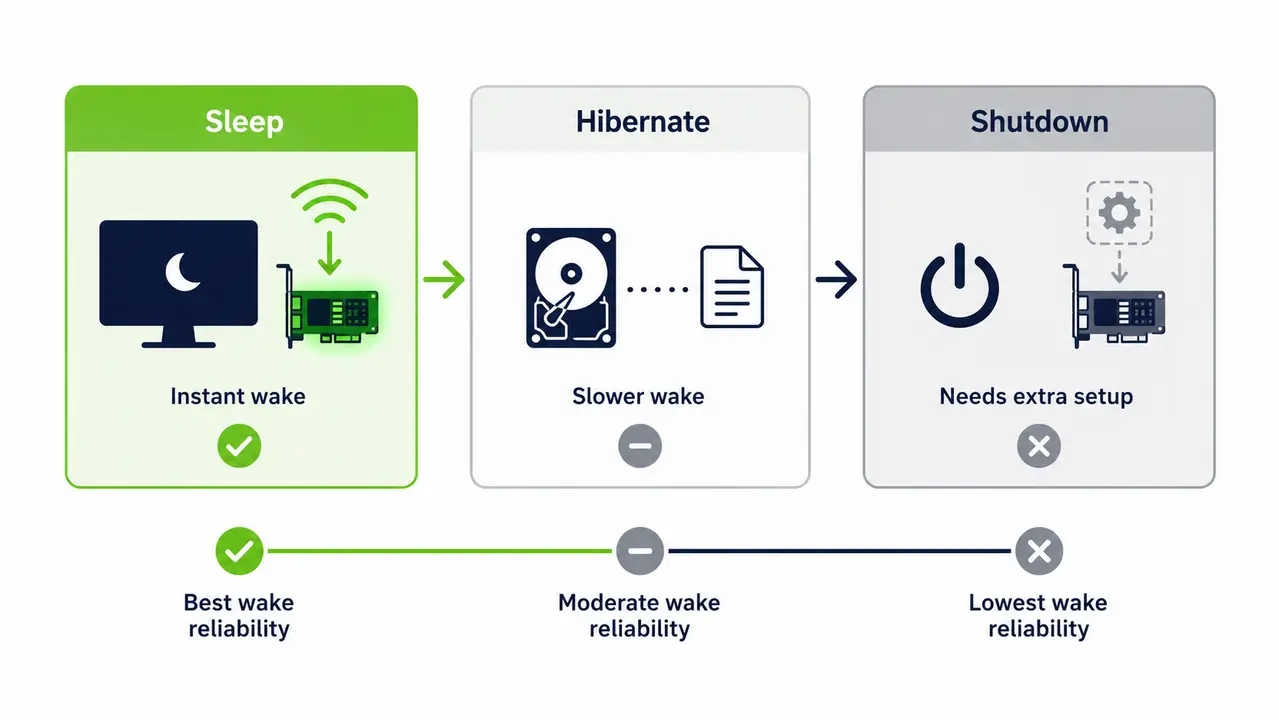
You must enable wake capabilities in the BIOS or UEFI. Look for settings like Wake on PCIe or Wake on Magic Packet. The system board must deliver standby power to the NIC in low-power states. Avoid firmware energy-compliance modes that fully power down the network controller. These modes are a frequent, hidden cause of WoL failure. The hardware vendor prioritizes meeting regulatory standby power targets over maintaining wake capability. You have to override those defaults. Setting the correct wake on lan bios settings is non-negotiable for a fleet rollout.
Common BIOS labels that map to WoL behavior
Vendor terminology varies wildly. Search for labels like Wake on PCI-E, Power On by PCI-E, Wake on Magic Packet, or Resume by LAN. Document the exact setting name for every hardware model in your environment to streamline configuration.
Why ErP and Deep Sleep settings stop WoL
ErP and Deep Sleep are energy-compliance modes designed to cut standby power to zero. They exist to meet environmental regulations. When enabled, the motherboard physically drops power to the NIC. No power means no wake. Standardize your wake on lan uefi settings by disabling ErP across the fleet using vendor configuration tools.
NIC driver and OS settings for Wake-on-LAN
The NIC must be explicitly configured to allow the device to wake the computer. It must also be set to respond only to magic packets. Power-management settings must not disable the adapter in sleep or off states. Windows exposes these settings in the adapter properties. Updated OEM driver packages sometimes expose additional or renamed wake options beyond the default inbox driver. Managing network adapter power management is a core requirement for keeping endpoints available. If the OS overrides the hardware, the machine stays asleep forever.
The minimum Windows settings checklist for fleet consistency
Open Device Manager and navigate to the Power Management tab for the network adapter. Disable the option allowing the computer to turn off the device to save power. Enable the option to allow this device to wake the computer. Check the box to only allow a magic packet to wake the computer. Push these windows device manager wake settings via Group Policy.
Why updating NIC drivers changes WoL behavior
Driver drift is a common cause of inconsistent wake behavior. A routine Windows Update pushes a new inbox driver. That new driver resets the advanced power management tabs to default. Suddenly half your fleet stops waking for patching. Lock down driver versions or monitor them closely to maintain consistent nic standby power behavior.
Does Wake-on-LAN work over Wi-Fi
Traditional WoL is designed for wired Ethernet. Waking over Wi-Fi is chipset and driver dependent. It is far less consistent for enterprise operations. Wireless cards often drop power entirely to save battery, ignoring magic packets. Set realistic expectations for your fleet. Require wired connections for guaranteed overnight maintenance. For Wi-Fi heavy laptop fleets, suggest wake timers or local agent relay approaches as complementary strategies to support your wake on lan enterprise deployment goals.
Does Wake-on-LAN work across VLANs or subnets
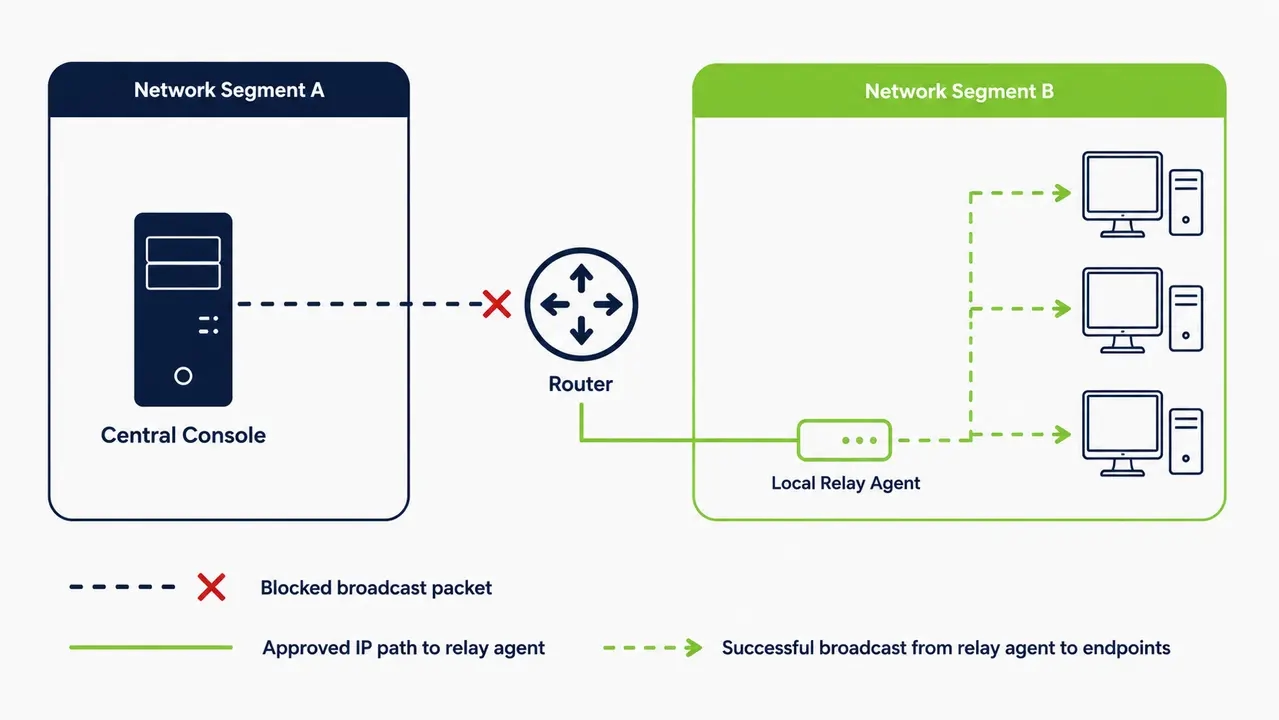
Not by default. Magic packets are broadcast at Layer 2. Routers do not forward broadcast traffic between VLANs or subnets. If your SCCM server sits in VLAN 10 and your endpoints sit in VLAN 30, the packet stops at the router. This is the number one reason WoL fails in production. You have to engineer a way around broadcast domain boundaries to achieve reliable wol across vlan or wol across subnet configurations.
What broadcast domain means in practical IT terms
A broadcast domain is the physical or logical boundary where a broadcast frame can travel. If two PCs are on the same unmanaged switch, they share a broadcast domain. If a router separates them, they are in different domains. The router drops the broadcast.
Safer enterprise patterns than forwarding broadcasts everywhere
Network admins hate enabling directed broadcast wake on lan. It opens the network to amplification attacks. Instead of opening router broadcast forwarding wol across every site, enterprise teams typically deploy a purpose-built wake-up technology that delivers magic packets locally within each subnet while reporting status back centrally. This avoids risky router configuration changes and ensures reliable remote office wake on lan.
Switch configuration factors for Wake-on-LAN
Basic same-VLAN WoL usually needs no special switch configuration. However, switch features like port security, MAC limiting, and energy-efficient Ethernet defaults can prevent the packet from reaching a sleeping NIC. A switch refresh can silently introduce new energy-saving defaults that break previously working WoL. You test everything in a lab, deploy it, and six months later a network team pushes a firmware update. The wake traffic stops. Validate your switch configuration for wol on a representative access switch model per site before fleet-wide rollout.
DHCP and ARP considerations for Wake-on-LAN
A static IP is not required for the NIC to recognize a magic packet. The hardware listens for its MAC address, not an IP address. IP and DHCP behavior matters when packets must be delivered across subnets or through routers that need a target mapping. This is why the “it worked yesterday” complaint fails after a DHCP lease renewal or ARP cache timeout. The router forgets where to send the packet. Use DHCP reservations for manageability and consistent targeting, especially when using relay tooling. Understanding arp cache wake on lan behavior saves hours of troubleshooting. A dhcp reservation for wol ensures your relay always knows exactly where to direct traffic.
Which ports does Wake-on-LAN use
Many tools send WoL using UDP port 7 or 9 by convention. The port number matters far less than whether the packet actually reaches the correct Layer 2 segment. Opening a port on a router does not guarantee broadcast delivery across subnet boundaries. Firewall guidelines recommend deliberate, documented rule design rather than broad port openings. Enterprise teams should focus on controlled delivery paths using a local relay or agent. Stop worrying about port 7 vs port 9 wol debates and focus on the physical delivery mechanism.
Why Wake-on-LAN fails even when settings look correct
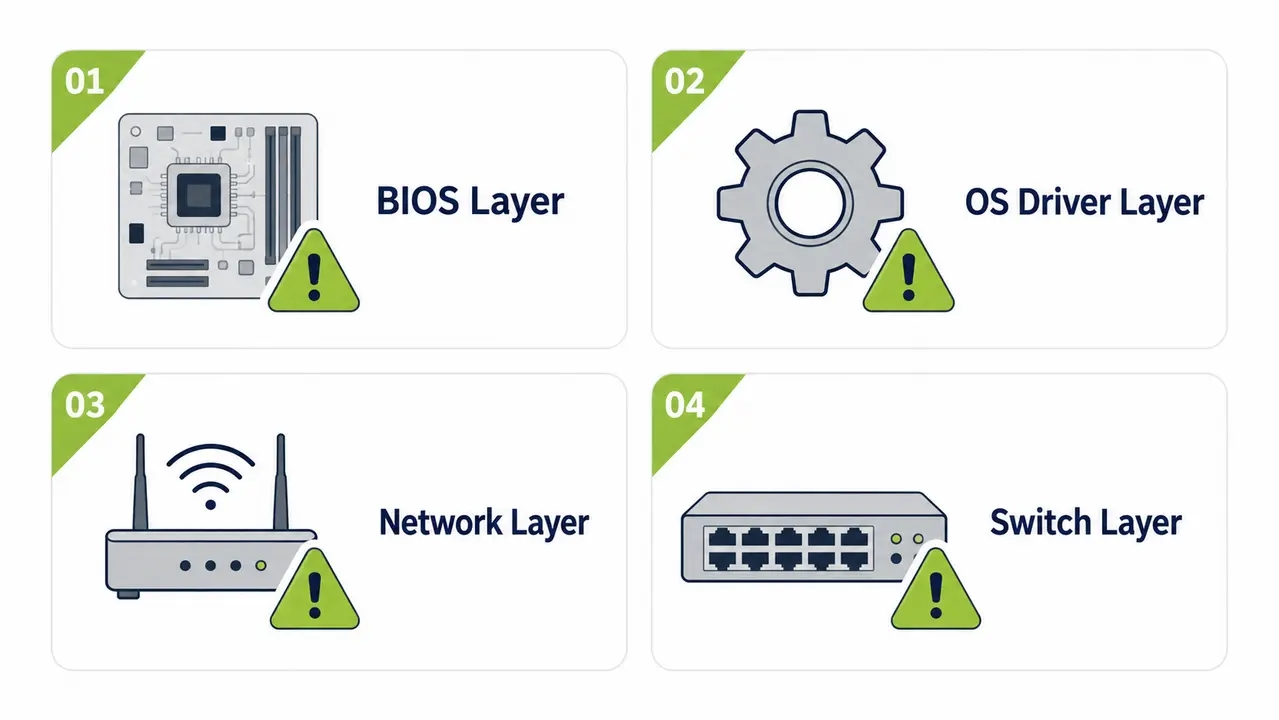
Most failures trace to one of four areas. The power state does not retain NIC standby power. The driver disables wake. The packet cannot reach the broadcast domain. Network security controls block the traffic. A good wake on lan troubleshooting checklist maps symptoms to these layers. If it works on the same switch but not a remote VLAN, check the network layer. If it works from sleep but not shutdown, check the BIOS. If it stops working after a driver update, check the OS layer. Microsoft’s own troubleshooting guidance for the Wake-on-LAN feature confirms that driver and power-policy conflicts are among the most common root causes.
| Symptom | Most likely layer | Quick verification | Recommended fix | Preventive control |
|---|---|---|---|---|
| Works on same switch, fails remote site | Network and VLAN layer | Check broadcast domain boundaries | Deploy local relay agent | Document VLAN topology |
| Works from sleep, fails from shutdown | BIOS and power state layer | Check S5 wake setting in BIOS | Enable full wake-on-shutdown support | Standardize power policy |
| Stops working after driver update | OS and NIC driver layer | Verify Device Manager power tabs | Re-enable magic packet wake | Lock driver versions via WSUS |
| Fails on specific access switches | Switch infrastructure layer | Check energy-efficient Ethernet | Disable EEE on access ports | Standardize switch configs |
Can 802.1X or NAC block Wake-on-LAN
Yes. Access control mechanisms can prevent a sleeping endpoint from receiving traffic. 802.1X port-based access control drops unauthenticated frames. A sleeping device does not maintain an authenticated session state. The switch port reverts to an unauthorized state. The magic packet hits the port and gets dropped before it reaches the NIC. Coordinating 802.1x wake on lan behavior requires network team involvement. You must implement exceptions or MAC Authentication Bypass policies. Addressing nac blocking wol ensures your endpoints actually receive the wake signal.
Configure Wake-on-LAN without weakening security
Use segmented, least-privilege delivery. Keep wake traffic local to each site or VLAN via a relay agent. Restrict who can trigger wake requests. Log wake events like any other administrative action. A central admin console triggers a wake request. A local component inside each subnet broadcasts the magic packet. Endpoints wake and check in for maintenance. Logs are recorded centrally. This is how you configure wol enterprise environments safely.
Recommended enterprise architecture patterns for reliable WoL
The console-plus-local-relay pattern is the gold standard. The central server tells the local relay to send the packet. The relay handles the Layer 2 broadcast. This works perfectly for remote offices without opening broadcast traffic across the WAN. Coordinating this manually across dozens of sites is difficult. Many IT teams instead rely on a unified platform that centralizes rollout status, logging, and role-based wake permissions.
Logging and audit requirements for who woke what
Compliance-minded organizations need an audit trail of wake actions tied to maintenance windows. Healthcare and finance auditors want to know who woke a machine and why. Every wake event must log the initiator, timestamp, and target machine.
Test and validate Wake-on-LAN delivery end-to-end
Validate in layers. Confirm endpoint wake capability locally first. Confirm same-VLAN wake next. Then test cross-VLAN or remote site delivery. Use a staged test plan. Start with a pilot group on representative hardware models. Test different access switch models. Test different VLANs. Finally test a remote office link. Use a packet capture on a span port to confirm the magic packet actually arrives on the target segment. Never assume success just because the console shows a green checkmark. Following this wake on lan troubleshooting checklist ensures your wol network requirements are actually met before you shut down 10,000 machines.
The enterprise checklist for rolling out Wake-on-LAN
Standardize BIOS settings. Standardize NIC driver versions and wake settings. Define one supported power state policy. Implement a network delivery method that does not rely on broadcast routing across every site. Treat this as an infrastructure project with change control and pilot success metrics. A successful wake on lan enterprise deployment requires governance.
Fleet readiness checklist for endpoint power policy
Review endpoint hardware eligibility. Establish a firmware baseline. Enforce NIC power settings via GPO or MDM. Map out network and VLAN requirements. Document security controls and exceptions. Define validation steps for each site. Establish rollout operations and exception handling for Wi-Fi only laptops.
Success metrics to track for ROI and compliance
Track wake success rate as your primary technical KPI. Monitor patch compliance improvement as the operational KPI. Track energy and cost savings as the financial KPI. For a real-world example of standardizing BIOS and NIC baselines and measuring wake success rate across a large network, see how a university-scale deployment addressed these exact prerequisites. Tying these metrics to energy savings endpoint shutdown outcomes secures ongoing funding for the project.
Wake timers compared to Wake-on-LAN for maintenance
Wake timers can wake devices on a schedule without network delivery dependencies. WoL enables on-demand wake but depends on network reachability. Scheduled weekly maintenance windows work well with wake timers. Ad-hoc incident response or unscheduled patch pushes require WoL. Combine both methods for resilience and higher patch compliance. This hybrid overnight patching wake strategy maximizes uptime while supporting carbon reporting endpoint power initiatives.
| Method | Works when PC is shutdown | Works across VLANs by default | On-demand or scheduled | Security risk level | Operational complexity | Best use case |
|---|---|---|---|---|---|---|
| Wake-on-LAN | Depends on S5 config | No | On-demand | Medium | High | Ad-hoc patching |
| Wake timers | No | Yes | Scheduled | Low | Low | Weekly maintenance |
| Local relay agent | Depends on S5 config | Yes | On-demand | Low | Medium | Enterprise fleets |
| Manual power-on policy | Yes | Yes | N/A | None | High | Not recommended |
Common enterprise gotchas that break WoL at scale
Mixed hardware models break rollouts. Inconsistent BIOS baselines, driver drift, and VLAN sprawl cause failures. A new laptop model arrives with differently labeled BIOS settings. A switch refresh enables new energy-saving defaults. A NAC policy change drops wake traffic. Users unplug Ethernet cables overnight. These scale breakers turn a perfect lab test into a production nightmare. Reliable enterprise WoL is a governance problem as much as a technical one. Standardized baselines, tested network delivery, and auditable processes matter more than any single setting. Solutions like PowerPlug Pro exist specifically to standardize and automate these prerequisites across large, heterogeneous fleets. Managing your endpoint fleet power policy this way ensures you capture the energy savings without breaking IT operations.
See how much you could save
Find out how PowerPlug Pro handles endpoint fleet power policy, standardizes BIOS and NIC baselines, and automates local relay wake delivery across your subnets. Get a clear estimate of your potential energy and cost savings.
Frequently asked questions
How do I ensure Wake-on-LAN does not weaken network security?
You avoid opening directed broadcast forwarding across your routers. Instead, deploy a local relay agent inside each subnet to handle the Layer 2 delivery. This keeps the magic packet traffic confined to the specific VLAN where the target machine lives. You also enforce role-based access controls on the central console so only authorized IT staff can initiate wake requests.
Will Wake-on-LAN work for endpoints at remote office sites?
Yes, provided you do not rely on routing broadcasts across the WAN. A central console sends a trigger over the standard IP network to a local component at the remote site. That local component generates the magic packet on the local subnet. This architecture works reliably even over slow VPN links without saturating the connection.
Does Wake-on-LAN interfere with overnight patching windows?
It enables them. Without a wake mechanism, IT teams leave PCs running all night just to catch a maintenance window. With a managed wake strategy, machines stay powered down until the exact moment SCCM needs them. The platform wakes the fleet, the patching engine does its work, and the machines return to sleep or shutdown automatically.
What is the ROI and payback period for managed PC power shutdowns?
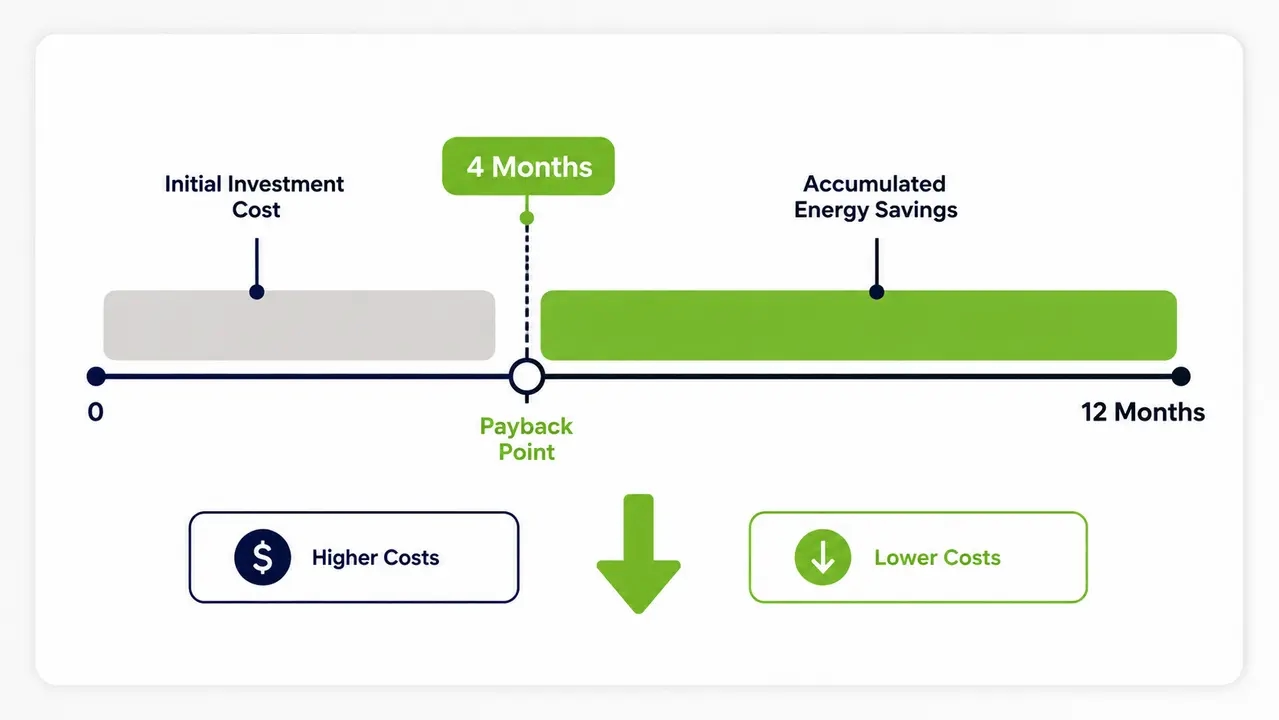
Organizations typically see ROI in as little as four months. An organization with 1,000 PCs can save tens of thousands of dollars a year by eliminating idle overnight power draw. PowerPlug customers have together saved over $50 million and eliminated 200,000 tons of CO2 by enforcing structured shutdowns and reliable wake-ups.
How does managed PC power shutdown support ESG and CSRD reporting?
It provides hard data on kWh avoided and carbon footprint reduced. Instead of estimating sustainability metrics, IT hands finance and sustainability teams concrete numbers based on actual endpoint power state changes. This data directly supports carbon accounting and corporate sustainability reporting requirements.
Wake-on-LAN depends on hardware, OS, and network alignment. Success requires standardizing BIOS settings, locking down NIC drivers, and deploying a local relay architecture to cross VLAN boundaries safely. Treat WoL as an infrastructure project to capture energy savings without breaking IT operations.

About the author
Nimrod Yedaya
VP Customer Experience
Over 15 years of experience in customer service, technical support, and customer relationships. Nimrod joined PowerPlug in 2012 as Customer Support Manager and was promoted to VP in 2016. He holds an MBA from BIU and a BSc in Communication Systems Engineering from BGU.