
Attendance Based PC Wake-Up Automation
By Nimrod Yedaya, VP Customer Experience
Walk through any enterprise office at 3 AM and you will see hundreds of monitors glowing in the dark. IT teams leave these machines on overnight for patching, remote access, and maintenance windows. The cost of that availability is massive idle power draw. You can tell users to shut down at 5 PM, but you will never hit 100% compliance. Attendance based PC wake up automation solves the conflict by tying endpoint power states directly to employee arrival signals, ensuring machines are ready when needed and powered down when not. This approach delivers just-in-time PC wake readiness without sacrificing your IT maintenance windows.
Reading time: 4 minutes
What is Attendance Based PC Wake Up Automation
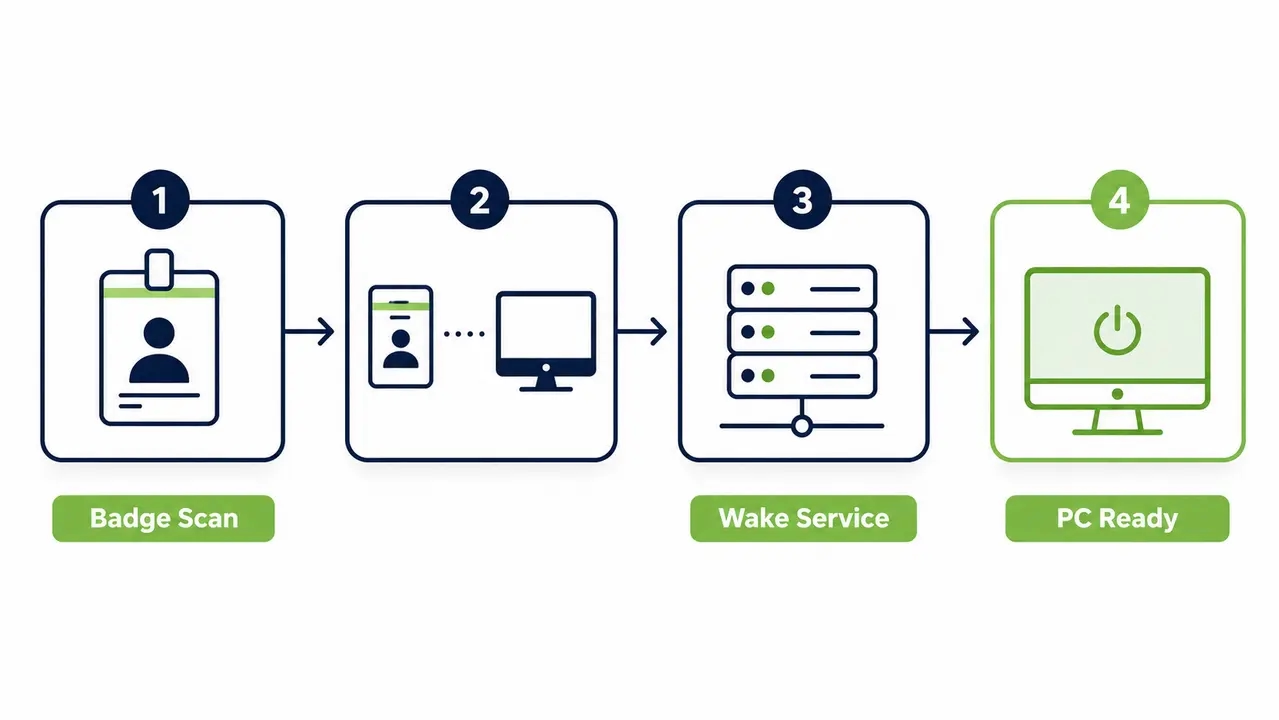
Attendance based PC wake up automation is a workflow that triggers an employee arrival PC boot using signals from your existing identity and access systems. When an employee badges into the building, logs into the VPN, or associates with the corporate Wi-Fi, that event triggers a managed wake action for their assigned PC. The machine is fully booted and waiting at the lock screen by the time they sit down.
This is not a single tool. It spans attendance system integration, a secure wake mechanism, and IT policy enforcement. Common arrival signal sources include time clocks, access control badge readers, SSO login events, and network presence. The wake targets are typically sleep, hibernate, or soft-off states, depending on what your hardware supports. Platforms like PowerPlug Pro manage this workflow centrally, providing full audit logs and RBAC controls instead of relying on risky DIY scripts.
How an Arrival Event Triggers the Boot
The event flow is straightforward but requires precise mapping. An attendance event occurs, such as a badge scan at the door. The system maps that employee identity to a specific device hostname and MAC address. It then sends a wake request to a dedicated wake service. The service executes the wake mechanism, whether network-based or agent-based, and returns telemetry for logging.
Device assignment models vary. One-to-one mapping works for standard dedicated workstations. Pool logic is required for shared or hot-desk environments. The execution method also varies by environment. Network-based Wake-on-LAN works well for wired desktops on flat networks, while an endpoint agent wake approach handles complex routing. Getting this flow right ensures reliable attendance-triggered PC wake across the fleet.
Mapping Users to Devices
The foundation of reliable automation is your user-to-device mapping table. Required data fields include the employee identifier, device hostname, MAC address, location, and shift assignment. You also need exception rules for temporary assignments. Errors in this mapping table cause the wrong PC to wake up, leading to helpdesk tickets and user frustration. Solid device assignment for hot-desking requires continuous inventory synchronization.
Can an Attendance System Trigger Wake-on-LAN
Yes. If your attendance platform can call an API, fire a webhook, or run an automation step, it can trigger a Wake-on-LAN action. The most common integration pattern uses a webhook from the attendance platform sent to an automation layer, which then forwards the wake request to a dedicated wake service. Direct Wake-on-LAN calls from the attendance app itself are rare in enterprise settings.
Most enterprises route wake requests through a dedicated, IT-controlled wake layer rather than letting the attendance vendor trigger endpoints directly. This separation provides better security, reliability, and auditability. You restrict access to the wake mechanism and log every request. Requests are routed through a dedicated wake layer such as PowerPlug Pro’s Wake-Up Technology, which handles the actual network wake execution securely across the fleet.
Defining Wake-on-LAN for Enterprise Fleets
Wake-on-LAN (WoL) is a network-based method that wakes a compatible PC from certain low-power states by sending a magic packet to its network interface. The best-fit scenario for WoL is wired desktops on managed networks. Laptops and Wi-Fi connections behave inconsistently depending on hardware and NIC power settings. WoL enables just-in-time readiness at shift start without leaving PCs powered on overnight.
Understanding the technical mechanics is critical for troubleshooting. Windows-specific WoL behavior, requirements, and known limitations are documented by Microsoft’s Wake-on-LAN behavior reference. You must know the difference between wake from sleep vs hibernate vs shutdown. Magic packets do not wake machines from full mechanical off states unless specifically configured in BIOS/UEFI.
WoL Fails Across Subnets and VLANs
Simple WoL works in small flat networks but breaks in segmented enterprise environments. Broadcast packets do not naturally traverse routed networks. Multiple VLANs, subnets, and firewalls block the magic packet from reaching the target endpoint. This is where rollouts stall. IT teams test WoL in a pilot room, see success, and then fail spectacularly when trying to wake PCs across subnets.
Enterprise-grade solutions must solve this reliably at scale. You need a controlled wake architecture using distributed relays, agent-based mesh forwarding, or managed wake gateways. These systems support multi-subnet fleets without opening broad network exposure. Microsoft Configuration Manager documents specific network requirements for waking clients across managed environments, including subnet-directed broadcasts. A purpose-built remote wake portal handles this routing automatically.
Wake and Auto-Login Are Different Layers
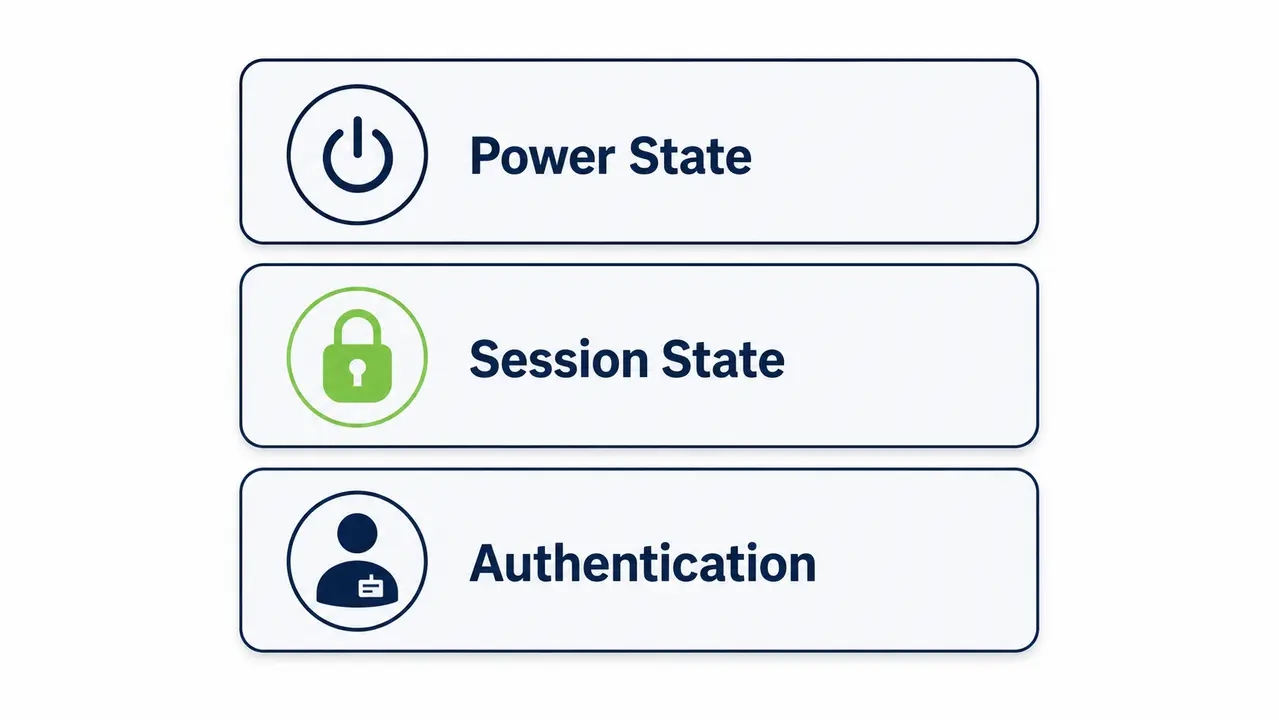
Many IT teams confuse automatic computer start login with simply waking a PC. There are three distinct layers to understand. Power state refers to whether the machine is on, off, sleeping, or hibernating. Session state refers to whether the user is locked or unlocked. Identity and authentication refers to who is signed in.
Starting a PC means powering it on from a full shutdown or waking it from sleep. Attendance-triggered automation should make the device ready, but it should not bypass authentication in workplace environments. Setting clear expectations here prevents security disasters. You want the machine booted to the lock screen, not logged in with saved credentials.
Why IT Prefers Wake to Lock Screen Over Auto-Login
Technically possible does not mean advisable. Auto-logging into Windows after the PC wakes up is possible in some configurations, but it is generally discouraged in business environments due to security and compliance risk. It creates credential exposure, leaves sessions unattended, and breaks audit trails. It also breaks practically when passwords rotate or when conditional access and MFA policies conflict.
The industry standard is wake to lock screen. It preserves security controls while delivering the productivity benefit. The employee arrives to a ready device and authenticates normally. A shift worker badges in, their PC wakes, and they sign in with an approved credential method like a PIN or smart card. This approach aligns with secure wake automation requirements and maintains audit logs for compliance.
Integrating Attendance Without Breaking Security
Security teams hate uncontrolled wake requests. Use an IT-owned wake service, restrict who and what can trigger wake events, and log every request with full user and device context. Implement signed webhooks, allowlisted IPs, and service accounts with least-privilege permissions. Apply rate limiting and approval rules so wake requests only fire during scheduled shifts for assigned devices.
Access control integration with PC wake requires strict logging. You need attendance event IDs, user IDs, device IDs, trigger sources, success or failure results, and timestamps. This data set supports both security audits and operational troubleshooting. Time clock integration with IT automation gives you the operational efficiency of just-in-time PC wake without the security gaps.
Required Logs for Compliance and Troubleshooting
If an endpoint wakes unexpectedly at 2 AM, your security team needs to know why. Required log fields include the attendance event ID, user ID, device ID, trigger source, result status, and precise timestamps. This data is non-negotiable for compliance frameworks and for isolating why a wake-on-LAN automation for enterprises failed. Centralized telemetry is the difference between a managed system and a chaotic one.
Handling Shared PCs and Hot-Desking
Shared environments require a device assignment strategy. You either wake a pool of PCs for a location and shift, or you dynamically assign a device at check-in. Call centers with shared stations, training rooms, and school computer labs all face this challenge. Zone-based wake logic badges an employee at a door and wakes a defined set of PCs in that zone. First available dynamic assignment logic allocates the nearest ready machine.
You also need exception handling. Keep a subset of devices always ready for emergencies or priority roles. This lab PC wake scheduling approach is highly effective for shift-based PC readiness. As demonstrated in the Ben Gurion University case study, lab and shared-PC environments require flexible wake scheduling across large device pools to balance availability and energy efficiency.
Scheduled Wake vs Arrival-Triggered Wake
Use scheduled wake when start times are predictable. Use arrival-triggered wake when attendance is variable. Classes, fixed shifts, and patch maintenance windows benefit from scheduled wake 10 to 20 minutes before start time. Variable arrivals and just-in-time readiness goals benefit from attendance triggers. Many organizations use a hybrid approach, scheduling baseline capacity and using attendance triggers for early or late arrivals.
Endpoint power scheduling must account for patch and update maintenance windows. This is a separate, complementary scheduled-wake use case. You need machines awake for SCCM deployments and remote access, even if no employee is present. A managed platform handles both endpoint power scheduling and just-in-time PC wake without conflict.
The Real Energy and Cost Savings
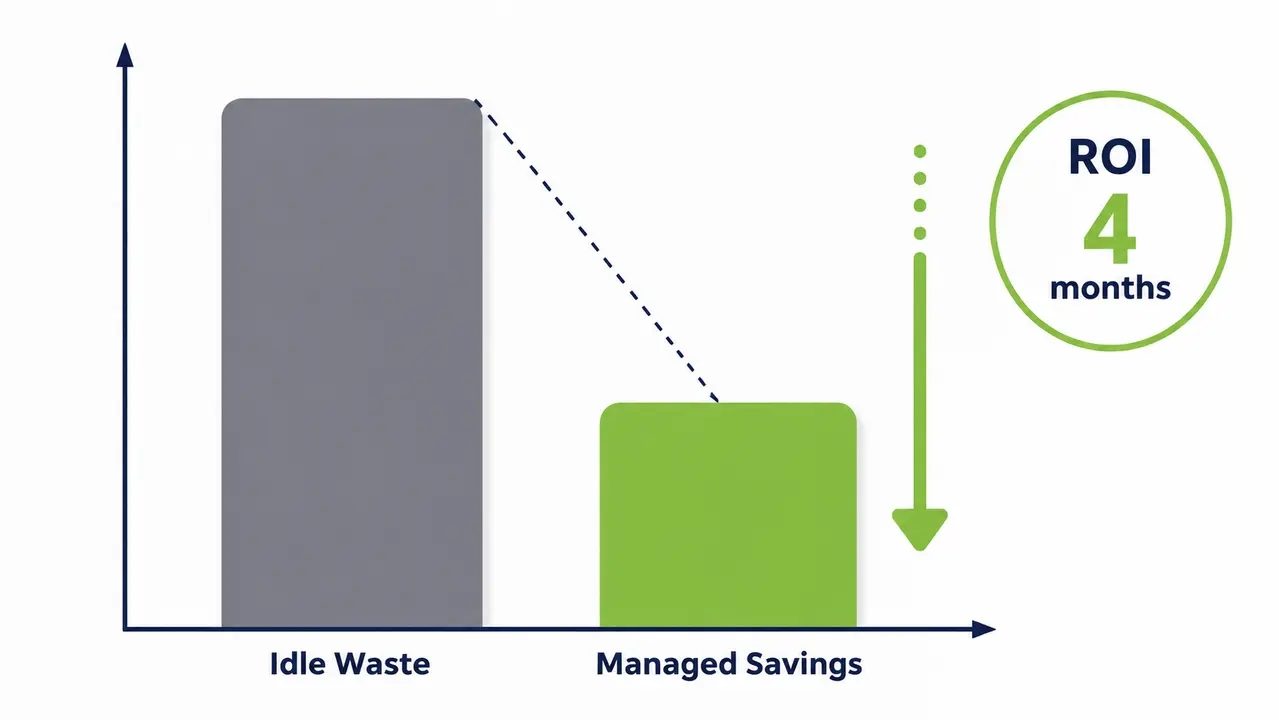
Savings come from reducing unnecessary powered-on idle hours. The formula is simple. Multiply the number of PCs by the baseline idle wattage, the hours reduced, and your electricity rate. An idle PC still draws power. Multiply that by 1,000 machines and 250 working nights, and the waste is no longer a rounding error. Cutting idle hours across a large fleet compounds into substantial annual kWh reduction.
Organizations such as those featured in the Clalit Health Services case study have demonstrated measurable reductions in after-hours PC runtime using automated wake and shutdown policies. Track before and after runtime and power-state data to prove ROI to finance stakeholders. PC energy savings reporting turns an IT operations project into a board-level sustainability initiative.
Ready to calculate your savings?
Talk to us about integrating automated PC wake-up with your existing attendance and network systems.
Hardware Prerequisites for Reliable Wake
Reliable wake automation requires compatible hardware settings, correct power states, and consistent endpoint configuration. Enable wake features in BIOS/UEFI. Ensure NIC power settings allow wake. Standardize sleep and hibernate power plan policies across the fleet using endpoint management tooling. Wake from full shutdown is technically harder to achieve reliably than wake from sleep.
Laptops on battery behave differently than desktops on AC power. You must verify wake from sleep vs hibernate vs shutdown capabilities for every hardware model. An endpoint agent wake mechanism can bypass some network limitations, but the hardware must still support the target power state transition.
Rolling Out to 500 Plus Endpoints
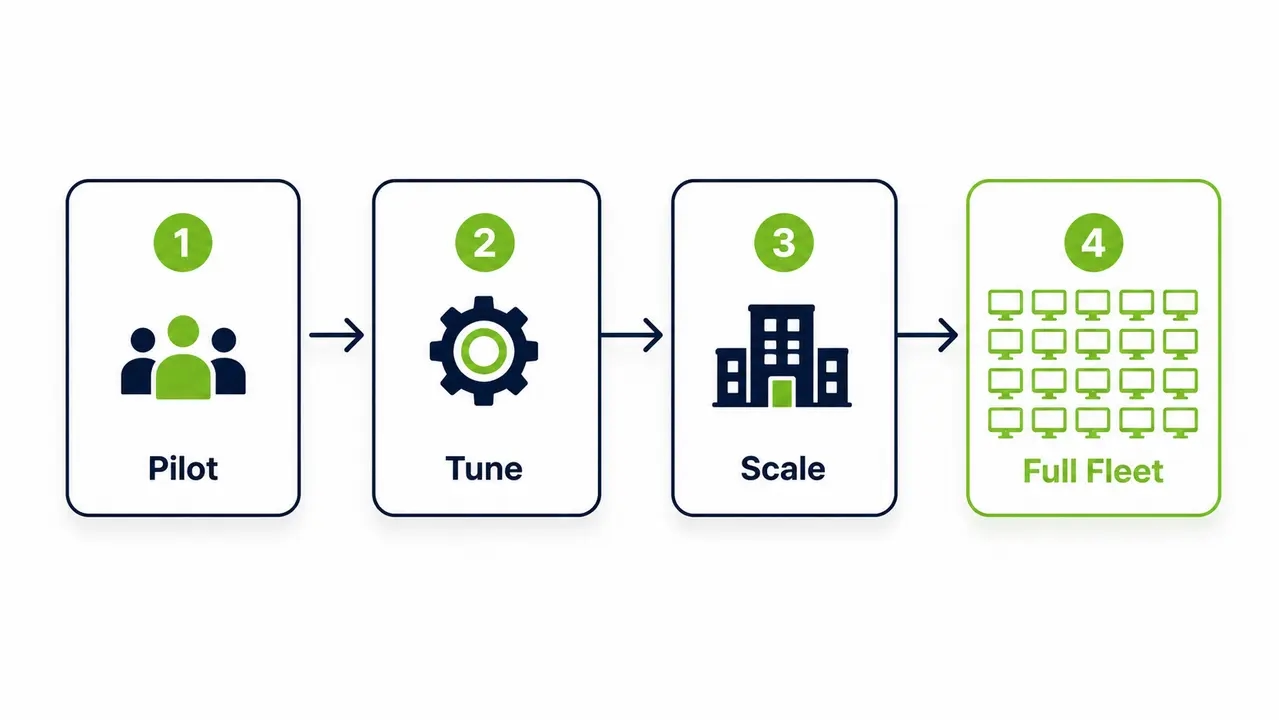
Roll out in phases. Pilot one department, validate wake success rates, then expand with standardized policies, monitoring, and exception handling. Start by inventorying devices and network segments. Select one arrival signal source. Build the user-to-device mapping table. Pilot with 50 to 100 PCs. Tune exception rules based on pilot results. Scale by organizational unit, group, or location.
Change management is critical. Provide helpdesk scripts and user communications explaining that their PC will be waiting at the lock screen. Establish fallback procedures if wake fails. Centralized policy management, such as the group- and schedule-based controls available in Our Platform, simplifies scaling from a pilot group to the full fleet. PC fleet power management requires operational discipline to succeed.
Diagnosing Failed Wake Events
Wake failures happen. Isolate the failure point. Determine if it is a power-state issue, a network path issue, or a device configuration issue. Then validate wake events end-to-end using logs. Confirm the device supports wake from its current sleep state. Verify the wired network connection, as Wi-Fi wake is less reliable. Validate that MAC address and device identity records are current.
Check switch port configuration and ensure no conflicting random wake or power-saving settings are interfering. Confirm wake requests are reaching the correct subnet path. Centralized telemetry provides success and failure codes, last-seen heartbeats, and historical wake logs. This data is essential for maintaining wake-on-LAN automation for enterprises at scale.
What to Look for in a Commercial Solution
Look for secure integrations using APIs and webhooks. Demand enterprise network support for multi-subnet environments. Require centralized policy control, reporting, and audit logs. A purpose-built solution must offer role-based access control, group-based device targeting, combined scheduling and on-demand wake capability, and exception policy management. Dashboards for savings and uptime reporting are essential for proving ROI.
Integration flexibility is key. You need webhook in and API out. Measurable energy savings and reduced helpdesk tickets are your procurement-friendly proof points. PowerPlug Pro is an example of a commercial solution matching this criteria list. IT teams evaluating this approach can Contact Us to discuss integration requirements for their specific attendance system and network environment.
| Power State | Idle Wattage Draw | Wake Support Reliability | Best Use Case |
|---|---|---|---|
| Sleep (S3) | Low (2-5W) | High | Daytime idle and short-term attendance triggers |
| Hibernate (S4) | Very Low (<1W) | Medium | Overnight retention of session state |
| Soft Off (S5) | Very Low (<1W) | Variable | Weekends and extended absence periods |
| Powered On Idle | High (30-60W) | Not Required | Maintenance windows only |
| Factor | Manual Shutdown Policy | Attendance Based Automation |
|---|---|---|
| Compliance Rate | Low (40-60%) | High (95%+) |
| IT Maintenance Access | Broken by user shutdowns | Preserved via scheduled wake windows |
| User Experience | Waiting for boot on arrival | Immediate readiness at lock screen |
| Energy Savings Realized | Fragmented and unmeasurable | Consistent and fully reported |
Frequently asked questions
Does attendance based PC wake up automation bypass Windows authentication?
No. The automation wakes the hardware and boots the operating system to the lock screen. The user must still authenticate using your approved methods, such as a PIN, password, biometrics, or smart card. Bypassing authentication creates severe security and compliance risks, breaks audit trails, and conflicts with conditional access policies.
How do you handle Wake-on-LAN across different subnets and remote sites?
Standard WoL broadcast packets do not route across subnets or VLANs. You need an enterprise wake architecture with distributed relays, an agent-based mesh, or a managed wake portal to forward requests securely. This allows you to wake endpoints across complex networks without opening broad firewall rules.
What happens to patch windows and IT maintenance if PCs are asleep?
Scheduled wake events handle IT maintenance independently of user attendance. You configure policies to wake machines before your SCCM or patching windows begin. This ensures endpoints are available for updates, remote access, and software deployments without requiring users to leave machines powered on overnight.
What is the ROI and payback period for a PC wake automation platform?
The ROI depends on your fleet size, idle wattage, and local electricity rates. By cutting unnecessary idle hours, organizations typically see a payback period in as little as 4 months. Savings scale linearly with endpoints, turning an energy waste problem into a measurable operational saving and a reduction in your carbon footprint.
Does this approach support CSRD and ESG carbon reporting requirements?
Yes. Centralized power management platforms track before and after runtime data, providing exact kWh reduction metrics. This data feeds directly into your ESG and carbon footprint reports. Reducing after-hours PC runtime is one of the easiest operational changes to make for measurable CSRD compliance.
Attendance based PC wake up automation aligns IT maintenance needs with employee productivity by triggering hardware boot based on arrival signals. It preserves network security by waking machines to the lock screen for standard authentication, bypassing the risks of auto-login. By cutting idle powered-on hours, organizations achieve measurable energy savings and support their ESG carbon reporting goals.

About the author
Nimrod Yedaya
VP Customer Experience
Over 15 years of experience in customer service, technical support, and customer relationships. Nimrod joined PowerPlug in 2012 as Customer Support Manager and was promoted to VP in 2016. He holds an MBA from BIU and a BSc in Communication Systems Engineering from BGU.