
Wake on LAN Patching
By Nimrod Yedaya, VP Customer Experience

Wake on LAN overnight patch deployment solves the oldest conflict in enterprise IT. You have to patch Windows fleets to remain secure, but you cannot disrupt users during the day. The default workaround is leaving machines powered on 24/7. This guarantees availability for the maintenance window but consumes electricity unnecessarily and keeps hardware running when it is not needed. Overnight patching WoL breaks this compromise by waking devices from low-power states only when needed, running installs, and returning them to sleep. This article covers how after hours software deployment works, why it fails, how to scale a WoL maintenance window across subnets, and how to prove compliance to auditors.
Reading time: 4 minutes
What is wake on LAN overnight patch deployment?
Wake on LAN overnight patch deployment is an automated process where endpoints are woken from sleep or low-power states during a scheduled after-hours window. The system allows patches to install, triggers required reboots, and returns the machines to a power-saving mode. The core workflow follows a strict sequence. You select a target group, schedule a wake event, open a patch install window, orchestrate the reboot, run post-checks, and force the endpoint back to sleep. The business reason is simple. Higher patch success rates without keeping PCs on all night. Endpoint power management policies handle the sleep transitions while the wake commands ensure reachability. Once the deployment finishes, the machines drop back down. This cycle repeats on your patch cadence, defining your reliable WoL maintenance window.
What is a WoL maintenance window
A WoL maintenance window is a recurring, low-disruption time block scheduled specifically for wake, patch, and reboot operations. You must distinguish a window from a deadline. A window is the operational time you give IT to execute changes. A deadline is the compliance enforcement date by which devices must be patched. Common examples include a weekly workstation window on Tuesday from 2am to 4am, a monthly feature update window, or an emergency out-of-band patch window for zero-day threats. You coordinate these windows with reboot policies and user experience expectations. If a user logs in at 6am, the machine must be fully booted, patched, and quiet.
Maintenance windows for servers versus endpoints
Servers often have stricter uptime SLAs and require change advisory board approval. Employee endpoints have more flexible overnight windows. Endpoint fleets benefit most from wake and sleep cycling because they sit idle overnight. Servers generally stay running to serve applications.
What success looks like
Success is a four-part checklist. The device must be reachable on the network. The patch must install successfully. The machine must reboot to complete the installation. The machine must return to sleep.
Running after hours software deployment correctly
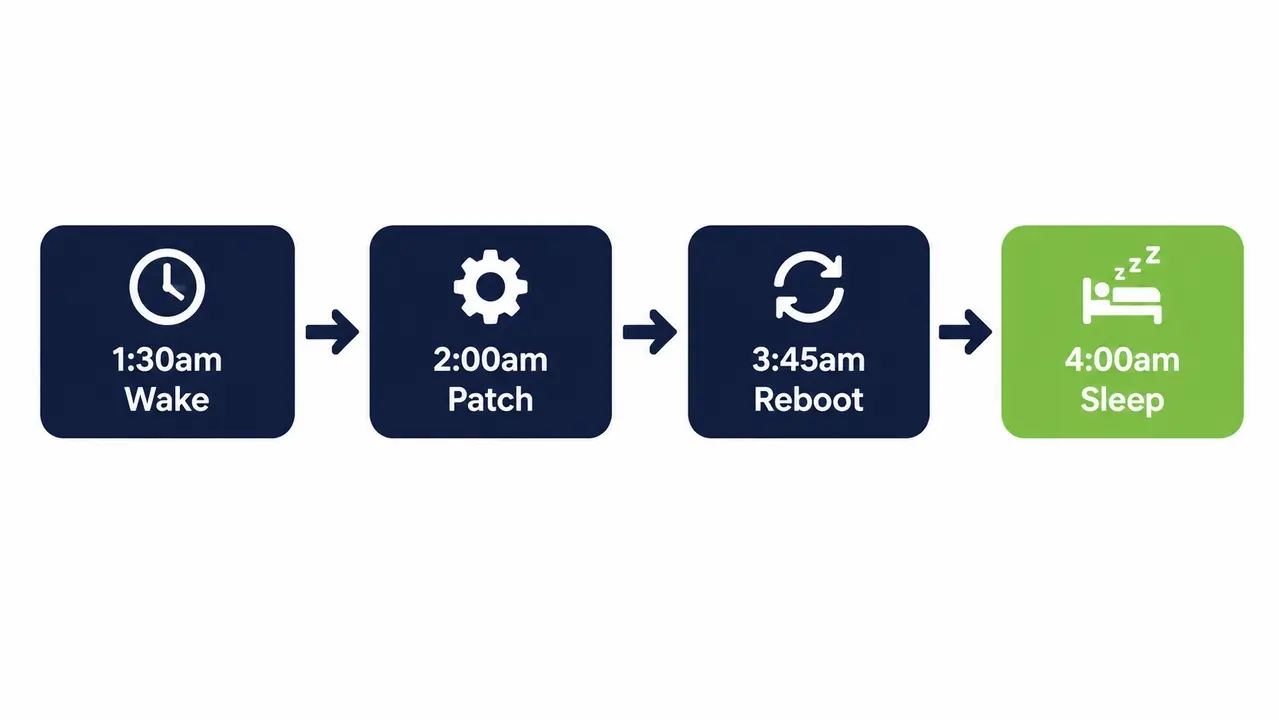
After hours software deployment requires strict sequencing. You wake the fleet 10 to 30 minutes before the deployment starts. This accounts for staggered spin-ups and DHCP lease acquisitions. You run the installs in a controlled window, verify the execution, and return the devices to sleep. A practical timeline looks like this. Wake at 1:30am, patch from 2:00am to 3:30am, reboot by 3:45am, and sleep at 4:00am. You must stagger wakes to avoid network spikes. Waking large endpoint groups simultaneously can create unnecessary bursts of network and infrastructure activity. Staggering wake events by site or device group provides a more controlled rollout. A managed wake schedule for PCs spaces these requests across a few minutes per site. This remote wake up computers approach ensures wake and reboot orchestration happens cleanly.
Wake patch reboot sleep beats keeping everything on
Leaving devices on nightly wastes energy and causes unnecessary hardware wear on fans and spinning drives. Targeted wake windows restrict runtime to exactly what the deployment requires. The machines stay cool and asleep for the other eight hours.
WoL reliability across sleep hibernate and shutdown
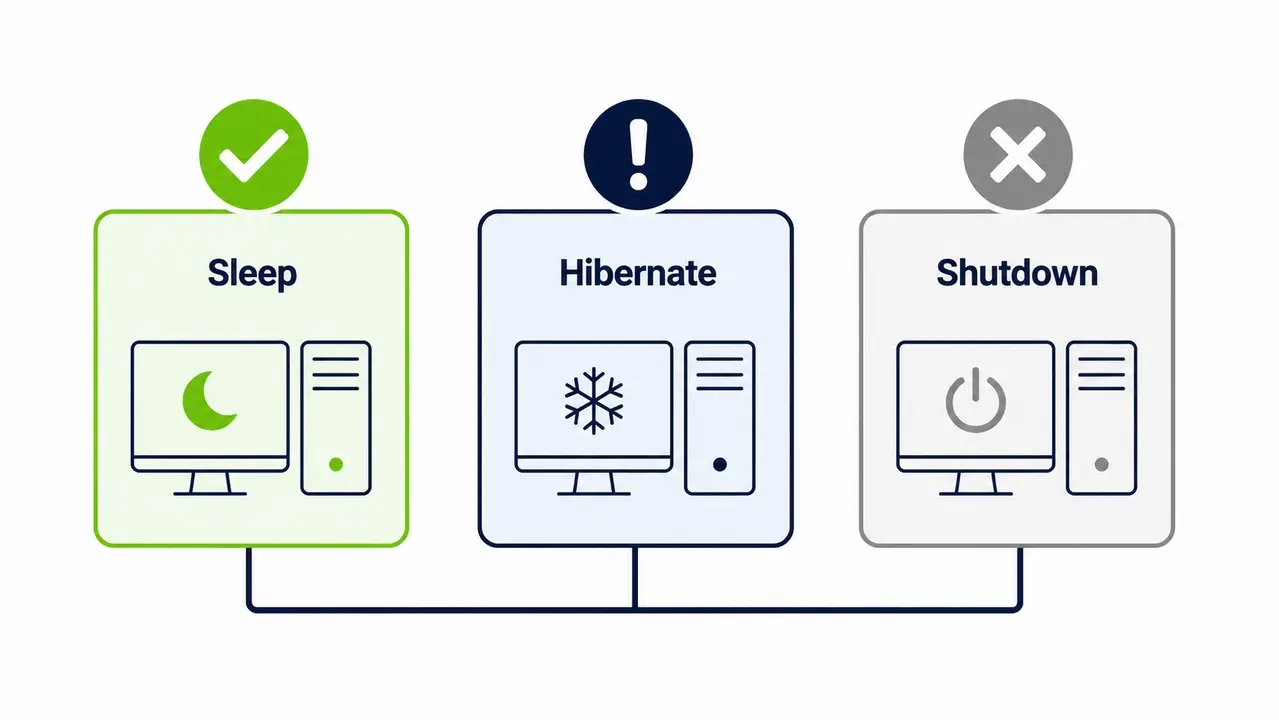
Reliability depends heavily on the hardware and firmware state. Wake-on-LAN behavior varies significantly by power state, hardware, firmware, driver configuration, and Windows settings. Sleep is commonly supported, while hibernate and shutdown wake behavior should be validated for each device model and configuration. According to Microsoft documentation on Windows power states, the NIC must maintain standby power to listen for the magic packet. If that power is cut, the packet never arrives. Microsoft troubleshooting guidance confirms that device and state specific behavior dictates success. Never assume uniform support across your fleet. You must validate sleep vs hibernate vs shutdown WoL behavior per device model.
What to test before committing to overnight WoL patching
Test each power state per device model. Document the supported states. Retest immediately after any firmware or driver updates, as these updates frequently reset power management capabilities.
Why overnight patch deployments fail
Most failures fall into four areas. Firmware settings disable WoL by default. OS or NIC power settings drop the link. Network path limitations block the magic packet across subnets or VLANs. Endpoint reachability fails because the device is off the network or on a VPN. Microsoft documents these unwanted and failed wake up events extensively. A device that wakes sometimes usually has a power plan conflict. A device that wakes only on the same subnet points to a broadcast limitation. A device that wakes but the agent cannot reach it indicates a network path or firewall issue. Missed patches due to sleep almost always trace back to one of these device reachability failures.
Quick triage checklist
Check the BIOS or UEFI WoL setting. Check the NIC allow wake setting in Windows. Check if Fast Startup is interfering. Check the switch port configuration. Check the subnet or VLAN path. Check the patch agent connectivity.
Scheduling Wake on LAN for overnight patching at scale
Scaling this across hundreds or thousands of endpoints is typically managed through a centralized power and wake scheduling platform rather than manual per-device configuration. You use policy-based targeting paired with staggered wake scheduling and patch job rules. The deployment follows a phased approach. You start with a pilot ring, move to a broad rollout, and segment by site or subnet while excluding always-on systems. Operational guardrails are necessary. You set a maximum number of concurrent wakes per site. You use bandwidth-aware content delivery. You build retry logic for missed wakes. This IT operations automation approach manages your reboot window policy and ensures patch rings or phased rollout schedules execute without manual intervention.
Designing patch rings for after-hours windows
Group devices by risk and criticality. Roll the wake and patch out in sequential rings. If the pilot ring fails, you catch the error before it hits the broad fleet.
Staggering strategy to avoid broadcast storms
Space wake events across minutes and physical sites. This prevents network and bandwidth spikes that can trigger switch CPU spikes or dropped packets.
Waking devices on different subnets for a patch window
Magic packets do not naturally traverse routed boundaries. A broadcast sent on subnet A will not wake a PC on subnet B without explicit network support. Unicast WoL can work, but it is inconsistent because ARP tables age out and forget the MAC address of a sleeping machine. You have vendor-neutral options to solve cross subnet wake on lan. You can use site-local relays. You can deploy a wake proxy or wake relay agent on active machines in the target subnet. You can configure subnet directed broadcast on your routers. The choice depends on your network architecture and security posture.
Unicast versus subnet-directed broadcast
Use unicast when you have known and stable MAC to ARP mappings. Use subnet-directed broadcast for reaching multiple devices per subnet, but this requires explicit router support and carries historical security implications.
What to ask your network team
Ask if IP directed broadcast is permitted on the routers. Ask if wake packets are blocked by firewall or ACL rules. Ask if there is a site-local relay option available. Ask how ARP tables are refreshed.
Settings required for reliable WoL overnight patching
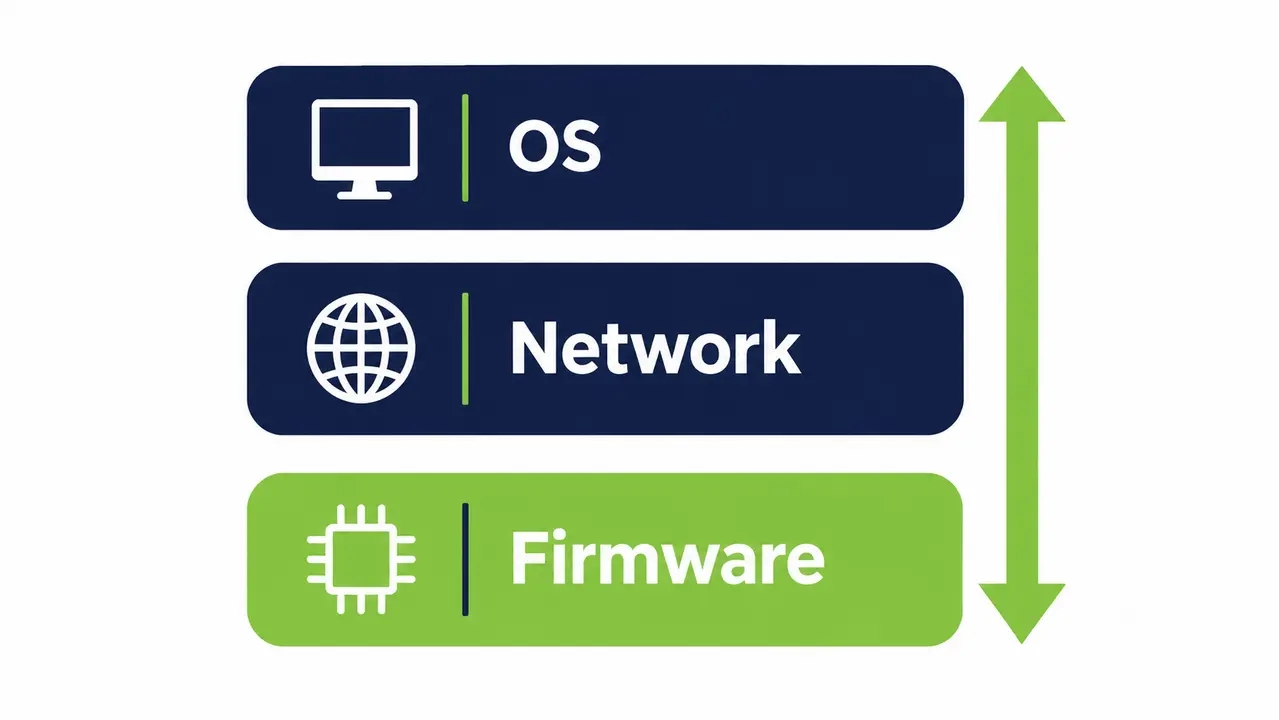
Reliability requires a layered configuration model. You must align firmware, the operating system, the driver, and the power plan. Common gotchas include leaving Fast Startup enabled, which alters shutdown behavior. The allow this device to wake the computer setting gets unchecked. Deep sleep or ERP settings in the BIOS cut power to the NIC. A driver update resets the Windows NIC power management options. Microsoft official Wake on LAN behavior documentation outlines these OS and driver level dependencies. You must standardize BIOS UEFI wake on lan settings via policy baseline. Manual per-device setup will drift and break over time.
The three-layer model
Firmware must keep the NIC powered. The OS must allow the device to wake the system. The network path must deliver the packet. All three layers must align for a successful wake.
Common misconfigurations that break overnight waking
Fast Startup is enabled by default. NIC power-saving mode disables wake capabilities. Firmware WoL is disabled by default on new hardware. A routine driver update silently resets the advanced power settings.
Preventing user disruption from overnight patching
Reboot rules dictate the user experience. You define deadlines, deferrals, and reboot windows. A standard policy allows reboots between 3am and 5am. If the machine misses that window, it prompts the user at next realize with a four-hour deferral. Silent overnight principles are critical. Avoid waking machines too early. Avoid reboot loops if an install fails. Protect open applications and user data. Handle missed-window behavior gracefully. A solid reboot window policy reduces helpdesk tickets and keeps after hours patching invisible to the workforce.
Reboot orchestration patterns that reduce helpdesk tickets
Use pre-reboot save prompts. Enforce deferral limits. Fall back to the next available window if the machine is offline. Use standardized user notification templates.
Proving patch compliance when endpoints sleep
Endpoints that sleep most of the time complicate compliance reporting. You must combine execution logs, reachability reporting, and post-install verification to demonstrate outcomes. Leadership and auditors want specific reporting slices. They need coverage percentage, success percentage, exceptions, and a remediation plan. They want this data broken down by site, device type, power state, and miss reason. A machine missed the patch because it was off-network, or because WoL failed, or because the install failed. The NIST enterprise patch management guidance emphasizes tracking and validating these deployment outcomes for compliance. For a real-world example of how a large healthcare provider tracks overnight patch compliance across a distributed fleet, see the Clalit Health Services case study. Accurate patch compliance reporting drives patch success rate improvement.
The minimum reporting set for leadership
Report attempted versus succeeded versus failed. List the exception reasons. Provide a remediation timeline. Break the data down by device and site.
Energy cost reduction using WoL instead of leaving PCs on
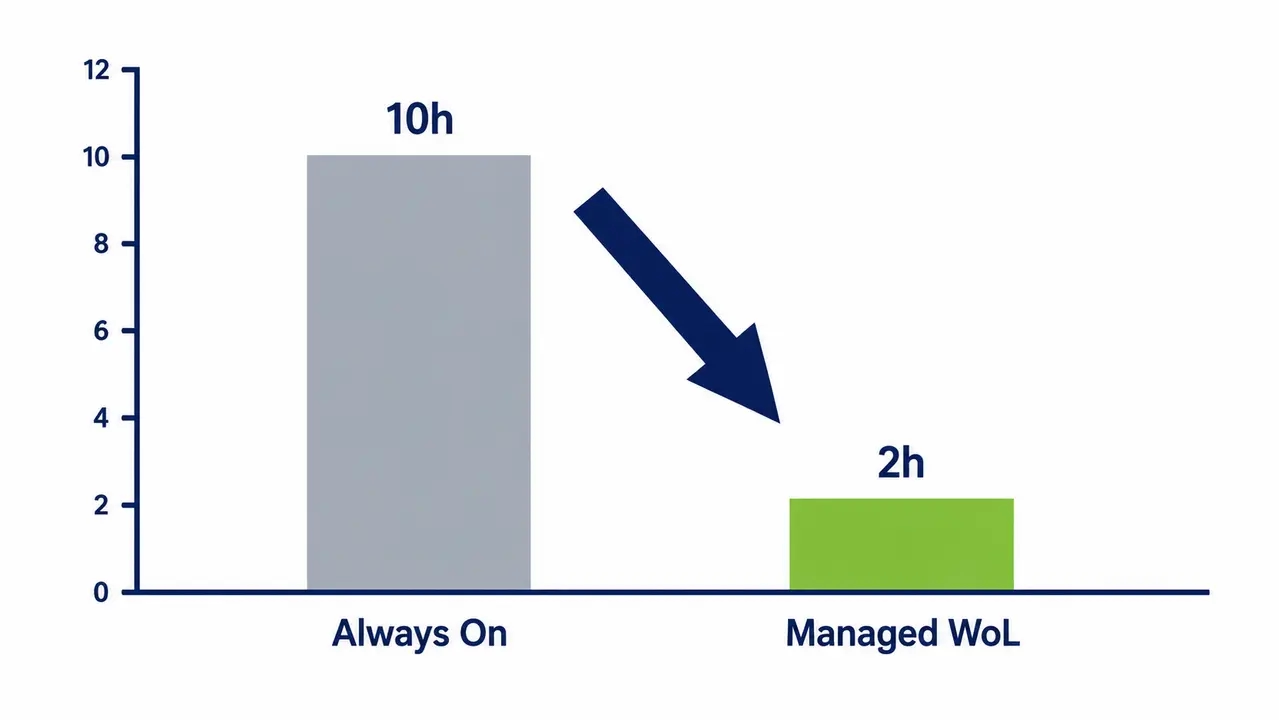
Leaving a fleet on for 10 to 12 extra hours nightly accumulates significant kilowatt-hours. Waking devices only for a 1 to 2 hour window reduces runtime substantially. Federal energy management guidance notes that enabling power management features on computers can yield significant annual energy savings. This approach lowers heat output and extends hardware life. It also prepares your organization for carbon reporting for endpoints. You reduce overnight power consumption directly. The energy savings for IT are immediate. Multiply the idle wattage per PC by 1,000 machines and 250 working nights. The waste is no longer a rounding error. This operational shift supports ESG goals without requiring a lecture on sustainability.
See how much you could save
Calculate the exact energy and cost reductions for your fleet by mapping your current idle hours against a targeted wake and sleep cycle.
Is Wake on LAN safe to enable for overnight patch deployment
WoL is safe when scoped to managed networks, limited to necessary segments, and paired with standard security controls. The real security risk is unpatched endpoints, not controlled waking. Wake on LAN overnight patch deployment actually strengthens your security posture by ensuring devices receive updates promptly. You mitigate network risks by restricting who can send wake traffic. Segment your management networks. Monitor for unusual wake patterns. Align the process with zero-trust principles, recognizing that waking a machine is not the same as authenticating to it. Governance requires change control for maintenance windows and documented exceptions. If you are evaluating how to talk to a specialist about securely rolling out overnight WoL patching, ensure the platform enforces scoped orchestration. PowerPlug Pro is one example of a platform enabling secure, scoped WoL orchestration for enterprise fleets.
Wake on LAN overnight patching resolves the conflict between security and energy waste by targeting specific devices only when maintenance is required. By validating hardware power states, staggering wake events, and enforcing strict reboot policies, IT teams can maintain high patch compliance without disrupting users or leaving machines running continuously. This structured approach lowers operational costs, extends hardware lifespan, and provides the auditable reporting required for enterprise security standards.
Frequently asked questions
What is the best maintenance window for overnight patching?
The best window is outside business hours and before typical login times, usually between 1am and 5am. The exact timing depends on your patch size and network bandwidth. You must size the window to allow adequate time for the wake event, installation, reboot, and verification with buffer time for failures.
How do I wake computers for patching without waking the whole office?
Use targeted device groups or collections rather than broadcasting to all endpoints. Schedule wake events only for machines due for patching in that specific window. A managed platform queries your patch server and wakes only the devices requiring updates, leaving the rest of the fleet asleep.
Why does Wake on LAN work sometimes but not always?
Inconsistent behavior usually stems from power state variability, NIC driver settings resetting after updates, or network path issues across subnet and VLAN boundaries. If a machine hibernates instead of sleeping, or if a switch drops the ARP entry, the magic packet will fail to trigger a wake.
Does Wake on LAN work over VPN?
Wake on LAN is generally unreliable over standard VPNs. Magic packets operate at Layer 2 and require broadcast reachability on the local network. Off-network or remote laptops typically need alternative approaches, such as patch on connect policies, rather than traditional WoL.

About the author
Nimrod Yedaya
VP Customer Experience
Over 15 years of experience in customer service, technical support, and customer relationships. Nimrod joined PowerPlug in 2012 as Customer Support Manager and was promoted to VP in 2016. He holds an MBA from BIU and a BSc in Communication Systems Engineering from BGU.