
The Wake on LAN Security Risks Best Practices That Actually Matter
By Nimrod Yedaya, VP Customer Experience
Most articles about wake on LAN security risks best practices read like home-router advice: forward a port, send a magic packet, done. That framing is useless to an IT director running 8,000 endpoints across a segmented campus with a 1:00 AM patch window and a CISO asking hard questions in the next risk review.
The short version: Wake-on-LAN (WoL) is operationally useful, but the traditional magic-packet mechanism does not provide authentication or encryption on its own. It carries no authentication, no encryption, and no login. The risk is not that someone steals data through a wake packet. The risk is that anyone who can reach the right network segment can bring sleeping machines back to life, and a machine that wakes up is a machine an attacker can reach. Best practice therefore comes down to three questions you must be able to answer with evidence: who can send wake traffic, where it travels, and when it is allowed. Everything in this article is a variation on those three controls.
Four risk categories cover the whole problem: unauthorized wake-ups, broadcast abuse, an expanded attack surface during maintenance windows, and lateral movement enablement. This is a governance and operations issue, not a networking toggle.
Reading time: 5 minutes
What the Magic Packet Really Does
A magic packet is a small UDP frame containing a specific byte sequence, typically UDP port 7 or port 9 by convention, whose payload is a run of synchronization bytes followed by the target machine’s MAC address repeated sixteen times. When a powered-down or sleeping machine’s network interface card (NIC) hears its own MAC in that pattern, it signals the motherboard to boot. That is the entire mechanism.
Notice what is absent: there is no handshake, no credential check, no way for the endpoint to verify who asked it to wake. The packet is a trigger, not a session. Also note the port convention is just a convention. Any UDP port can be configured for wake traffic, which matters when you write firewall rules later, because blocking port 9 alone accomplishes nothing if the sender chose port 12345.
Wake traffic normally travels as a Layer 2 broadcast within a single subnet. Crossing subnets requires routing support, a directed broadcast, or a relay, and each option changes your risk profile. We cover that below.
Which Power States Can Actually Be Woken
WoL can wake machines from sleep, hibernate, and in some configurations from full shutdown, but results vary by hardware. The behavior depends on the NIC’s “Wake on Magic Packet” setting in the driver, BIOS/UEFI power settings such as deep sleep or ErP mode, and whether the operating system hands the NIC the right wake arbitration before it powers down. One device model wakes reliably from shutdown, the next model in the same imaging pipeline does not, and nobody finds out until the first night of patching fails at 30 percent of the fleet. Hardware standardization across device models is a prerequisite, not an afterthought.
Wake-on-LAN Is a Trigger, Not an Authenticated Session
Traditional WoL provides no strong authentication and no encryption for the wake signal. If an attacker can put a packet on the right segment, they can wake the machine. That is the entire WoL threat model in one sentence, and it is the reason WoL security vulnerabilities are real rather than theoretical.
The nuance most teams miss is what the risk actually is. WoL itself does not exfiltrate data or grant login access. The danger is that waking endpoints enables follow-on actions: remote exploitation of unpatched services, credential theft, ransomware staging. An attacker with a foothold in your network gains nothing by waking a machine they cannot touch. The wake packet matters because it removes the “sleeping equals out of reach” assumption your security monitoring was quietly built on. The central question for any deployment is simply this: who can reach the wake path?
A Powered-Down PC Still Has a Live Control Plane
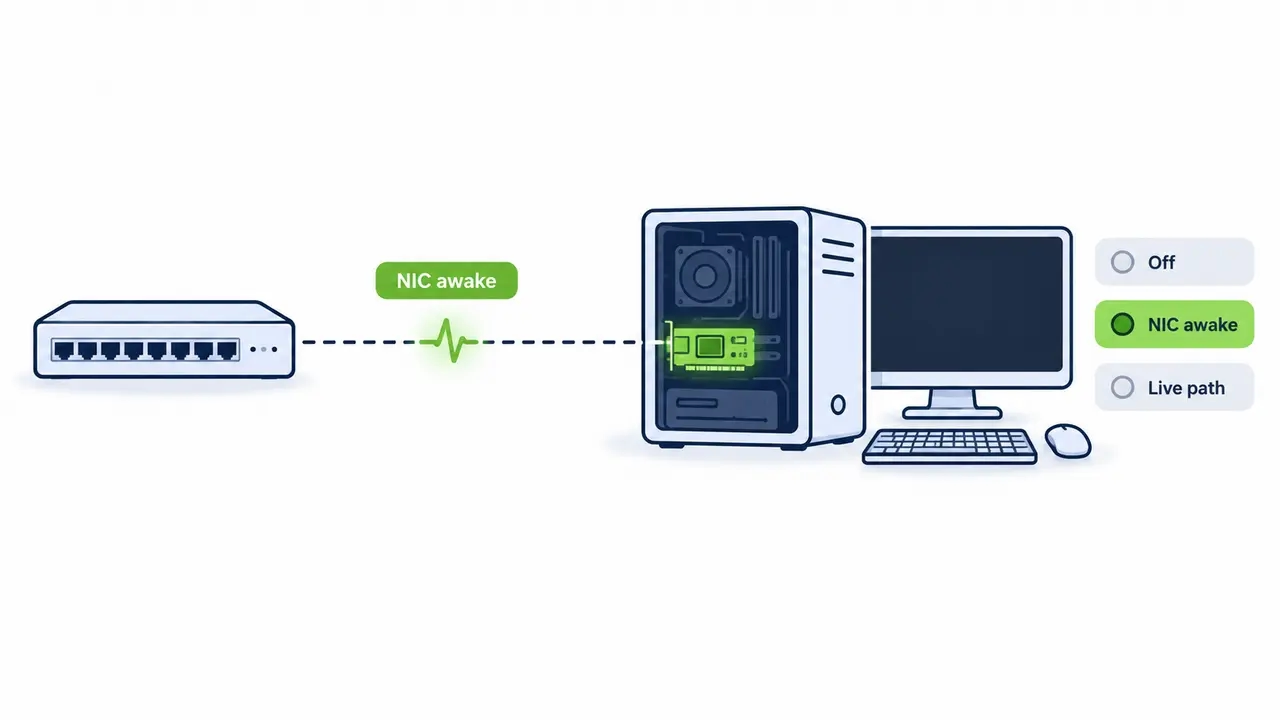
Here is the misconception worth correcting with your security team. A “shut down” PC with WoL enabled is not off. The NIC stays partially powered, listening for wake events on the wire. That listening adapter, plus every network path that can deliver wake traffic to it, becomes a control plane you must protect like any other management interface.
This is endpoint power management security in its purest form. The machine shows as off in your CMDB, it draws almost nothing, your energy dashboard takes credit for the savings, and yet the NIC may remain partially powered and able to recognize a wake pattern. This does not provide access to the operating system, but the network path capable of triggering a wake should still be governed as part of the organization’s management architecture. None of this means you should disable WoL. It means wake capability belongs in your asset inventory, your threat model, and your change control, exactly like remote management tools do. Hardening wake on LAN is not optional hygiene. It is the price of using the feature at all.
Local Subnet Broadcasts and the Directed Broadcast Trap
Within one subnet, WoL works as a local broadcast and stays reasonably contained. The trouble starts in multi-subnet environments, which is to say every enterprise environment. Campuses are segmented into VLANs, remote sites sit behind routers, and the lazy fix is to enable directed broadcast forwarding so a central sender can reach every subnet at once.
Do not do this. Directed broadcast forwarding is disabled by default on modern routers for good reason. RFC 2644, the IETF standard that changed this default, exists precisely because forwarding directed broadcasts toward arbitrary subnets enabled amplification attacks, where a single spoofed packet becomes a flood at the target segment. Turning that back on across your WAN to make wake packets travel is a classic anti-pattern: it solves a patching inconvenience by weakening the network for everything else.
The safer pattern is a controlled relay inside each segment. The relay accepts an authenticated request from a management service, then emits the broadcast locally. Directed broadcast stays off at the router, and network segmentation for WoL remains intact. Vendors have converged on this design too; Configuration Manager’s wake mechanism, for example, uses awake clients on the remote subnet as the broadcast point rather than routed broadcasts.
The Secure Deployment Pattern: Authenticate, Relay, Audit
The reference architecture that survives a security review is a chain: authenticated user, controlled management service, segment-local relay, broadcast within that one segment. Strict authorization and auditing happen at the management layer, where identity actually exists.
In practice that means a management portal or API behind single sign-on with MFA, role-based access control (RBAC) by device group, a relay deployed per site or VLAN, zero WoL exposure to the internet, and change control governing wake schedules tied to your patch windows. PowerPlug Pro is an example of this architecture in production: a platform-managed approach where the wake path is designed, authenticated, and logged, rather than assembled from ad hoc network configuration. Platforms offering wake-up technology built for enterprise fleets are built around exactly this relay-and-RBAC model instead of exposing raw broadcast traffic.
| Deployment approach | Where the wake packet originates | Authentication and authorization | Network exposure | Auditability | Recommended for |
|---|---|---|---|---|---|
| Same-subnet broadcast | Any host on the local segment | None | Contained to one subnet | Poor, no central record | Small flat networks only |
| Directed broadcast across subnets | Central sender, routed to target subnet | None at packet level | High, re-opens a disabled router default | Poor | Not recommended |
| Segment relay with managed platform | Authenticated service via relay in each segment | SSO, MFA, RBAC per device group | Minimal, relays only | Full log of who, what, when | Enterprise multi-site fleets |
Scope Wake Permissions With RBAC
Not every endpoint deserves the same wake policy. Tier it. Standard user devices can be woken by their assigned user and by the patching service. Critical infrastructure endpoints, executive devices, and anything handling regulated data should require an approval workflow or a restricted admin role. Least privilege applies to power states the same way it applies to file shares.
Reduce the Blast Radius
One compromised relay or one compromised segment must never expose the entire fleet. Per-VLAN relays, no global broadcasts, and per-group authorization caps mean an attacker who takes over a site relay still only controls that site’s devices. Design so the worst day is a bad day in one building, not everywhere at once.
Firewall and ACL Rules for Wake Traffic
Best practice firewall logic for WoL is short enough to state in three rules. Management subnet to relay hosts: allow UDP on your chosen port. User VLANs to other VLANs: deny outbound wake traffic. WAN edge: do not expose raw WoL traffic directly to the internet; remote wake should instead be mediated through an authenticated management service. NIST’s firewall policy guidance, SP 800-41, is worth reading alongside this, because its core principle, allow only specifically authorized traffic and document why, is exactly the discipline wake traffic needs.
Two additions. First, remember the port convention point from earlier: if your ACLs only reference port 9, a sender on any other port walks through. Write rules around the relay hosts themselves, not around port numbers. Second, enable rate limiting on wake traffic where your network hardware supports it. A wake flood against a segment is an availability problem, not just a security oddity, and rate limits blunt it cheaply.
Never Put Wake-on-LAN on the Internet
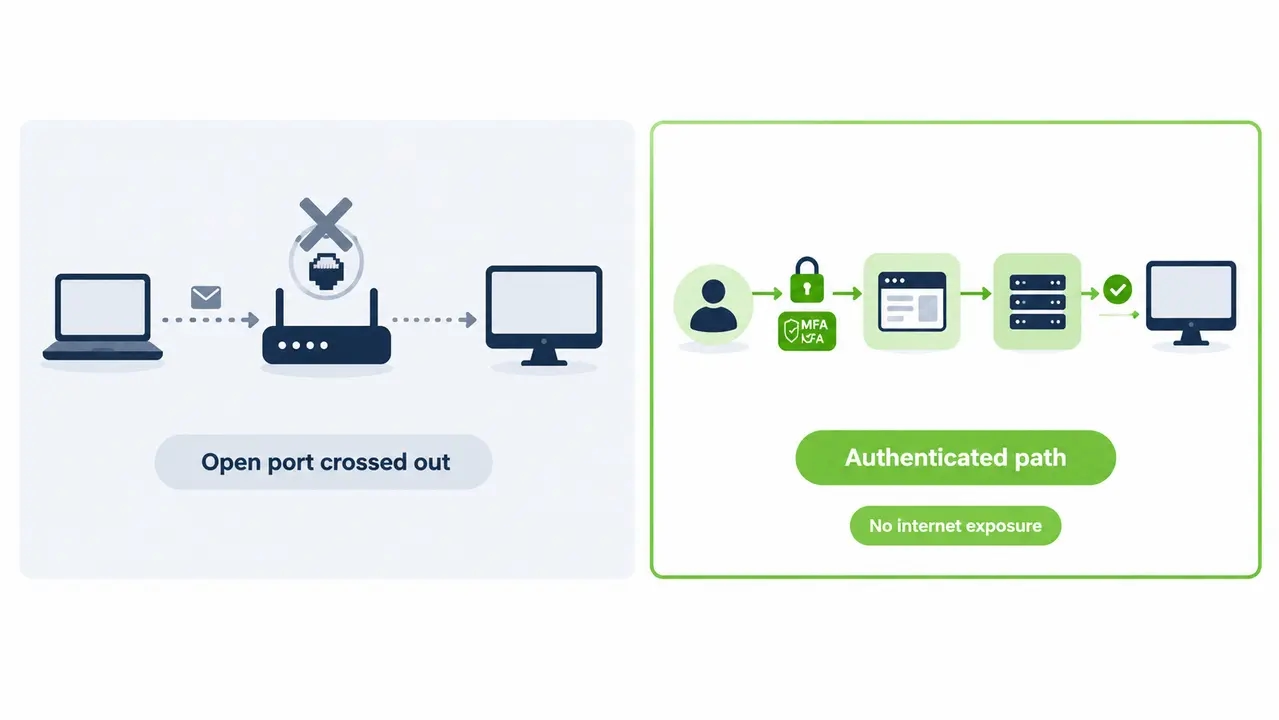
Wake-on-WAN, forwarding a wake port on your edge firewall so a remote worker can wake their office PC from home, is occasionally done and almost never justified. Internet scanners hit open UDP ports within minutes of them appearing. The magic packet can be spoofed. The configuration is almost always set up by one person and forgotten, and it is nearly impossible to audit because the request never touches anything you control before it reaches the broadcast segment.
The alternative is the same pattern as everything else in this article: the remote user authenticates first, through VPN or a zero trust access path, then triggers the wake through an internal management service that enforces RBAC and logs the request. No open ports, an identity attached to every wake event, and a single place to revoke access when someone leaves. Enterprise WoL attack prevention is fundamentally about never letting an unauthenticated packet touch a wake path.
Why Unauthorized Wake Events Matter During a Security Incident
Consider a scenario in which an attacker already has a foothold on a network segment. If wake traffic is unrestricted, the attacker may also be able to trigger sleeping endpoints to power on. The wake event itself does not compromise those machines, but it can make additional endpoints available to whatever attack paths already exist. An attacker compromises one workstation through a phish. From that foothold they enumerate the network and collect MAC addresses, which are trivially discoverable from ARP caches, DHCP logs, or endpoint inventory shares. They then send magic packets to sleeping endpoints across the segment. The machines wake. The wake packet did nothing harmful itself, but the payload arrives through whatever other mechanism the attacker already controls: the same phishing tooling, a remote management abuse, an unpatched service.
The result is that ransomware encryption succeeds on machines your team believed were safely powered down, and lateral movement reaches endpoints that were never counted as “in scope” during the incident. This is why wake on LAN belongs explicitly in your organization’s threat model under assume-breach thinking. If your detection tooling would not flag a burst of wake packets from a user VLAN at 2:00 AM, you have a blind spot shaped exactly like this attack.
Patch Window Without Breaking Energy Goals
Security teams and sustainability teams usually pull in opposite directions here, and they shouldn’t. The pattern that satisfies both is scheduled wake windows with automatic return to low power. Wake the fleet at the local site’s maintenance window, say 1:00 AM. Patch, verify, confirm compliance. Then return the endpoints to sleep or shutdown under policy.
The measurable outcome is what matters to your budget. ENERGY STAR’s guidance on computer power management, backed by Department of Energy efficiency programs, has long identified power management as one of the highest-return energy measures in commercial buildings, and organizations using structured PC power management routinely cut PC energy costs by up to 60 percent. Scheduled wake preserves the full patch and compliance window while eliminating the hundreds of always-on hours that made the old “leave everything on for maintenance” policy so expensive. Handle exceptions honestly: genuinely always-available endpoints get a documented exclusion, not a fleet-wide policy that quietly keeps everyone awake.
| Policy | PC power state overnight | Patch window availability | Wake control | Annual energy outcome per 1,000 PCs |
|---|---|---|---|---|
| Leave PCs always on | Fully powered, idle | Full, always | Not needed | High waste, largest cost and carbon footprint |
| Unmanaged sleep, no wake path | Sleep | None for offline machines | Ad hoc, unreliable | Savings partially lost to patch failures and overrides |
| Managed shutdown with scheduled wake | Shutdown or hibernate | Full, on schedule | Authenticated, logged, policy-driven | Up to 60% PC energy savings with compliance intact |
On-Demand Wake for Remote Employees
The pandemic-era question that never went away: a remote employee needs their office PC at 9:00 PM and it is asleep. The insecure answer is a router port forward. The secure answer is a Wake-Up Portal: the employee authenticates with MFA, selects their assigned device, triggers the wake, and the system logs who woke what and when.
Guardrails make this enterprise-grade. Verify device ownership so users can only wake machines assigned to them. Apply time-of-day policies. Route privileged or high-value device groups through an approval workflow. This kind of on-demand, audited wake request is only practical with a centralized platform for managing PC fleet power states, because doing it device-by-device with scripts and spreadsheets collapses the first time someone changes departments.
Wake-on-LAN in a Zero Trust Model
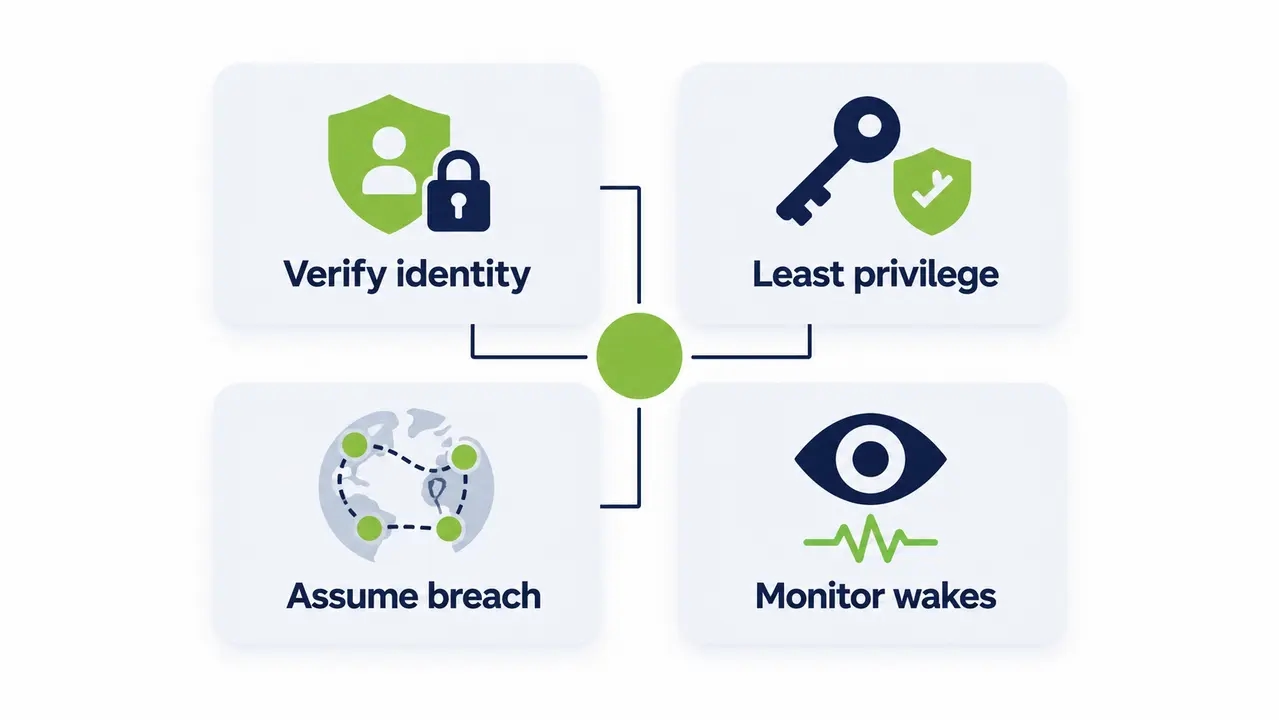
Treat WoL as a controlled management action, never implicitly trusted just because the traffic is “internal.” The mapping to zero trust principles is direct. Verify explicitly: every wake request flows through SSO with MFA, no exceptions for convenience scripts. Least privilege: RBAC per device group, scoped per site, reviewed on a schedule. Assume breach: per-segment relays and denied cross-VLAN wake traffic cap lateral movement. Continuous monitoring: alerting on anomalous wake activity, which is the next section, as outlined in NIST’s Zero Trust Architecture guidance.
One complementary layer worth naming is identity-based network access control in the 802.1X family, where switch ports enforce who and what may attach to a segment. It does not authenticate wake packets themselves, but it sharply limits which compromised devices can sit on a segment capable of sending them. Secure wake on LAN deployment is never one control. It is a stack of small, boring, verifiable ones.
Monitor Wake Events Where They Actually Happen
Endpoint logs cannot be your source of truth for wake activity, because the endpoint is asleep or off when the request originates. It cannot log what it never processed. Logging and alerting for wake events must live at the management service and relay layer, where every request passes through regardless of the target’s power state. NIST’s log management guidance, SP 800-92, applies here in full: collect centrally, protect the logs, and actually analyze them.
Four detection patterns cover most abuse. A wake burst across many subnets in a short window, the signature of a wake storm. Wake requests originating from non-management VLANs, which should be impossible in a hardened deployment. Wakes targeting high-value device groups outside approved workflows. And repeated wake attempts against the same host, the fingerprint of someone probing reliability for a follow-on action. Wire these into your SIEM before you scale the rollout, not after the first incident review asks why nobody saw it.
Common Misconfigurations, SecureOn, and When to Disable WoL Entirely
Audit any existing deployment against this list, because these are the six WoL security vulnerabilities we encounter most often in the field. Directed broadcast forwarding enabled broadly across the WAN. Any internal host allowed to send wake traffic instead of designated relays only. Shared or admin service accounts used to trigger wakes, destroying attribution. No separation between user VLANs and the management plane. No rate limiting. And no return-to-sleep policy, so endpoints woken for a 1:00 AM patch are still fully powered at 8:00 AM the next day, silently eroding both security posture and the energy savings that justified the project.
A word on SecureOn, the vendor-specific “password” field some NICs support in the magic packet. It can reduce casual misuse, but it is hardware-dependent, painful to manage across thousands of endpoints, and not equivalent to modern authentication: no MFA, no identity binding, no audit trail. Treat it as optional defense-in-depth, never the primary control.
Finally, know when to disable WoL outright: highly sensitive networks where the benefit does not justify the review burden, unmanaged BYOD segments, device models with erratic NIC or driver wake behavior, and anywhere remote wake simply is not required. A tiered policy, enabled only for centrally managed corporate endpoints, is the honest answer for most fleets.
See how much you could save
Find out what a managed shutdown and scheduled wake policy would mean for your fleet’s energy bill, patch compliance, and security posture. Tell us your PC count and we will walk you through the numbers and the rollout plan.
A Phased Rollout Checklist for a Large PC Fleet
Rolling WoL out across thousands of endpoints safely is a phased program, not a switch. Inventory first: which device models support wake from which power states, with which BIOS/UEFI and NIC settings. Standardize those settings across your hardware models before you promise anyone a patch window. Define wake schedules tied to your actual patch cycles. Deploy relays per segment. Implement RBAC. Integrate logging into your SIEM. Then run tabletop abuse scenarios, including a wake storm and an unauthorized requester, and see what your detections actually catch.
Pre-Deployment Readiness
Four gates before go-live: a device and NIC inventory with wake capability verified per model, a VLAN and segmentation map showing exactly where relays will sit, identity provider integration done and tested for RBAC, and a logging pipeline that is already receiving events. If any of the four is missing, you are not ready, and the pilot will tell you so expensively.
Pilot Success Criteria
Pick one site, one VLAN. Define “passed” before you start: wake reliability above your threshold from every target power state, zero broadcast leakage outside the pilot segment, and complete audit records for every wake event. A pilot without written success criteria always passes, and that is how bad patterns scale to 10,000 machines.
Ongoing Operations
After rollout, run a quarterly policy review covering RBAC assignments, exception devices, and wake schedules against changed patch cycles. Watch for configuration drift, the quiet killer, where reimaged machines inherit default BIOS settings and stop waking until someone notices a failed patch cycle. For a real-world example of this phased approach working under heavy regulation, see how a large healthcare network deployed secure wake-up at scale across a security-sensitive environment. Deployments like that, and PowerPlug’s customers collectively eliminating over 200,000 tons of CO2 while saving more than $50M, show that the security and the savings are not in conflict. Managed properly, they are the same program.
Frequently asked questions
Does Wake-on-LAN create compliance or audit problems I should plan for?
Only if it is unmanaged. Regulated environments generally expect you to control and log remote actions on endpoints, and an unauthenticated broadcast that powers machines on can absolutely fail that test. Route every wake through an authenticated, logged management service, and WoL becomes an asset in audits rather than a finding, because you can show who woke which device and when.
How do I make Wake-on-LAN work across subnets and remote sites securely?
Use a segment-local relay or proxy in each subnet or site, driven by a central authenticated service, and leave directed broadcast forwarding disabled at the routers, consistent with RFC 2644 defaults. The relay emits the broadcast locally, so no wake traffic crosses your routed network in the clear and no router defaults get weakened. This is also the only pattern that gives you reliable audit records per site.
Will scheduled wake-ups interfere with my patch and maintenance windows?
No, they enable them. The standard workflow is a scheduled wake at the start of the maintenance window, patching and verification by Configuration Manager or your tooling, then an automatic return-to-sleep policy when the window closes. You get the full compliance window without keeping the fleet powered around the clock, which is how organizations reach PC energy savings of up to 60 percent without missing a patch cycle.
What happens when an employee needs their PC outside working hours?
They authenticate into a Wake-Up Portal with MFA, select their assigned device, and trigger an on-demand wake that is logged end to end. There is no open port to the internet and no manual IT ticket, and time-of-day policies plus device ownership checks keep the capability scoped. If the machine is needed for a privileged action, an approval workflow applies before the wake goes through.
What is the realistic payback period for a managed power and wake solution?
For fleets of roughly 1,000 PCs or more, the energy savings alone commonly drive ROI in as little as 4 months, because the software cost is small relative to the electricity and carbon reduction it captures. A 1,000-PC organization can save tens of thousands of dollars a year, and the savings compound with ESG reporting value under frameworks like CSRD, where measurable kWh reductions and avoided CO2 feed directly into disclosure.
Book a demo
See an authenticated, fully logged wake and shutdown workflow running against a live fleet. The demo covers RBAC, scheduled wake windows, the Wake-Up Portal, and the reporting your security and sustainability teams will both ask for.
Wake-on-LAN is essential to enterprise endpoint operations and insecure by default, so the control has to come from you. Keep wake traffic off the internet, replace directed broadcasts with authenticated segment relays, scope permissions with RBAC, log every wake event at the management layer, and tie scheduled wake windows to your patch cycles so security and energy savings reinforce each other. Fleets that follow this pattern get full patch compliance and up to 60 percent lower PC energy costs from the same program.

About the author
Nimrod Yedaya
VP Customer Experience
Over 15 years of experience in customer service, technical support, and customer relationships. Nimrod joined PowerPlug in 2012 as Customer Support Manager and was promoted to VP in 2016. He holds an MBA from BIU and a BSc in Communication Systems Engineering from BGU.