
Enterprise PC Power Management Architecture
By Nimrod Yedaya, VP Customer Experience
Walk through an enterprise office tower at midnight on a Tuesday. The trading desks and cubicles sit empty, but thousands of desktop workstations hum quietly under fluorescent fixtures. Fans spin inside chassis, network cards pull baseline wattage, and power supplies radiate heat into empty rooms. Across corporate campuses, this silent drain continues unchecked every night of the year.
A fleet of 5,000 unmanaged desktop computers wastes between 60 and 150 watts per unit while idling outside business hours. Over a standard annual operating cycle of 250 workdays, that unnecessary runtime consumes hundreds of thousands of kilowatt-hours. Facilities directors notice the inflated electricity utility bills, while IT directors worry that aggressive shutdowns will interrupt nighttime patch deployments and vulnerability remediation.
Building an enterprise PC power management architecture reconciles this operational friction by replacing manual habits with policy-driven automation. This infrastructure establishes centralized governance over endpoint power states without jeopardizing scheduled maintenance, remote worker access, or critical security updates. The following technical architecture blueprint outlines how enterprise engineering teams deploy, orchestrate, and verify power policies across distributed workstation fleets.
Failing to solve this problem carries measurable financial, operational, and environmental penalties. Leaving endpoints unmanaged costs an organization tens of thousands of dollars in wasted electricity every single year. Machines that stay awake without structured reboots also accumulate memory leaks and driver degradation, along with pending patch backlogs that expose corporate networks to avoidable security threats.
Reading time: 14 minutes
What enterprise PC power management architecture entails
At its technical foundation, an enterprise PC power management architecture provides a centralized software framework designed to govern the operational states of thousands of distributed computers. This architecture replaces disparate local operating system preferences with one standard for how machines enter sleep, hibernate, and shutdown states. The primary objective is cutting electrical overhead while preserving absolute endpoint availability for business operations and technical maintenance.
Operating a fleet of modern endpoints requires navigating diverse hardware configurations across several physical locations. Engineering teams manage tower workstations, small form-factor office desktops, and enterprise laptops that shift between wired docking stations and home Wi-Fi connections. To manage these assets, the architecture must detect device states continuously and schedule network wake routines while it distributes policy centrally and reports tamper-proof telemetry.
The technical foundation of any power management infrastructure rests upon the Advanced Configuration and Power Interface industry standard. Microsoft Windows translates these hardware capabilities into distinct power boundaries, spanning fully operational systems down to mechanical power disconnects. Microsoft’s documentation on system power states summarizes these boundaries, from G0 working states down to G3 mechanical off.
A resilient architecture maps enterprise policies directly to these hardware specifications. The central control system balances energy conservation against user responsiveness, ensuring that devices conserve power whenever operational conditions permit.
Fleet operational challenges solved by architectural control
Unmanaged enterprise environments suffer from an enduring operational blind spot. Operational audits regularly find a large share of corporate computers powered on continuously through evenings and weekends. This behavior generates massive utility expenditures and inflates corporate greenhouse gas reporting without delivering any productivity value.
This persistent uptime stems directly from operational friction between distinct corporate stakeholders. Facilities and sustainability directors demand immediate reductions in facility kilowatt-hour consumption to satisfy carbon reduction targets. But IT operations teams need continuous network access for software distribution, vulnerability assessments, and patch management cycles. Because waking remote machines across segmented networks often fails, systems administrators intentionally disable sleep timers to prevent endpoints from missing critical deadlines.
This operational deadlock causes severe financial waste. An unmanaged desktop idling overnight consumes substantial electricity that serves no business purpose. Across a fleet of 5,000 workstations, this waste translates into tens of thousands of dollars in avoidable utility charges each month. Architectural control eliminates this dilemma by providing reliable waking mechanisms that satisfy IT requirements while enforcing systematic after-hours power reduction.
Core functional layers of power management infrastructure
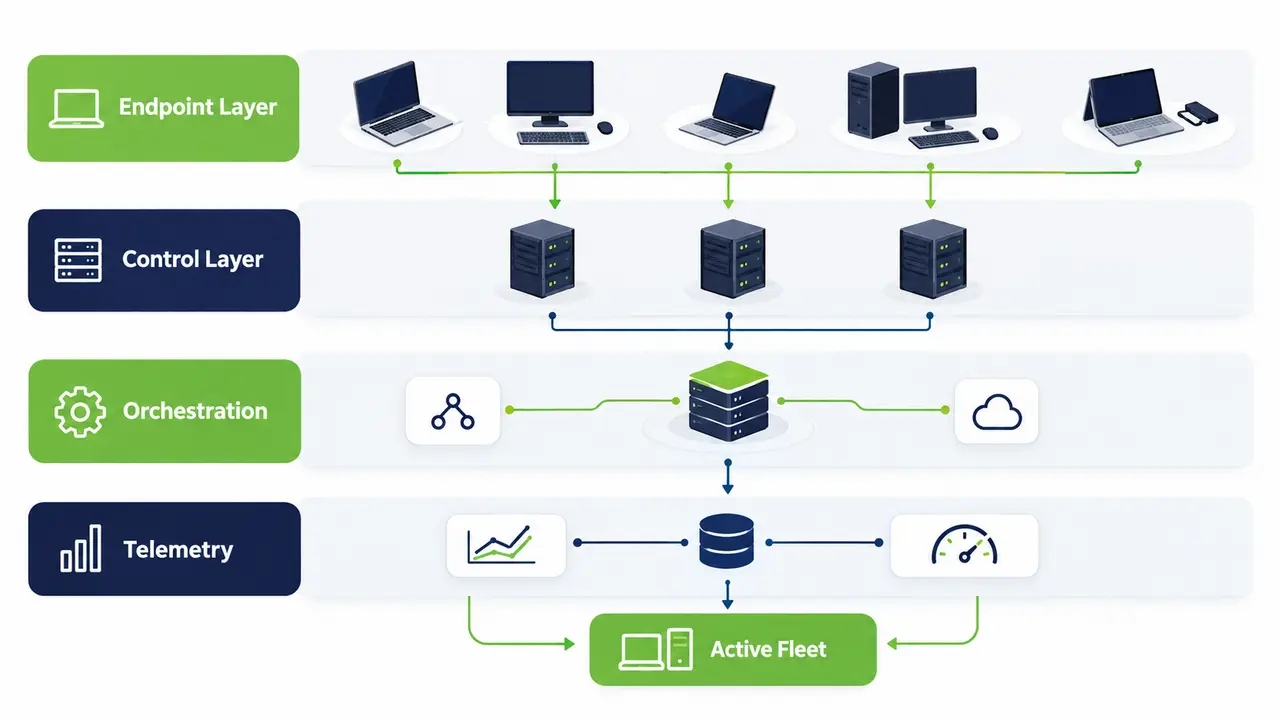
A production-grade power management infrastructure separates responsibilities into four distinct structural tiers. Decoupling these functional areas lets each tier, from endpoint policy execution and network wake orchestration to central governance and financial verification, operate independently without a single point of failure.
Endpoint layer mechanics for sleep, hibernate, and shutdown
The endpoint layer operates directly upon the workstation operating system through a lightweight client agent. This component works with ACPI power levels ranging from S0 Low Power Idle and traditional S3 Suspend to RAM through S4 Hibernate and S5 Soft Off. The agent validates local prerequisites before requesting a power transition, verifying that network interface card drivers support wake packets and system timers function correctly.
Control layer for policy targeting and client enforcement
The control tier serves as the policy distribution engine for the entire endpoint fleet. Rather than deploying fragmented administrative scripts, systems administrators implement an enterprise endpoint management platform to centralize rule distribution and monitor real-time operational states across the network. Administrators assign policies based on Active Directory organizational units, chassis type, and physical network subnets. Client agents download these directives and execute them locally, so policies are enforced consistently even if an endpoint temporarily loses connectivity to the central server.
Orchestration layer for schedules and wake coordination
The orchestration tier manages all transitions from low-power states back to active operation. This layer governs maintenance schedules, coordinated wake tasks, and patch cycles. It also incorporates intelligent staging algorithms that wake endpoints in phased batches. Staggering wake routines prevents dangerous electrical circuit spikes inside facilities and protects core network switches from broadcast packet storms.
Measurement layer for telemetry, compliance, and audit logs
The measurement layer collects time-stamped endpoint activity and power-state records, enabling administrators to monitor policy compliance and calculate estimated electricity savings. These calculations should use documented baseline power consumption, electricity rates, and transparent assumptions. Audit logs provide supporting operational evidence, while formal financial or sustainability verification may require additional measurements and independent validation.
Why native operating system settings fail at scale
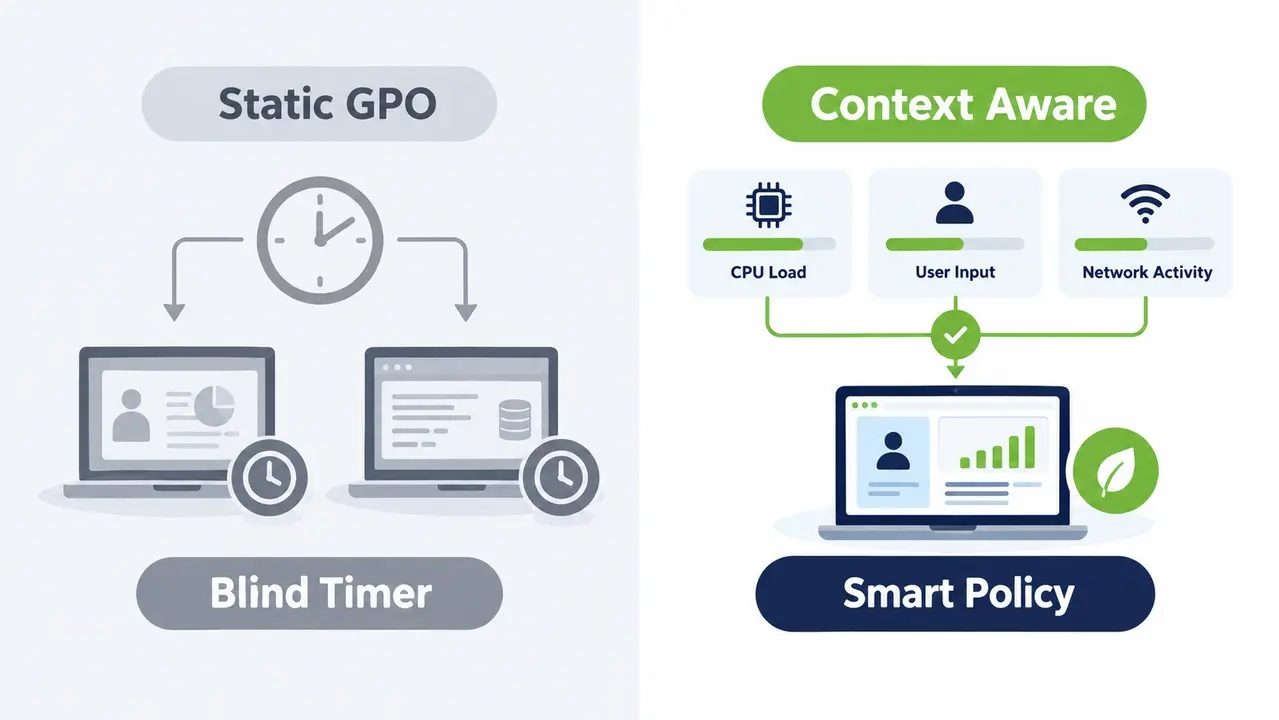
Many organizations attempt to regulate power consumption using native Windows Group Policy Objects and command-line configurations. While standard GPOs require no additional licensing, they consistently fail when deployed across enterprise environments. A static GPO applies an inflexible timer, such as forcing sleep after thirty minutes of perceived inactivity.
Static timers lack operational context. A standard operating system timer cannot discern whether an employee is actively presenting slides in a boardroom, compiling code, or running a data query. When a workstation abruptly enters sleep during an executive presentation, user frustration mounts immediately. IT administrators face a deluge of helpdesk tickets, and executive complaints inevitably force management to rescind the policy entirely.
Native configuration mechanisms also lack centralized visibility. Standard Windows tools offer no aggregated reporting on fleet compliance, energy consumption baselines, or realized financial returns. Without continuous telemetry, administrators cannot prove whether devices obeyed policies or calculate real cost reductions. A purpose-built architecture replaces blind timers with contextual awareness and checks running processes, network utilization, and input peripherals before it changes a machine’s power state.
Designing enterprise power policies without business disruption
Designing effective power policies requires balancing aggressive energy reduction against daily employee workflows. A successful deployment protects user productivity through intelligent safety valves that suppress power actions whenever meaningful work occurs.
Policy inputs that evaluate active runtime context
Effective endpoint power policies should account for user activity and business-critical workloads before initiating power transitions. Administrators should identify computers running applications or background processes that must remain active and configure suitable policy exceptions.
Where supported, additional workload monitoring can help prevent unnecessary interruptions. Detection capabilities and thresholds depend on the endpoint management solution and should be validated during pilot deployment.
Balancing work hours against overnight sleep posture
Workstation policies must adapt dynamically between active business hours and non-production windows. During regular office hours, systems should maintain an unobtrusive posture, turning off idle displays after 15 minutes while allowing system sleep only after extended periods of inactivity. This prevents disruptive interruptions when employees step away for short meetings. Once the business day concludes, the architecture enforces an aggressive posture, prompting machines toward sleep after 20 minutes of idleness and executing full shutdowns on non-working weekend days.
Overcoming the always-on myth with runtime telemetry
Departmental managers often resist automated power management, claiming their workstations must run uninterrupted around the clock. Overcoming this resistance requires transparent empirical evidence. Deploying auditing agents in a silent observation mode captures baseline activity across target machines over several weeks. Telemetry dashboards that show these computers sat completely idle for most overnight hours usually overcome that resistance and justify the policy.
Why computers remain powered on across enterprise facilities
Computers remain awake overnight due to structural operational incentives rather than simple employee forgetfulness. Identifying these systemic causes allows systems architects to build targeted technical mitigations into the power framework.
The patching dilemma represents the most common reason IT teams intentionally disable sleep timers. Systems management platforms push monthly security baselines, operating system upgrades, and application patches during overnight windows. If endpoints are asleep and fail to respond, they miss their enforcement deadlines, increasing corporate exposure to known vulnerabilities. Faced with rigid compliance mandates, systems administrators prioritize security patching over energy conservation by configuring endpoints to remain permanently powered.
Hybrid working models introduce additional complications. Office employees frequently leave their physical desktop workstations running overnight so they can access their internal work sessions from home via Remote Desktop Protocol. Without a self-service mechanism that enables remote users to wake dedicated office computers on demand, IT administrators have little choice but to permit continuous runtime. Unmanaged peripheral devices, such as optical mice detecting surface vibration or faulty display cables, further exacerbate the problem by triggering unexpected system wake events.
Integrating maintenance windows with power orchestration
Enterprise maintenance requires coordination between endpoint power management and patch deployment systems. Power management solutions such as PowerPlug Pro can help prepare compatible workstations for scheduled maintenance by coordinating wake-up operations with defined maintenance windows.
Before deployment begins, IT teams should verify that targeted computers are awake and reachable. Patch management platforms remain responsible for installing updates, tracking installation results, and managing required reboots.
Power policies should be configured to avoid interrupting critical maintenance operations. Once maintenance has finished, endpoints can return to their normal power-saving schedules, subject to the configured policies and hardware capabilities.
Making Wake-on-LAN operate reliably across enterprise subnets
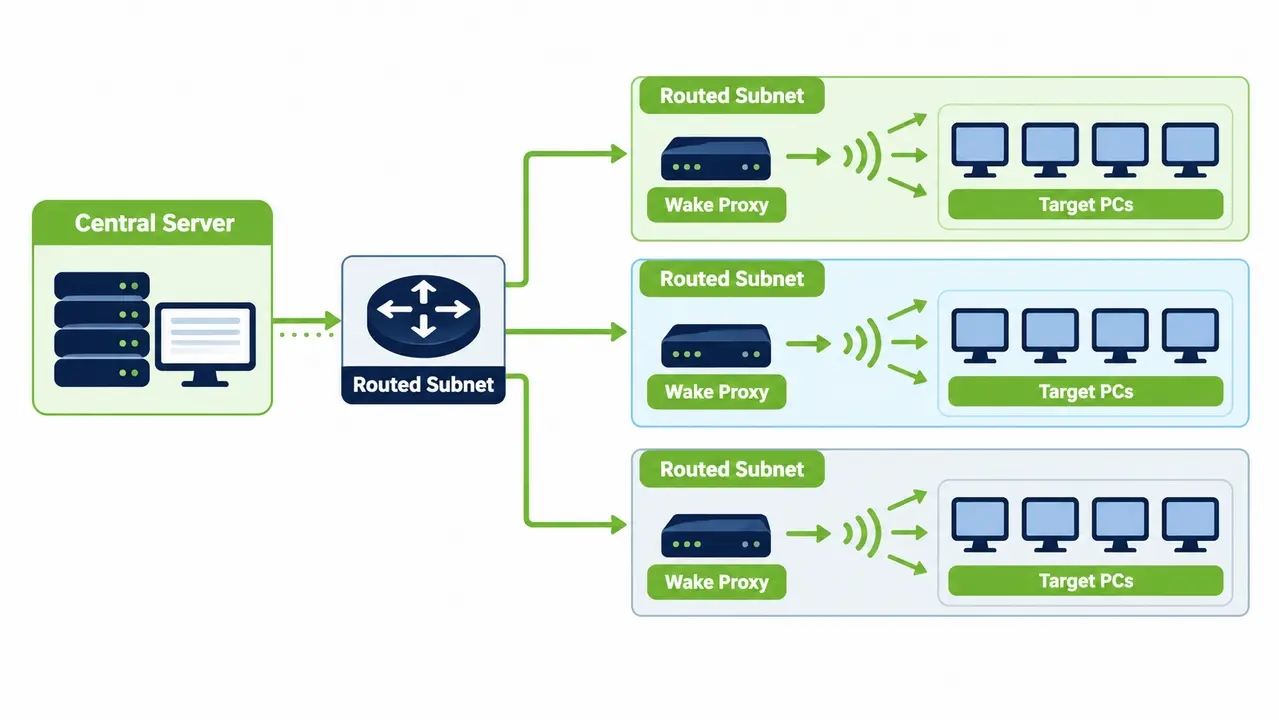
Basic Wake-on-LAN functions reliably inside small lab environments, but native implementations consistently fail across modern enterprise networks. Standard implementations broadcast a magic packet across the local network segment. On corporate networks split by virtual local area networks and firewalls into routed subnets, wake delivery rates frequently collapse.
Enterprise network switches and core routers routinely block directed subnet broadcasts to defend against denial-of-service amplification attacks. Furthermore, dynamic address resolution protocol tables on core switches expire quickly after an endpoint powers down, leaving network equipment unable to map incoming IP packets to physical MAC addresses. Deploying patented Wake-on-LAN technology overcomes these infrastructure barriers by using distributed subnet proxies to forward wake signals reliably to target machines across complex routing topologies.
Performance metrics defining reliable wake operations
An enterprise wake architecture must achieve documented operational performance targets. First-attempt wake delivery across routed subnets must exceed 95% fleet-wide. System initialization and network stack verification must complete within 120 seconds of signal transmission. The orchestration engine must also record whether each offline device woke successfully, stayed unplugged from electrical power, or failed because of network interface errors.
Overcoming network bottlenecks with distributed wake relays
Architectural reliability requires deploying intelligent wake relays throughout the network landscape. Rather than attempting to force broadcast packets through hardened enterprise firewalls, the management platform identifies active workstations residing on the destination subnet. These designated agent machines act as local relays, receiving unicast wake instructions from the central server and converting them into local layer-2 broadcast packets directly on the target network segment. This approach bypasses router broadcast restrictions and sidesteps the problem of expired ARP table entries.
Automating patch wake cycles without fragile custom scripts
Relying on ad-hoc PowerShell scripts to wake endpoints for patching creates significant operational vulnerabilities. Custom scripts lack exception handling, fail silently when network topology changes, and require constant maintenance. Scaling power management across thousands of endpoints requires declarative application programming interfaces that connect endpoint management tools directly to the central power orchestration engine.
Enterprise patch maintenance can be coordinated with centralized wake-up scheduling. Solutions such as PowerPlug Pro can help make compatible workstations available before scheduled maintenance windows, while Microsoft Configuration Manager or another patch management platform remains responsible for software deployment and installation results. The degree of automation depends on the available connectors, supported APIs, and configuration of the integrated systems.
Failsafe execution policies should prevent computers from remaining powered on unnecessarily when maintenance tasks stall. However, maximum maintenance windows must not interrupt active software installations, firmware updates, or critical system operations. When a maintenance window expires, the management system should verify that no protected operations remain active before restoring normal power policies. Unresolved operations should be logged and flagged for administrator review.
Essential enterprise software ecosystem integrations
An enterprise power management architecture cannot operate as an isolated silo. It must exchange operational data continuously with directory services and systems management platforms as well as with IT service desks and security monitoring infrastructure.
Directory integration is an important component of enterprise power management. Active Directory integration can support centralized policy assignment and management of computers across organizational groups. Additional identity platforms, such as Microsoft Entra ID, require compatible integration mechanisms and should be evaluated according to the capabilities of the deployed solution.
Organizations may also benefit from integrating power management data with IT service management and security monitoring platforms. Such integrations depend on available APIs, supported connectors, and the requirements of the organization’s IT infrastructure.
Governing device exceptions across specialized departments
Enterprise fleets encompass diverse operational profiles that cannot adhere to uniform office schedules. Without structured exception governance, departmental requests for policy exemptions quickly undermine fleet-wide energy conservation initiatives.
Different workstation roles require distinct operational profiles. Public reception kiosks and digital signage systems require displays to shut down after business hours while the underlying hardware remains awake to download scheduled content updates. Computer labs across universities demand scheduled shutdowns at facility closing, followed by automated wake sequences 30 minutes before morning lectures begin. Conversely, critical clinical workstations across large healthcare networks demand zero sleep while medical staff are logged in, enforcing rapid display privacy locks while reserving system sleep exclusively for explicit user logout events.
Operational exceptions should have a documented business owner, a clear justification, and a defined review schedule. Exceptions that are no longer required can be removed following appropriate approval. Critical systems, including clinical workstations and operational kiosks, should not automatically revert to standard power-saving policies solely because an administrative review deadline was missed.
Preventing user disruption and unsaved data loss
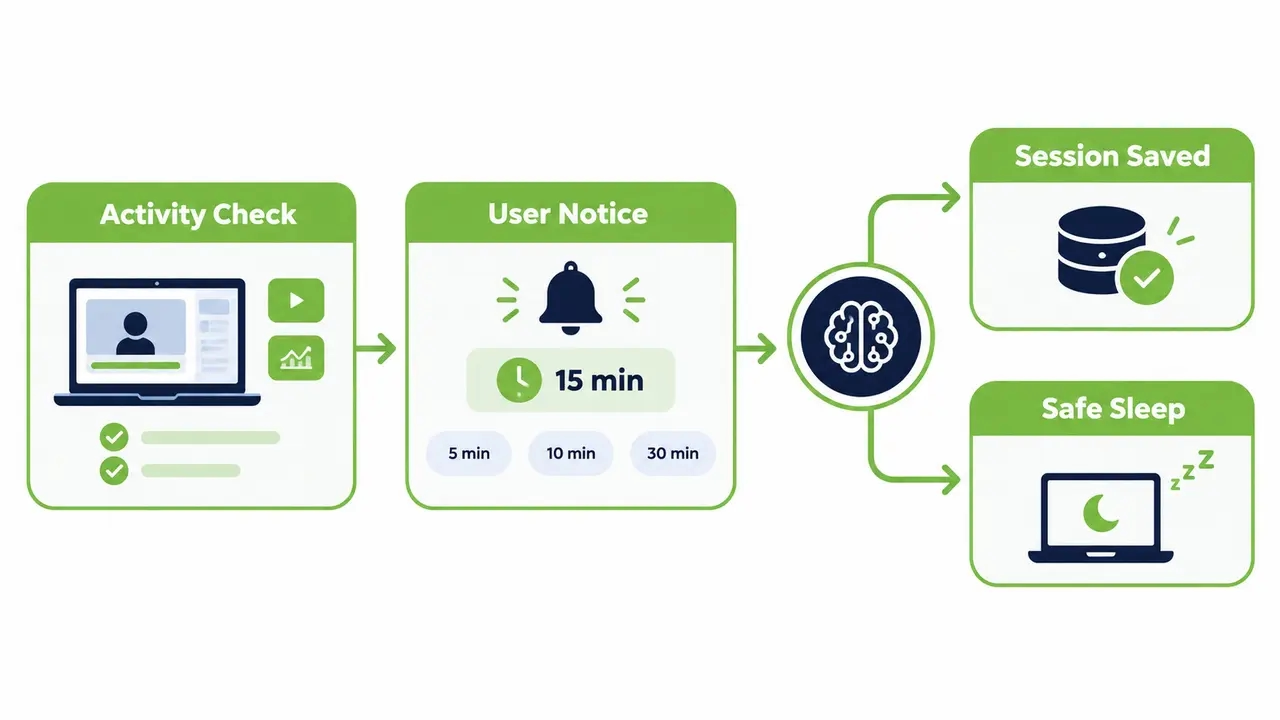
User resistance quickly derails endpoint power projects if employees lose unsaved files during unexpected shutdowns. Architecture designs must incorporate intelligent software safeguards that respect active user sessions while enforcing energy reduction.
The operational distinction between sleep and shutdown provides the primary technical defense against data loss. Transitioning an idle workstation to S3 Sleep or S4 Hibernate preserves active memory contents completely, writing session states to physical RAM or non-volatile disk storage. When an employee returns, the desktop resumes instantly with open documents and applications intact, browser tabs included. Full system shutdowns must be reserved for non-working weekends and must check for active interactive user sessions before executing.
Interactive notification banners provide essential communication before scheduled power transitions occur. When an after-hours shutdown is scheduled, the agent displays a non-intrusive countdown prompt 15 minutes in advance, providing the employee with an option to postpone the power action. Administrators should also account for full-screen applications, video conferencing, remote desktop sessions, and other critical workloads when defining power policy exceptions. The ability to detect these conditions automatically depends on the capabilities of the deployed endpoint agent.
Telemetry requirements for operational and financial accounting
Proving the value of an enterprise power management architecture requires reliable runtime telemetry. Centralized dashboards must translate raw endpoint telemetry into operational performance metrics that satisfy IT leadership and corporate sustainability auditors.
Operational health metrics evaluate technical execution across daily infrastructure cycles. Systems engineers track first-attempt wake success percentages, patch window compliance rates, and endpoint agent health across all subnets. Concurrently, telemetry processors calculate fleet-wide idle hours eliminated, translating runtime reduction into defensible kilowatt-hour savings and avoided Scope 2 carbon emissions. The following schema outlines the essential operational metrics required for fleet power governance.
| Telemetry Parameter | Measurement Unit | Operational Purpose | Target Baseline |
|---|---|---|---|
| Wake Delivery Rate | Percentage (%) | Verifies packet delivery across multi-subnet routers | Greater than 95% |
| Patch Availability | Percentage (%) | Measures target machines awake during patch window | Greater than 98% |
| Idle Time Eliminated | Hours per device | Quantifies non-productive runtime avoided after hours | 8 to 12 hours daily |
| Sleep Blocker Rate | Count per chassis | Identifies driver or peripheral sleep failure bugs | Under 2% of fleet |
Calculating verifiable energy and carbon reduction
Calculating financial returns requires transparent mathematical models grounded in real operational baselines rather than rough industry estimates. Finance executives and sustainability boards reject arbitrary assumptions when validating expenditure returns and emissions reporting.
Designing baseline audit periods before policy activation
Establishing an unmanaged baseline requires deploying client agents in a silent observation mode for two to four weeks across the entire workstation fleet. The software records active runtime, user input patterns, and idle hours during this assessment window but enforces no sleep or shutdown policies. This discovery period captures actual facility power consumption patterns while normalizing data against seasonal holidays and hybrid office attendance schedules.
Converting runtime data into finance and ESG reporting
Estimating energy savings requires combining recorded reductions in active runtime with measured or documented hardware power consumption. For example, a desktop consuming 65 watts while idle and 2 watts during sleep saves approximately 63 watt-hours for each hour spent sleeping instead of remaining idle.
Estimated electricity savings can be converted into financial cost avoidance using applicable electricity rates. Estimated greenhouse gas emissions reductions can be calculated using appropriate regional emissions factors and documented Scope 2 accounting methodologies.
These calculations provide useful evidence for financial and sustainability reporting, but should not be described as independently verified without an appropriate validation process.
| Workstation Fleet Size | Annual Idle Hours Saved | Total Energy Avoided (kWh) | Annual Financial Savings ($) | Avoided Carbon (MT CO2e) |
|---|---|---|---|---|
| 1,000 PCs | 2,500,000 hrs | 157,500 kWh | $23,625 | 68.5 MT |
| 5,000 PCs | 12,500,000 hrs | 787,500 kWh | $118,125 | 342.5 MT |
| 10,000 PCs | 25,000,000 hrs | 1,575,000 kWh | $236,250 | 685.0 MT |
See how much your fleet could save
Estimate your savings before you deploy. Share your workstation count and chassis mix along with your utility tariff, and we will build a savings model from your own baseline data rather than industry averages.
Common architecture pitfalls observed during fleet deployments
Enterprise power management projects frequently encounter technical hurdles that stall deployment timelines. Recognizing common architecture pitfalls allows engineering teams to design reliable controls before expanding policies fleet-wide.
Treating power management as a static configuration project represents a frequent deployment mistake. Organizations configure simple registry timers via Group Policy and assume their energy objectives are met. Broken maintenance windows and missed security patches, along with employee pushback, force administrators to abandon the effort within weeks. A production deployment requires dynamic operational software capable of monitoring health and coordinating wake events continuously.
Failing to account for segmented network topologies represents another critical design error. Standard Wake-on-LAN packets cannot pass through enterprise routers without dedicated relays or directed broadcast configurations. When administrators schedule off-hours maintenance without deploying distributed subnet proxies, thousands of remote branch office computers fail to wake, leaving critical security patches uninstalled. Projects also fail when teams neglect remote workers, enforcing rigid shutdowns on office desktop hosts without providing self-service waking portals for home employees.
Phased deployment framework from initial audit to scale
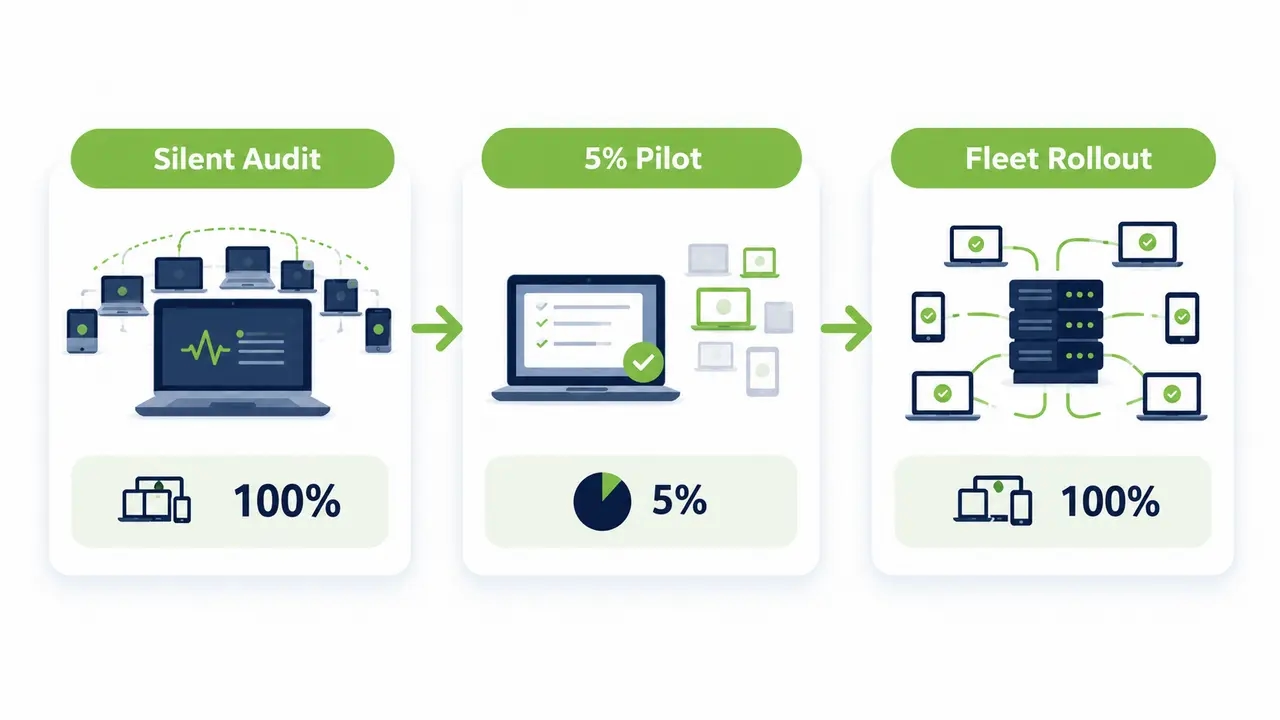
Deploying an enterprise power management architecture across tens of thousands of endpoints requires a structured, phased implementation roadmap. Moving systematically through defined project gates ensures hardware compatibility, validates wake reliability, and protects user productivity at scale.
The discovery phase begins by deploying client agents in a silent auditing mode across 100% of the endpoint fleet for two weeks. This discovery cycle maps existing power consumption baselines, categorizes hardware chassis types, and identifies systems suffering from broken ACPI sleep states or faulty device drivers. Telemetry gathered during this stage establishes the definitive benchmark for subsequent financial validation.
The pilot phase activates policy enforcement across a representative 5% sample of the organization over a two-week period. This group should incorporate technical workstations, back-office administrative systems, and hybrid laptops. IT teams validate wake-for-patching orchestration, fine-tune notification banners, and confirm network proxy communication. Once the pilot satisfies operational stability targets, the rollout expands across operational departments in staged weekly waves, establishing automated power management as an ongoing enterprise operational standard.
Plan a phased rollout for your environment
Every network has its own subnets, patch windows, and exceptions. Talk through your topology with our team and map a deployment plan that fits your maintenance calendar and fleet size.
Frequently asked questions
What effect does automated power management have on endpoint security compliance?
Automated power management strengthens security compliance by combining scheduled wake orchestration with patch delivery cycles. Rather than relying on machines to remain awake continuously, the architecture wakes endpoints automatically for maintenance windows and verifies installation completion before returning devices to sleep. Furthermore, scheduled weekend shutdowns terminate abandoned user sessions and eliminate persistent memory vulnerabilities across the fleet.
Can Wake-on-LAN cross isolated subnets and enterprise firewalls?
Standard Wake-on-LAN magic packets cannot cross routed subnets or enterprise firewalls because network infrastructure blocks directed broadcast packets. An enterprise power management architecture overcomes this obstacle by deploying distributed wake proxies onto local client subnets. The central server sends lightweight unicast commands to an active computer on the target subnet, which then broadcasts the wake packet locally to wake sleeping machines reliably.
What happens if an employee works late during a scheduled shutdown?
Organizations should configure appropriate exceptions and user notification procedures for computers that may remain in use outside standard working hours. Depending on the power management solution, users may be able to postpone scheduled transitions. IT teams should test these safeguards, particularly for remote sessions and critical applications, before enabling automated shutdown policies..
How long does an enterprise power management deployment take to deliver ROI?
The return on investment from enterprise PC power management depends on fleet size, baseline electricity consumption, achievable reductions in operating hours, local electricity rates, and deployment costs. Organizations should establish an initial consumption baseline, calculate projected savings, and compare those savings against the total cost of the solution. Actual payback periods vary between deployments.
How does endpoint power telemetry integrate into CSRD and Scope 2 reporting?
Endpoint power telemetry can support CSRD and Scope 2 reporting by documenting workstation activity, power-state transitions, and estimated electricity savings. Organizations can calculate associated emissions reductions using appropriate regional emissions factors and recognized accounting methodologies. Formal sustainability disclosures may require additional documentation, validation, and independent assurance.
An enterprise PC power management architecture turns idle PC runtime from an uncontrolled cost into a governed, measurable outcome. Four functional layers covering endpoint enforcement and policy control along with wake orchestration and telemetry let organizations eliminate after-hours energy waste while keeping machines available for patching, remote access, and specialized departmental workloads. When a baseline audit and a phased rollout are paired with verifiable kilowatt-hour accounting, the resulting savings hold up to scrutiny from both finance teams and sustainability auditors.

About the author
Nimrod Yedaya
VP Customer Experience
Over 15 years of experience in customer service, technical support, and customer relationships. Nimrod joined PowerPlug in 2012 as Customer Support Manager and was promoted to VP in 2016. He holds an MBA from BIU and a BSc in Communication Systems Engineering from BGU.