
Remote Work vs Office PC Energy
By Nimrod Yedaya, VP Customer Experience
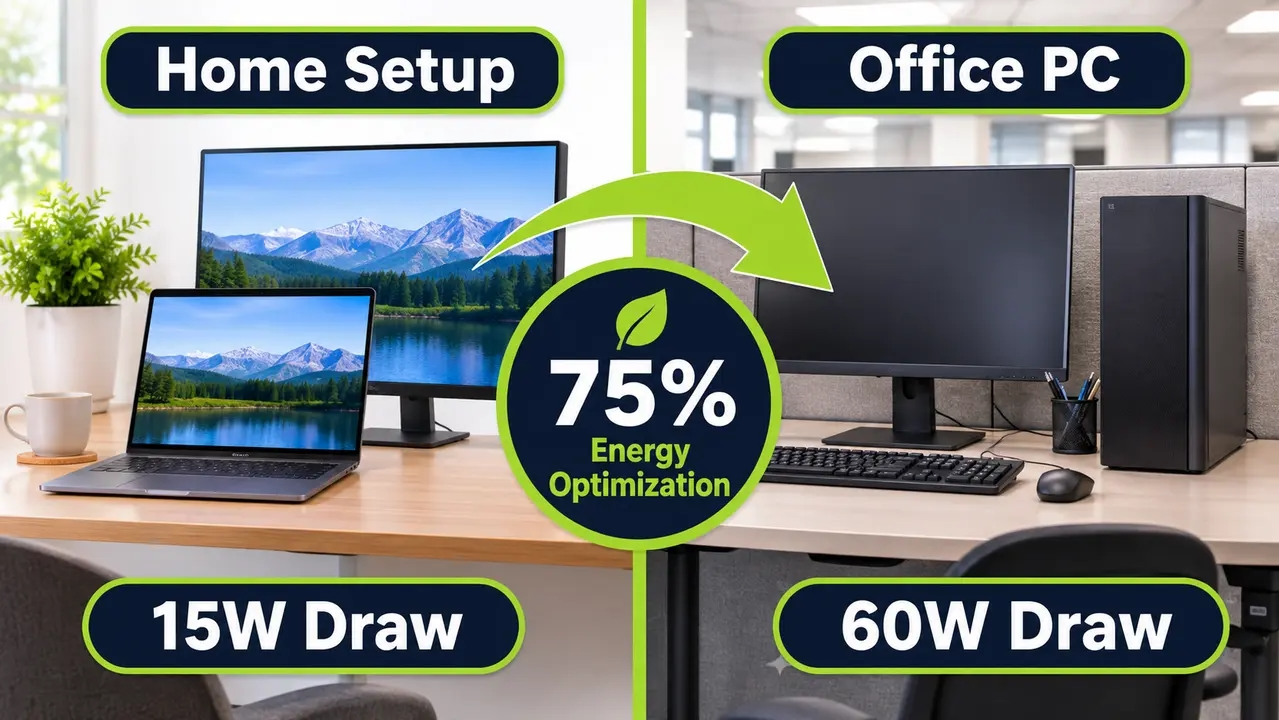
Walk through an office tower in downtown Chicago at 11:00 PM on a Tuesday. The floors are dark, but amber and blue LEDs illuminate hundreds of cubicles. Desktops run cooling fans into silent rooms, while monitors hum on standby. Thirty miles away, remote workers sleep with corporate laptops plugged into docks, drawing steady wall power through the night.
Both environments waste electricity, but they drain resources through different operational channels. Many IT directors assume that sending staff home naturally shrinks the computing footprint. The data tells an entirely different story.
Hardware wattage remains bound by physics, yet fleet distribution changes operational control. When machines move outside corporate walls, automated power policies break down, and visibility vanishes. Understanding the real remote work vs office PC energy impact requires looking past basic assumptions about commutes and office lights.
This analysis settles the operational math behind distributed endpoint computing. Getting this balance wrong leaves tens of thousands of dollars on the table each year while corrupting corporate carbon filings under new disclosure rules.
Reading time: 5 minutes
The remote work vs office PC energy impact debate explained
Evaluating the remote work vs office PC energy impact requires separating hardware electricity draw from broader workplace variables. Facility executives frequently blend HVAC systems and commuter fuel into their teleworking assessments. Those broader elements matter for general sustainability, but they conceal endpoint computing performance. Corporate computing energy stems strictly from device hardware states, runtime hours, and peripheral loads.
Enterprise IT leaders face a split in compliance reporting when tracking these machines. On-premises hardware draws power under Scope 2 greenhouse gas emissions, representing direct purchased electricity on corporate utility accounts. When workers transition to home offices, that endpoint consumption shifts into Scope 3 teleworking categories. The physical electricity consumption persists, but the reporting boundary moves.
Every PC moves between four distinct electrical states, from Active and Idle down to Sleep and Off. An individual workstation drawing 60 watts may seem harmless when compared to a central chiller plant. Multiply that workstation across 5,000 distributed endpoints running unmonitored for 250 nights, and you face massive operational waste. The Scope 3 Calculation Guidance outlines how unmonitored home electricity expands corporate reporting boundaries. Managing this requires active endpoint telemetry rather than assumptions.
The effect of working from home on PC electricity consumption
A computer processor draws the same wattage running a financial model regardless of whether the desk sits in Dallas or an employee’s basement.
The physical location does not alter hardware efficiency.
Remote work can increase or decrease endpoint electricity consumption depending on the hardware used, operating hours, peripheral equipment, and power management policies. Organizations may face additional challenges maintaining visibility and enforcing consistent power settings across devices operating outside corporate networks. In managed office environments, IT teams deploy group policies to trigger low-power states after short inactivity periods. At home, employees routinely disable local sleep timers to keep messaging icons green. Many workers connect secondary television screens and unapproved USB accessories that draw continuous vampire power.
Remote access architectures compound the issue through machine duplication. Millions of home workers use thin laptops to open Remote Desktop sessions into corporate desktop towers left running in the office 24 hours a day. That topology doubles the active endpoint hardware required for a single employee. The real WFH energy impact expands whenever IT supports unmanaged dual-endpoint configurations.
Factors driving up home PC energy draw
Auxiliary displays represent the largest unmanaged home load. An employee using two 27-inch monitors alongside an uncertified USB-C hub adds 50 watts of continuous operational load. Operating systems running without enforced policies leave background audio services and communication apps active indefinitely. These background threads prevent standard operating system idle routines from engaging sleep modes.
Efficiency advantages of modern enterprise laptops
Modern business ultrabooks provide an essential counterbalance. A recent business laptop draws between 15 and 25 watts under standard office productivity tasks. Older corporate mini-towers demand 65 to 90 watts for the same workload. Migrating remote employees to modern mobile architectures reduces active computing draw, provided they do not tether to inefficient desktop hosts.
Establishing an apples-to-apples comparison between home and office setups
Building an honest comparison between work environments demands controlled baselines. Comparing an office worker using a 150-watt workstation tower against a remote analyst on an ultra-low-voltage laptop generates misleading data. Accurate benchmarking requires identical job profiles, equivalent production hours, and matching peripheral configurations.
Endpoint analysis relies on five operational variables. First is inventory classification, separating laptops from compact desktops and high-draw workstations. Second is peripheral overhead, accounting for display count and external dock draw. Third is duty cycles, measuring active hours alongside idle and sleep durations. Fourth is policy enforcement state, noting whether centralized power automation governs the machine. Fifth is remote connectivity, tracking whether the device operates independently or tethers to an office host.
Standardized profiles from ENERGY STAR computer specifications provide objective power thresholds across these device tiers.
| Device Profile | Active Power (Watts) | Short Idle Power (Watts) | Sleep State (Watts) | Annual Draw (kWh/yr) |
|---|---|---|---|---|
| Enterprise Ultrabook (14-inch) | 15 to 30W | 8 to 15W | 0.5 to 2W | 40 to 80 kWh |
| Corporate Desktop Tower | 45 to 90W | 25 to 45W | 1 to 3W | 180 to 320 kWh |
| Performance Engineering Workstation | 120 to 250W | 60 to 100W | 2 to 5W | 450 to 850 kWh |
| Commercial LED Display (24-27 inch) | 18 to 35W | 10 to 18W | 0.3 to 0.5W | 50 to 110 kWh |
| Dual-Monitor Unmanaged Desktop Setup | 85 to 160W | 45 to 80W | 2 to 4W | 450 to 600 kWh |
Daily electricity consumption across enterprise PCs and monitors
Fleet energy accounting relies on a clear mathematical formula. Daily kilowatt-hours equal the combined energy draw across all operational states divided by one thousand. The calculation multiplies active watts by active hours, then adds idle watts times idle hours and sleep watts times sleep hours. Dividing that total by one thousand yields the daily kilowatt-hour consumption.
Daily Consumption Formula: Daily kWh = [(Active Watts × Active Hours) + (Idle Watts × Idle Hours) + (Sleep Watts × Sleep Hours) + (Off Watts × Off Hours)] / 1,000
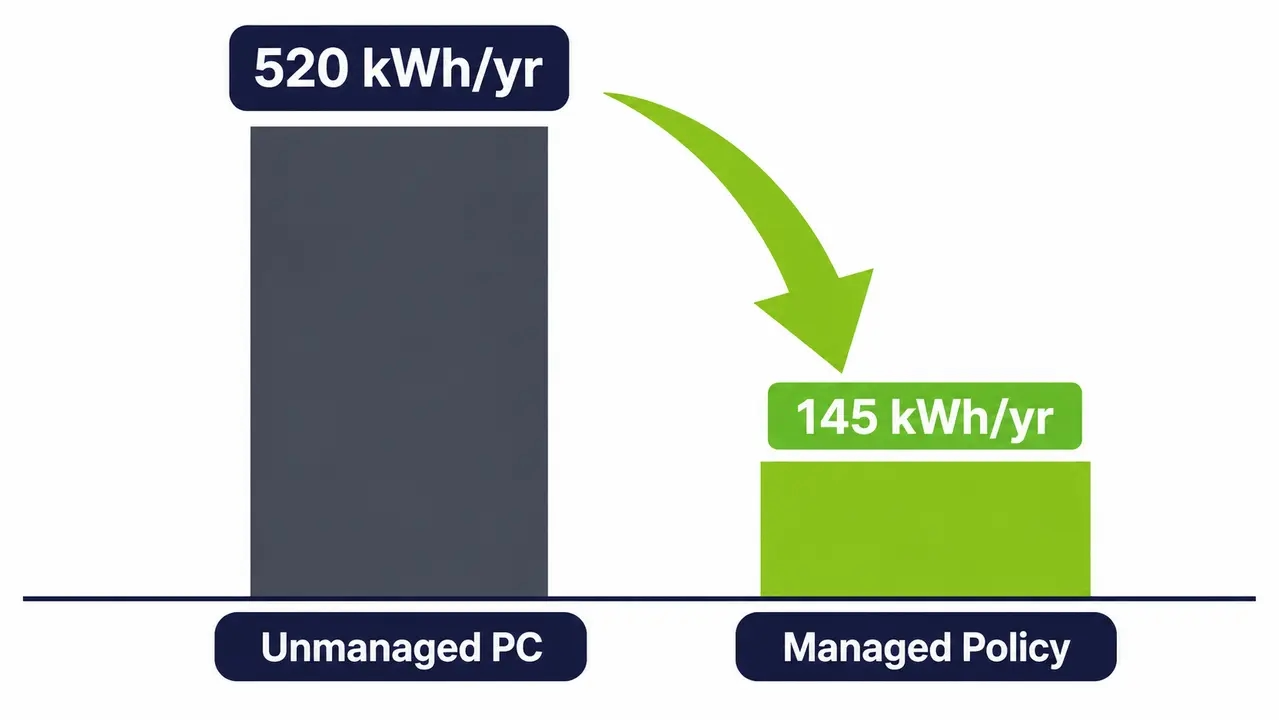
A standard corporate desktop pulls 60 watts during active use, 35 watts while idling, and 2 watts during sleep. Add two 24-inch LED monitors pulling 22 watts each during active operation. If the desktop draws 60 watts during eight working hours and 35 watts during the remaining sixteen hours each day, its annual electricity consumption would be approximately 380 kWh, excluding monitors. Two monitors drawing 22 watts each for eight hours daily would add approximately 129 kWh annually if used every day, bringing the total to roughly 509 kWh. Actual annual consumption depends on working days, monitor standby behavior, and power-state transitions. Compare that scenario to an identical setup governed by an enforced power policy. The system runs actively for eight hours, idles for one hour, and sleeps for fifteen hours overnight and throughout weekends. That managed workstation consumes roughly 145 kilowatt-hours annually.
Policy enforcement saves 375 kilowatt-hours per desktop each year.
Why after-hours idle draw dominates active computing workloads
A standard calendar week contains 168 hours. Full-time staff work roughly 40 of those hours. That leaves 128 non-working hours where an unmanaged PC simply sits idle. Background system tasks and antivirus scans pull between 25 and 50 watts continuously during these quiet hours. Over a full calendar year, after-hours idle waste consumes more than three times the electricity of actual productive computing.
Endpoint computing power compared to commercial building energy
Commercial real estate facilities consume enormous quantities of power through central heating, ventilation, and perimeter lighting. In centralized corporate campuses, environmental systems account for the overwhelming share of gross energy consumption per square foot. Desktop computers and office peripherals fall under the technical classification of plug loads. Plug loads represent between 20% and 40% of total electrical consumption in commercial office buildings.
While facility engineers cannot easily alter ventilation zones for a half-empty floor, IT teams can govern endpoint power with pinpoint accuracy. Unmanaged workstations generate a secondary thermal penalty. Every watt consumed by an idling desktop converts directly into ambient heat inside the building. Office cooling systems must expend additional energy to extract that heat during summer months. Eliminating after-hours workstation idle cuts facility cooling bills alongside direct plug loads.
Why remote work fails to automatically lower PC carbon emissions
Moving staff outside the office does not guarantee a smaller environmental footprint. Regional grid emissions factors govern the actual carbon output of every kilowatt-hour consumed. An enterprise office in San Jose might run on local solar arrays or a low-carbon municipal grid. An employee teleworking from West Virginia draws electricity from a regional utility heavily reliant on coal. A low-wattage laptop operating on a fossil-heavy grid frequently produces higher operational emissions than an office desktop running on renewable commercial power. The metric that governs sustainability is office vs home PC carbon intensity per delivered kilowatt-hour.
The equipment duplication trap worsens this carbon balance. When enterprises provide a home laptop while retaining dedicated in-office desktops, they double the embodied carbon of their hardware fleet. Zombie endpoints make the problem acute. These are office desktops left permanently running without an occupant, maintained purely so remote staff can connect over Remote Desktop. Such configurations generate massive remote work PC emissions with zero operational advantage.
After-hours PC runtime drives enterprise fleet energy waste
After-hours waste represents up to two-thirds of total enterprise PC energy consumption. Most IT organizations fail to track this loss because utility bills arrive at facility departments while computer configuration rests with IT operations.
Behavioral habits reinforce this continuous drain. Employees leave computers running because they believe animated screensavers conserve energy. Software developers keep high-performance workstations awake over the weekend to run occasional local build scripts. IT support desks actively instruct staff to leave computers powered on so maintenance tasks can complete overnight.
The aggregate math is punishing. In a deployment of 10,000 corporate PCs, leaving 40% of the fleet running unnecessarily overnight can create substantial electricity waste. For example, if 4,000 computers each draw 50 watts for 16 unnecessary hours per night, the annual consumption attributable to those hours would be approximately 1.17 million kWh. That unmanaged runtime inflates corporate expenses without delivering a single minute of productivity.
Sleep vs Hibernate vs Shutdown across enterprise fleets
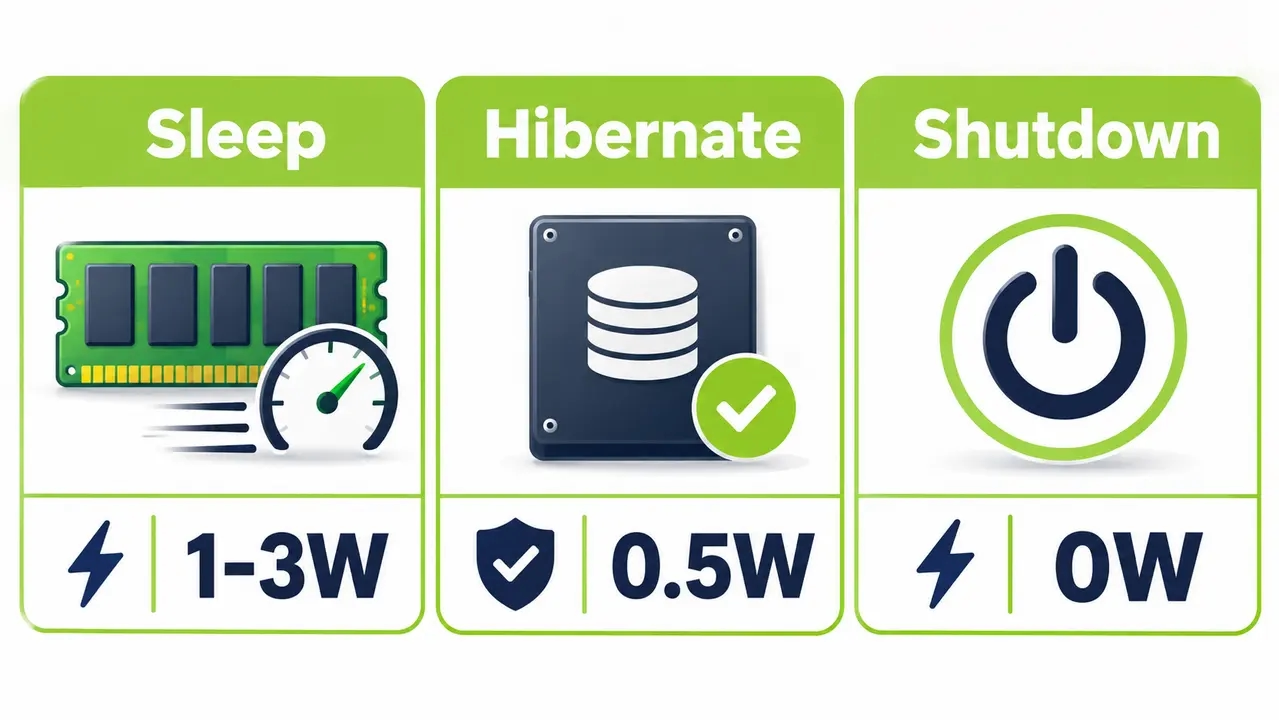
Governing endpoint power requires understanding Advanced Configuration and Power Interface states. Modern operating systems offer three primary low-power conditions called Sleep, Hibernate, and Soft Off. Each state presents a distinct operational compromise between energy reduction, wake latency, and software reliability.
Sleep retains the active system session in dynamic RAM while shutting down fans, internal storage, and auxiliary processor cores. It consumes between 1 and 3 watts, returning the user to their desktop in under two seconds. The operational risk is system fragility. Rogue USB devices and background scheduled tasks can trigger unwanted wake events, leaving systems running hot inside laptop bags or empty offices.
Hibernate (S4) saves the system session to storage and enters a very low-power state. Power consumption and resume times vary by hardware and configuration. Unlike traditional sleep, hibernation does not maintain the active session in RAM, but supported wake events may still be possible depending on the device and firmware settings.
Shutdown (S5) typically reduces electricity consumption to very low levels, but some computers continue drawing standby power for network wake capabilities, firmware functions, or other hardware features. The trade-off is operational disruption. Shutting down terminates running software, closes open documents, and prevents simple remote desktop connections unless supported by specialized hardware controllers. The most effective corporate strategy uses phased transitions. Systems should enter Modern Standby after 15 minutes of daytime inactivity, then transition to Hibernate after two hours of evening non-use. Microsoft explains each option in its PC power guide.
| Power State | Power Draw | Resume Speed | Session State | Best Enterprise Use Case |
|---|---|---|---|---|
| Modern Standby (S0 Low Power Idle) or Traditional Sleep (S3), depending on hardware support | 1.0 to 3.0W | 1 to 2 seconds | Preserved in RAM | Short daytime breaks and meeting travel |
| Hibernate (S4) | 0.3 to 0.8W | 10 to 15 seconds | Saved to SSD storage | Overnight policies and weekend schedules |
| Complete Shutdown (S5) | 0.0 to 0.4W | 25 to 45 seconds | Terminated completely | Long-term storage and decommissioned hardware |
Why the hybrid working model complicates endpoint energy management
The split workweek breaks conventional IT management assumptions. When staff divide their time between home offices and corporate hot-desks, endpoint visibility fragments. Organizations generally adopt one of three hybrid hardware topologies. The most efficient is single-laptop hot-desking, where workers carry one device and dock via USB-C cables. The second topology uses dual devices, assigning an office desktop and a home laptop to a single user. The third uses thin clients connecting to virtual desktop infrastructure hosted in corporate data centers.
Disconnected endpoints create major policy gaps.
Laptops disconnected from local corporate domains fail to refresh Group Policy Objects consistently. Mobile devices operating across residential networks slip out of compliance scanning rings. Without continuous telemetry across both physical locations, ESG leads cannot produce verified Scope 3 teleworking data.
Cloud applications and video conferencing change local PC draw
Modern collaboration platforms place heavy demands on local endpoint silicon. Continuous high-definition video streaming and software background blur force processors out of low-power modes. During text editing or spreadsheet calculation, a business laptop processor idles near 5% utilization, drawing roughly 12 watts. Initiating a continuous multi-party video call pushes CPU and integrated graphics utilization to 40% or higher. Power draw rapidly jumps to between 30 and 45 watts. Cooling fans spin up, and battery depletion accelerates.
Perspective is essential here. Running an intensive video meeting for two hours consumes roughly 60 extra watt-hours. Leaving that same laptop idling on a desk overnight wastes more than 200 watt-hours. IT teams waste political capital when they ask employees to turn off cameras to conserve energy. The operational priority must remain eliminating after-hours idle waste across the entire fleet.
Centralized endpoint power automation across distributed workforces
Native operating system tools cannot manage enterprise power at scale. Windows Power Schemes and Intune configuration profiles look sufficient on paper alongside Active Directory Group Policies, but they fail under real enterprise conditions. Standard policies are blunt instruments. They apply rigid inactivity timers that frustrate users by sleeping during presentations, software compilations, or large data transfers. Annoyed employees find workarounds, using caffeine utilities or adjusting local sliders.
Native operating system tools offer zero auditable telemetry, leaving IT directors blind to actual fleet power consumption. Scalable governance requires automated PC power management that balances operational continuity against energy conservation. Enterprise endpoint power management platforms can combine centralized schedules, inactivity settings, and configured exceptions to reduce unnecessary computer runtime. Administrators should identify critical background workloads and apply appropriate safeguards to prevent sleep or shutdown from interrupting them. Automatic workload detection depends on the specific capabilities of the deployed solution. When an endpoint is genuinely idle, the system enforces low-power states predictably across both home and office environments.
Maintaining security patching and remote access without 24/7 runtime
The primary obstacle to enterprise power conservation is operational conflict. IT security engineers demand constant endpoint availability to distribute software patches, update endpoint detection agents, and execute vulnerability scans. System administrators refuse to enable sleep policies because sleeping machines miss critical maintenance windows.
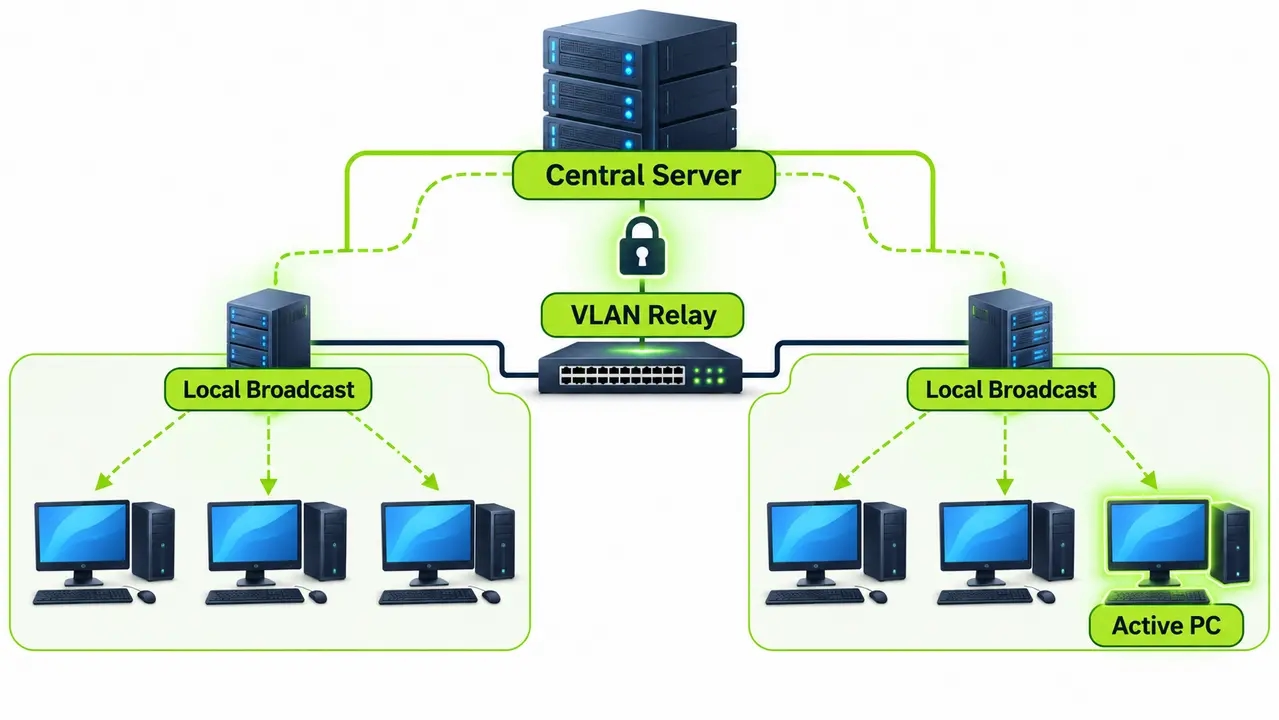
Traditional Wake-on-LAN mechanisms cannot solve this problem across modern enterprise architectures. Standard magic packets rely on subnet-directed broadcasts. These network packets do not route across complex enterprise VLANs, corporate VPN tunnels, or residential Wi-Fi networks.
Solving this friction requires advanced wake-up technology capable of orchestrating maintenance tasks across segmented networks. Enterprise wake management can bring compatible computers online before scheduled maintenance windows. PowerPlug Pro supports scheduled wake operations, while the patch management platform remains responsible for deploying updates, monitoring installation results, and managing reboots. Administrators should configure power policies to avoid interrupting unfinished maintenance operations. Remote staff can wake their office workstations on demand through a secure web portal, eliminating the need to leave desktop hosts running around the clock.
Keep endpoints patchable without running them around the clock
PowerPlug Pro enforces sleep and hibernation across office and home machines, wakes fleets automatically ahead of maintenance windows, and gives remote staff an on-demand portal to reach their office PCs. We assess your fleet’s power-state activity and hardware characteristics to estimate potential electricity and cost savings before wider deployment. Results depend on representative power consumption assumptions, operating schedules, and observed endpoint behavior.
Measuring and calculating remote work PC emissions for corporate ESG reporting
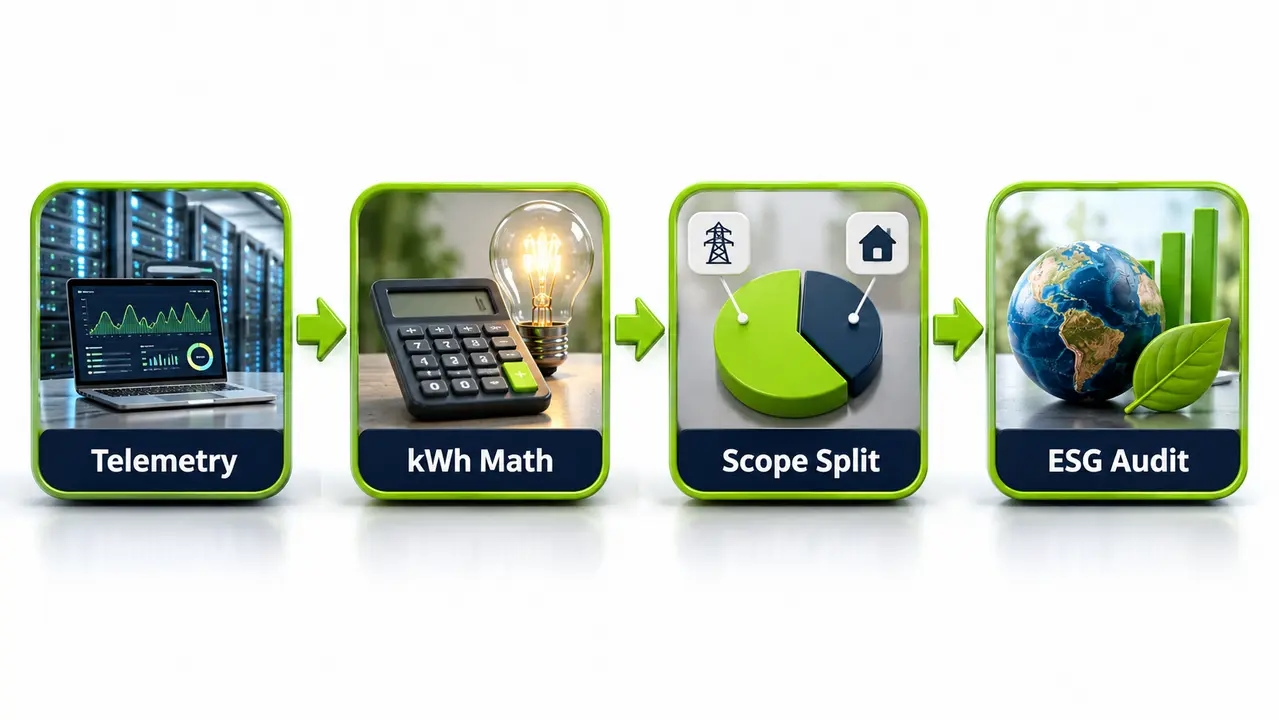
Corporate sustainability reporting frameworks encourage transparent, consistent, and appropriately documented emissions calculations. Where direct electricity measurements are unavailable, organizations may use reasonable estimation methodologies supported by relevant activity data and documented assumptions. Reporting requirements depend on the applicable framework and organizational reporting boundaries. Calculating distributed computing emissions involves four sequential steps.
IT teams first track verified active, idle, and sleep hours per endpoint profile using local telemetry. Second, teams convert those operational hours into annual kilowatt-hours using standardized hardware draw baselines. Third, they split consumption into Scope 2 for office electricity and Scope 3 Category 7 for remote teleworking. Fourth, they apply electricity emissions factors appropriate to each location, reporting period, and accounting methodology. Relevant sources may include national electricity authorities, recognized regional emissions datasets, and other accepted reporting references.
Dedicated platforms simplify this accounting burden. Deploying PowerPlug Pro provides organizations with granular operational state tracking across thousands of distributed machines. PowerPlug Pro records endpoint power-state activity and uses documented hardware power consumption assumptions to estimate electricity savings, associated costs, and carbon emissions reductions. These estimates can support organizational sustainability reporting when accompanied by an appropriate methodology and supporting evidence.
Auditing endpoint energy across kWh, financial cost, and carbon emissions
Managing endpoint efficiency requires tracking three distinct operational metrics. Each metric serves a specific executive stakeholder. Kilowatt-hours represent the absolute physical metric of computing efficiency. This baseline measurement remains completely independent of shifting commercial utility tariffs or seasonal grid changes. IT operations and engineering directors track kilowatt-hours to evaluate baseline operational performance across hardware tiers.
Financial cost translates energy reductions into executive ROI. Multiplying kilowatt-hours saved by blended corporate utility rates proves the commercial value of power automation. Organizations managing large PC deployments routinely recover their software investment in as little as 4 months. Real deployment data from Clalit Health Services shows how structured power policies eliminate millions of kilowatt-hours across sprawling clinical and administrative operations.
Carbon equivalents fulfill annual corporate sustainability mandates. Converting avoided electricity into metric tons of carbon dioxide equivalent satisfies sustainability officers and board ESG committees. Maintaining operational health metrics alongside these savings ensures that patch compliance and user availability remain completely uncompromised.
A 90-day action plan for distributed PC power management
Enterprise power governance succeeds through structured deployment.
Rushing aggressive shutdown policies across an entire organization overnight triggers employee resistance and IT support tickets. A disciplined 90-day rollout ensures operational stability.
The first 30 days focus entirely on discovery. IT teams deploy telemetry agents across a representative sample of 1,000 endpoints without enforcing any power restrictions. This initial phase establishes baseline idle runtime, records actual sleep adherence, and flags continuous overnight power consumers such as development labs and support desks.
Days 31 through 60 introduce targeted operational policies. Administrators segment the fleet into distinct user personas, separating standard office staff from remote analysts and developers. Pilot policies apply gentle daytime sleep thresholds and scheduled evening hibernation. Wake automation schedules align directly with existing patching cycles to verify update delivery.
The final 30 days expand automation across the broader enterprise fleet. Remote employees gain access to self-service wake portals, allowing them to wake remote hosts only when needed. Executive dashboards begin tracking verified energy savings, financial returns, and avoided greenhouse gas emissions.
Measurable operational control replaces unmanaged waste.
See the savings math for your own fleet
Share your endpoint count and hardware mix and we will model the annual kWh, cost, and carbon impact of managed power policies for your organization. The estimate draws on the same telemetry engine that runs in production at hospitals, universities, and government agencies.
Frequently asked questions
How does an enterprise wake sleeping PCs across different network subnets?
Advanced power management engines bypass standard subnet limitations by routing targeted wake commands through designated on-network agents or cloud-relay proxies. These agents dispatch localized broadcast packets directly within each target VLAN. This architecture wakes systems reliably without requiring network routers to forward broad magic packets across enterprise boundaries.
Does shutting down enterprise PCs interfere with overnight security patching?
Scheduled wake automation eliminates patching interference by powering systems on prior to scheduled maintenance windows. Management software works with deployment tools like Microsoft Configuration Manager to wake targeted device rings and verify update installations, then returns endpoints to sleep once scans finish. Systems remain offline during non-working hours without missing essential vulnerability updates.
What is the typical payback period for enterprise PC power management software?
Return on investment depends on fleet size, device power consumption, existing operating schedules, electricity rates, and software costs. Organizations with substantial unnecessary after-hours runtime may achieve significant electricity savings, but actual reductions and payback periods should be calculated using representative baseline measurements and documented assumptions. Hardware longevity also improves as systems operate at lower cumulative temperatures.
How are teleworking PC emissions verified for CSRD and ESG audits?
Auditors require actual hardware telemetry rather than generalized headcount estimates. Dedicated endpoint agents capture verified runtimes for active, idle, and sleep states on home machines and translate those hours into net kilowatt-hours. Applying local eGRID emissions factors converts this verified consumption into audit-ready Scope 3 Category 7 reporting data.
What happens if a remote employee needs access to an office workstation that is asleep?
Employees use an on-demand self-service web portal accessible from any browser or mobile device to wake their assigned office computer. The portal sends an authorized wake request through the configured PowerPlug infrastructure. The target computer can resume when its hardware, firmware, network configuration, and current power state support Wake-on-LAN. Wake times and reliability vary between devices and environments. The employee then establishes their standard Remote Desktop session without requiring IT intervention or keeping the machine awake around the clock.
Remote work does not eliminate PC energy waste but relocates it beyond the reach of standard power policies. The largest savings come from eliminating after-hours idle across the fleet, aligning wake automation with patching windows, and capturing verified runtime data for Scope 2 and Scope 3 reporting. Organizations that manage these three levers routinely cut PC electricity consumption by up to 60% while keeping every endpoint available for IT maintenance.

About the author
Nimrod Yedaya
VP Customer Experience
Over 15 years of experience in customer service, technical support, and customer relationships. Nimrod joined PowerPlug in 2012 as Customer Support Manager and was promoted to VP in 2016. He holds an MBA from BIU and a BSc in Communication Systems Engineering from BGU.