
Centralized PC Power Policy Management
By Nimrod Yedaya, VP Customer Experience
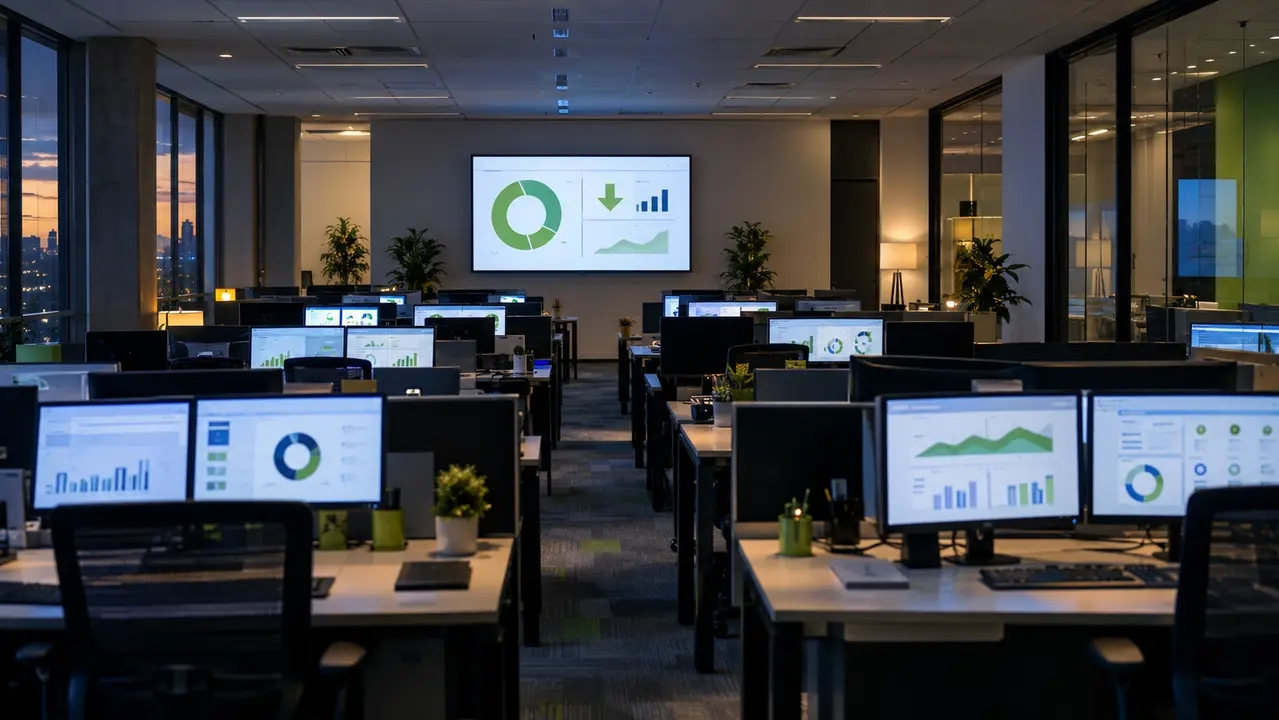
Walk through any corporate office at 11 PM and count the glowing power LEDs. In most organizations that number is embarrassing, and the reason is rarely lazy users. It is the absence of centralized PC power policy management. One console where you define sleep, hibernate, shutdown, and wake rules once, then enforce them across thousands of endpoints without depending on anyone remembering anything. Manual per-device configuration and basic Group Policy get you partway, but they drift, they cannot prove savings, and they do nothing for the machines that must stay reachable for patching. PowerPlug Pro was built for exactly this gap. This article walks through how network PC power policies actually work at enterprise scale, where the savings and the risks live, and how enterprise power plan management pays for itself.
Reading time: 5 minutes
What centralized PC power policy management actually covers
Centralized power policy management means defining power behavior once and enforcing it everywhere. That covers sleep, hibernate, and shutdown schedules, scheduled wake events, exception rules for machines doing real work, and the monitoring and reporting that prove what happened.
The practical unit of control is the group, not the individual PC. You segment endpoints by department, site, device type, or working hours, and assign each group its own policy. A call center running three shifts gets a different rule set than an executive floor or a student lab. Centralized power plan management succeeds or fails on this grouping logic, because a single fleet-wide rule will always be wrong for someone, and the wrong rule is the one users call the helpdesk about.
Settings drift is why hand-tuned power settings never survive
Here is the mistake most organizations make. They image new PCs with a sensible power plan, maybe push it once via Group Policy, and assume the problem is solved. Six months later, an audit may find that sleep timers have been disabled or changed across a meaningful portion of the fleet.
This is settings drift, and it is unavoidable in any large organization. Users change power settings to keep presentations alive. Reimaged machines miss the policy. New laptops ship with vendor defaults. Multiply that across 20 sites and three hardware generations, and your fleet-wide power settings exist mostly on paper. Enterprise power management that relies on per-device correctness is not management at all. It is hope. Centralized enforcement closes the loop because the policy reapplies and reports on every device, every day, and drift shows up in a dashboard instead of hiding until someone notices the electricity bill.
The savings hide in non-productive runtime
An idle PC still draws power. Multiply that by 1,000 machines and 250 working nights, and the waste is no longer a rounding error.
The target of any after-hours shutdown policy is non-productive runtime, meaning hours when a machine is on but nobody is using it. The EPA’s guidance on power management for computers and monitors makes the same point from the energy side, and power consumption monitoring is what turns that principle into a number you can defend. The math matters because it frames the decision honestly.
| Approach | Typical overnight behavior | Annual cost per 1,000 PCs (approx.) | Availability for IT |
|---|---|---|---|
| Leave PCs on 24/7 | Full idle draw all night, all weekend | Highest; Potentially substantial, depending on operating hours, device power draw, and after-hours behavior. | Excellent, but expensive and insecure |
| Native sleep timers only | Sleeps if timers survived user changes | Meaningful reduction, often eroded by drift and false idle | Good, until a machine misses its patch window |
| Managed shutdown with scheduled wake | Full shutdown, automated wake before work and maintenance | Lowest; Up to 60% PC energy savings observed in PowerPlug deployments with significant after-hours waste. | Excellent when wake orchestration is reliable |
Idle detection, using CPU, disk, and network signals rather than just keyboard and mouse, is what keeps aggressive policies from punishing machines that are genuinely busy.
A Windows power plan is not an enterprise power policy
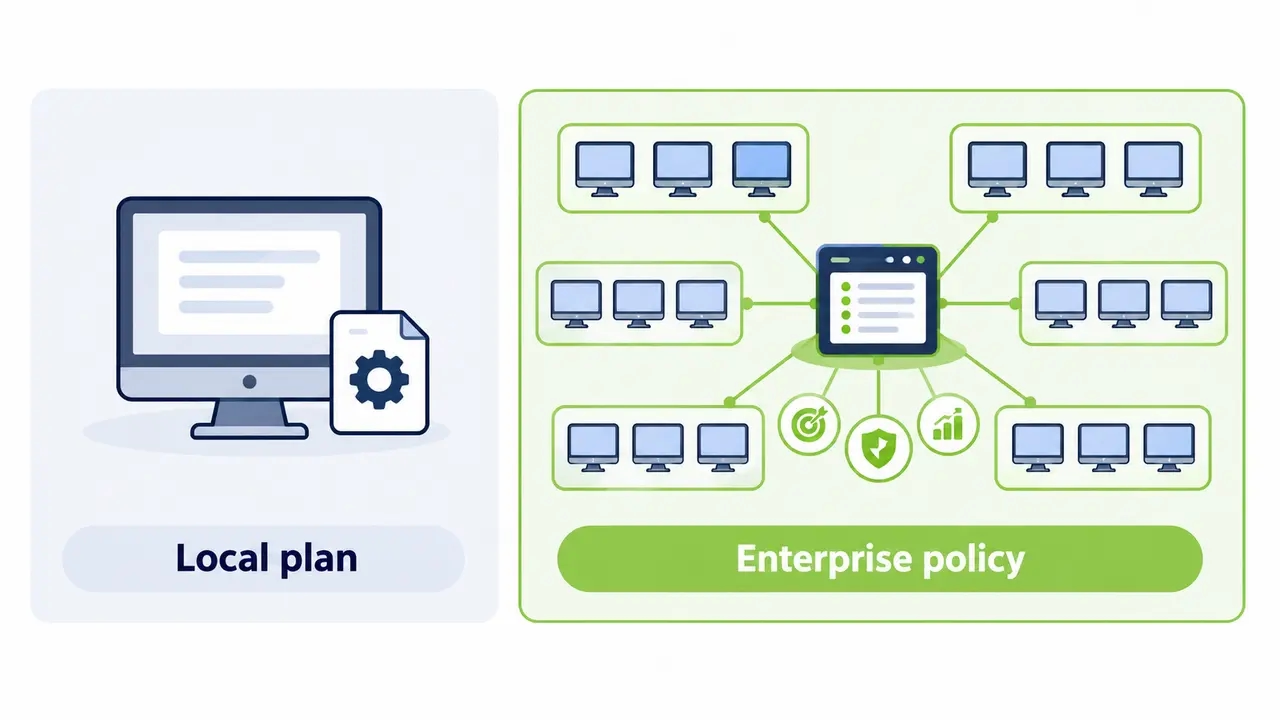
A Windows power plan is a local configuration file. An enterprise power policy is a governed set of rules with targeting, priority, enforcement, exceptions, audit logs, and outcome reporting. Confusing the two is why so many “power management initiatives” quietly die.
Windows power policy enforcement through Group Policy can push plan settings, and it is a legitimate starting point. But it lacks the governance layer, meaning who may change a policy, which policy wins when groups overlap, what happens when a machine is mid-task at shutdown time, and how you prove compliance to anyone outside IT. Managing Windows power plans at scale means answering those questions, not just setting a sleep timer.
How policy priority works when a PC matches multiple groups
Every endpoint sits in multiple groups at once. A finance director’s PC belongs to both “Site A” and “Executive.” If Site A says shutdown at 8 PM and the executive policy says no power savings, which one wins? In a governed system the answer is deterministic. A “no power savings” or VIP policy outranks a general office policy, always. Policy prioritization is not a nice-to-have. It is the difference between a system administrators can predict and one they disable after the first angry call from a VP whose machine slept through a deadline.
Sleep, hibernate, or shutdown: match the state to the workload
Sleep resumes in seconds and suits work-hours idling, with monitors off and light sleep after 15 to 30 minutes of inactivity. Hibernate writes memory to disk and draws near zero, which fits weekends and long idle windows. Full shutdown delivers maximum savings and the smallest attack surface, but only works as a policy if you can wake the machine reliably when it is needed. That is the whole trick of power policy orchestration. An aggressive after-hours shutdown policy combined with dependable wake scheduling beats a timid sleep policy that nobody notices and nobody trusts.
Mix modes by time window. Sleep during the workday, hibernate overnight Friday, shutdown and wake on schedule the rest of the week. A shared PC power policy for labs or kiosk PCs will look different from a developer workstation policy, and that is the point. One policy engine, many behaviors. What defines a safe shutdown policy is not the state you choose, but the guarantee that the machine comes back when work requires it.
False idle is where basic power settings fail
Ask anyone who has run a naive sleep policy about the phone call that ends the pilot. It usually involves an overnight render, a backup job, or a data export that died at 2 AM because the OS decided the machine was idle.
False idle means the keyboard and mouse are quiet but the machine is working, such as a build running, an imaging job in progress, or a clinical application mid-update. Basic OS idle timers cannot tell the difference. Enterprise-grade idle detection watches CPU, disk, and network activity, and application-based exceptions let you say “never power down a machine running this process.” Getting exception logic right is where rollouts stall, so build your exception list during a learning phase, not during enforcement.
Exceptions must be explicit, not improvised
Critical endpoints need a formal “always-on” policy with the highest priority, covering emergency stations, security monitoring consoles, 24/7 operations devices, and specialized equipment controllers. These machines still get monitored and still appear in audit logs for power events. Exemption without visibility is just another form of drift.
Patch windows need wake orchestration, not luck
The reason IT teams keep PCs on overnight is real. SCCM deployments, patch cycles, and remote access all assume a reachable machine. The resolution is not to abandon power management. It is to align it with IT operations through scheduled wake-up for maintenance.
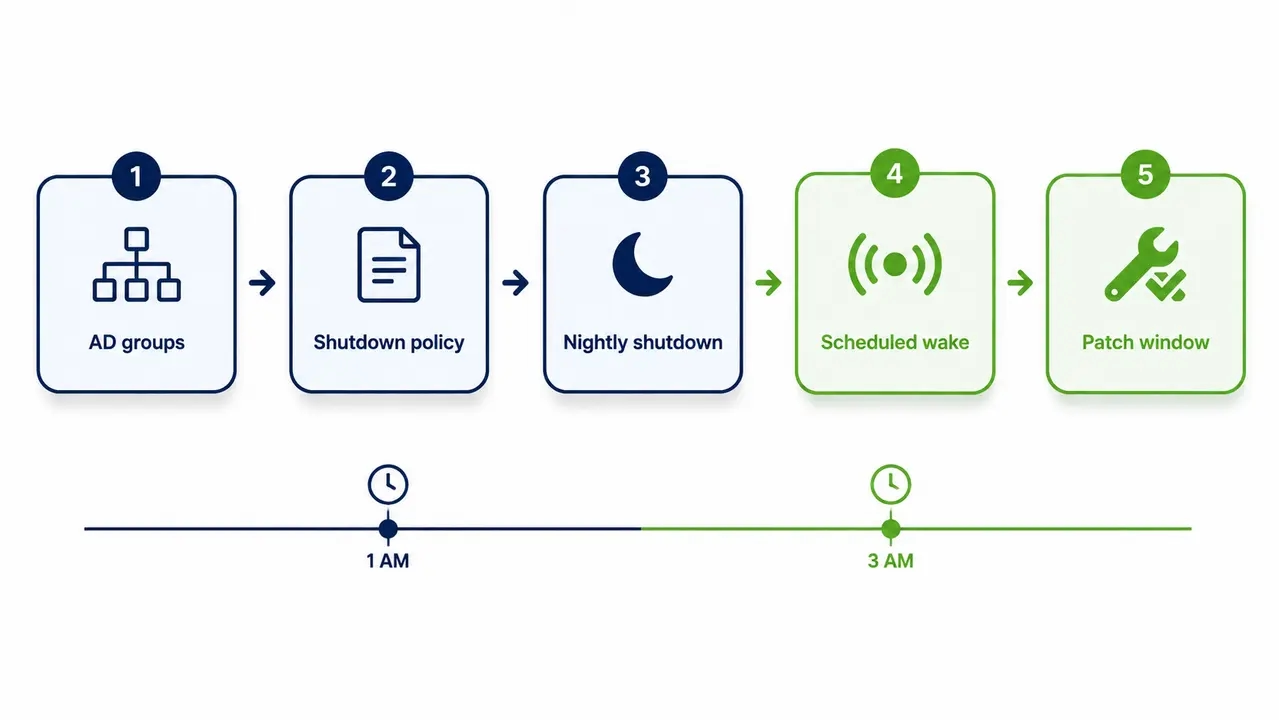
The standard workflow looks like this. Wake the target group at 1 AM, hold devices awake through the window, let the patch agent run, reboot as needed, validate completion, then return the fleet to its normal shutdown policy. Patch window power management stops fighting the maintenance calendar and starts feeding it, because a machine that is deliberately awake at 1 AM and asleep at 3 AM is more predictable than one that has been “on” for eleven months. This workflow depends on wake-up technology built for maintenance windows that reliably brings devices online before the patch job starts, and on audit logs for power events so you can see which machines woke, which completed, and which need follow-up.
Subnets and Fast Startup are where Wake-on-LAN breaks
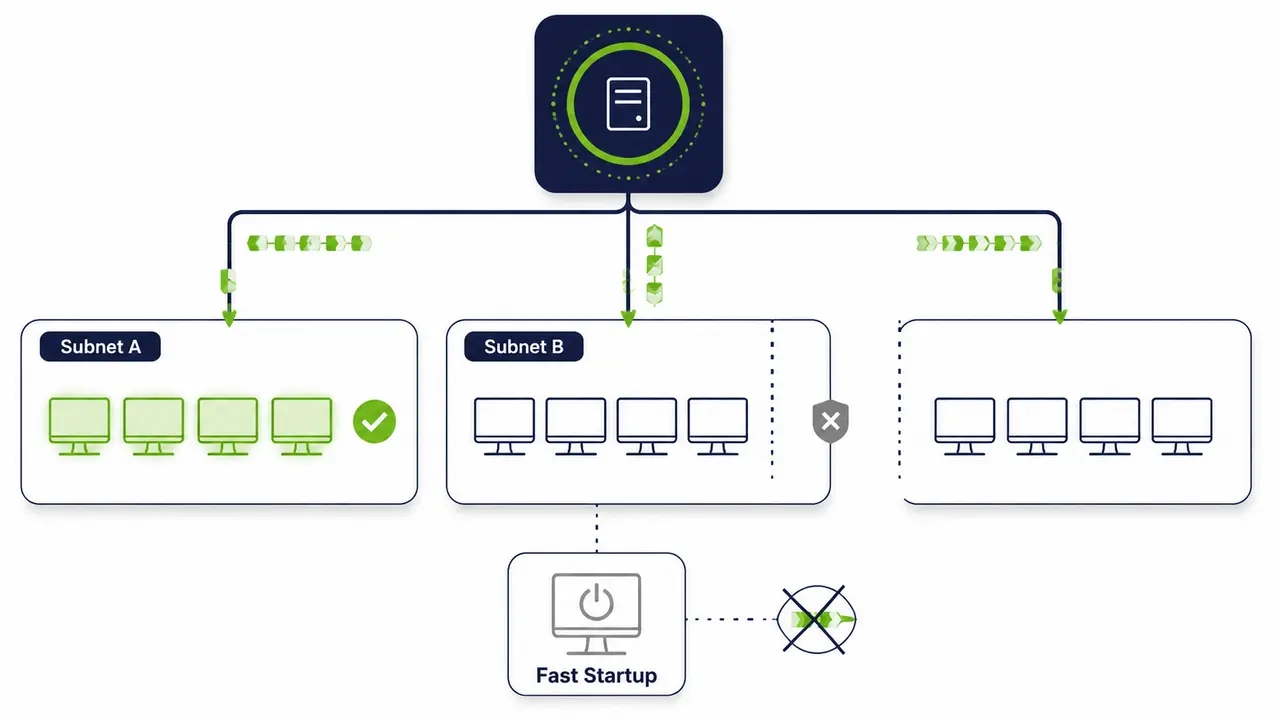
Wake-on-LAN (WoL), the mechanism that wakes a machine by sending it a specially formatted network packet, works beautifully in a flat lab network and disappointingly in a real enterprise. Broadcast boundaries between VLANs swallow magic packets. Router and firewall rules block them. Windows Fast Startup, a hybrid shutdown that is on by default, changes the shutdown state in ways that prevent wake, as Microsoft’s Wake-on-LAN documentation explains in detail. NIC firmware settings vary by vendor, and a single missed BIOS setting can disable wake across an entire hardware model.
Wake-on-LAN orchestration for multi-site policy management means handling all of this centrally, with directed wake traffic, subnet-aware delivery, detection of machines that will not wake from their current state, and reporting on wake success rate. A Wake-Up Portal extends this to people, not just processes, so a remote employee can wake their own office PC from home on demand and connect in. WoL alone is a packet. Managed wake is a system.
Reporting that satisfies IT, finance, and ESG at once
Two audiences need completely different reports from the same data. IT wants operational reporting, including devices not receiving policy, wake success rate by subnet, and top exception reasons preventing shutdown. Leadership wants outcome reporting, including kWh avoided, dollars saved, and CO2 reduced, by site and by quarter.
A typical dashboard view shows baseline versus post-policy after-hours runtime as a weekly trend line bending downward after enforcement, wake success rate broken out by site, and exception reasons ranked so you can see whether your exception list is protecting real work or just accumulating clutter. Carbon reporting for endpoints is where this stops being an IT project. Reduced electricity consumption maps directly to Scope 2 emissions under the GHG Protocol Scope 2 Guidance, which is the framework your sustainability team will be held to as CSRD-style disclosure requirements tighten. Policy compliance reporting is what makes the numbers defensible rather than estimated.
Phased rollout: how to reach 50,000 PCs without a helpdesk meltdown
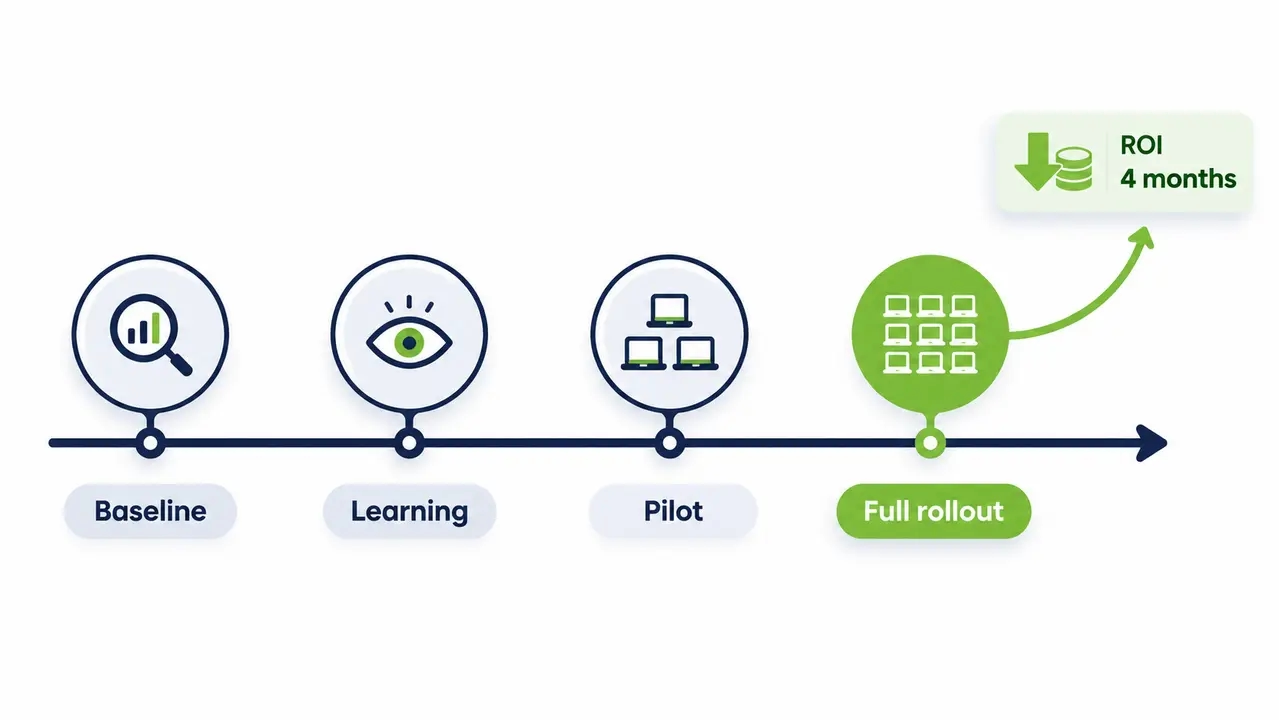
Nobody flips a shutdown policy on for 50,000 machines on a Tuesday. Mature rollouts move through phases, starting with discover and baseline, then learning mode where the system monitors what would happen without enforcing anything, then a pilot with representative groups, exception refinement, and expansion by site and department.
Your pilot checklist should cover wake reliability, user complaint rate, patch success rate, exception accuracy, and compliance rate against the baseline. That last one is the truth serum, because it shows verified savings, not projected savings. This phased approach mirrors how a university that rolled out power policies across a large, diverse device fleet moved from pilot to full deployment without disrupting students or staff. Plan the change management side too, with a communications note before enforcement, helpdesk scripts for “my PC was off this morning,” and a rollback path. Deployment itself should be fast; a well-built platform integrates with Active Directory and SCCM and can be running in hours, with ROI in as little as 4 months. Near-zero ongoing maintenance overhead for IT is the difference between a capability and another system to babysit.
Want to see what your fleet is actually burning overnight?
Our team can model the after-hours runtime of your PCs, estimate the savings from a managed shutdown policy with scheduled wake, and walk you through a pilot plan that keeps patching intact. You get concrete numbers based on your environment, not generic benchmarks.
What separates a platform from a Group Policy script
If you are evaluating centralized PC power management, judge candidates on the capabilities that determine whether the savings survive contact with reality.
| Requirement | Why it matters | What good looks like | Question to ask vendors |
|---|---|---|---|
| Policy scheduling | Work hours, nights, weekends, and holidays need distinct behavior | Separate work and non-work rules with automatic transitions | How are holidays handled per country or site? |
| Group targeting and priority | Overlapping groups create conflicts | Deterministic precedence, with always-on policies winning | Show me a device in three groups; which policy applies? |
| Exception handling | False idle kills credibility in week one | CPU, disk, and network thresholds plus application-based exceptions | What signals define “busy” before a shutdown? |
| Wake orchestration | Maintenance windows and remote users need machines on demand | Multi-subnet wake, user-facing Wake-Up Portal, wake success reporting | What is your wake success rate across routed networks? |
| Reporting and audit | Finance and ESG need repeatable, defensible numbers | Operational and executive views, audit logs for power events | Can we regenerate savings reports monthly for Scope 2? |
| Access control | Policies affect every user in the company | Role-based access control for IT policies, with change history | Who can change a policy, and is it logged? |
| Deployment model | Long deployments lose sponsorship | AD and SCCM integration, live in hours, minimal IT overhead | What is the realistic time to first enforced policy? |
Centralized PC power policy management turns fragmented, manual settings into a governed, auditable, reportable capability. Organizations with 1,000 PCs can save tens of thousands of dollars a year, and across our customers the combined total now exceeds $50M saved and 200,000 tons of CO2 eliminated. If you are ready to move from spreadsheet estimates to a measured, enforceable program, talk to our team about a rollout plan for your fleet.
Frequently asked questions
How do I enforce a power policy on all domain-joined PCs without breaking patching?
Use a central policy engine that integrates with Active Directory so group membership drives policy assignment, then pair enforcement with scheduled wake events before your maintenance windows. That combination lets you run an aggressive after-hours shutdown policy while keeping SCCM deployments and patch cycles fully intact. The audit logs tell you which machines complied and which need follow-up.
Does Wake-on-LAN work across subnets and separate sites?
Raw WoL often fails across routed networks because magic packets do not cross broadcast boundaries, and Fast Startup can leave machines in a state that will not wake at all. Wake-on-LAN orchestration solves this with subnet-aware delivery and wake success reporting by site, so you know where the dead zones are. For remote workers, a Wake-Up Portal lets users wake their own PC from home on demand.
How do I calculate and prove the energy savings from PC power management?
Start with a baseline period where you monitor actual runtime without enforcing anything, then measure reduced after-hours runtime after enforcement and convert the kWh difference into cost and emissions. Run a pilot group against a control group to isolate the effect, and repeat the report monthly or quarterly so finance and ESG teams get a defensible, consistent number. Reduced electricity consumption maps to Scope 2 under the GHG Protocol, which is what your sustainability reporting will require.
What happens if a PC does not respond to a wake command?
A managed platform reports the failure immediately, with the device, subnet, and likely cause, so IT can intervene before the patch window closes rather than discovering it in the morning. Common causes include disabled WoL in BIOS, Fast Startup shutdown states, or firewall rules blocking wake traffic, and good wake orchestration flags each one. Endpoints that repeatedly fail to wake are exactly the devices that belong in exception review, not in a silent gap in your compliance data.
How long does a rollout take across a large enterprise fleet?
Deployment of the platform itself is fast, often just hours, because it integrates with your existing AD and SCCM infrastructure. The timeline that matters is the phased rollout, with baseline and learning mode, a pilot group, exception refinement, then expansion site by site. Most large deployments reach steady state in a few months, with customers typically seeing full ROI in as little as 4 months once enforcement begins.
Centralized PC power policy management replaces settings drift and manual configuration with a governed system of group-based policies, deterministic priority, enterprise-grade idle detection, and wake orchestration that keeps patching on schedule. The result is defensible savings in kWh, dollars, and CO2, often with full ROI within months of enforcement.

About the author
Nimrod Yedaya
VP Customer Experience
Over 15 years of experience in customer service, technical support, and customer relationships. Nimrod joined PowerPlug in 2012 as Customer Support Manager and was promoted to VP in 2016. He holds an MBA from BIU and a BSc in Communication Systems Engineering from BGU.