
Real Time PC Power Monitoring Analytics
By Nimrod Yedaya, VP Customer Experience
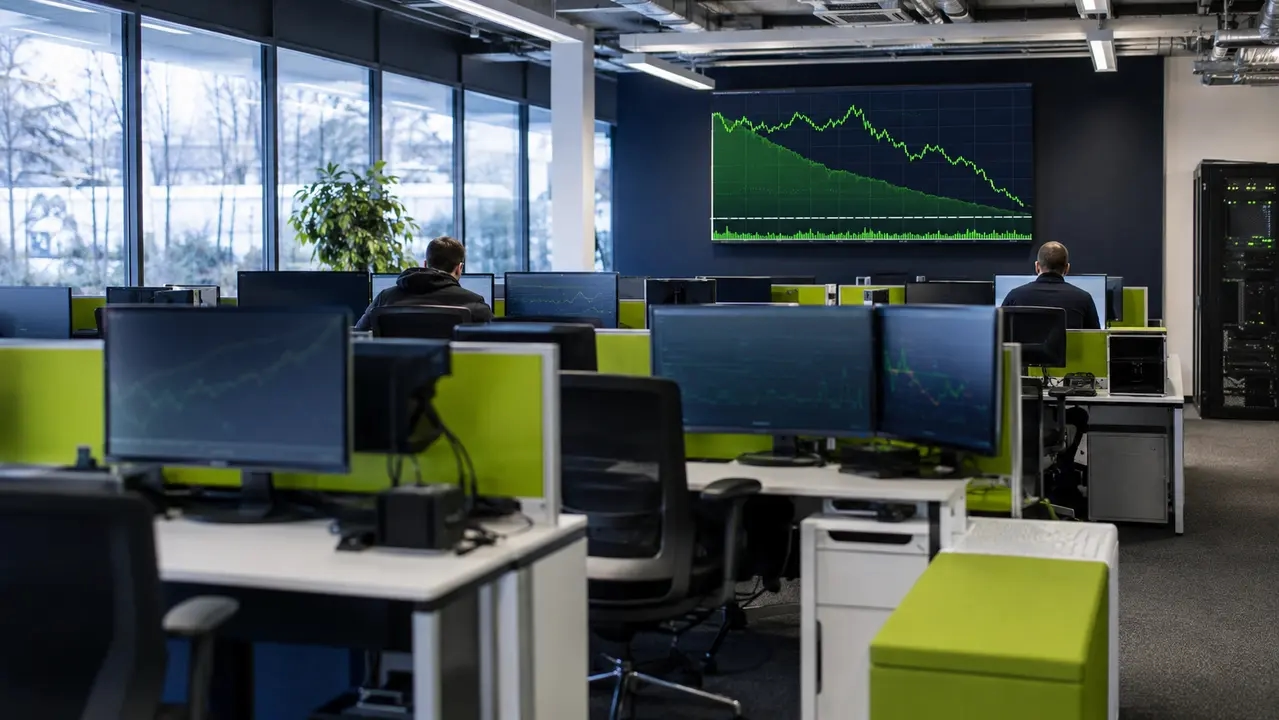
Most organizations discover their PC energy waste the same way: a facilities manager opens an electricity bill, sees it higher than expected, and asks IT why 4,000 machines appear to be running at 2 a.m. Nobody has an answer, because nobody has device-level data. Real time PC power monitoring analytics closes that gap. It gives you continuous visibility into watts, kWh, and cost per machine, so waste shows up on a live power consumption dashboard instead of on a bill six weeks later. This article covers how a PC energy monitoring tool measures power, what the dashboards should show, how accurate the numbers are, how to turn them into ROI, and how to run a working pilot in a single week.
Reading time: 5 minutes
Real time PC power monitoring analytics is visibility, not guesswork
Real time PC power monitoring analytics means the continuous collection and analysis of power-related metrics from every endpoint in your fleet, plus the plumbing to make those numbers useful: dashboards, baselines, trends, anomaly flags, and exportable reports. The distinction that matters commercially is between live watts and accumulated energy. Watts tell you what a machine is drawing right now. kWh tell you what it consumed over a night, a week, or a quarter, and kWh is what your finance team pays for.
Different stakeholders read the same data differently. IT admins want device status and sleep compliance. Finance wants cost per department. Sustainability leads want kWh and CO2 for ESG reporting. MSPs want multi-client views with clean separation. Device-level energy tracking serves all four from one dataset, which is why platforms built for this category, PowerPlug Pro among them, treat the analytics layer as seriously as the power policy engine itself. Without measurement, a power policy is just a hope with a GPO behind it.
What “real time” means, and what it does not
When a vendor says real time, they should mean a live refresh measured in seconds, backed by reliable aggregation at minute, hour, and day granularity for reporting. Three separate concepts hide inside that sentence, and conflating them causes bad purchases.
Sampling rate is how often the agent reads power data from the machine. Dashboard refresh rate is how often the console re-renders. Data retention is how long you keep raw versus aggregated numbers, and it determines whether you can answer an auditor’s question about last March. A GPU rendering job can spike draw for 40 seconds; a 60-second sampling interval might miss it entirely, while 1-second sampling catches the full shape. But oversampling a fleet of office-idle machines adds storage overhead and noise without adding a single decision. Our rule of thumb: use near-second data for anomaly detection and live troubleshooting, and 60-second or 5-minute aggregation for cost reporting and executive dashboards.
Wall meters, telemetry, or both
There are two ways to measure a PC’s power consumption in real time, and they answer different questions. External metering with a smart plug or wall meter captures ground-truth total draw, including PSU inefficiency, the monitor, and peripherals. On-device telemetry, read by an energy monitoring agent from internal sensors and OS power APIs, estimates draw continuously across the whole fleet with zero extra hardware. The ENERGY STAR program requirements for computers define standardized measurement methodology across operating modes, which is a useful anchor for what disciplined measurement looks like.
| Approach | What it measures | Accuracy for total system | Component visibility | Setup effort | Best for |
|---|---|---|---|---|---|
| External wall meter | Total system draw at the outlet | Highest, includes PSU and peripherals | None | High per machine | Calibration and validation |
| On-device telemetry | Estimated draw from CPU, GPU, and platform sensors | Good for trends and comparisons | CPU and GPU level | Low, agent-based | Fleet-wide monitoring |
| Hybrid validation | Telemetry at scale, meters on a sample | Telemetry corrected against ground truth | Yes, plus verification | Moderate | Enterprise rollouts |
The hybrid row is where serious fleets live. You run telemetry everywhere and validate it against a handful of external meters.
What a live power consumption dashboard must show
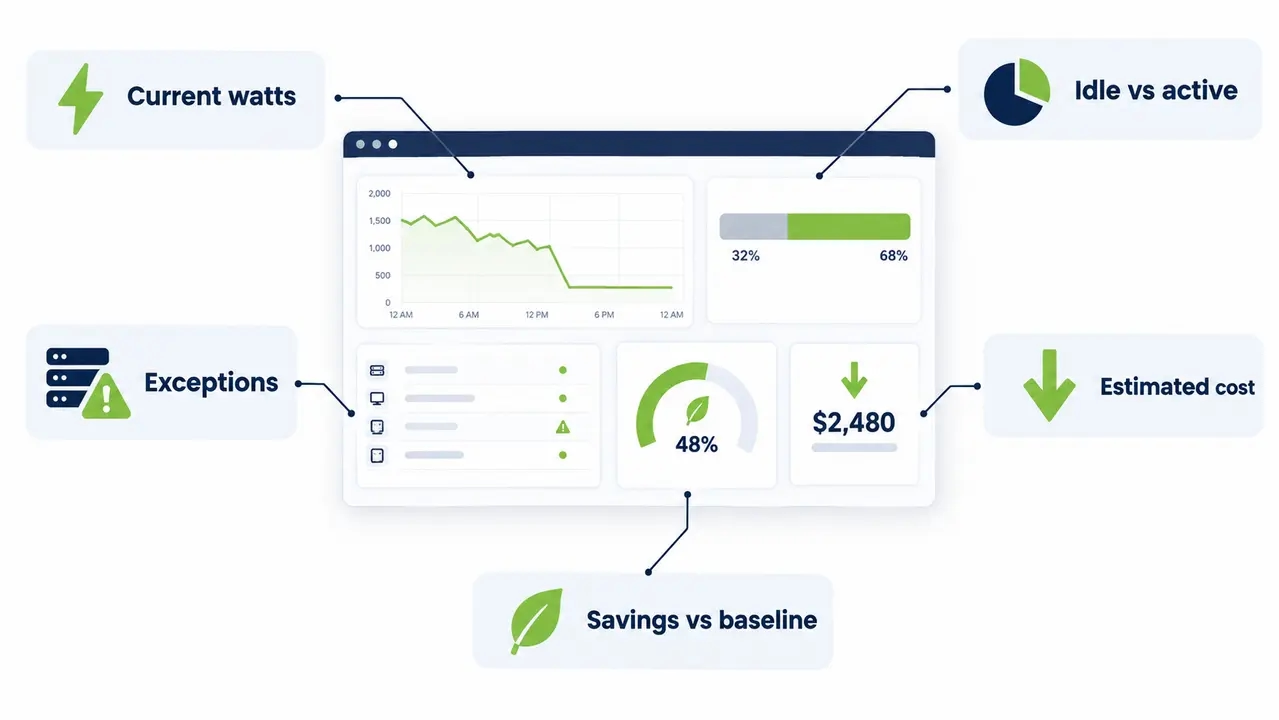
A live power consumption dashboard is not a nice chart. It is the interface between your endpoint data and every decision that follows. The minimum viable version shows current watts per device, kWh over the last 24 hours and 7 days, estimated cost, peak versus average draw, idle versus active time split, and an exceptions view for machines behaving abnormally. If you cannot export the underlying data, you do not own it.
The presentation layer matters as much as the data. Admins need device-level detail: current draw, anomaly flags, sleep and wake compliance per machine. Executives need the same data framed as cost, kWh, and savings against baseline. Platforms built for enterprise fleets, including our platform, combine both views so IT and finance are literally reading the same numbers, which ends a surprising amount of internal arguing. For commercial buyers, the differentiator to insist on is policy impact tracking: a savings-over-time view tied to the specific power policy you deployed, not a generic trend line.
How accurate is software-based power monitoring
Accurate enough for the decisions you actually need to make: trend analysis, cohort comparisons, policy validation, ROI tracking. Not billing-grade, because billing-grade requires certified metering on every circuit. The buyer’s job is to know which numbers are measured, which are estimated, and which are modeled, and any vendor who will not disclose that should not pass your evaluation. Vendors should label their figures, full stop. The ENERGY STAR Computers specification is a good reference point for how standardized power measurement is defined, and it is fair to hold your vendor to similar transparency.
Here is a validation method any IT team can run in a week. Pick three to five representative machines, ideally a mix of desktops, laptops, and one high-performance workstation. Put an external meter on each and run the software alongside it for a few days. Compare kWh totals, document the variance percentage, and if it sits in the low single digits, your fleet-wide numbers are decision-grade. While you are at it, watch the agent’s own CPU footprint during the pilot. A well-built agent adds low single-digit CPU overhead during normal monitoring; if your pilot machines feel sluggish, fix that before scaling, because no savings number survives a user complaint.
Watts versus kWh: where the ROI math lives
Watts are a rate. kWh are what accumulates, and kWh is what you are billed for. A PC averaging 120W over an 8-hour workday consumes 0.96 kWh. That same machine idling at 60W for another 14 hours because nobody shut it down burns another 0.84 kWh, nearly doubling its daily footprint without producing a minute of work. Peak watts matter for circuit and capacity planning. kWh matters for the budget line.
Worked example, clearly labeled as illustrative. Assume a baseline of 1.2 kWh per PC per weekday, a managed policy that cuts idle and after-hours draw to bring that to 0.7 kWh, 1,000 PCs, 250 working days, and a blended electricity rate of $0.15 per kWh. That is (1.2 minus 0.7) times 1,000 times 250 times 0.15, or roughly $18,750 per year removed from the bill. Set your baseline against comparable days of week and season, or your savings claim will be skewed before you start. The dashboard visual you want to see after a policy change is a line chart of average watts across the workday, baseline overlaid on post-change, with the after-hours plateau visibly collapsed.
Per-component power: CPU and GPU analytics
Yes, real time analytics can surface CPU and GPU power separately, and on workload-heavy fleets that visibility pays for itself. The agent reads component telemetry: CPU package power from the processor’s own energy reporting registers, and GPU power draw through vendor APIs such as NVIDIA’s management library on supported hardware. Understand the boundary, though. CPU package power is a component reading, not total system draw. RAM, storage, fans, PSU losses, and monitors all add on top.
Where component data earns its keep is cost attribution and optimization. An AI inference workload or a rendering queue can pin a GPU at full draw for hours, and fleet-average reporting will bury that story. GPU power draw analytics lets you see which machines are driving cost, cap power where it does not hurt throughput, and shift batch jobs to off-peak hours. Power spikes detection at the component level also catches the quieter failure mode: a machine that never sleeps because a stuck process is holding the CPU at 30 percent at 3 a.m.
Fleet rollout: pilot, baseline, policy, verify, scale
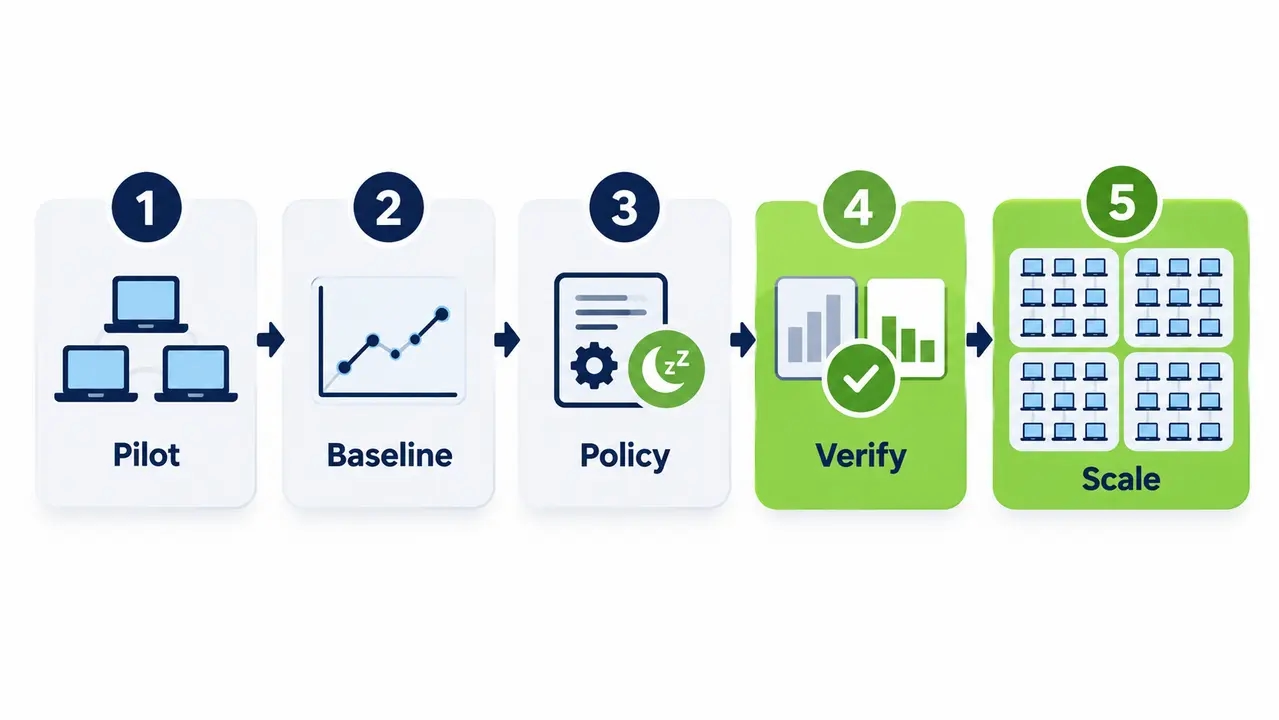
Endpoint energy management at fleet scale is a sequence, and skipping steps is where rollouts stall. Start with a pilot group of a few hundred machines across two or three departments. Run a baseline period, typically two weeks, with no policy changes so you capture honest current-state behavior. Deploy one policy change, such as after-hours sleep enforcement. Measure for another two weeks against baseline. Verify the savings, then scale to the full fleet with device grouping by department, device type, location, and workload profile, so a policy tuned for call-center desktops never lands on an engineering workstation.
Real fleet analytics needs filters, cohort-versus-cohort comparison, before-and-after views, and exportable summaries. This pilot-to-scale approach has been proven in healthcare and university environments, where tens of thousands of endpoints required consistent enforcement across departments that run very different workloads. The pattern is always the same: the pilot produces the evidence, and the evidence ends the argument.
The reports that beat a monthly utility bill
A utility bill tells you a building cost more this month. It cannot tell you which department, which floor, or which of 3,000 machines caused it, and it arrives weeks too late to fix anything. Real time energy analytics verifies a policy change in days, because you can watch after-hours power usage drop the morning after deployment.
The reports you should expect pre-built include “After-hours usage,” “Top 20 devices by kWh,” “Policy compliance,” and “Savings versus baseline.” Sleep and hibernate compliance analytics matter as much as the energy numbers, because a sleep policy that 40 percent of machines ignore is a policy that saves 60 percent of what you promised. Two visualizations are worth demanding: a bar chart of top devices by after-hours kWh, which usually surfaces a handful of egregious offenders, and a heatmap of hour-of-day versus average watts, which makes overnight waste visible to executives in one glance. Teams that pair real-time analytics with automated wake-up scheduling can enforce sleep overnight without sacrificing patch windows, because machines wake on schedule for SCCM deployments and go back to sleep afterward.
Security and privacy questions to ask first
A monitoring agent is software on every endpoint, and it deserves the same scrutiny as any other endpoint tool. Ask what data is collected, where it is stored, who can access it, how it is encrypted in transit and at rest, and whether the tool captures user- or application-level activity. Device telemetry, meaning watts, kWh, and power states, is low-sensitivity. Behavioral data is not: even pure power data reveals when a person is active, so data minimization is a governance issue, not paranoia.
Insist on retention controls, role-based access, admin audit logs, and deployment controls that respect your AD structure. This matters doubly in regulated sectors like healthcare and finance, where internal audit will ask who accessed what and when. A well-designed energy monitoring agent reports on machines, not on people, and can tell you everything you need for savings and ESG reporting without ever capturing a keystroke.
A 7-day pilot plan you can start Monday
You do not need a procurement cycle to prove this. You need one week and a few hundred machines.
| Day | Action | Output |
|---|---|---|
| Day 1 | Scope pilot group, deploy agent via SCCM or AD | Machines reporting into the console |
| Days 2 to 3 | Run untouched baseline, spot-check 3 machines with external meters | Honest current-state kWh and variance % |
| Day 4 | Deploy one policy: after-hours sleep with scheduled wake for maintenance | Policy live, users informed |
| Days 5 to 6 | Measure against baseline, check user impact and patch success | Verifiable kWh reduction, zero incidents |
| Day 7 | Report results, recommend fleet rollout | One-page evidence pack for stakeholders |
Define success before you start. Good looks like a measurable kWh reduction against baseline, a sleep compliance rate climbing into the high nineties, and no user-visible slowdown. The three fastest wins are after-hours shutdown enforcement, sleep and hibernate compliance improvement, and shifting batch workloads to off-peak hours. If you want help scoping a pilot for your environment, talk to our team and we will map the rollout plan to your fleet size. Done properly, this is where the IT energy optimization budget conversation stops being theoretical: our customers have collectively saved over $50 million and eliminated more than 200,000 tons of CO2, with payback on deployments often arriving in as little as four months.
See how much your fleet could save
Book a short walkthrough with our team. We will review your fleet size, current power policies, and utility rates, and give you a realistic savings estimate you can take to your budget conversation.
Frequently asked questions
How accurate is real time PC power monitoring without external hardware?
Software-based telemetry is reliable for trends, cohort comparisons, policy validation, and ROI tracking, which are the decisions enterprise buyers actually make. It is not billing-grade, and honest vendors label their numbers as measured or estimated. Run the spot-check described above, three to five machines against external meters for a few days, and document the variance before you trust fleet-wide figures.
Can I monitor PC power consumption per user or per application?
Some tools can attribute power patterns to workload or application activity, which is useful for cost attribution on heavy workloads. The moment you cross from device telemetry into per-user behavioral data, you are in privacy territory, so apply the governance controls from the security section before enabling anything user-attributed. Most savings use cases need device-level data only.
How do I track PC power usage in kWh and dollars?
Convert accumulated kWh by a blended electricity rate, then compare against a baseline period to quantify savings. A PC averaging 120W for 8 hours consumes 0.96 kWh; multiply fleet kWh by your rate, match baseline and post-change periods for comparable days and seasons, and the dollar figure falls out. Use your utility’s actual rate, not a national average, because regional variation is large.
Does power monitoring work on laptops running on battery?
It works, but the numbers mean something different. Battery-powered draw reflects the machine’s internal consumption, not wall consumption, and sleep behavior differs on AC versus battery. Your tool should clearly separate AC and battery reporting, otherwise laptop-heavy fleets will show misleading totals and your savings math will drift from reality.
The short version
Real time PC power monitoring analytics replaces guesswork with device-level data, and the discipline is straightforward. Validate software telemetry against a few external meters, insist on dashboards that tie savings to specific policies, separate watts from kWh when doing ROI math, and prove the concept with a one-week pilot before scaling fleet-wide. Handled this way, power management stops being a facilities complaint and becomes a measurable line item, with savings that finance and sustainability teams can both verify from the same dataset.

About the author
Nimrod Yedaya
VP Customer Experience
Over 15 years of experience in customer service, technical support, and customer relationships. Nimrod joined PowerPlug in 2012 as Customer Support Manager and was promoted to VP in 2016. He holds an MBA from BIU and a BSc in Communication Systems Engineering from BGU.