
Scalable PC Power Management for 10,000 Endpoints
By Nimrod Yedaya, VP Customer Experience

Facilities turns the office lights off every night. IT leaves 10,000 PCs running. That contradiction survives in most enterprises because the obvious fix, a shutdown mandate, sounds like a patching and remote access disaster waiting for a date. It does not have to be one. Here is how large fleets actually run PC power management at scale without breaking anything the business cares about.
Reading time: 9 minutes
What scalable power management for 10,000 endpoints really means
Scalable power management 10000 endpoints is the search phrase that usually brings IT leaders to this problem, often right after someone opens the overnight utilization report. The short version: scalable power management for 10,000 endpoints means enforcing, monitoring, and adjusting PC power states (sleep, hibernate, shutdown, wake) from one central console, and staying reliable at that device count. Large scale PC power management is not pushing a policy once and calling it done. Scale means exception handling, drift control, and the ability to prove cost and carbon outcomes to finance and ESG without hand-waving.
Three pillars hold it up. Policy is what should happen to each device and when. Telemetry is what actually happened, per machine, per night. Operations is who closes the gap between the two, and how fast. PowerPlug Pro was purpose-built around this loop for enterprise fleet power control, and it serves organizations managing thousands to tens of thousands of PCs, including healthcare networks and university campuses. Next, here is how to run this without hurting productivity.
Protect productivity with staged policies, not blanket shutdowns
Productivity is the objection that kills these projects, so solve it first. Standardize a small set of enterprise PC power management policies, schedule them around business hours, and add role-based controls plus exception groups so critical machines stay available while everything else saves energy automatically.
Roll out in order: pilot group, then a department, then a site, then the enterprise. Start with a baseline policy, gentle idle timers during work hours and firmer fleet-wide sleep and shutdown scheduling after hours. Then add specialized policies for labs, 24/7 stations, and shared devices. Build in safety rails, meaning settings that stop a PC from shutting down while someone is working. User-activity detection and minimum uptime windows are the two that matter most.
Idle time reduction for PCs comes from the after-hours policy, not from nagging users. Behavioral campaigns fade within weeks. Fleet scheduling does not. To do this reliably, you need a clear policy structure.
Structure power policies in layers, not in dozens
At massive scale, the architecture question is not which settings to pick. It is how policies resolve when they disagree. Use a layered model, global defaults, then site or department overrides, then device-role exceptions, with clear priority rules so conflicts resolve predictably. Argue for fewer policies, too. Fewer policies mean simpler operations, easier reporting, and fewer edge-case failures across a fleet. Massive endpoint energy management fails more often from policy sprawl than from weak settings.
Segment by location, device role, and usage pattern
Clinical workstations cannot sleep mid-shift, so they get display-off and short idle timers only. Call center machines follow shift schedules. Student labs need deep shutdown overnight and a scheduled wake before opening. Kiosks must be on at opening time, full stop. Executive laptops travel, so they run battery-aware settings. VDI endpoints are thin clients, and most of their savings live in the data center, not on the desk.
Resolve conflicts with one predictable rule
Adopt the rule that the most specific policy wins, document the priority order, and refuse to create a new policy for every request. A new policy per request is how a 20 policy estate becomes 200, at which point nobody remembers why anything is set the way it is. Identity sources decide how maintainable this is.
Target policies through directory groups and organizational units
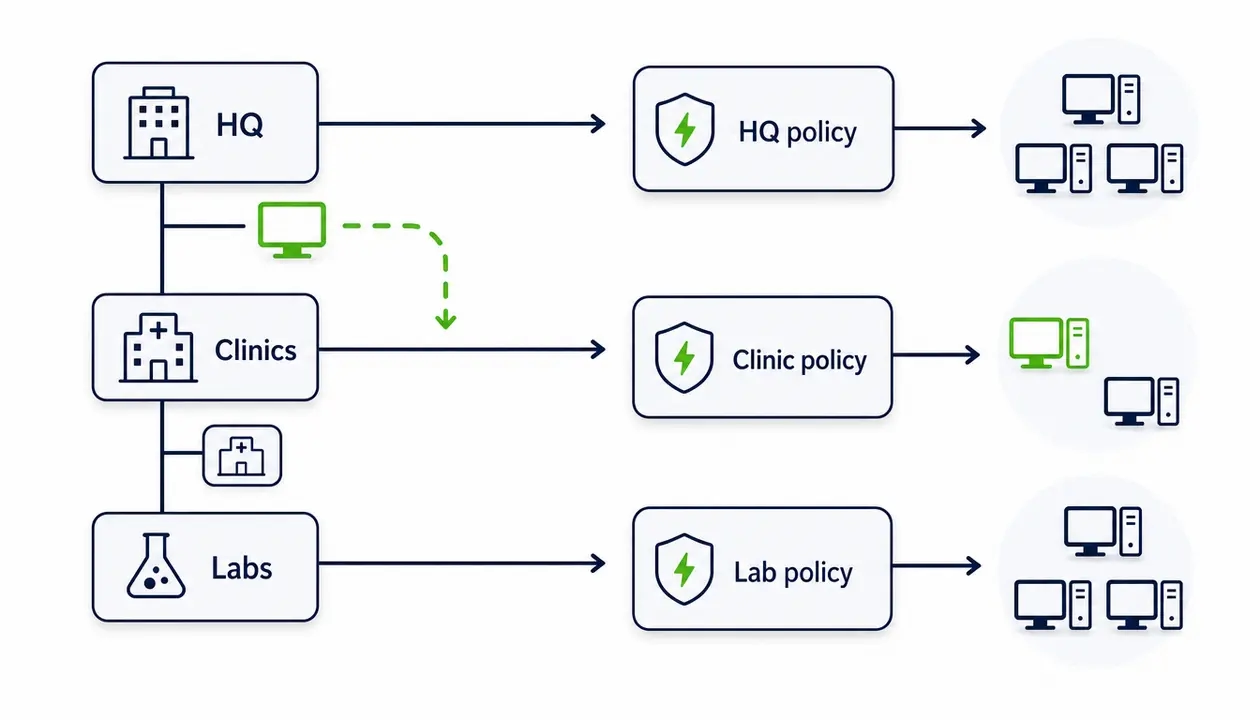
Yes, and you should. Distributed enterprise power management works best when policies map to Active Directory groups and organizational units, so devices inherit the right settings automatically when they move between departments or sites. Directory-based targeting removes manual assignment, cuts orphaned devices, and makes onboarding consistent for newly imaged PCs.
A concrete example: PCs in OU=Clinics get the Clinic policy, OU=HQ gets the HQ policy, and a sub-OU overrides as needed. A machine that migrates from HQ to a regional clinic picks up the correct behavior without a ticket.
One caution. OU hygiene matters. Stale computer objects and messy directory structures produce misassigned policies, and at 10,000 endpoints nobody finds those by eyeballing a console. Clean the directory before layering policies on top of it. Once targeting is set, you need continuous visibility into compliance.
Coverage, assignment, and compliance are three different failures
Teams that report fleet savings without verifying participation are reporting fiction. Track three things separately. Coverage: is the agent installed? Assignment: does a policy actually apply? Compliance: does the device follow it? Then surface everything that fails on operational dashboards for non-compliant endpoints, backed by power state monitoring across sleep, hibernate, and shutdown.
The failures fall into three buckets: no agent at all, an unhealthy agent that installed but stopped reporting, and devices assigned to nothing or to the wrong policy. Power policy compliance reporting works as a weekly routine. Review the non-compliant queue, remediate, and track trend lines by site.
| Coverage funnel stage | Question it answers | Typical failure here | Action item |
|---|---|---|---|
| Total endpoints | How many PCs do you own | Inventory drift, stale objects | Reconcile against the directory |
| Agent installed | Is the client present | Failed or blocked installs | Redeploy the agent |
| Policy assigned | Does a rule apply | Unassigned or misassigned devices | Fix directory targeting |
| Compliant | Is the device saving | Sleep blockers, local overrides | Remediate, then recheck |
Treat every drop-off in that funnel as an action item with an owner. Verification is what makes savings numbers credible.
Prove energy savings with honest math
Savings claims die in finance review when the method is vague. The credible method combines device activity states (working, idle, off) with power-state transitions and your local electricity rate. That produces kWh avoided, dollars saved, and emissions impact over time, which is exactly what energy savings reporting for IT needs to survive both a CFO and an ESG auditor. A proper kWh savings calculation for a PC fleet is baseline versus post-policy analysis, not an estimate in a slide.
For finance, keep it boring: a baseline period, the policy start date, savings by site, and the stated assumptions behind every number. For ESG, document the kWh and emissions methodology for carbon footprint reduction at the endpoint layer, set a reporting cadence, and keep audit-friendly exports that trace back to device level.
One caution worth repeating. State your assumptions and never overstate precision. Auditors forgive rough numbers with a clear method; they do not forgive precise numbers with no method. Sleep-state behavior and power management are recognized as core levers of computer efficiency in ENERGY STAR guidance on computers, which is a useful anchor for the methodology. Measurement only holds up if you handle real-world exceptions and drift.
Drift, not bad design, is what kills power policies
Most large-scale power policy enforcement does not fail at launch. It fails six months later, quietly. Policies drift because of conflicting settings, user overrides, sleep blockers, maintenance needs, and inconsistent connectivity across sites.
The blockers are predictable. Media playback, conferencing tools, background compute jobs, quirky drivers, local “never sleep” settings, and remote access tools that hold machines awake. Each is legitimate on some devices and a leak on thousands of others.
Prevention is three habits. Use standard policy templates instead of one-off configurations. Govern exceptions through a controlled process rather than ad hoc edits. Run endpoint telemetry on a reporting cadence that flags outliers, such as abnormal overnight uptime with no business reason behind it. Here is the pattern to remember: the most common reason teams switch workstation energy optimization off is maintenance windows. That is why waking devices on purpose matters more than any shutdown setting.
Wake PCs on purpose for patching, scans, and maintenance
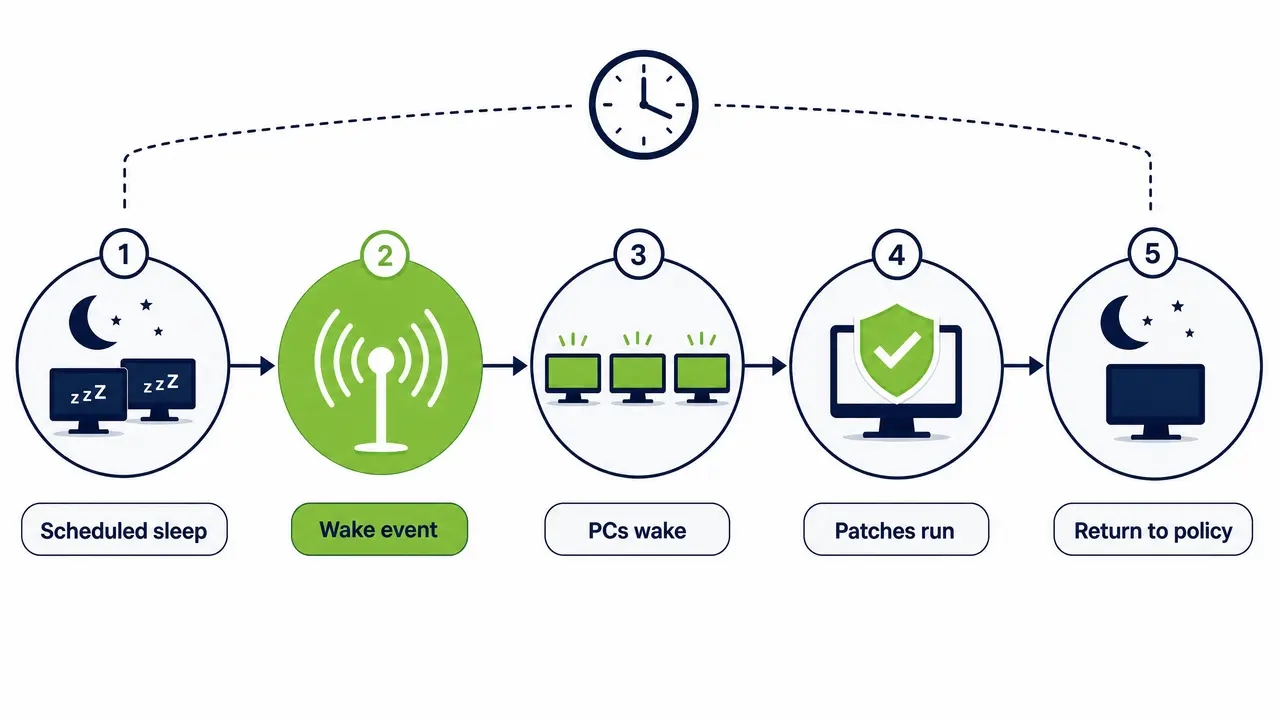
This is the section that decides whether the project survives the endpoint team. The answer to “how do we patch machines that are asleep” is a sequence, not a workaround. Wake the devices for the maintenance window, run updates or scans, verify they completed, then return the devices to their power policy automatically. Automated shutdown and wake scheduling turns the window into a scheduled event instead of a reason to keep 10,000 machines running around the clock.
Coordinate wake events with your existing patch tools and change windows, and account for time zones, because one 2 a.m. window is really several windows across a multi-site fleet. To handle the wake step reliably across sites, teams use tools such as PowerPlug Pro’s wake-up technology, which schedules wake events, confirms they landed, and gives IT real-time endpoint power-state control instead of hope.
The “leave everything on” workaround wastes energy and becomes unnecessary the day wake-for-maintenance works. Remote and hybrid devices add further complexity.
Hybrid endpoints change the definition of compliant
Enterprise power management does reach remote and hybrid endpoints, but success depends on how devices receive policies and report back when they are off-network. The design has to tolerate intermittent connectivity, or your compliance numbers will be fiction for a third of the fleet.
Three scenarios cover most estates. Always-on VPN devices behave like LAN machines. Split-tunnel devices check in but may miss real-time actions. Rarely connected laptops surface every few weeks at best. The practices that hold up are policies that persist locally on the device, periodic check-in reporting, and grace periods before a device is flagged.
Decide up front what “compliant” means for a laptop that has been offline for ten days, and get the endpoint team to agree to that definition in writing. Ambiguous definitions are how hybrid workforce endpoint power policies collapse into arguments. Governance and access control come next.
Fleet power control needs governance, not just access
Enterprise fleet power control is the ability to change the state of 10,000 machines at once. Treat that power accordingly. Use role-based access control for IT operations with least-privilege permissions, scope control by device group, and log every action for auditability.
A sensible role model separates read-only reporting from real-time operator, policy designer, and global admin. Nobody who only reads dashboards should be able to trigger a fleet-wide shutdown. Audit logs should answer three questions without effort: who changed a policy, who triggered a wake or shutdown, and when. In regulated settings such as healthcare, education, and the public sector, that record is not optional, and the RBAC and audit principles in NIST access control guidance apply to endpoint power management software the same way they apply to anything else privileged. Wake-on-LAN and remote power actions should be limited to authorized roles and networks, since a wake capability anyone can use is an attack surface. Governance also covers exceptions.
Exceptions need a business reason and an expiry date
Every fleet has machines that must not sleep. The mistake is treating them as informal arrangements instead of managed exception policies. Create explicit exceptions for 24/7 workstations and similar cases with a documented business reason, then review them quarterly to prevent exception creep, the slow accumulation of “just this once” machines that never leave the list.
Useful exception patterns keep intent clear. Never sleep but allow display off, for clinical stations. Hibernate only, for machines with long boot times. Short idle timers at night instead of shutdown, for shared workstations. No shutdown on weekdays, for departments that start early.
Each department should own its exceptions, because the people who requested them are the only ones who know when the reason expires. Large healthcare networks face this daily, as the Clalit Health Services case study shows, and PowerPlug Pro handles clinical fleets precisely because exceptions are first-class, auditable objects rather than settings overrides nobody can trace later.
Endpoint power management solves problems general tools ignore
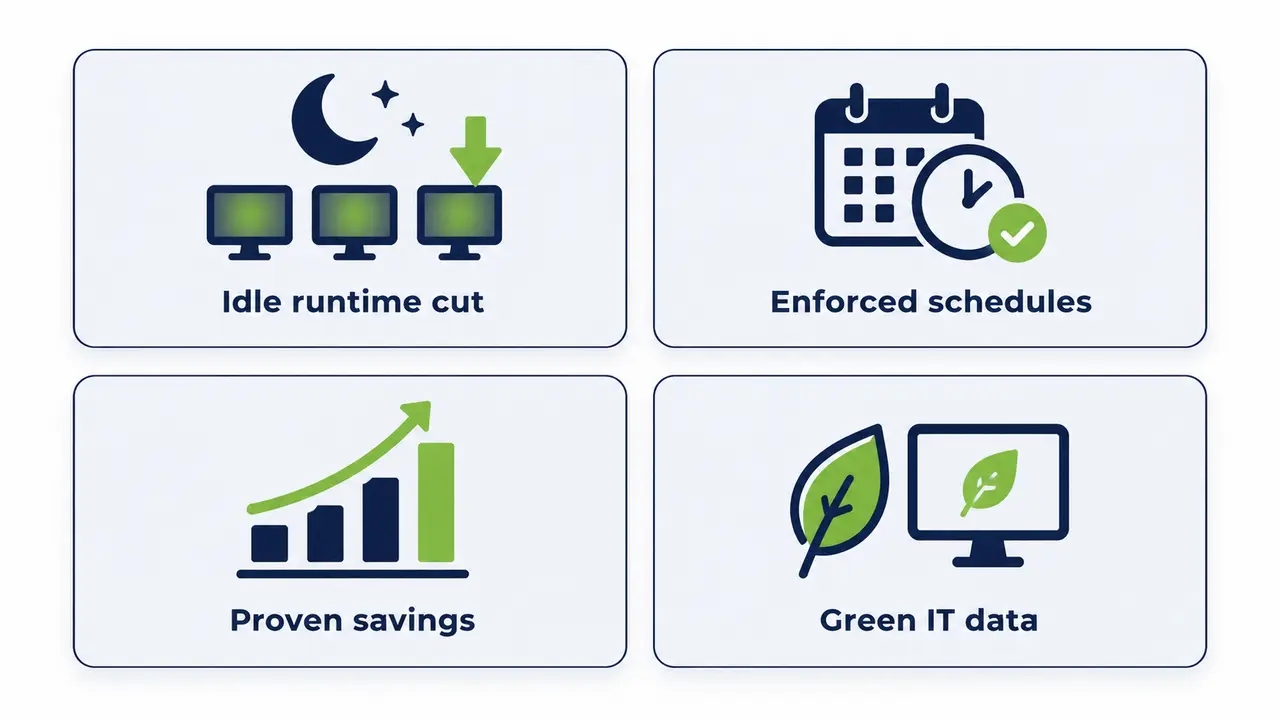
Endpoint power management software is specialized control and reporting for PC energy behavior. It reduces idle runtime, enforces sleep, hibernate, and shutdown schedules, and proves the savings without depending on user behavior, which is what makes it stick as a green IT initiative instead of a campaign that fades.
The problems it solves are familiar to anyone who has opened an energy report. Wasted overnight energy on machines nobody is using. Inconsistent local settings across sites because every technician configured power differently. No way to prove savings to the people paying the bill. And friction between IT and sustainability teams, where one side owns the machines, the other owns the carbon target, and neither has the data. The core loop is always policy, then telemetry, then reporting. Now compare it with general endpoint management.
Endpoint management is not the same as power management
No. Endpoint management covers inventory, configuration, software deployment, and security posture. Power management covers energy behavior, power-state automation, and savings measurement. They overlap in device groups and patch windows, but the goals and the reporting differ, and that difference is where homegrown attempts at massive endpoint power control usually stall.
The two disciplines integrate well, sharing device groups, coordinated patch windows, and compliance data. What general tools typically lack is savings-specific dashboards, energy baselines, and power-state optimization workflows, in other words the parts finance and ESG actually ask about.
| Capability | Why it matters at 10,000 endpoints | What basic tools typically do | What purpose-built power management should do | Ask in demos |
|---|---|---|---|---|
| Policy layering | Conflicts resolve predictably across sites | Flat settings, limited precedence | Global, site, and role layers with clear priority | Show me the precedence rules |
| Wake for maintenance | Patch windows depend on reliable wake | Manual or subnet-limited wake | Scheduled, confirmed wake across subnets | Wake a machine on another subnet now |
| Savings reporting | Finance and ESG need kWh and cost proof | Uptime data, no energy math | Baseline versus policy savings by site | Export a savings report by site |
| Role-based access | Regulated fleets need scoped control | Shared admin credentials | Granular roles per device group | Demonstrate read-only versus operator |
| Non-compliance dashboard | Drift is invisible without it | Nothing, or a raw log | Queue of devices failing policy | Show machines non-compliant last night |
| Remote endpoint handling | Hybrid devices are often off-network | Policies apply on VPN only | Local persistence with check-in reporting | Define compliant for offline devices |
Decision-makers then ask about ROI and timelines.
The ROI math compounds across 10,000 endpoints
ROI depends on three inputs you already have: idle hours, electricity rates, and policy scope. The formula fits in one spreadsheet cell. Average watts saved during idle hours, times hours per year, times device count, times electricity rate. A few dollars per PC looks trivial until the device count does the multiplying, which is why enterprise PC power management justifies itself quickly on large fleets and why fast payback is the norm rather than the exception.
PowerPlug customers see up to 60 percent PC energy savings, with ROI in as little as 4 months. An organization with 1,000 PCs can save tens of thousands of dollars a year, and the figure scales roughly linearly as the fleet grows. Across our customer base, organizations have together saved over $50 million and eliminated more than 200,000 tons of CO2.
Soft ROI counts too, presented honestly. Less heat load in dense offices, possibly longer hardware life, and ESG reporting value a sustainability team would otherwise have to source separately. After ROI comes deployment effort.
See how much you could save
Share your fleet size, idle hours, and electricity rate, and we will build a savings estimate and a pilot plan for your environment. Nothing changes on your endpoints until you approve it.
Deployment is measured in weeks, not quarters
With a staged rollout and a clear grouping strategy, multi-site power management deploys in weeks rather than quarters. These are planning estimates, not promises. The real pace depends on your change control, pilot results, and integrations.
Discovery and baseline take 1 to 2 weeks, establishing what your fleet actually does overnight. The pilot runs 1 to 3 weeks, ideally with one department and one hostile reviewer. Phased rollout by site takes 2 to 8 weeks or more depending on geography and change windows. Then ongoing optimization, which never fully ends. PowerPlug Pro can be up and running in hours for the pilot, so the calendar is dominated by your process, not the software.
Prepare the operational side before go-live, including helpdesk scripts for “my PC was asleep” calls, an exception request process, and a reporting cadence finance agrees to. That operational readiness is what turns a deployment into an IT sustainability program. Finally, here is a checklist to evaluate vendors.
The buyer’s checklist for massive endpoint energy management
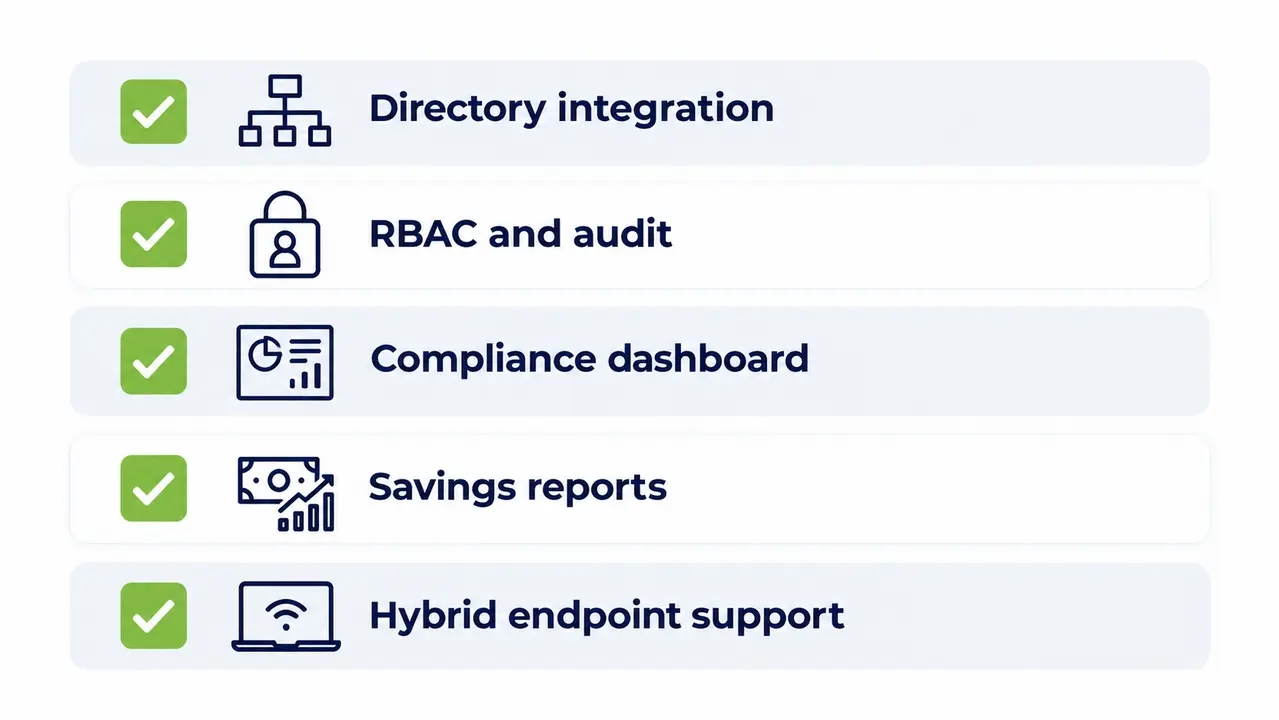
Large scale PC power management succeeds or fails on eight capabilities, so score every vendor against them. Device grouping that matches how you actually organize the fleet. Directory integration with AD so targeting survives reorganizations. Role-based access and audit logs for regulated environments. Non-compliance dashboards that show last night’s failures, not last quarter’s. Exportable finance and ESG reports. Support for remote and hybrid endpoints. Clear exception handling with review dates. And enterprise fleet power control that stays low-touch for the team running it, because a power tool that generates tickets is not saving anything.
Ask every vendor for proof points: case studies in your industry, references at your fleet size, and time-to-value from contract to first verified savings. Healthcare and university deployments are the best stress tests, because exceptions, scale, and compliance pressure all peak there at once.
To scope a baseline assessment and a pilot plan for your fleet, contact the PowerPlug Pro team.
Talk to us about a pilot
We can scope a baseline assessment for your fleet, from the first agent install to the first verified savings report. You can also call us directly at +1 (646) 751-7797.
Frequently asked questions
Won’t managed shutdowns break our patching and maintenance windows?
No, provided wake is part of the design from day one. Schedule wake events ahead of the maintenance window, run the patches, verify completion, and return devices to their power policy automatically. The pattern fails only when teams rely on manual wake methods, which is why scheduled, confirmed wake is the feature to demand in every demo.
Does Wake-on-LAN work across subnets and separate sites?
Plain broadcast Wake-on-LAN stops at the subnet boundary, which is exactly why homegrown wake scripts disappoint in multi-site environments. A managed approach routes wake requests, confirms the device actually woke, and reports the power state back so a patch window does not start on faith. PowerPlug Pro’s Wake-Up Portal covers this, including waking machines across separate sites and letting users wake their own PCs on demand.
What happens when a user needs their PC outside working hours?
With an on-demand Wake-Up Portal, the user wakes their own machine from a browser or phone before connecting remotely, so the PC spends the night off instead of running just in case. If someone forgets, IT can wake the device from the console. Availability stops being an argument against saving energy.
How do we report PC power savings for ESG or CSRD purposes?
Use device-level telemetry to calculate kWh avoided, apply a stated emissions factor, and document the methodology, baseline period, and assumptions. Keep audit-friendly exports so every reported ton of CO2 traces back to power-state data. That is the difference between a sustainability claim and a reportable number.
What payback period should we expect at 10,000 endpoints?
PowerPlug customers typically reach ROI in as little as 4 months, because small per-PC savings compound across thousands of devices. Your exact figure follows your idle hours and electricity rate, so run the formula, watts saved times idle hours times device count times rate, before the pilot rather than after it.
Scalable PC power management at 10,000 endpoints comes down to a small set of layered policies targeted through the directory, separate tracking of coverage, assignment, and compliance, honest savings math that survives finance and ESG review, scheduled wake for maintenance windows, and governed exceptions with expiry dates. Deployed in stages, programs like this typically reach payback within months, cut PC energy costs by up to 60 percent, and turn an overnight energy leak into a reportable sustainability result.

About the author
Nimrod Yedaya
VP Customer Experience
Over 15 years of experience in customer service, technical support, and customer relationships. Nimrod joined PowerPlug in 2012 as Customer Support Manager and was promoted to VP in 2016. He holds an MBA from BIU and a BSc in Communication Systems Engineering from BGU.