
Enterprise Wake-on-LAN Orchestration
By Nimrod Yedaya, VP Customer Experience
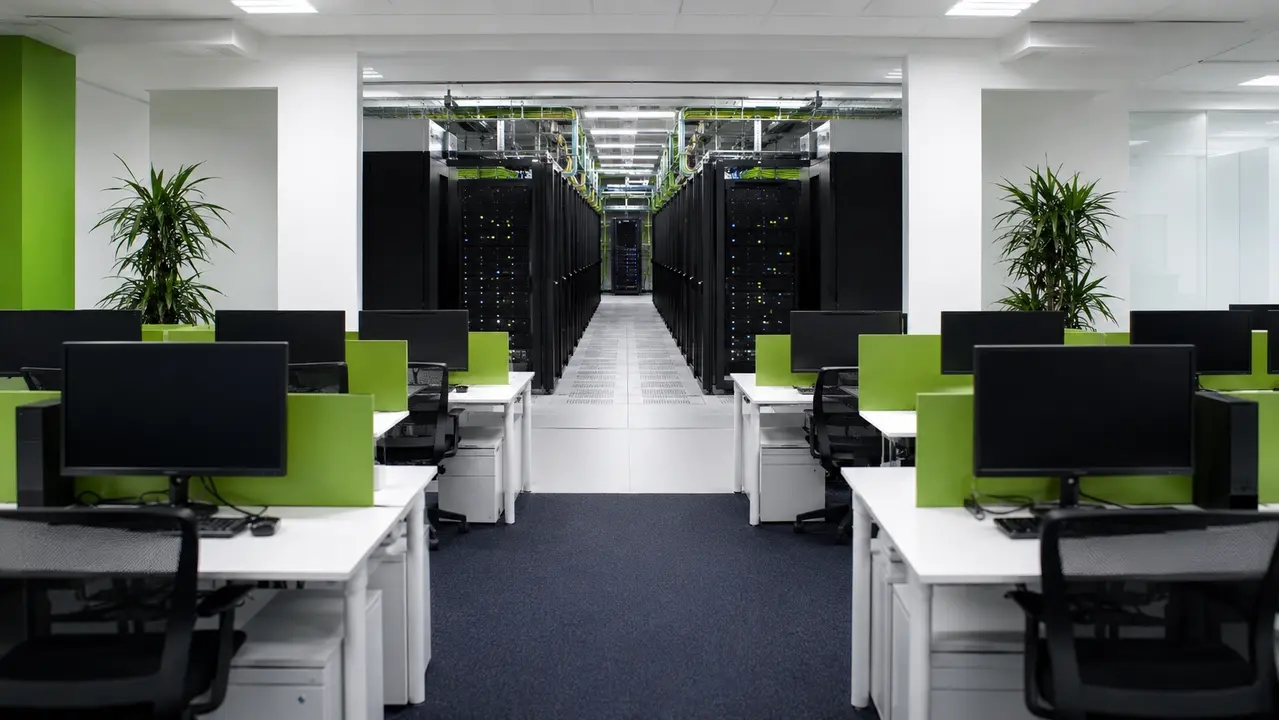
The short version is that sending a single Wake-on-LAN packet from a central server fails the moment you cross a subnet. If you are managing a distributed fleet, you need orchestrated, rate-limited delivery with local relays, not a basic script. This is how you shut down 10,000 PCs overnight to cut energy costs without breaking your patch windows.
Reading time: 4 minutes
Reliable wake on LAN large network 10000 PCs requires local delivery
The most reliable way to wake on LAN large network 10000 PCs is through centralized orchestration paired with rate limiting and subnet-local delivery. A single broadcast from one central server fails once you cross subnets or VLANs. Routers block broadcast traffic by design, which means your magic packet hits a wall and never reaches the endpoints. Enterprise wake on lan is not about pushing harder from the center. It is about distributing the execution to the edge.
The core building blocks of a successful mass wake up PCs strategy are device grouping, intelligent retries, proof-of-wake verification, and automated reporting. When you orchestrate wake events instead of blindly blasting packets, you get higher patch success rates. You spend less time chasing manual helpdesk tickets. You deliver predictable mornings where machines are ready for users and IT maintenance. That is what scalable WoL looks like in practice.
Enterprise-scale wake up means managed workflows not just packets
Enterprise-scale wake up is a managed workflow. It includes discovery, policy-based scheduling, cross-subnet delivery, throttling, and proof-of-wake reporting. Basic tools and free utilities handle single MAC address wakes fine for a lab. They fall apart across thousands of endpoints spread over multiple sites. Distributed wake architecture is what separates a hobbyist tool from a fleet orchestration platform.
Large enterprises operate across multiple subnets and physical locations. Retail chains, hospital networks, university campuses, and distributed offices all face this reality. An audit trail and repeatability are what matter at this scale. You need to know the wake command worked, when it worked, and which machines failed. That requires bulk wake on lan capability built for reporting, not just execution.
What mass PC boot means in IT operations
A mass PC boot solution is operationally defined as waking large batches of devices ahead of patch windows, software rollouts, or business hours across multiple locations. It is a scheduled, logged event, not an ad-hoc request.
What success looks like for deployment success rate
IT teams track three metrics to measure deployment success rate. They look at the percentage of devices online by the target time, the time-to-ready for those machines, and the patch or deployment compliance rate. If you cannot measure these, you cannot prove your wake strategy works.
Wake-on-LAN depends on NIC power and magic packets
Wake-on-LAN depends on the network interface card remaining powered in a low-energy state and recognizing a magic packet addressed to its MAC address. The BIOS or UEFI and the operating system must both enable wake events. A magic packet is simply a broadcast frame containing a specific byte pattern where the MAC address of the target machine is repeated sixteen times.
Endpoint power management settings dictate whether this works. Shutdown behavior varies significantly depending on Windows Fast Startup or hybrid shutdown settings. Fast Startup puts the machine into a deep sleep state that often cuts power to the NIC, breaking the wake capability. Consistent configuration across wake on lan large network 10000 PCs deployments is the only way to ensure reliability.
Which power states support wake
WoL from sleep is generally the most reliable because the NIC retains power and network state. Waking from hibernation or full shutdown is trickier. It depends heavily on the Wake on Magic Packet setting being enabled and Fast Startup not interfering with the shutdown state.
Why it worked on 20 PCs but fails at 10,000
Pilot success hides problems that only appear at scale. You test on 20 identical machines in a lab and it works perfectly. Then you deploy to wake on lan large network environments and hit mixed hardware models, inconsistent BIOS settings, multiple subnets, and VPN-connected devices. The variables multiply exponentially.
WoL across VLANs requires subnet relays not router changes
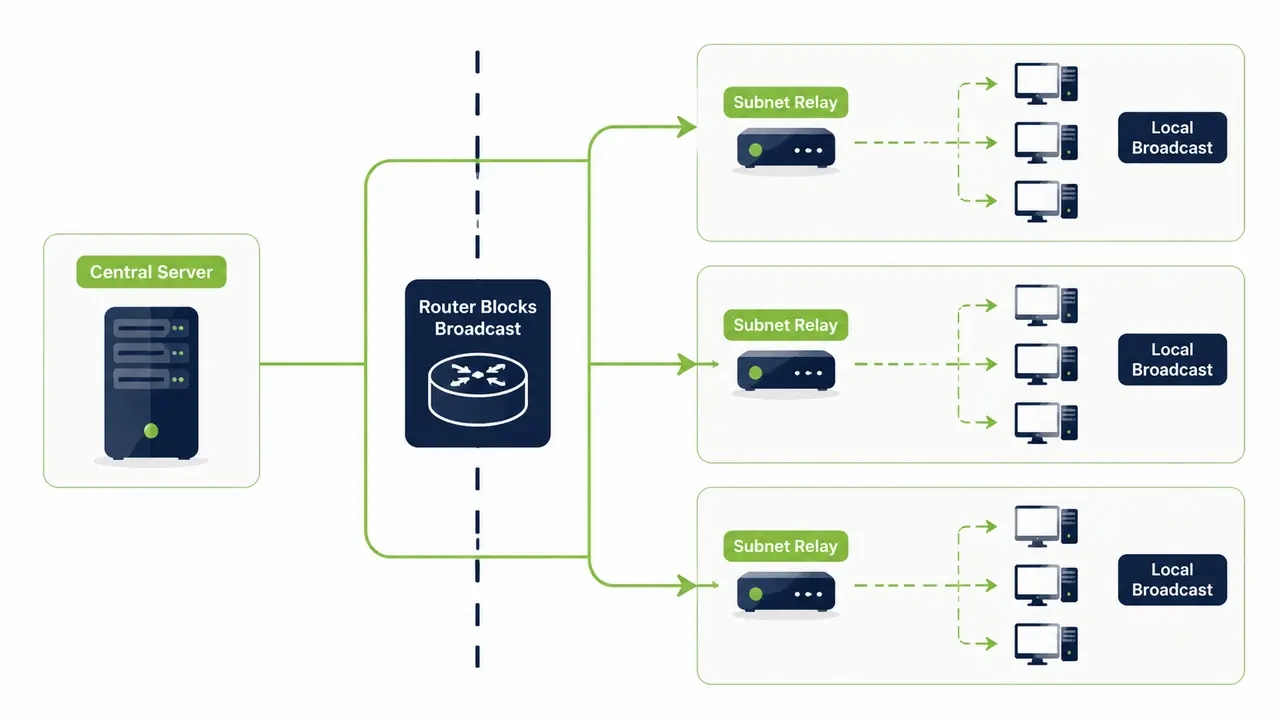
Wake on lan across vlan boundaries does not work by default. Broadcast traffic typically does not route across subnets. Routers and switches do not forward broadcast traffic between segments. This is exactly why naive WoL setups fail the moment a company has more than one subnet.
Directed broadcast wake on lan is the traditional workaround, but modern routers disable directed broadcasts by default to prevent abuse. Trying to reconfigure core network infrastructure to allow these broadcasts is a fight you will lose with your security team. The practical enterprise pattern is to use a local relay inside each subnet instead.
What breaks WoL in segmented networks
The common breakers are routers blocking directed broadcast by default, strict firewall rules, NAC or 802.1X enforcement, and VPN-only remote devices that never touch the local broadcast domain directly.
The practical enterprise pattern of local subnet relays
Instead of fighting network security policy, enterprises place a lightweight subnet wake relay inside each subnet. This relay receives a central instruction over standard TCP ports and performs the local broadcast. It eliminates the need to touch router configurations.
A wake on lan relay solves the cross-subnet problem
A wake on lan relay is a managed endpoint or service inside a subnet that receives a central wake instruction and emits the local broadcast. It acts as a wake on lan proxy. The relay selection logic usually targets an always-on or reliably available machine within that specific subnet. This reduces dependency on routers being reconfigured.
This pattern is what allows a single console to orchestrate wake across dozens or hundreds of sites without touching core network infrastructure. It is the foundation of wake on wan capability. Once delivery is solved, the next challenge is network throughput and safety at scale.
Rate limited wake on lan prevents network floods
You wake 10,000 PCs without flooding the network by using batching, rate limits, and subnet-by-subnet scheduling. Firing off one massive simultaneous burst is risky. Switch and router CPUs spike. Packet loss occurs. Wake success rates drop unpredictably.
Bulk wake on lan requires wake storm prevention. You must monitor packet loss and network device load during your wake windows. If you do not throttle the delivery, you will take down the local network segment. Rate limited wake on lan is not optional. It is a requirement for enterprise survival.
Batching strategy by site and department
You group your wake commands by site or subnet first for network safety. Then you batch by department or organizational unit for business alignment. For example, you wake the finance team before market open so they are ready to trade.
Rate limiting and retry logic tuning
IT should understand two knobs for rate limiting. The wake burst size is how many packets are sent per interval. The burst delay is the time between batches. You add retry logic for non-responders to catch machines that missed the first wave.
Staggered boot schedule prevents facility power spikes
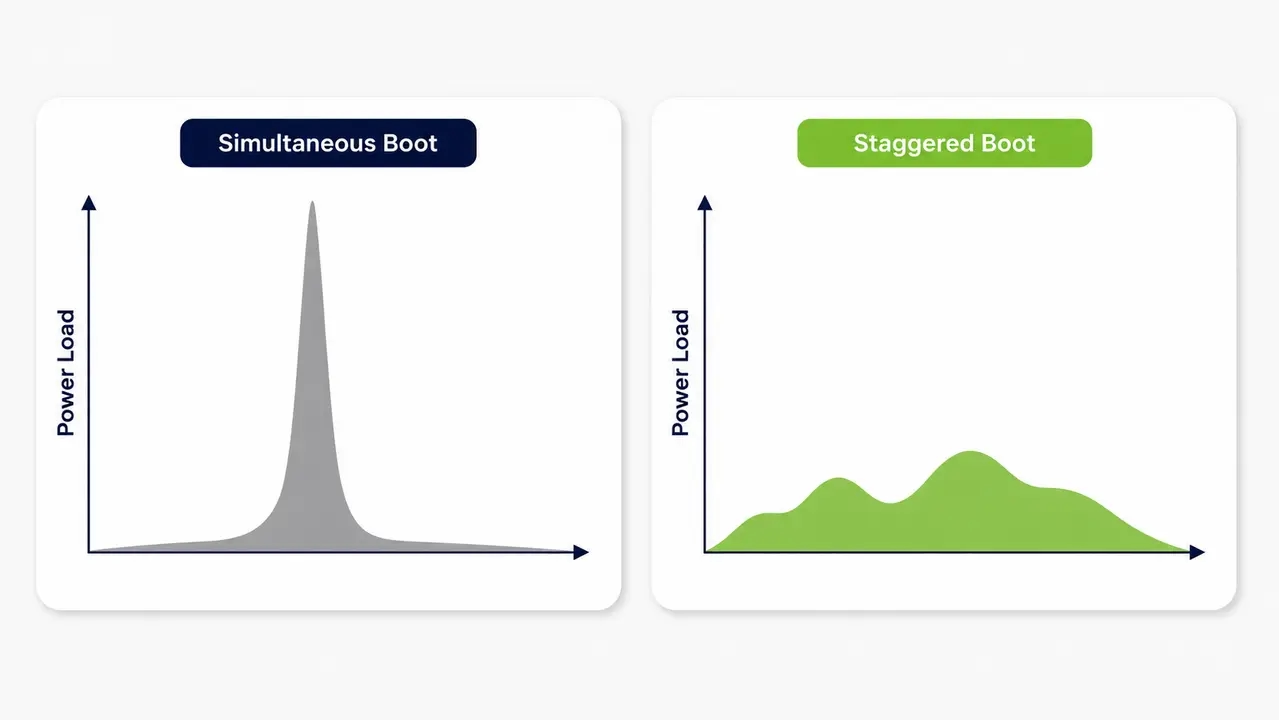
Staggered boot schedule planning prevents power spikes when thousands of PCs boot simultaneously. You smooth the electrical load by staggering wake windows per floor, electrical circuit, or site. Rolling 10-minute wake windows per building or department is a practical approach.
This is a real operational concern for large office and campus environments. Facilities and UPS capacity planning teams must be involved. If you boot an entire high-rise simultaneously, you risk tripping breakers. Wake storm prevention applies to the electrical grid as much as the network.
Scheduled shutdown and wake aligns with patch windows
You schedule Wake-on-LAN for patch windows while keeping PCs shut down overnight by defining a strict policy. The workflow is wake, confirm online, run patch or deployment, verify completion, then return to the desired power state. Sending a pre-patch wake command is only the first step.
Software distribution wake strategies require verification. Sending a wake packet does not mean the device is actually online and ready for the task. You must handle exception workflows for critical or always-on devices that should be excluded from the overnight shutdown policy.
The operational workflow IT teams actually need
The loop is straightforward. Schedule the event, wake the machine, verify it is online, execute the task, verify task success, then shut it down or return it to policy. If any step fails, the system must flag it.
Handling devices that miss the window
Use a second-chance policy for missed windows. The system should retry the wake attempt, try an alternate delivery path, or automatically generate a ticket for manual follow-up on chronic non-responders. Wake verification closes the loop.
Wake timers vs network-triggered wake for mass boot
Wake timers are device-local scheduled wakes. They are more predictable per device and independent of the network. Wake-on-LAN is network-triggered and enables on-demand or portal-based wake. Large enterprises often combine both for comprehensive endpoint power management.
Wake timers reduce network dependency for routine daily schedules. WoL wins for on-demand or dynamically-scheduled wake events, like an unplanned emergency patch. Using wake on lan large network strategies alongside local timers gives you the most flexibility.
Enable WoL in BIOS and Windows at scale or fail
At scale, enablement requires standardized firmware settings, consistent NIC power settings, and automated enforcement. Configuration drift silently destroys wake rates over time. You cannot set this up once and walk away.
The rollout approach for wake on lan 10,000 endpoints is a cycle. Pilot on each hardware model, define a baseline configuration, automate settings via endpoint management tooling, then continuously validate. If you skip continuous validation, driver updates and OS updates will silently reset your settings.
Common BIOS or UEFI settings that block WoL
Typical culprits include Wake on LAN being disabled by default, deep sleep or ErP settings that cut NIC power to save energy, and USB or PCIe power management conflicts that interrupt the wake chain.
Common Windows NIC settings that block WoL
Look for the Allow this device to wake the computer box being unchecked. Fast Startup interferes with shutdown-state wake. Outdated NIC drivers also cause silent failures.
Ongoing compliance checks for endpoint availability
You need periodic automated checks rather than a one-time setup. Driver and OS updates can silently reset power management settings. Continuous validation ensures endpoint availability for maintenance remains high.
Unreliable WoL stems from configuration drift and segmentation
Unreliability usually stems from inconsistent endpoint configuration, subnet segmentation, sleep-state quirks, security controls, and lack of verification. The fix is a managed, measurable system, not a single script. Wake on lan large network environments fail when IT assumes a static environment.
The top causes of failure are Fast Startup interference, driver issues, NIC power loss, laptop-specific behavior, switch port settings, stale MAC or IP inventory, and missing relays in a subnet. Wake on lan 10,000 endpoints means managing 10,000 potential failure points. Wake verification is the only way to catch them.
Security segmentation and 802.1X interfere with WoL
Access control and segmentation may prevent packets from reaching sleeping endpoints. 802.1X port-based network access control can block broadcast behavior. A sleeping or powered-down endpoint may not maintain an authenticated port state, so the switch drops the magic packet.
WoL design must be coordinated with network security policy, not bolted on afterward. Approved wake on lan proxy placement inside trusted segments is the standard mitigation. Document policy exceptions and coordinate change control with the network security team to ensure your subnet wake relay functions properly.
Proof-of-wake reporting catches non-responders
You verify which PCs actually woke up by using proof-of-wake signals. Online status, agent heartbeat, last-seen timestamp, and power state reporting are the data points you need. Automated remediation for non-responders is required. A packet sent confirmation is useless without an audit trail power events log.
IT operations needs specific reporting views. Wake success rate by site or subnet, time-to-online distribution, and a repeat offenders list for hardware remediation are the minimum requirements. Without these, you are flying blind.
What to measure for wake rate and time-to-ready
Track overall wake success percentage, average time-to-ready, and a breakdown of failure reasons. Categorize failures by hardware, network, or configuration issues to spot trends.
What to do with failures and retries
Follow a strict remediation loop. Automatic retry first, then an alternate wake method if available, then automated ticket creation for devices needing a hands-on fix.
The ROI of waking 10,000 PCs only when needed
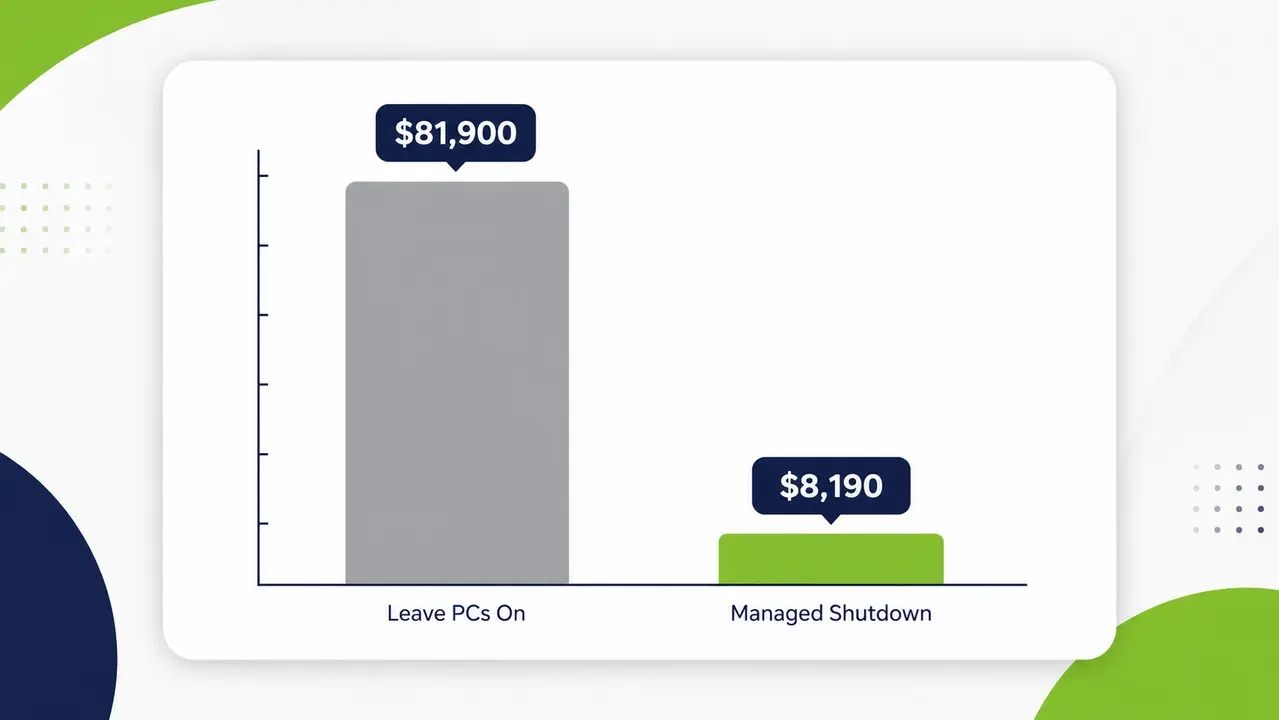
The cost to leave 10,000 PCs on overnight depends on idle wattage, hours, and electricity rate. Even small per-PC overnight waste becomes a major annual expense at 10,000 endpoints. Scheduled shutdown paired with reliable wake is a high-ROI project. An overnight shutdown policy is the single fastest way to reduce idle power consumption.
Consider an illustrative example. If a PC draws 30 watts idle, and you leave it on for 14 hours overnight and 48 weekend hours weekly, that is roughly 1,820 hours per year. At an average commercial electricity rate of $0.15 per kWh, that is $8.19 per PC annually. For 10,000 PCs, the waste is $81,900 per year. Energy savings endpoints of this magnitude demand attention. This is not theoretical. a university campus that scaled scheduled shutdown across thousands of endpoints demonstrates how quickly these savings compound once shutdown and reliable wake are running as a managed policy rather than a manual habit.
| Strategy | Energy Cost per PC (Annual) | Maintenance Availability | Compliance Rate |
|---|---|---|---|
| Leave PCs on 24/7 | $81.90 | High (always on) | N/A |
| Manual shutdown requests | $40.00 | Low (unpredictable) | Low (depends on users) |
| Managed shutdown with WoL | $8.19 | High (on-demand wake) | High (enforced) |
Carbon reporting endpoints supports ESG goals
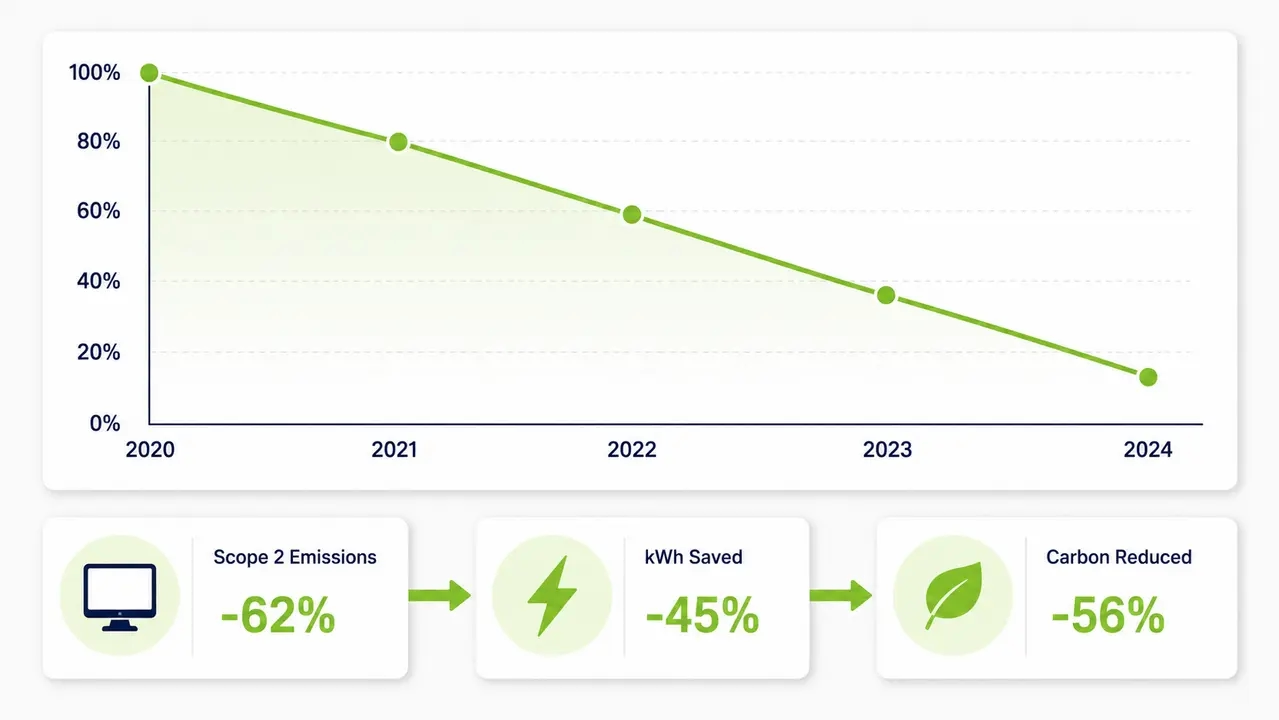
Reducing overnight endpoint consumption directly reduces purchased electricity emissions. This is commonly reported as Scope 2. Centralized reporting makes results easy to defend internally and externally. Sustainability and ESG stakeholders need a consistent measurement methodology and an audit trail from IT.
Electricity consumed by idle or powered-on endpoints overnight typically falls under what is known as Scope 2 emissions, as defined by the U.S. EPA’s greenhouse gas accounting guidance. Rollups by site or department provide the data needed for board-level carbon reporting endpoints initiatives. Scope 2 electricity reduction is a tangible, verifiable metric for ESG reporting.
Choosing a mass PC boot solution for 10,000 endpoints
Prioritize cross-subnet reach, rate limiting, scheduling, verification, audit logs, and integrations with directory tools. Low operational overhead and reporting that serves both IT and sustainability stakeholders are critical. A mass PC boot solution must offer scalable WoL and a distributed wake architecture.
Rather than stitching together scripts and manual processes, most enterprises managing 10,000+ endpoints eventually adopt a platform built specifically for enterprise-scale wake orchestration that combines scheduling, relays, and reporting in one system. PowerPlug Pro integrates smoothly with Active Directory and SCCM, deploying in hours to provide an on-demand Wake-Up Portal.
Must-have capabilities for scale
Require multi-subnet relay support, configurable rate limiting, proof-of-wake verification, exportable audit and compliance reports, and directory integration. These are non-negotiable for wake on lan 10,000 endpoints.
Nice-to-haves for self-service and exceptions
Look for self-service wake requests for helpdesk or end users, exception workflows for VIP or critical devices, and flexible scheduling per department.
When to avoid WoL and use out-of-band management
If endpoints cannot reliably retain NIC power, are frequently off-network, or require guaranteed remote power control, out-of-band options may suit a subset of the fleet better. This is not an either-or decision. Segment your approach. Use WoL for desktops, out-of-band management for critical kiosks or edge devices, and a different policy for laptops given their mobility.
Every fleet has a mix of desktops, laptops, and edge devices, so it is worth mapping out which wake method fits which device type. If you would like help thinking this through, talk to a specialist about designing a wake strategy for your specific environment.
Book a demo
See how PowerPlug Pro orchestrates cross-subnet wake events, enforces rate limits, and verifies endpoint availability across 10,000+ PCs.
Frequently asked questions
How do I wake computers on a different subnet with Wake-on-LAN?
You cannot send a broadcast across a subnet boundary by default. You need a relay or proxy inside the target subnet to receive the central instruction and emit the local broadcast. This avoids reconfiguring routers to allow directed broadcasts.
Why won’t my PC wake up from shutdown but wakes from sleep?
This usually comes down to Windows Fast Startup or hybrid shutdown behavior. Fast Startup puts the machine into a deep sleep state that cuts power to the NIC. You need to disable Fast Startup and ensure the BIOS allows wake from shutdown.
How do I test if Wake-on-LAN is enabled on a PC?
Check the BIOS or UEFI settings for a Wake on LAN option and ensure it is enabled. In Windows, check the network adapter properties under the Power Management tab to confirm the device is allowed to wake the computer.
How do I wake PCs over a VPN connection?
Broadcast-based WoL generally does not traverse VPN or WAN connections without a relay or agent at the remote site. Wake on wan requires a local relay to inject the magic packet into the remote subnet.
How do I wake PCs in remote offices without changing router settings?
Deploy a relay or proxy machine in that remote office. The central server sends a unicast instruction to the relay, which then performs the local broadcast to wake the endpoints without requiring router configuration changes.
Orchestrating Wake-on-LAN across an enterprise requires local subnet relays, strict rate limiting, and continuous configuration validation. When you verify wake success and align schedules with patch windows, you keep endpoints available for IT maintenance while cutting overnight energy waste.

About the author
Nimrod Yedaya
VP Customer Experience
Over 15 years of experience in customer service, technical support, and customer relationships. Nimrod joined PowerPlug in 2012 as Customer Support Manager and was promoted to VP in 2016. He holds an MBA from BIU and a BSc in Communication Systems Engineering from BGU.