
Wake on LAN API Integration for Enterprise IT
By Nimrod Yedaya, VP Customer Experience
The short version: enterprise IT teams need to wake thousands of PCs for patching, remote support, and pre-shift readiness without leaving security holes or breaking network boundaries. Wake on LAN API integration enterprise deployments solve this by triggering device power-on programmatically through governed API calls rather than manual scripts. Instead of relying on a WOL REST API that simply fires off packets, an enterprise approach treats programmatic wake up as an auditable, secure operation. Solutions like PowerPlug Pro wrap the raw protocol in policy, identity, and verification. This article covers how the technology works, how to design and secure an automated PC boot API, how to solve multi-subnet challenges, and how to integrate wake triggers into your existing IT workflows.
Reading time: 4 minutes
What wake on LAN API integration means in an enterprise
It means triggering WoL magic packets through a controlled service, often REST-based, so business systems can request device power-on with governance, logging, and security. The shift from ad-hoc tools to workflow-driven wake requests changes the operational risk profile. You no longer have technicians running scripts from their local machines. Instead, an enterprise wake on lan api integration enterprise system handles the request lifecycle. It enforces role-based access control, writes audit trails, reaches across subnets, and returns predictable, verifiable outcomes. Use cases include scheduled patching, remote support, and pre-shift readiness. This is the difference between a neat network trick and enterprise wake on lan infrastructure. A true wol api integration abstracts the packet-sending mechanics behind a wake on lan api designed for scale and compliance.
What Wake-on-LAN sends across your network
Wake-on-LAN relies on a magic packet. This is a specific Layer 2 broadcast frame containing six bytes of 0xFF followed by the target MAC address repeated sixteen times. When a compatible network interface card receives this frame, it signals the motherboard to power on or resume. Because it operates at Layer 2, the packet is typically confined to a single broadcast domain. Routers do not forward these broadcasts across subnets by default. This is the core enterprise scaling challenge. The MAC address, not the IP address, is the central identifier here. A sleeping machine has no active IP stack. Understanding this layer 2 broadcast limitation is step one. The magic packet api must know how to reach the exact broadcast domain where the target device lives.
What prerequisites must be enabled on endpoints
Three layers must align for WoL to function. First, the BIOS or UEFI needs the bios uefi wake settings enabled. Second, the NIC driver properties must allow wake from the nic wake on magic packet setting. Third, the OS power management configuration must permit the network adapter to wake the computer. If any of these layers are misconfigured, the wake request fails silently.
How a REST API wakes a PC programmatically
A wake on lan rest api receives a request containing a device identifier and context. It validates authorization against identity provider claims. It resolves the device network details from inventory. It selects a relay on the correct subnet to emit the magic packet. Finally, it verifies reachability. The WOL REST API request lifecycle follows a strict flow: authenticate, authorize, resolve, select relay, send packet, verify, return status. Best practice dictates an asynchronous job model for programmatic wake up pc operations. A fire-and-forget HTTP call leaves too many blind spots at scale. The API should accept the request, return a job identifier, and allow the client to poll for completion.
Synchronous vs asynchronous wake job APIs
Synchronous calls are risky at scale. They lead to timeouts and unclear outcomes when hardware takes time to boot. An asynchronous pattern returns a job ID immediately. The client then uses a wake job status api to check progress. This prevents connection drops and allows the system to handle network latency gracefully.
What success means in programmatic wake up
The API accepting the request does not mean the device actually woke. Packet sent does not equal device online. This distinction is critical. You must verify post-wake reachability before marking a job successful.
The difference between an automated PC boot API and basic WoL tools
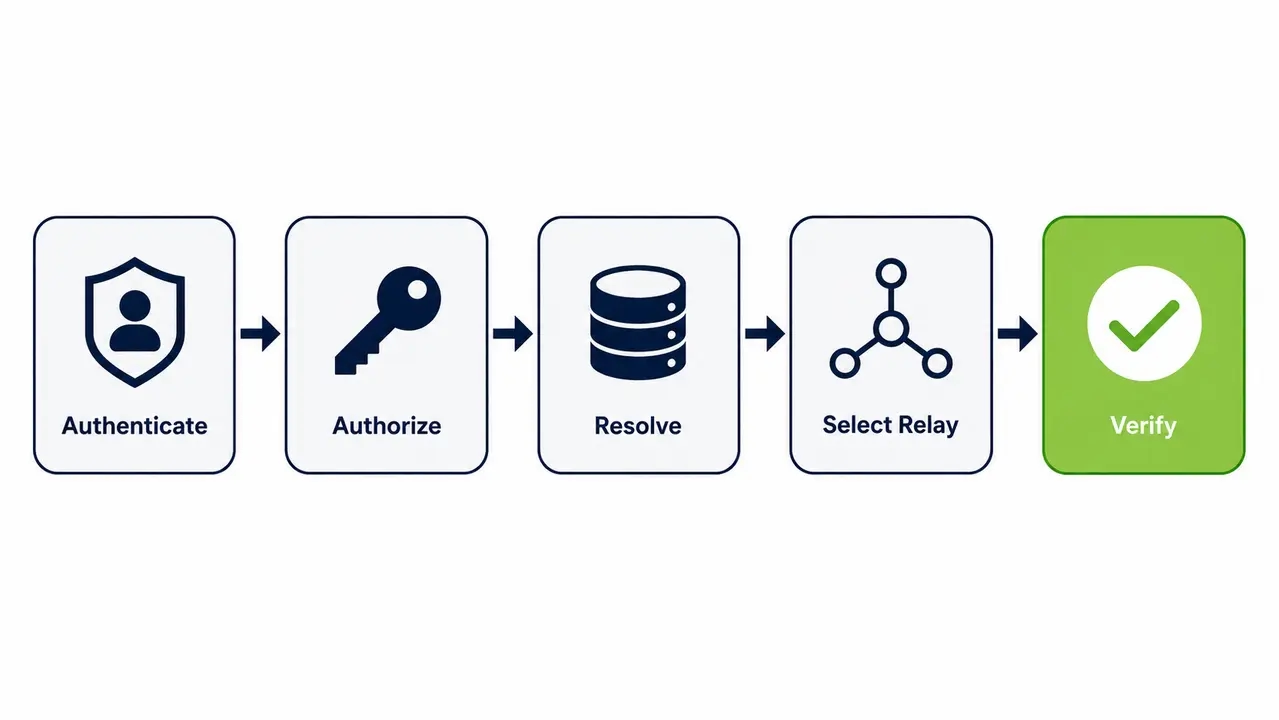
An automated pc boot api wraps WoL with enterprise controls. It adds identity, policy, scheduling, verification, and integration hooks. This turns a raw packet broadcast into a governed operation. The remote pc power on api enforces rules like only waking assigned devices, restricting after-hours wake, requiring a ticket ID, logging who initiated the action, and auto-timing out if the device fails to appear online. Platforms like PowerPlug Pro are built around this governed model. They do not rely on raw packet-sending scripts that disappear into the ether. An automated PC boot API ensures accountability and predictable execution for every programmatic wake up action.
What endpoints an enterprise wake on LAN API should expose
At minimum, the API must expose endpoints to create a wake request, check wake status, list devices, and manage credentials. At scale, you need bulk wake endpoints, scheduling, and audit endpoints. A suggested endpoint set includes create job, job status, device lookup, scoped device wake, audit events, policy rules, relay health, and key rotation. Design requirements must include support for idempotent api requests. If a client submits the same wake request twice due to a network retry, the system should not generate duplicate jobs or send redundant packets.
Recommended request fields for wake payloads
A wake request payload needs specific fields for auditability. Essential fields include device ID, MAC address, site or subnet, reason for wake, requester identity, and a time-to-live value. Maintaining accurate device inventory mac mapping is what makes these fields reliable.
Bulk wake design considerations
Waking thousands of devices simultaneously creates network strain. Bulk operations require batching, staggering, and rate control to avoid overwhelming the local subnet or the power infrastructure.
Integrating a wake on LAN API into enterprise workflows
Treat wake as one step in a larger orchestration. The flow is ticket, approval, wake, verify, run maintenance, return to power policy. Concrete use cases include software deployment wake tasks waking devices pre-deployment, service desk automation wake for remote troubleshooting, and occupancy signals pre-waking assigned workstations. The rollback step is essential. You must return devices to sleep or shutdown policy after task completion. This ensures the patch window wake up does not result in machines idling all weekend. Proper maintenance window automation closes the loop on power waste.
Example workflow for patch window orchestration
The sequence is straightforward. Schedule the deployment. Wake the target fleet. Verify devices are online. Push patches via SCCM. Confirm completion. Return devices to their managed sleep policy. This removes the need to leave machines running overnight just in case a patch window opens.
Example workflow for service desk remote sessions
A support agent submits a ticket. The API wakes the single device scoped to that agent’s permission level. The system verifies the endpoint is online. The remote session begins. The device returns to sleep when the session ends.
Why Wake-on-LAN fails across VLANs and subnets by default
It does not work reliably across routed boundaries. Broadcasts do not traverse routers. The lab test on a single subnet does not translate to a multi-site corporate network. This is why wake on lan across vlan boundaries and wake on lan across subnets fails without specific engineering. Even wake on lan over wan requires deliberate design. The core issue remains the broadcast domain. Routers drop broadcast traffic to prevent network congestion. Enterprises need relays or network changes to reach every subnet.
The relay approach to enterprise wake orchestration
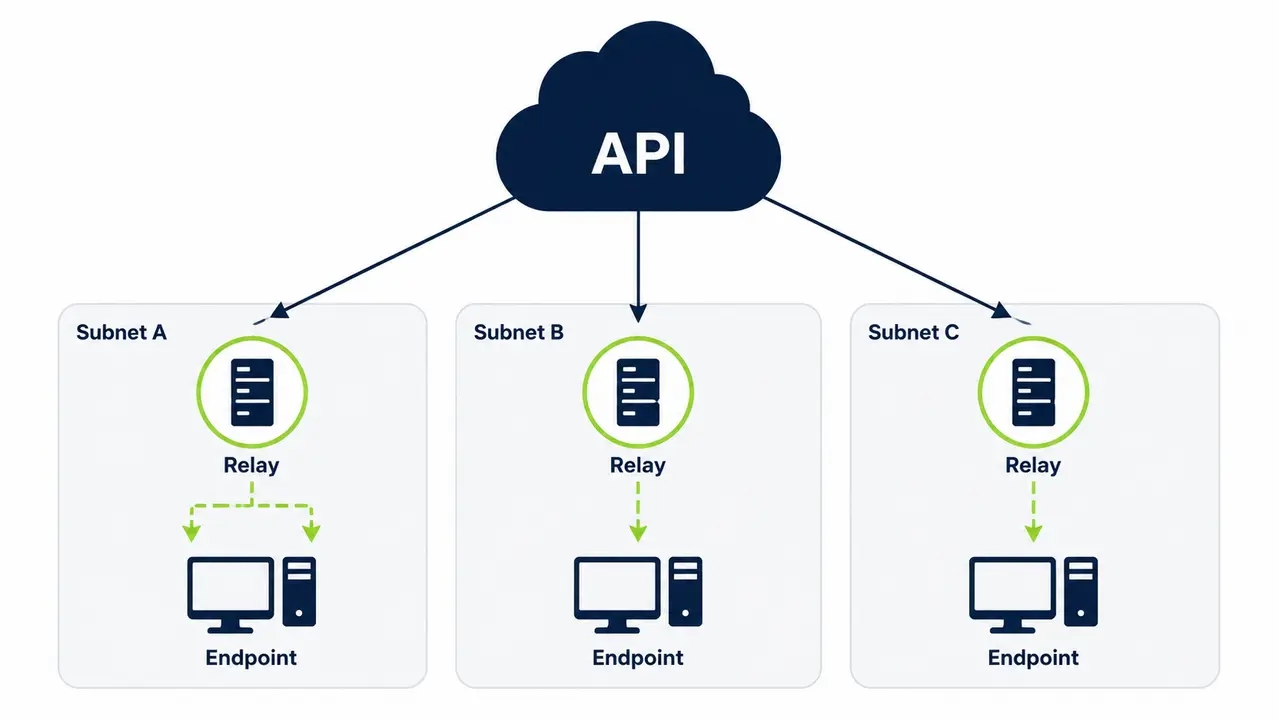
A wol relay approach places always-available senders inside each subnet. These relays emit local WoL broadcasts on demand. This enables domain-wide wake without routing broadcast traffic. This wol mesh provides predictable reach, minimal network changes, centralized control, and resilience. Automatic relay selection optimized for availability ensures subnet relay wake requests hit the closest active sender. This is the same principle behind PowerPlug’s wake-up technology, which coordinates relays across sites without requiring broadcast traffic to cross routed boundaries. This architecture is the backbone of reliable endpoint wake orchestration.
Relay placement strategy
Plan one relay per subnet minimum. Deploy redundant relays for critical sites. Implement failover logic so the failure of one relay does not leave a site dark for wake operations.
How relay health checks prevent silent failures
Monitoring relay uptime avoids wake requests silently failing. If a relay goes offline and nobody knows, wake jobs queue indefinitely with no visibility. Health checks make the infrastructure honest.
Securing a Wake-on-LAN API against abuse
Secure it like any privileged infrastructure API. Use strong authentication, least-privilege RBAC, network segmentation, audit logs, and rate limits. Concrete controls include rotating API keys, SSO for human users, scoped service accounts for automations, and approval gates for bulk wakes. Implement rbac for infrastructure api strictly. Maintain audit logging for api activity. Enforce api rate limiting to protect the secure wake endpoint. Architect around zero trust network segmentation. These controls align with NIST SP 800-228 and SP 800-53r5 guidelines for API protection and security controls.
RBAC model examples for wake operations
Helpdesk tiers should have single-device wake permissions only. Endpoint engineering teams can wake device groups. Automation service accounts must be scoped strictly to patch groups. This limits the blast radius of compromised credentials.
Rate limiting and blast radius controls
Throttling logic prevents accidental wake storms. If a script errors and loops, rate limiting stops it from waking an entire site simultaneously, which avoids power circuit overloads and network storms.
Making wake requests reliable with idempotency and verification
Use an asynchronous job model with idempotency keys, bounded retries, and post-wake verification. Common failure modes include packets sent but devices failing to wake, relays going offline, stale MAC addresses, and endpoint misconfigurations. Store last-known device network metadata. Verify relay availability before sending. Return accepted quickly. Use clear status transitions. Idempotent api requests prevent duplicate processing. The wake job status api must reflect reality. Device reachability verification closes the loop.
Status model for wake jobs
The lifecycle is queued, sent, verified, failed, or timeout. This clear progression gives operators visibility into exactly where a wake request stalled.
Verification options for post-wake confirmation
Ping is fast but unreliable across firewalls. The management agent heartbeat is slower but definitive. The management plane check via SCCM or Intune offers the highest fidelity for enterprise readiness.
The data required to wake a device remotely
You need a stable device identifier mapped to a MAC address, plus a way to choose the correct subnet. IP addresses are unreliable for sleeping or offline devices because DHCP leases expire. The enterprise approach is to maintain inventory from directory services, endpoint management tools, or agent telemetry. Map devices to sites and subnets. Keep relay association current. Accurate device inventory mac mapping is non-negotiable. You must know the exact broadcast domain and the target layer 2 broadcast address to guarantee the magic packet reaches the right NIC.
Why programmatic wake-up fails from shutdown even when sleep works
Shutdown-state wake depends on firmware and NIC power states. Features like Windows fast startup, NIC power-saving modes, or a disabled wake on magic packet setting can prevent wake from full shutdown, known as the S5 power state. Troubleshooting requires checking BIOS settings, NIC advanced properties, OS power configuration, and switch port behavior. You must disable conflicting power-saving features where required and confirm a wired Ethernet connection. Standardize these settings via policy or agent-based configuration at scale. Manual per-device fixes do not scale. For official guidance on Windows fast startup and WoL power-state behavior, review the Microsoft Learn documentation. Ensure bios uefi wake settings and the nic wake on magic packet property are active. The windows fast startup wol conflict is the most common culprit when sleep works but shutdown fails.
Troubleshooting when the API says success but PCs stay offline
Separate packet sent from device woke. Troubleshoot in layers. Start with API auth and logs. Move to relay selection. Check the subnet broadcast. Verify endpoint configuration. Finish with post-wake reachability. The triage flow is confirming the correct MAC, confirming the relay is on the same subnet, checking relay logs, checking switch and VLAN config, verifying endpoint BIOS and NIC, validating power state and cable, and confirming post-wake services like VPN or management agents come online. This structured wake failure troubleshooting methodology isolates the failure point quickly.
Common misconfigurations checklist
Check for a wrong MAC stored in inventory. Verify the relay is not offline. Look for a NIC setting that reverted after a driver update. Confirm the switch port does not disable broadcast. Ensure the endpoint is on wired Ethernet, not Wi-Fi.
Observability and logging for root-cause analysis
Log the requester, device ID, relay used, timestamp sent, verification result, and failure reason code. These fields provide immediate root-cause visibility during incidents.
Expected time for devices to wake and become usable
Expect tens of seconds to several minutes. Hardware performance, disk encryption like BitLocker PINs, startup applications, and network login times all factor in. Design workflows with timeouts and progressive verification. Set SLAs per device class. Standard workstations might have a three-minute SLA. Lab PCs or kiosks might allow five. Use staged checks. Look for online status at Layer 2 or Layer 3 first. Wait for the management agent to report next. Finally, listen for a ready for task signal from the OS. The time to ready metric dictates your orchestration timeouts.
When to use Wake-on-LAN versus out-of-band power control
Use WoL when endpoints support it and you can reach their broadcast domain. Use out-of-band power control when you need power-on regardless of OS state and have compatible hardware like Intel vPro or Dell iDRAC. Out-of-band is a distinct mechanism with different security and provisioning requirements. Decision factors include coverage, cost, hardware support, network constraints, and compliance requirements. A remote pc power on api might use WoL for standard desks and out-of-band for critical infrastructure. Both fall under enterprise wake on lan strategy, though they operate differently.
Integrating wake with power policies to protect IT operations
Treat wake as a controlled exception. Wake the device for a defined purpose. Keep it on only as long as needed. Return it to policy-driven sleep or shutdown immediately after. Define must-on windows for maintenance. Schedule pre-work wake tasks. Automate post-task power-down. Attach pre and post actions or scripts around power events to handle maintenance automation and application compatibility. Enterprises typically manage this exception-based logic through a centralized power management platform that governs both the wake trigger and the return-to-sleep policy. This ensures maintenance window automation via the automated pc boot api does not erase the energy savings the power policies were designed to capture.
Key performance indicators for enterprise wake integration
Track operational success and sustainability impact. Measure the percentage of verified wakes, median time-to-ready, failed wake reasons, relay health, and avoided after-hours runtime. Track wake requests by source, such as ITSM, patching, or service desk. Identify top failure causes and relay uptime. Calculate estimated energy, cost, and carbon impact tied to policy compliance. According to the EPA and the Department of Energy, activating PC power management features is one of the most effective ways to reduce plug load energy in office buildings. The NREL highlights workstation plug loads as a major energy drain. Organizations tracking these metrics at scale, such as in the Ben Gurion University case study, have been able to correlate wake reliability with measurable energy savings. The time to ready metric and overall endpoint wake orchestration success rates provide the data needed to prove ROI.
Rolling out wake on LAN API integration safely
Start with a pilot site. Standardize endpoint settings. Deploy relays with redundancy. Integrate with one workflow, then expand with governance and monitoring. The phased rollout is inventory accuracy, endpoint WoL enablement, relay deployment, API and RBAC setup, one automation use case like patching, service desk enablement, and finally multi-site expansion. Include change management notes. Conduct network and security reviews. Meet audit requirements. Document the architecture for future admins. A successful wake on lan api integration enterprise deployment relies on solid wol relay architecture, strict rbac for infrastructure api enforcement, and proven enterprise wake on lan methodology. PowerPlug has guided customers through this exact process, helping them save over $50 million and eliminate 200,000 tons of CO2. The right approach to wake on lan api integration enterprise makes your fleet available when needed and efficient when not.
See how much you could save
Calculate the exact energy and cost reduction PowerPlug Pro can deliver across your fleet by governing wake events and enforcing automated sleep policies.
Frequently asked questions
How does securing a wake on LAN API affect compliance and access control?
Securing the API enforces least-privilege access and creates the audit trail required by enterprise security frameworks. By implementing RBAC, you ensure helpdesk staff can only wake single devices while automation accounts are scoped strictly to specific patch groups. This limits the blast radius of compromised credentials and satisfies auditors looking for who triggered a power state change and why.
Can Wake-on-LAN work across different subnets or remote sites?
Wake-on-LAN does not route across subnets by default because it relies on Layer 2 broadcast traffic. To reach remote sites, you need a relay or mesh approach that places a sender inside each target subnet to emit the local broadcast. This allows the API to trigger a wake request across the WAN without requiring network engineers to configure directed broadcasts on every router.
What happens to maintenance and patch windows when PCs are powered off?
PCs can be powered off safely when the wake API is integrated directly into your patching orchestration. The workflow wakes the fleet just before the maintenance window opens, verifies the devices are online, pushes the patches, and then returns the machines to their sleep or shutdown policy. This eliminates the need to leave thousands of machines running idle overnight just to catch a 2 AM deployment window.
What is the ROI and payback period for an enterprise wake and power management platform?
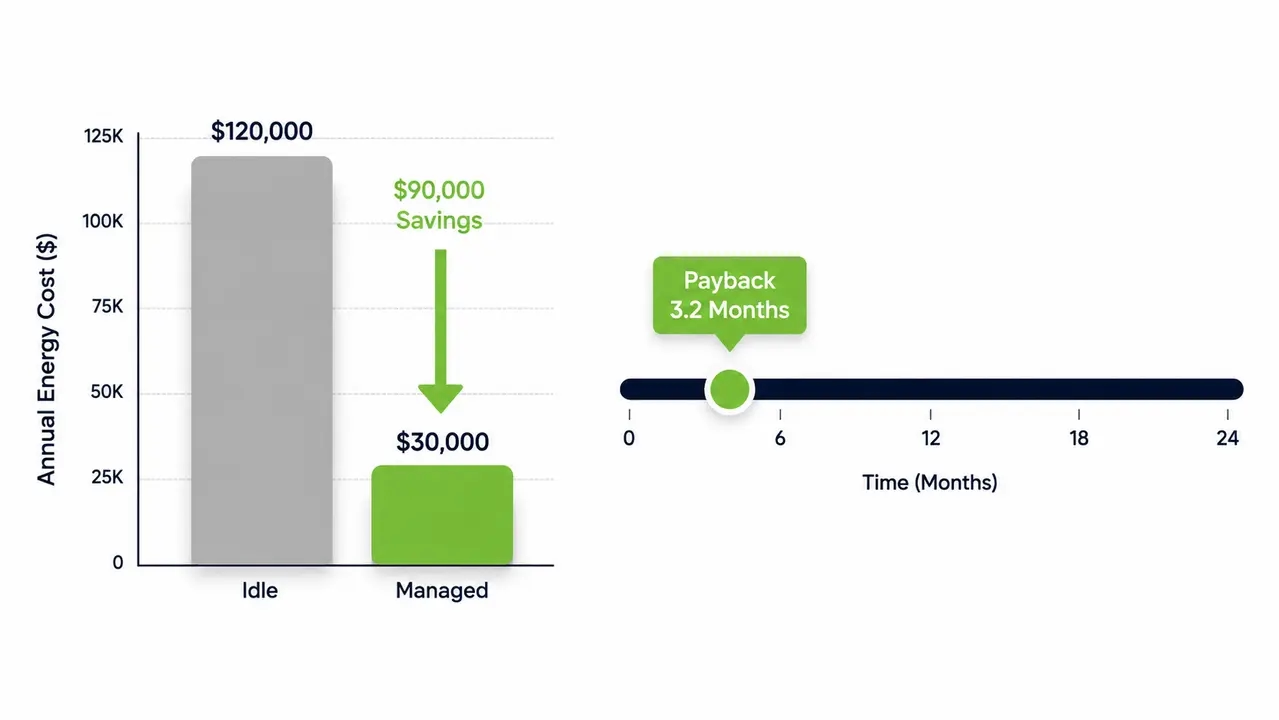
Organizations typically see ROI in as little as 4 months by cutting PC energy costs by up to 60 percent. A fleet of 1,000 PCs can save tens of thousands of dollars a year by eliminating overnight idle power draw, which directly improves the total cost of ownership for endpoint hardware. The financial return is matched by measurable ESG outcomes, including significant reductions in carbon footprint and avoided kilowatt-hours.
How do I wake a specific machine for off-hours remote support?
A service desk agent submits a ticket or clicks a button in the ITSM tool, which triggers an API call scoped to their specific permissions. The platform wakes the single assigned device, verifies it is online via the management agent, and allows the remote session to begin. Once the support session ends, the device automatically returns to its enforced power-saving policy.
Enterprise wake on LAN API integration replaces ad-hoc scripts with a governed, auditable service. By routing magic packets through secure relays, enforcing RBAC, and verifying device reachability, IT teams can confidently wake machines for patching and support without sacrificing energy efficiency or security.

About the author
Nimrod Yedaya
VP Customer Experience
Over 15 years of experience in customer service, technical support, and customer relationships. Nimrod joined PowerPlug in 2012 as Customer Support Manager and was promoted to VP in 2016. He holds an MBA from BIU and a BSc in Communication Systems Engineering from BGU.