
Automating Cost Savings in IT Operations: A Strategic Guide to Efficiency and ROI
Discover how IT leaders are using intelligent automation — including endpoint power management — to cut operational costs, eliminate waste, and deliver measurable ROI without adding headcount.
IT budgets are under relentless pressure. Every dollar spent on infrastructure, energy, and operations is scrutinised, yet the expectations placed on IT leaders keep rising. The answer increasingly lies not in spending more — but in automating smarter. This guide examines the most impactful categories of IT cost-saving automation, the metrics that prove their value, and the practical steps organisations are taking to translate automation into lasting financial gains.
Article Navigation Table of Contents
- The Hidden Cost Centre: Endpoint Power Consumption
- Comparing Cost-Saving Automation Categories
- Building the Business Case for Automation
- PC Power Management: A Deep Dive
- Common Mistakes That Erode Automation Savings
- Implementation Roadmap for IT Leaders
- Measuring and Reporting ROI to Stakeholders
- Frequently Asked Questions
Key Takeaways
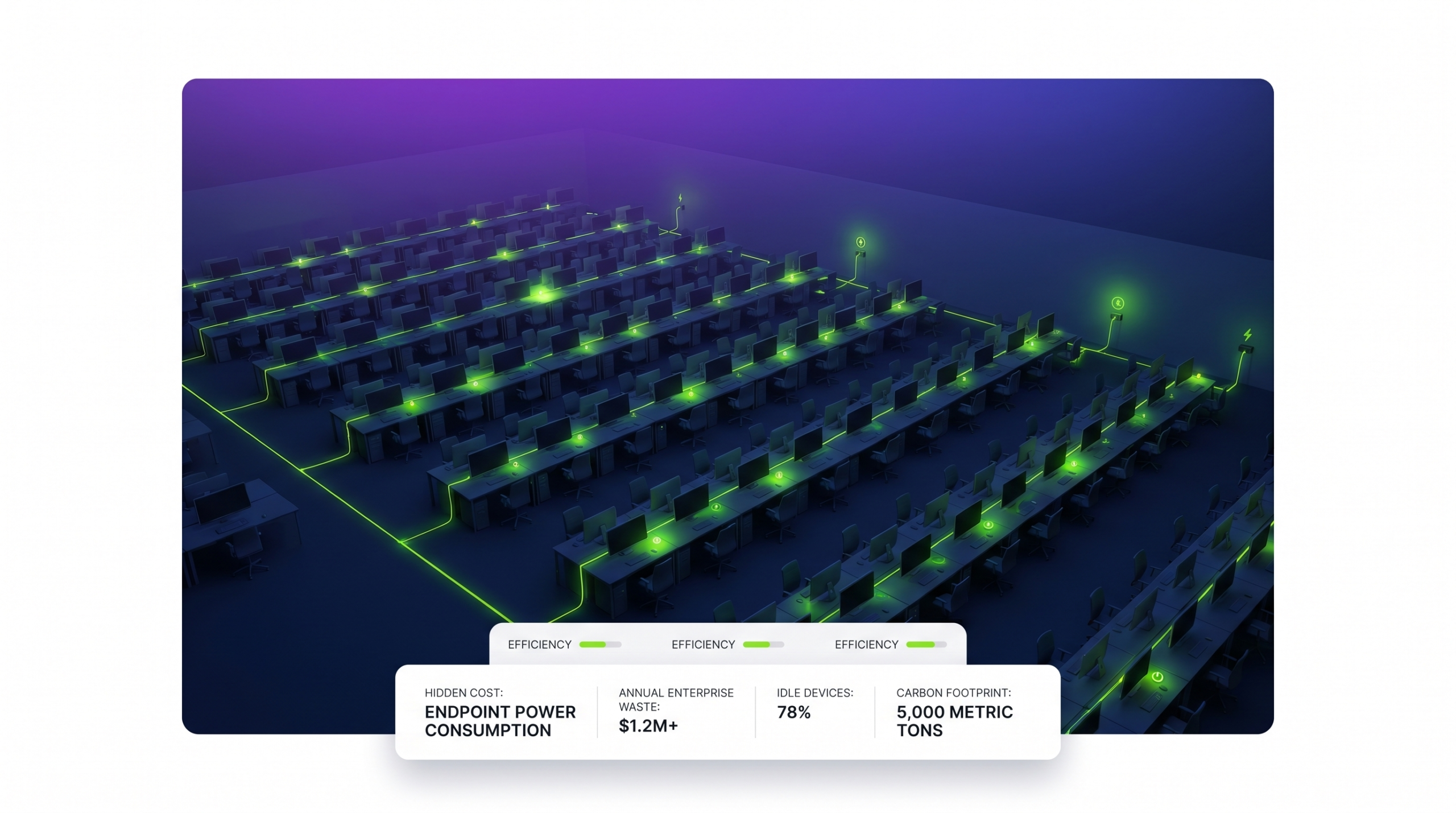
- Endpoint power consumption is one of the most consistently overlooked cost centres in enterprise IT — and one of the easiest to address with automation.
- Across IT operations, automation delivers ROI by eliminating manual effort, reducing error rates, and compressing response times at scale.
- The most impactful initiatives combine quick wins (energy savings, automated patching) with structural improvements (workflow automation, self-service portals).
- Measuring automation ROI requires tracking both hard savings (energy bills, licence costs) and soft savings (staff hours recaptured, downtime avoided).
- Organisations that embed automation governance — policies, reporting, accountability — sustain savings far longer than those that treat it as a one-time project.
Comparing Cost-Saving Automation Categories
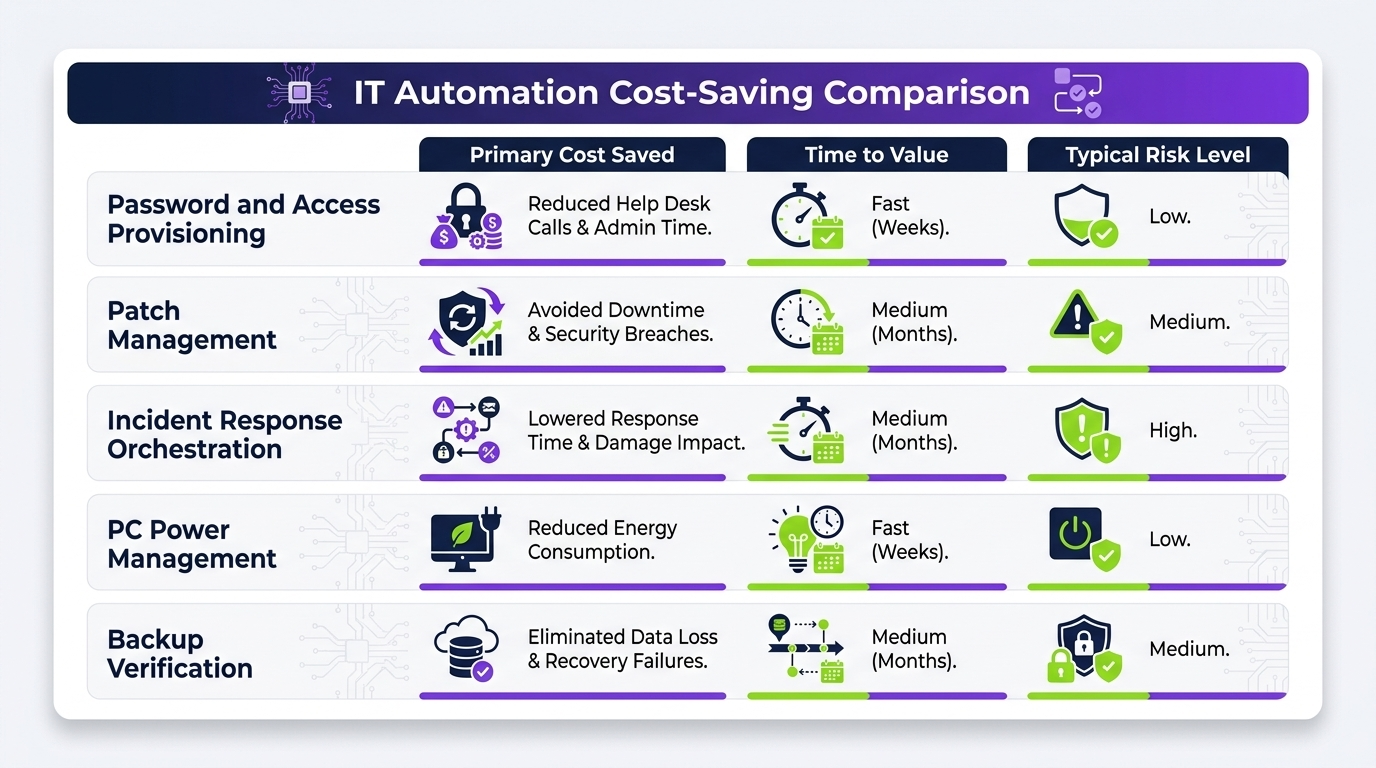
PC power management is one of several automation disciplines that IT leaders use to reduce operational cost. Understanding where it sits relative to other initiatives helps prioritise investment and sequence implementation effectively.
| Automation Category | Primary Cost Driver Addressed | Typical Payback Period | Implementation Complexity |
|---|---|---|---|
| PC Power Management | Energy waste from idle endpoints | 3–9 months | Low–Medium |
| Automated Patch Management | IT staff time, security incident cost | 6–12 months | Medium |
| IT Service Management (ITSM) Automation | Helpdesk labour, ticket resolution time | 12–24 months | High |
| Software Asset Management | Licence over-spend, audit risk | 6–18 months | Medium–High |
| Infrastructure Provisioning Automation | Server/cloud resource waste | 6–18 months | High |
| Identity & Access Automation | Onboarding/offboarding time, security risk | 12–24 months | High |
The table illustrates a notable characteristic of PC power management: it consistently offers the shortest payback period with the lowest implementation complexity. This makes it the natural starting point for organisations building an automation-led cost reduction programme — and an easy win that builds internal momentum for more complex initiatives.
How These Categories Work Together
The most mature IT cost-saving programmes do not treat these categories in isolation. An organisation that deploys automated patch management, for example, can coordinate patching windows with its power management platform — ensuring machines are awake when updates need to run, and powered down immediately afterwards. This coordination compounds savings and avoids the conflicts that undermine single-category deployments.
See How Much Your Organisation Could Save
PowerPlug’s PC power management platform gives IT leaders full visibility into endpoint energy consumption and automates intelligent shutdown, wake, and sleep scheduling across every managed device.
Building the Business Case for Automation
Securing investment for automation projects requires translating technical benefits into financial language that finance directors and executive sponsors understand. The business case for IT automation — and for PC power management in particular — rests on three pillars: quantified savings, risk reduction, and strategic alignment.
Quantifying Hard Savings
Hard savings are the most straightforward to present. For PC power management, the calculation begins with the current energy cost of the endpoint estate and works backwards from realistic usage scenarios.
A useful methodology:
- Audit the number and type of managed endpoints (desktops, workstations, thin clients, monitors).
- Estimate average power draw per device type and typical usage hours versus idle/off hours.
- Apply local energy tariff rates to calculate current annual cost.
- Model the impact of intelligent scheduling — typically a 40–60% reduction in idle-state energy consumption.
- Net the projected saving against platform cost to produce a payback period and multi-year NPV.
Quantifying Soft Savings
Soft savings — avoided costs and recaptured staff time — are harder to present but often larger in aggregate. For IT automation broadly, these include:
- IT staff hours no longer spent on manual processes (patch deployment, device inventory, ticket triage).
- Reduced helpdesk volume from self-service automation and proactive issue resolution.
- Lower risk of security incidents attributable to consistent, automated patching and access management.
- Reduced carbon tax exposure and improved ESG reporting positioning.
Aligning with Strategic Priorities
The most compelling business cases connect automation investment to board-level priorities. In the current environment, these typically include sustainability commitments (where energy reduction from PC power management is directly measurable), cost discipline (where every avoided pound of operational spend is valuable), and digital transformation (where automation capability is a prerequisite for more ambitious initiatives).
PC Power Management: A Deep Dive
Because PC power management sits at the intersection of energy management, IT policy, and endpoint administration, it deserves closer examination than it typically receives in broad automation surveys.
What Enterprise-Grade Power Management Delivers
Consumer-grade power settings in Windows — sleep timers, screen-off delays, hibernate options — are familiar to anyone who has configured a laptop. Enterprise power management platforms operate at a fundamentally different level of sophistication:
- Centralised policy management: Define power schedules for individual machines, groups, departments, or the entire estate from a single console, overriding local user settings without creating support incidents.
- Intelligent scheduling: Align power events with actual working patterns — shift schedules, office hours, seasonal variations — rather than applying a uniform policy that does not reflect operational reality.
- Patch-window coordination: Automatically wake machines for maintenance windows, allow updates to complete, and return machines to their scheduled power state — all without IT intervention.
- Real-time visibility: Monitor which machines are on, idle, asleep, or off at any moment, with historical reporting to quantify actual savings against baseline.
- Wake-on-LAN and remote access: Enable users to wake their machine remotely when needed, removing the objection that power management prevents flexible working.
- Energy and carbon reporting: Generate audit-ready reports showing kilowatt-hours saved, cost avoided, and CO₂ equivalent reduced — directly supporting ESG and sustainability reporting.
Addressing Common IT Objections
IT teams sometimes resist PC power management deployments because of legitimate operational concerns. A well-designed platform anticipates and resolves each of these:
| Objection | How Modern Platforms Address It |
|---|---|
| “Machines need to stay on for overnight patching.” | Scheduled wake events coordinate with patch windows; machines power off after completion. |
| “Users complain when their machine is off in the morning.” | Pre-shift wake schedules ensure machines are ready before users arrive. |
| “Remote workers need access to their office machine.” | Wake-on-LAN and VPN-integrated remote wake capabilities are standard features. |
| “We can’t apply one policy to all machines.” | Granular policy assignment by machine, group, or OU — no single policy required. |
| “We have no budget for new tools.” | The platform typically pays for itself within months from energy savings alone. |
Common Mistakes That Erode Automation Savings
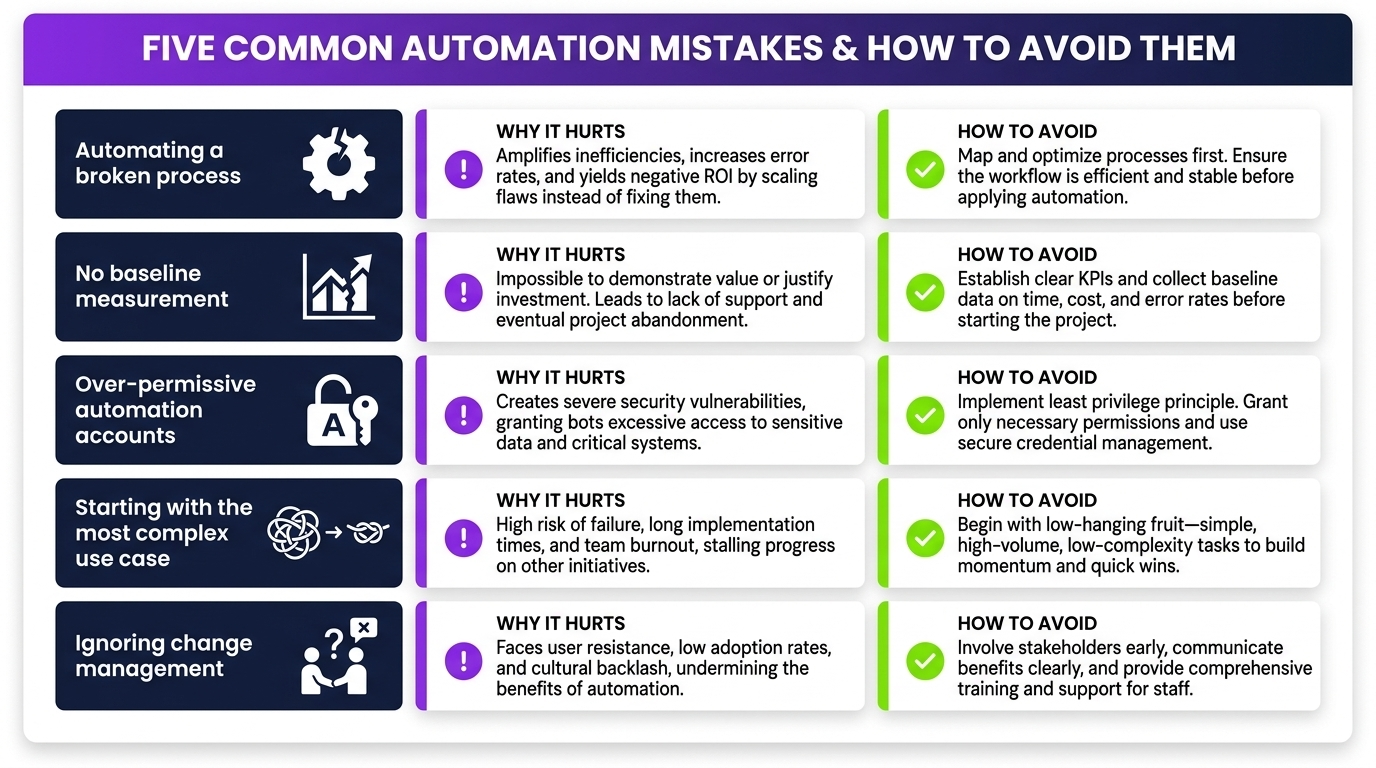
Organisations that deploy automation but fail to sustain the savings it was supposed to generate share a recognisable set of mistakes. Avoiding them is as important as deploying the right tool in the first place.
Mistake 1: Treating Automation as a Set-and-Forget Initiative
Automation is not a fire-and-forget solution. Endpoint estates evolve — machines are added, removed, and reassigned; shift patterns change; new software deployments alter power requirements. Policies that are not reviewed quarterly drift out of alignment with operational reality, and savings erode quietly without triggering any alert.
The fix: Assign a named owner for each automation initiative, schedule quarterly policy reviews, and use platform reporting to track actual savings against original projections.
Mistake 2: Insufficient User Communication
When machines power down unexpectedly — even if according to policy — users who have not been informed raise helpdesk tickets, escalate to IT management, and create political pressure to roll back the initiative. The technical savings are often correct; the user experience management is not.
The fix: Communicate power management policies to end users before deployment, explain the business rationale, and provide a clear mechanism for requesting exceptions where legitimate operational needs exist.
Mistake 3: Failing to Establish a Baseline
Without a credible pre-deployment baseline, it is impossible to prove what automation has saved. This matters both for internal reporting and for justifying the next automation investment.
The fix: Measure current energy consumption and staff hours before deployment. Most platforms can assist with pre-deployment assessment as part of the onboarding process.
Mistake 4: Scope Creep and Competing Priorities
Automation projects that start with a clear scope — power management for a specific estate segment, for example — sometimes expand to include adjacent requirements without the governance to manage them. The result is delayed deployment, rising complexity, and deferred savings.
The fix: Deliver the initial scope, prove the business case, then expand in controlled phases. Quick wins build the credibility that funds the next phase.
Mistake 5: Not Connecting Automation to Sustainability Reporting
Energy saved by PC power management is directly convertible to CO₂ equivalent avoided — a figure that finance and sustainability teams increasingly need for regulatory and investor reporting. Organisations that do not connect their power management platform to sustainability frameworks miss a significant reporting opportunity.
The fix: Ensure the power management platform generates energy and carbon reports in formats compatible with your ESG reporting framework. Most enterprise platforms support this natively.
Implementation Roadmap for IT Leaders
Organisations at different stages of automation maturity require different approaches. The following roadmap is structured for a mid-to-large enterprise beginning a systematic cost-saving automation programme, with PC power management as the first initiative.
Phase 1: Discovery and Baseline (Weeks 1–4)
- Conduct an endpoint audit: device types, count, location, typical usage patterns.
- Measure or estimate current energy consumption using metering data or vendor-provided assessment tools.
- Identify stakeholders: facilities, finance, sustainability, end-user representatives.
- Define success metrics: energy cost reduction, CO₂ reduction, staff hours recaptured.
Phase 2: Pilot (Weeks 5–10)
- Deploy the power management platform to a representative subset of the estate (typically 200–500 machines).
- Configure policies aligned with actual shift patterns and patching schedules.
- Communicate to pilot group users with clear rationale and exception process.
- Monitor savings against baseline weekly; adjust policies based on operational feedback.
Phase 3: Full Deployment (Weeks 11–20)
- Roll out to the full estate in staged waves, department by department or site by site.
- Integrate power management reporting with existing IT management dashboards.
- Connect energy and carbon data to sustainability reporting workflows.
- Establish quarterly review cadence with named owner accountable for outcomes.
Phase 4: Expand and Compound (Month 6 Onwards)
- Use proven savings from power management to fund the next automation initiative.
- Explore coordination between power management and patch management, ITSM, and asset management platforms.
- Report cumulative multi-year savings to finance and board-level sponsors to maintain investment appetite.
Measuring and Reporting ROI to Stakeholders
The ability to quantify and communicate automation ROI is what sustains organisational commitment to ongoing investment. IT leaders who can demonstrate that last year’s automation programme saved a specific, auditable sum are far better positioned to secure funding for the next phase than those who rely on qualitative assertions.
A Framework for IT Automation ROI Reporting
Effective ROI reporting combines four elements:
| Reporting Element | What to Measure | Source |
|---|---|---|
| Direct Energy Cost Savings | kWh reduction × energy tariff rate | Power management platform reports |
| Carbon Reduction | kWh saved × grid carbon intensity factor | Platform + national grid data |
| Staff Productivity Recaptured | Hours saved × fully loaded staff cost | IT team time-tracking, ticket volume |
| Risk-Adjusted Avoided Cost | Security incidents avoided × average incident cost | Security tooling, industry benchmarks |
Presenting to Finance and the Board
Finance directors respond to cashflow-based presentations. Structure the automation ROI narrative as:
- Investment made: Platform cost, implementation resource, change management.
- Savings delivered year one: Energy, staff hours, risk reduction — broken down by category.
- Payback period: Month in which cumulative savings exceeded total investment.
- Three-year projection: Compounded savings with growth in estate size factored in.
- ESG contribution: CO₂ equivalent avoided, mapped to reported sustainability commitments.
Ready to Automate Your IT Cost Savings?
PowerPlug gives enterprise IT teams the visibility, automation, and reporting tools to eliminate endpoint energy waste, deliver measurable ROI, and support sustainability goals — all from a single platform built for scale.
Frequently Asked Questions
How quickly can an organisation expect to see savings from PC power management?
Most organisations begin to see measurable energy cost reductions within the first month of full deployment. The payback period — the point at which cumulative savings exceed total platform investment — typically falls between three and nine months, depending on estate size, local energy tariffs, and the aggressiveness of the power policies deployed.
Does PC power management interfere with overnight IT operations such as patching and backups?
No — when properly configured, a modern PC power management platform coordinates with maintenance windows rather than conflicting with them. Machines can be automatically woken for patch deployments, held awake until the task completes, and then returned to their scheduled power state. This coordination is a core feature of enterprise-grade platforms, not an afterthought.
How does PC power management support ESG and sustainability reporting?
Enterprise power management platforms generate energy and carbon reporting that quantifies kilowatt-hours saved, cost avoided, and CO₂ equivalent reduced. These figures are directly usable in ESG reports, sustainability disclosures, and internal carbon accounting frameworks. Some platforms produce reports formatted to align with common ESG standards, reducing the effort required to integrate energy savings data into formal reporting workflows.
What is the difference between Windows built-in power settings and an enterprise power management platform?
Windows power settings are local configurations that users can override and that do not provide centralised visibility, reporting, or coordination with IT operations. An enterprise platform provides centralised policy management across the entire estate, real-time monitoring, historical reporting, integration with patch and maintenance schedules, and the ability to apply granular policies by machine, group, or department — none of which is achievable with native Windows settings alone.
Can PC power management be deployed alongside existing endpoint management tools?
Yes. Enterprise PC power management platforms are designed to complement existing tools such as SCCM, Intune, and ITSM platforms rather than replace them. Integration capabilities typically include coordination of wake/sleep events with software deployment schedules, and reporting that can be surfaced within existing IT dashboards.
How do organisations handle remote workers whose machines need to be accessible outside standard hours?
Modern platforms support Wake-on-LAN and VPN-integrated remote wake capabilities, allowing users to power on their office machine from a remote location when needed. This removes the primary user objection to power management policies and ensures that the operational benefits of remote working are preserved alongside the energy savings of intelligent power scheduling.