
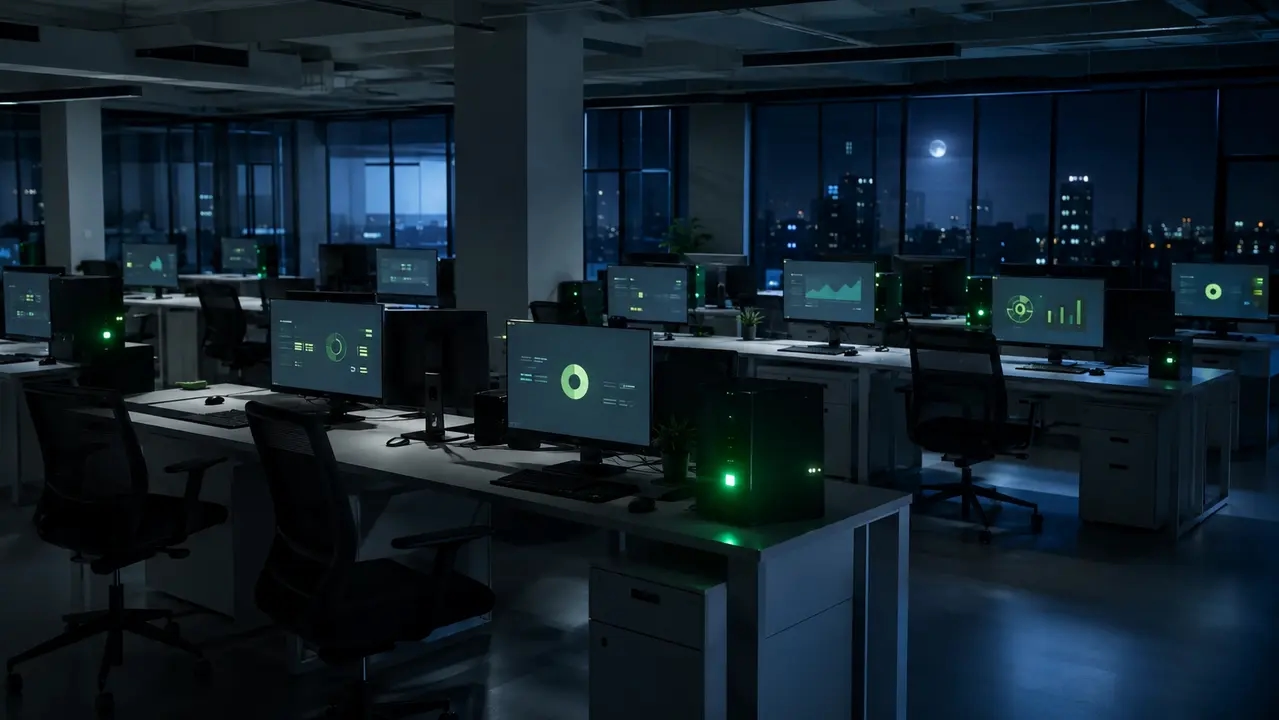
Walk through any enterprise office at 2:00 AM. The building is dark, but thousands of PC power lights are glowing. Large organization energy costs are driven heavily by these idle endpoints. The most effective strategy to reduce electricity costs large organizations IT teams face today focuses on controlling this exact waste. We are talking about real enterprise electricity savings achieved without breaking patching, maintenance windows, or user productivity. This is the core of a viable IT electricity reduction strategy.
Reading time: 4 minutes
Key takeaways
- Idle endpoints drive a massive portion of enterprise IT energy waste overnight.
- Centralized power policies must include maintenance-friendly wake scheduling to preserve patch windows.
- Measuring actual compliance against a baseline is required to prove savings to finance.
- A 30 to 90 day deployment plan can capture immediate endpoint energy savings.
Table of contents
- How can large organizations reduce electricity costs through IT (not just facilities)?
- What are the biggest IT-driven contributors to large organization energy costs?
- Does turning off PCs at night actually save money in an enterprise environment?
- How much electricity do office PCs waste overnight, and how do you estimate the savings?
- What is an IT electricity reduction strategy for large organizations?
- What is enterprise PC power management, and why is it usually the fastest win?
- How do you reduce endpoint electricity use without breaking patching, updates, and overnight maintenance?
- Why do power policies fail at scale in large organizations?
- How do you create an exception strategy (developers, labs, kiosks, call centers) without losing the savings?
- What reports do finance and sustainability teams expect for enterprise electricity savings?
- How do you measure and prove electricity savings from IT changes (so it survives budget scrutiny)?
- How do demand charges and peak pricing affect large organization electricity bills, and what can IT do?
- What is the difference between data center energy savings and endpoint energy savings?
- How do you reduce electricity costs in IT beyond endpoints (servers, storage, cloud) without risking performance?
- What is a realistic 30 to 90 day plan to reduce electricity costs for large organizations in IT?
- How do you choose an enterprise endpoint power management solution (what should you evaluate)?
- What results should you expect, and what are the most common pitfalls?
How can large organizations reduce electricity costs through IT (not just facilities)?
Facilities teams handle HVAC and lighting retrofits. IT controls the endpoints. When you want to reduce electricity costs large organizations IT departments must own the endpoint control plane. Facilities programs miss the thousands of unmanaged PCs, monitors, and peripheral exceptions left running overnight. IT can enforce policy, automate state changes, and prove savings via reporting. Large organization energy costs shrink when you target idle consumption and eliminate peak usage. The fastest enterprise electricity savings come from governing the machines IT already owns.
What are the biggest IT-driven contributors to large organization energy costs?
Three areas dominate large organization energy costs. First, data centers and servers run continuously. Second, idle end-user devices draw power all night. Third, inefficient operational patterns like unmanaged exceptions and peak-time workloads waste budget. Over-provisioned compute and cooling losses matter, but endpoint waste is the most ignored. Idle power consumption reduction starts with understanding what devices do after hours. Research on field surveys of office equipment operating patterns confirms a massive percentage of enterprise computers remain powered on overnight. An effective IT electricity reduction strategy targets these idle loads with strict device power state scheduling.
Does turning off PCs at night actually save money in an enterprise environment?
Yes, but only with centralized controls. If users shut down randomly, IT loses maintenance windows and patch compliance drops. Teams then revert to leaving everything on. The enterprise approach requires scheduled sleep or hibernate with guaranteed wake capability, plus strict exceptions. You need enterprise power policy enforcement to capture after-hours power savings safely. A well-structured sleep vs hibernate policy preserves the endpoint for IT maintenance while cutting idle draw. The US EPA offers clear guidance on power management for computers and monitors, validating sleep and hibernate as approved enterprise practices. You can read the full EPA power management guidelines for implementation details.
How much electricity do office PCs waste overnight, and how do you estimate the savings?
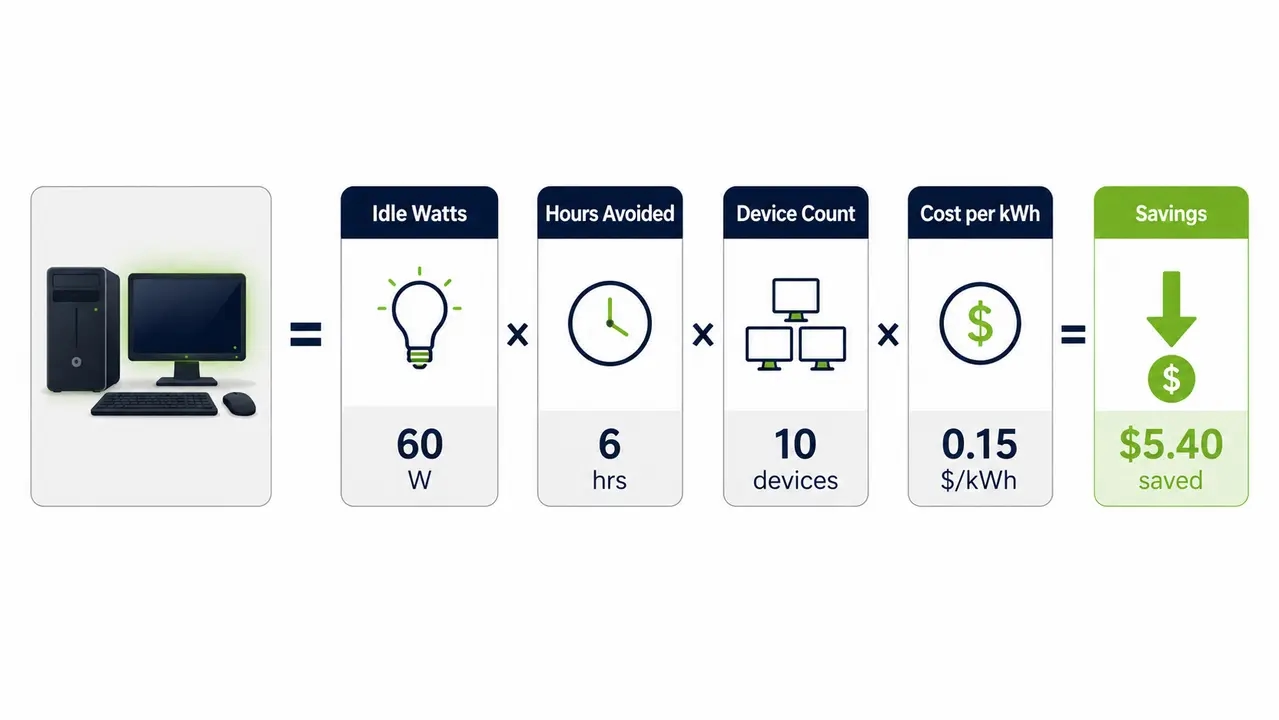
You estimate savings by multiplying average idle watts by hours avoided, device count, and your electricity rate. The formula is simple. Take your idle wattage, divide by 1000, multiply by hours per night, nights per year, device count, and your cost per kWh. This gives your gross kWh avoided calculation. Policy compliance rate matters more than theoretical savings. A 90 percent compliant fleet saves more than a 100 percent theoretical model with 50 percent actual compliance. Start with a pilot to validate assumptions. Research like the LBNL study on after-hours power status of office equipment shows real-world overnight waste is significant. You can review the LBNL after-hours power status report for baseline data.
What is an IT electricity reduction strategy for large organizations?
A governed program combining policy, enforcement, and measurement across your infrastructure. Policy defines sleep, hibernate, and shutdown standards, plus monitor timeouts and exception criteria. Enforcement uses centralized management to apply schedules and maintenance-friendly behavior. Measurement tracks baselines, savings, and audit-ready reporting for finance. You need energy governance and audit logs to prove the numbers. A PC power management policy only works if compliance is measurable. The fastest wins happen at the endpoint level.
What is enterprise PC power management, and why is it usually the fastest win?
Centralized control of device power states and schedules to eliminate idle waste without disrupting users. Endpoints are high volume but low complexity compared to retrofitting cooling plants. You can deploy EUC power management policies in weeks, not quarters. Enterprise requirements include handling remote and hybrid devices, different user personas, and maintenance windows. You need change control and quick time-to-value. This is typically delivered through our endpoint power management platform, which applies schedules and policies across the fleet without manual intervention. Endpoint energy savings deliver immediate ROI because the waste is already happening tonight.
How do you reduce endpoint electricity use without breaking patching, updates, and overnight maintenance?
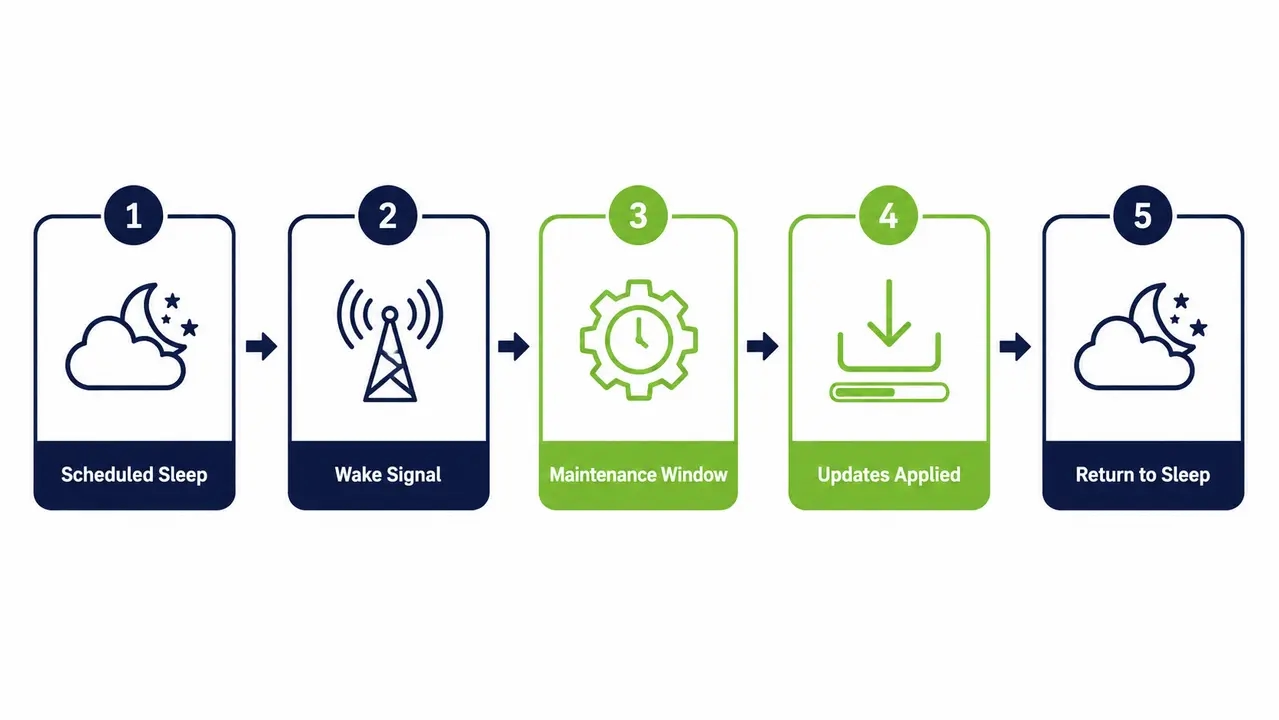
You use maintenance-aware schedules and controlled wake and sleep behavior. Devices stay available when needed and powered down when not. Define your maintenance windows. Devices wake for deployments, run updates, then return to a low-power state. Build in grace periods so you do not interrupt active users. Devices can be automatically brought online for maintenance using Wake-Up Technology, then returned to a low-power state once tasks complete. Success is measured in both energy saved and patch deployment success rates. Patching-friendly power management requires precise wake scheduling for maintenance windows.
What policies work best for mixed fleets (laptops, desktops, shared devices)?
Persona-based policies work best. Laptops use lid-close and battery-aware rules. Desktops use scheduled sleep. Shared kiosk devices use session-based timers. Device power state scheduling must match the user profile. Enterprise power policy enforcement fails when you treat a developer workstation like a training room PC.
How do you handle remote devices that are not on the corporate network overnight?
Use cloud-managed or agent-based policy enforcement independent of VPN connectivity. Remote workforce device power control ensures laptops comply even off-premises. Endpoint compliance reporting captures their state changes the next time they sync.
Why do power policies fail at scale in large organizations?
Inconsistent enforcement and too many exceptions. Poor user experience and lack of reporting also kill programs. Conflicting settings, user overrides, and role-based always-on needs create chaos. No single owner across IT, facilities, and sustainability means no accountability. Prevention requires clear exception rules and staged rollouts. Dashboards showing endpoint compliance reporting by department and site are mandatory. Exception management for always-on devices must be governed, not informal.
How do you create an exception strategy (developers, labs, kiosks, call centers) without losing the savings?
Define exception categories with tighter controls. Require business justification and periodic review. 24/7 operational stations should optimize idle states and monitors while restricting peripherals. Development and test machines allow longer active windows but enforce monitor sleep. Labs and training rooms use aggressive after-hours policies with calendar-based overrides. A tight PC power management policy preserves savings even with exceptions.
What should an exception request form include (so it is auditable)?
Include the requester, business justification, device group, site, approval owner, review date, and expected duration. Energy governance and audit logs depend on this documentation.
How often should exceptions be revalidated?
Review exceptions quarterly or biannually. Tie the cadence to your compliance reporting cycle. Exception management for always-on devices fails when exceptions become permanent.
What reports do finance and sustainability teams expect for enterprise electricity savings?
Baseline versus actual, methodology, coverage, and defensible conversion to cost and emissions. Reports must show device coverage percentage and compliance percentage following policy. Include estimated kWh avoided with stated assumptions. Show cost savings by tariff scenario and emissions impact. Sustainability reporting for IT energy requires Scope 2 emissions reduction IT calculations using your chosen factors. Auditability means showing assumptions, time periods, and change logs. The baseline vs actual savings methodology must survive finance scrutiny.
How do you measure and prove electricity savings from IT changes (so it survives budget scrutiny)?
Use a before and after baseline with control groups. Report gross and net savings. Pitfalls include seasonality, changing headcount, device refresh cycles, and rate changes. Run a pilot with representative departments. Establish a 4 to 8 week baseline, deploy policy, measure for 8 to 12 weeks, then scale. The DOE 50001 Ready Program offers a recognized framework for structured energy management measurement. Following a structured energy management framework helps validate your baseline vs actual savings methodology. This proves IT cost optimization energy results are real.
How do demand charges and peak pricing affect large organization electricity bills, and what can IT do?
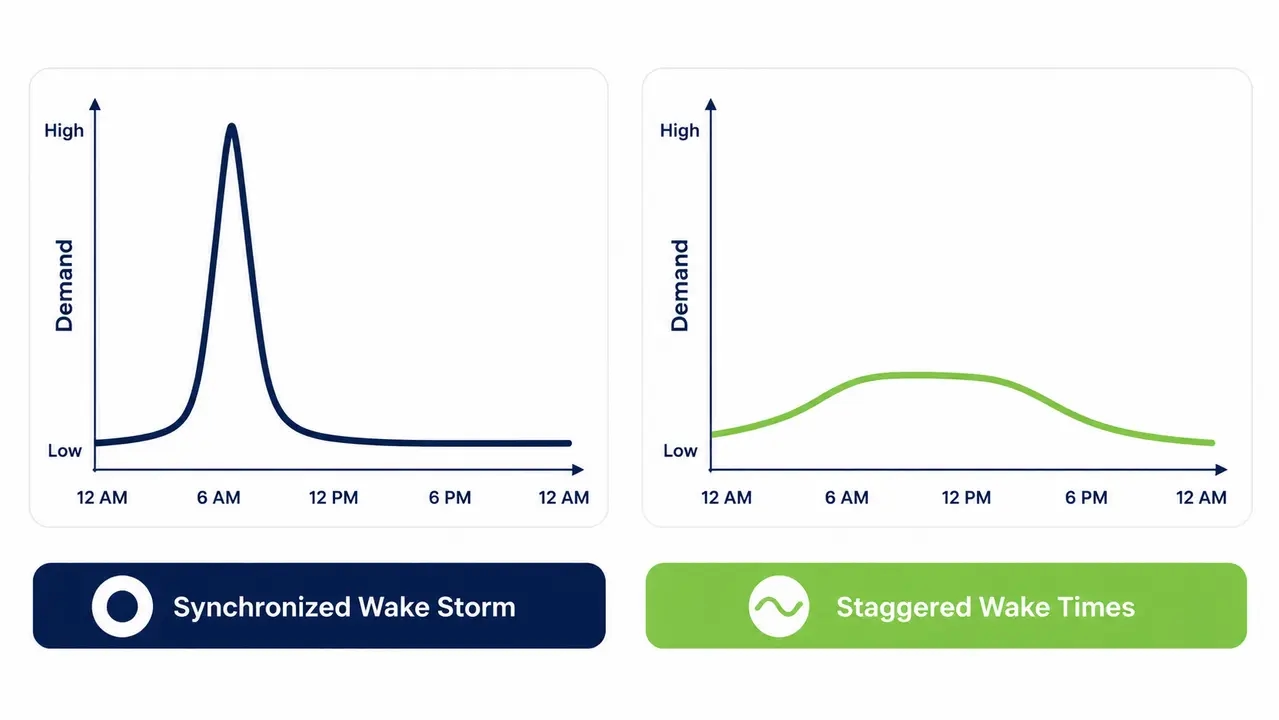
Peak kW drives a large share of commercial bills. Energy is measured in kWh. Demand is measured in kW. Commercial electricity tariff optimization requires reducing both. IT can reduce peaks by staggering wake times and scheduling updates outside peak windows. Coordinate with facilities on peak events. Shift non-urgent compute off-peak. A demand charges reduction strategy prevents synchronized wake storms. Peak kW management and awareness of time-of-use electricity rates protect your budget.
| Strategy | Energy (kWh) Impact | Demand (kW) Impact | Implementation Complexity |
|---|---|---|---|
| Staggered Wake Times | Low | High reduction | Medium |
| Off-peak Patching | Medium | High reduction | Low |
| Off-peak Batch Jobs | Low | Medium reduction | High |
What is the difference between data center energy savings and endpoint energy savings?
Data center savings are high impact but complex. They involve cooling, power chain, and utilization improvements. Endpoint savings are faster to deploy and easier to govern across many devices. Both matter. Best programs run in parallel. If you want 30 to 90 day results, start with endpoints. If you want structural long-term reductions, plan data center modernization. Endpoint energy savings offer the fastest IT cost optimization energy payback.
How do you reduce electricity costs in IT beyond endpoints (servers, storage, cloud) without risking performance?
Target utilization and waste via rightsizing, consolidation, and scheduling. Pair these with performance guardrails and monitoring. Decommission idle resources. Reduce overprovisioning. Enforce storage lifecycle policies. Schedule batch jobs off-peak. Keep vendor-neutral and governance-focused. Measurement must include service KPIs so savings do not create outages. To reduce electricity costs for enterprises, IT cost optimization energy strategies must protect uptime.
What are no-regrets controls to start with?
Decommission confirmed-idle servers. Enforce storage retention policies. Schedule batch jobs off-peak. An IT energy management program starts here.
When should you involve application owners?
Involve them before any change affecting shared infrastructure, uptime SLAs, or performance-sensitive workloads.
What is a realistic 30 to 90 day plan to reduce electricity costs for large organizations in IT?
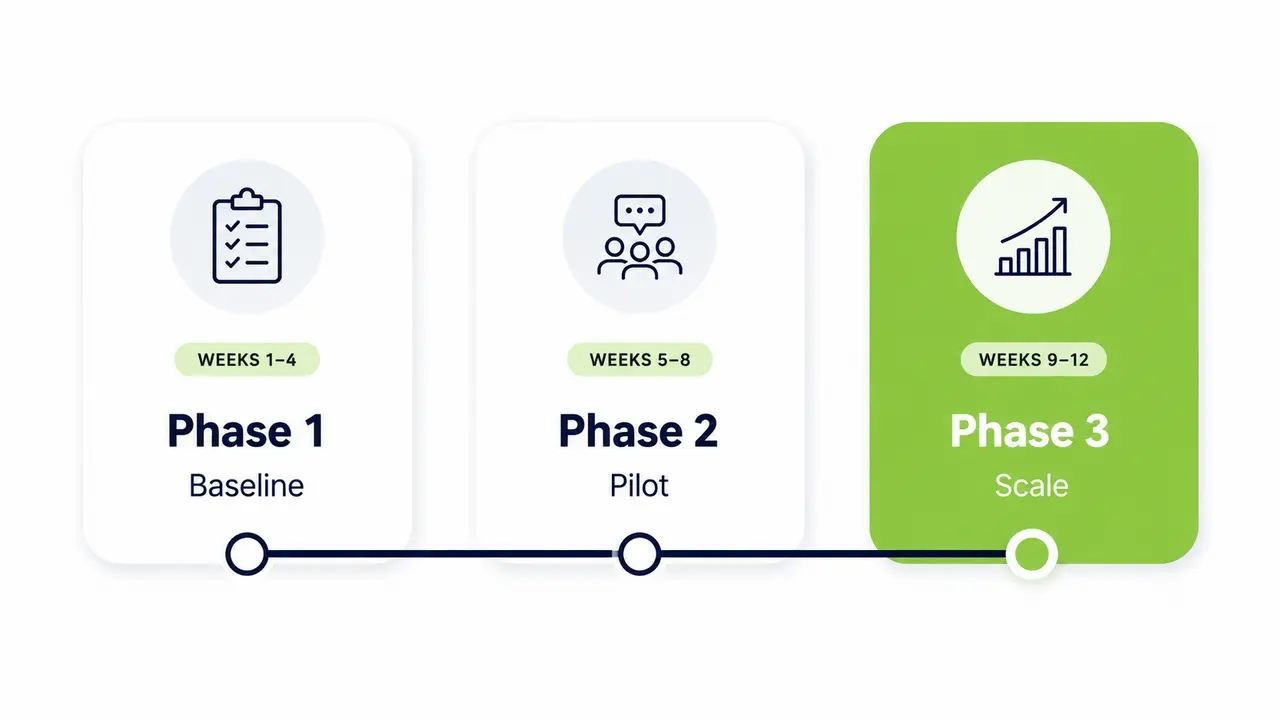
Baseline, pilot, roll out, govern exceptions, and report. Weeks 1 and 2 focus on inventory, baseline, and stakeholder alignment. Weeks 3 through 6 deploy pilot policies and exception workflows. Weeks 7 through 12 scale rollout, reporting, and optimization. Assign an IT ops owner, a sustainability liaison, a finance reviewer, and a change manager. This IT electricity reduction strategy ensures enterprise power policy enforcement sticks.
| Phase | Timeline | Key Actions |
|---|---|---|
| Baseline | Weeks 1-2 | Inventory devices, establish baseline kWh |
| Pilot | Weeks 3-6 | Deploy policies to test groups, build exception workflow |
| Scale | Weeks 7-12 | Fleet rollout, reporting dashboards, optimization |
How do you choose an enterprise endpoint power management solution (what should you evaluate)?
Evaluate enforceability, maintenance compatibility, reporting quality, and scalability. Do not just read feature lists. Can it keep devices available for maintenance while saving power? Does it offer granular schedules by group and persona? Does it ensure a safe user experience without surprise shutdowns? Does it provide evidence-grade reporting with coverage, compliance, and savings? Check deployment model fit, security, and energy governance and audit logs. Endpoint compliance reporting is the core feature. PC power management policy enforcement must be airtight.
| Requirement | Why it matters | What to look for | Common red flags |
|---|---|---|---|
| Maintenance window support | Prevents patch failures | Integrated wake scheduling | WoL only, no portal |
| Policy granularity | Handles diverse user types | Group and persona rules | Blanket GPO settings |
| Reporting quality | Proves savings to finance | Audit-ready kWh and cost logs | Theoretical savings only |
| Exception workflow | Handles always-on needs | Time-bound approval forms | Permanent local overrides |
What results should you expect, and what are the most common pitfalls?
Meaningful savings happen when compliance is high. Savings scale with device count, after-hours idle time, and electricity rates. The biggest pitfalls are poor exception governance, weak rollout communications, and lack of measurement discipline. Avoid the set-and-forget trap. Never ignore remote devices. Never misalign maintenance windows. For a real-world example of compliance-driven savings at scale, see the Ben Gurion University case study. PowerPlug Pro customers have saved over $50M and eliminated 200,000+ tons of CO2. Assess your fleet, run a pilot, and prove the enterprise electricity savings yourself.
Ready to calculate your fleet’s savings?
Talk to our team to see how endpoint power policies can cut your IT electricity costs without breaking maintenance windows.
Frequently asked questions
How can IT reduce electricity costs in a large organization quickly?
Target idle endpoints first. Deploy a centralized PC power management policy with maintenance-friendly wake scheduling. This captures after-hours power savings without waiting for hardware retrofits.
Does putting computers to sleep save money for businesses?
Yes. Sleep mode reduces idle power draw significantly. A structured sleep vs hibernate policy enforced centrally saves money while keeping devices available for patching.
How much does it cost to leave office computers on overnight?
It depends on idle wattage, hours, and fleet size. A 1,000 PC fleet leaving machines on overnight can waste tens of thousands of dollars annually. Use a kWh avoided calculation to estimate your exact waste.
How do you calculate electricity savings from PC power management?
Multiply average idle watts by hours avoided, device count, and electricity rate. Use a baseline vs actual savings methodology to prove the net savings after exceptions and non-compliance.
What is enterprise PC power management?
Centralized control of device power states across a fleet. It eliminates idle waste through automated scheduling, wake scheduling for maintenance windows, and endpoint compliance reporting.
How do you enforce sleep settings across thousands of computers?
Use an endpoint agent or platform integrated with Active Directory. Enterprise power policy enforcement ensures compliance and overrides local user settings safely.
Why do corporate power policies not work?
They fail due to inconsistent enforcement, too many unmanaged exceptions, and poor user experience. Lack of endpoint compliance reporting also hides non-compliance until savings disappear.
How do you keep patching working if PCs sleep at night?
Use patching-friendly power management. Devices wake on schedule for maintenance windows, apply updates, and return to sleep. Wake-Up Technology makes this reliable.
What is the difference between sleep and hibernate for energy savings?
Sleep uses slightly more power but wakes faster. Hibernate uses near-zero power but takes longer to resume. A sleep vs hibernate policy balances energy savings with user experience.
How do demand charges affect commercial electricity bills?
Demand charges are based on peak kW usage, not just total kWh. Synchronized PC wake storms can spike peak demand. A demand charges reduction strategy staggers wake times.
How do you reduce peak electricity demand from IT operations?
Stagger wake times for maintenance. Schedule batch jobs off-peak. Peak kW management and awareness of time-of-use electricity rates lower peak demand charges.
What reports prove IT energy savings to finance and sustainability teams?
Baseline vs actual savings, coverage percentage, compliance percentage, kWh avoided, and Scope 2 emissions reduction. Sustainability reporting for IT energy requires audit-ready logs.
How do you manage exceptions for always-on computers?
Use exception management for always-on devices. Require business justification, set review dates, and enforce shorter idle timers for monitors and peripherals.
How do you reduce electricity use for remote employee laptops?
Use cloud-managed or agent-based policies. Remote workforce device power control enforces sleep settings even off the corporate network.
Idle endpoints represent one of the most ignored areas of enterprise IT waste. By implementing centralized power policies, enforcing maintenance-friendly wake schedules, and governing exceptions properly, IT teams can capture immediate enterprise electricity savings. Assess your fleet, establish a baseline, and run a pilot to prove the results to finance and sustainability stakeholders.
About PowerPlug
PowerPlug has been helping organizations cut the environmental and financial impact of PC power consumption since 2009. Its flagship platform, PowerPlug Pro, combines intelligent PC power management with an on-demand Wake-Up Portal, so IT teams can shut down idle machines without sacrificing availability for maintenance, patching, or remote access.
Customers, including leading hospitals, universities, municipalities, government agencies, and global enterprises, have together saved over $50M on electricity bills and eliminated more than 200,000 tons of CO2. Led by CEO Eyal Yechieli, PowerPlug’s mission is simple: reduce the environmental and financial impact of PC power consumption worldwide, because the most sustainable and affordable energy is the energy you never use.