
Reading time: 10 minutes
A remote employee opens their laptop at seven in the morning, tries to connect to the desktop they left in the office, and gets nothing. The machine is off, because someone finally started shutting idle PCs down overnight to save energy. So they file a ticket, wait, and lose the first hour of the day while IT walks over and presses a power button.
A self-service wake-up portal removes that whole exchange. The employee wakes their own machine from a browser, connects, and gets to work, and IT never touches it. Done well, it lets an organization power down every night for the energy saving without turning remote access into a support queue. This guide covers how the portal works, how it stays secure, how it reaches machines across a segmented network, and what to require before you trust one.
The friction of asking IT to wake a machine
The old arrangement quietly punishes everyone. The employee loses time and momentum waiting for a machine they cannot reach. IT loses an afternoon to tickets that are beneath their skill and impossible to schedule. And the organization loses the energy saving, because the safest way to guarantee a remote worker can connect is to never let their PC sleep in the first place.
That is the trap. Leaving machines on all night to keep them reachable is expensive and wasteful, but shutting them down without a reliable way to wake them just moves the cost onto the help desk. A self-service portal is the way out, because it hands the wake action to the person who actually needs it.
What a self-service wake-up portal is
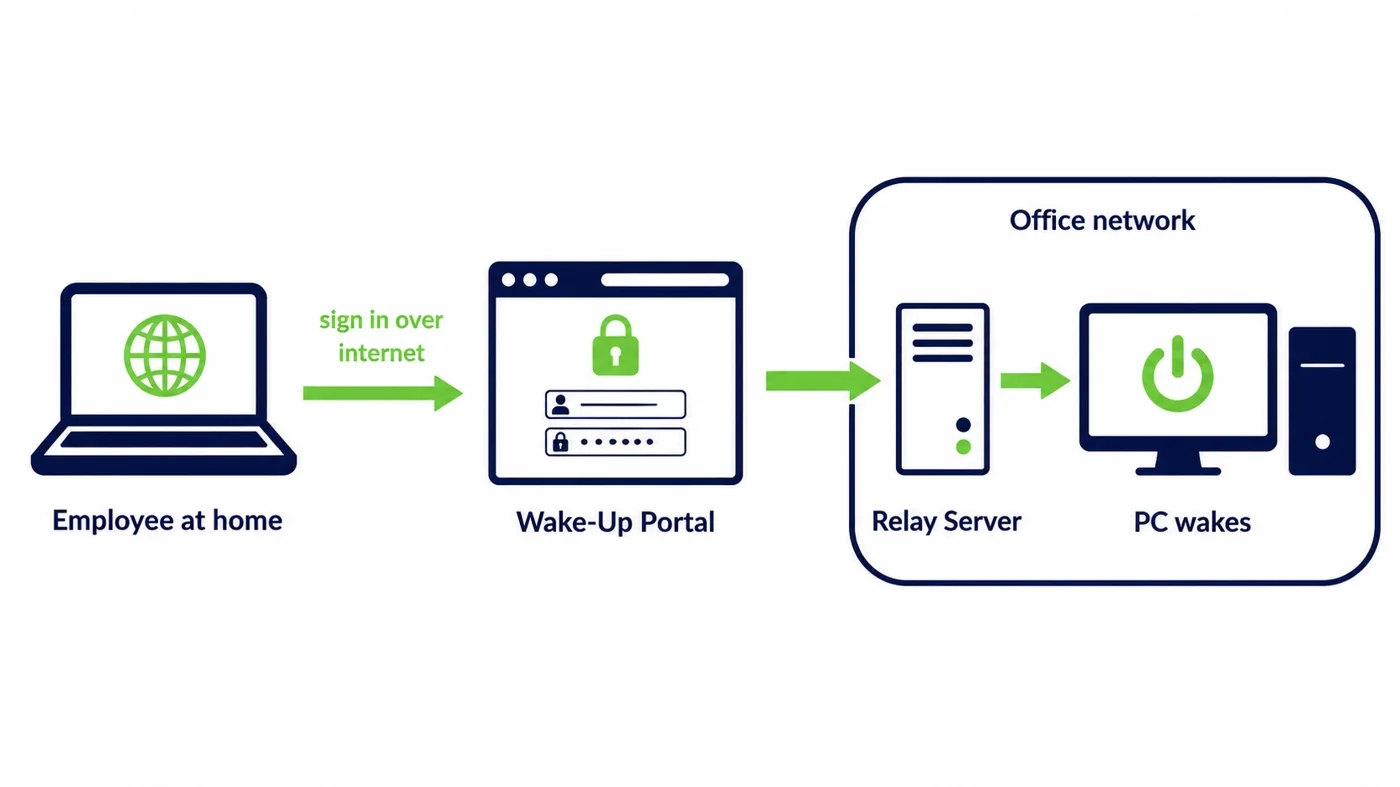
A wake-up portal is a simple web page an employee signs in to from anywhere. It shows the machines assigned to them, and next to each one is a button that wakes it. The employee clicks, the portal sends the wake request into the office network on their behalf, and the machine boots and becomes reachable for remote desktop.
The value is in what the employee does not have to know. They do not open a VPN just to send a wake packet, they do not learn which subnet their PC lives on, and they do not raise a ticket. From their side it is one click. Everything that makes cross-network wake difficult is handled behind the page.
How an employee wakes a PC from home
The sequence hides a lot of engineering behind a single action. The employee authenticates to the portal, which confirms who they are and which machines belong to them. They select the one they want and press wake. The portal passes that request to a component inside the office network that can reach the machine’s segment, and the wake packet is delivered locally.
Seconds later the machine is up and the employee connects with whatever remote desktop tool the organization already uses. The portal did not replace the remote access, it removed the one gap that made remote access unreliable once machines were allowed to power down.
Why Wake-on-LAN alone does not reach a remote worker
Classic Wake-on-LAN was built for a local network. The wake packet is a broadcast that reaches machines on the same subnet and goes no further. A person sitting at home is not on that subnet, and is not even on the same network, so they have nothing to broadcast onto. Sending a raw wake packet across the internet to an office machine is not how any of this works.
This is the gap a portal closes. Rather than asking the remote employee to reach the machine directly, the portal accepts the request over the internet, authenticates it, and hands it to something that is already inside the office network to finish the job locally. The employee never touches the broadcast; the portal does.
Waking a machine that is fully shut down
A portal is only useful if it can wake a machine that is genuinely off, not just asleep. That is the whole point, because the energy saving comes from a full managed shutdown, not from sleep mode. Wake-on-LAN can bring a machine back from a soft shutdown as long as the network card is configured to keep listening while the rest of the board is powered down.
That listening state is the detail that quietly breaks unmanaged setups. A firmware update or a fast-startup option can switch it off across a batch of machines, and the portal button then does nothing. A managed platform holds that state in place, which is the difference between a portal that works and one that works until the next update.
Keeping each employee to their own machines
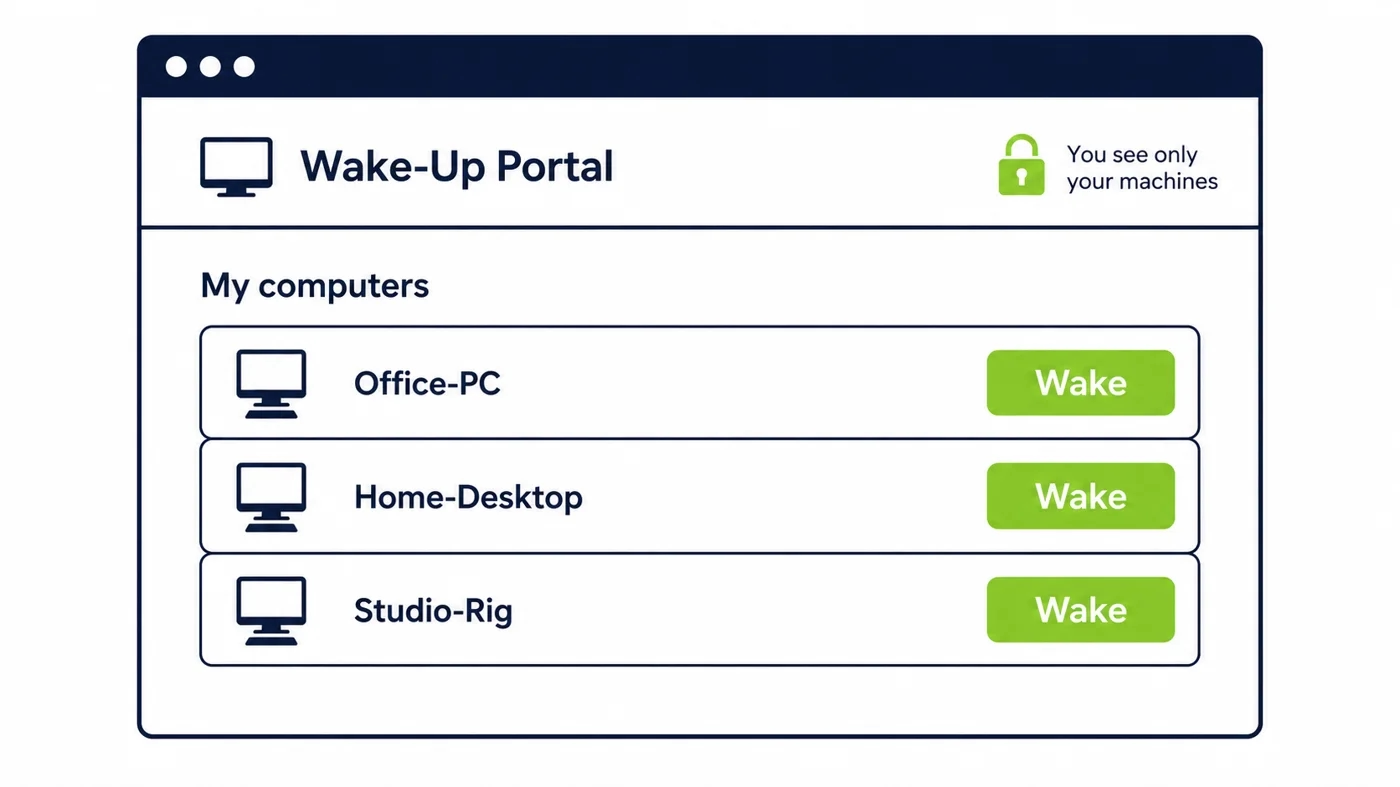
A wake action is small, but the right to perform it still has to be governed. In a good portal, access is tied to identity through the organization’s existing sign-in, so an employee sees only the machines assigned to them and cannot wake anyone else’s. An administrator can grant broader rights where a support role needs them, and every wake is recorded against the person who requested it.
This is what turns a convenience into something a security team accepts. Waking a machine stops being an anonymous broadcast anyone on the network could send and becomes an authenticated, scoped, logged action, no different in spirit from any other governed operation in the environment.
The security a portal has to earn
A page on the internet that can start machines inside your network deserves scrutiny, and a serious portal is built for it. The employee-facing side authenticates against your identity provider rather than a separate password. The component inside the network reaches out to the portal rather than the portal reaching in, so no inbound port has to be opened for wake traffic. And the wake itself stays local to the machine’s segment.
Put together, that means the attack surface a portal adds is small and well understood. There is no broadcast forwarded across the network, no new inbound path, and no wake action that is not attributable to a real, authenticated person.
Ask-IT against a self-service portal
The contrast is stark once you put the two side by side. The table compares the everyday reality of each.
| Dimension | Ask IT to wake it | Self-service portal |
|---|---|---|
| Time to a working machine | Minutes to hours, queue dependent | Seconds, one click |
| IT workload | A recurring ticket stream | None per wake |
| Can PCs be powered down overnight | Risky, so often not | Yes, wake is reliable |
| Record of who woke what | Informal at best | Authenticated and logged |
Reaching machines across subnets and sites
A portal is only as good as its reach. In a real enterprise the machines are spread across departmental VLANs, floors, and separate offices, and a wake request that only works on one flat network is not much use. The portal solves this the same way any reliable cross-network wake does, by placing a presence inside each segment that can deliver the local broadcast on command.
That is why the portal and the underlying wake infrastructure belong together. The employee sees one button, but behind it is a coordinated set of relays that guarantees the request reaches the right segment wherever the machine lives. PowerPlug builds the portal on top of its Wake-Up technology for exactly this reason.
Wake-on-LAN, Wake-on-WAN, and what remote wake needs
The terms get muddled, so it helps to be plain. Wake-on-LAN is the local mechanism, the broadcast that starts a machine on its own subnet. Wake-on-WAN is the idea of triggering that from outside the network, which people often try to do with fragile port-forwarding tricks that security teams rightly dislike.
A portal gives you the outcome people want from Wake-on-WAN without the exposure. The remote request is authenticated and terminates at the portal, and the actual wake is a local Wake-on-LAN performed inside the network. You get remote reach with local mechanics, which is the combination that is both usable and safe.
What a good wake experience looks like
From the employee’s side, the whole thing should be forgettable. They sign in with the credentials they already use, see a short list of their machines with a clear status for each, press one button, and get feedback that the machine is coming up rather than a silent wait. If a wake does not land, they should be told, not left guessing.
Anything more than that is friction the portal was supposed to remove. The best sign a portal is working is that people stop thinking about it, because waking their machine has become as unremarkable as opening a laptop lid.
Fewer tickets, faster starts, real savings
The payoff lands in three places at once. The help desk sheds a whole category of repetitive tickets, which frees skilled people for work that actually needs them. Employees start their day without a wait, which is a small daily win that adds up across a workforce. And the organization can finally power machines down overnight, because reliable self-service wake removes the reason they were kept on.
That last point is where the money is. Idle PCs left on overnight waste a measurable amount of energy, the same waste the US ENERGY STAR program has tracked for years, and a portal is what makes shutting them down safe. The wider platform that coordinates it is described on the platform overview, and it sits inside PowerPlug’s enterprise Wake-on-LAN solution.
What IT and security should require
Before approving a portal, a few requirements separate a serious product from a risky one. It should authenticate against your existing identity provider rather than holding its own passwords. It should not require inbound ports opened to the internet. It should scope each person to their own machines and log every wake. And it should reach every segment where machines live, not just one flat network.
Ask for those four things and most of the risk evaporates. A portal that meets them is a governed, auditable feature rather than a hole in the perimeter, and it is the version that will pass a security review instead of stalling in one.
Where a self-service portal pays off first
The organizations that feel this most are the ones with a large distributed workforce and a real energy target. A bank with thousands of staff working from home, a university whose faculty and researchers connect to office workstations after hours, a hospital group whose administrative teams work across sites, and any enterprise that has committed to cutting PC energy all share the same tension. They want machines off overnight, and they cannot afford a support queue every morning to bring them back.
In each of these, the portal is what makes the energy policy survivable. Without it, powering machines down creates a wave of tickets that pushes IT to quietly revert to leaving everything on. With it, the shutdown holds because the wake is one click away, and the saving becomes real rather than a policy that lasted a week.
Rolling a portal out without disruption
A portal does not need a disruptive project to land. Because it sits alongside the remote access people already use rather than replacing it, you can introduce it to a pilot group first, confirm that their machines wake reliably from home, and expand from there. The identity integration means there are no new passwords to distribute, and the assignment of machines to people usually maps straight onto existing inventory.
The one piece of groundwork that matters is the endpoint state. The pilot almost always surfaces a few machines whose network cards were never set to keep listening, and fixing that once, then holding it, is what makes the wider rollout dependable. After that, turning the overnight shutdown policy on is a setting, not a project.
The number that convinces finance
The financial case rests on two lines that move together. The first is energy. Put a modest figure on the overnight draw of one idle desktop, multiply by the fleet and the nights those machines sit unused, and the annual waste reaches six figures for a large organization before anyone counts weekends. The second is help-desk time reclaimed, because every wake that used to be a ticket is now a click the employee makes themselves.
Neither number depends on a heroic assumption. The machines were on and doing nothing, and the tickets were real and repetitive. A portal is what lets you claim both savings at once, with no reduction in service and no employee left waiting, which is the rare kind of change that a finance team and a workforce both welcome.
A real portal, not a patchwork of scripts
Some teams try to build this themselves from wake scripts and a few forwarded ports, and it usually works in a demo and fails in production. Scripts do not authenticate the person, do not scope who can wake what, do not reach across segments cleanly, and quietly break when an endpoint stops listening. Every one of those gaps becomes a ticket or a security question later.
A managed portal exists precisely so those gaps are handled once, properly, and stay handled. The point of self-service is to remove work, and a homegrown version that needs constant tending just moves the burden rather than lifting it.
Frequently asked questions
Can an employee wake a PC that is fully shut down?
Yes, as long as the machine’s network card is set to keep listening while the rest of the board is off. That is the whole point, because the energy saving comes from a full managed shutdown rather than sleep. A managed platform holds that listening setting in place so a firmware update does not quietly disable it.
Does the employee need a VPN before they can wake their PC?
No. The employee signs in to the portal over the internet, and the portal delivers the wake inside the office network on their behalf. They only need their normal remote access once the machine is up to connect to it, not to send the wake itself.
How do you stop an employee waking someone else’s machine?
Access is tied to identity through your existing sign-in, so each person sees and can wake only the machines assigned to them. Administrators grant broader rights only where a support role needs them, and every wake is logged against the person who made it.
Does a wake portal work across subnets and multiple sites?
Yes, when it is built on wake infrastructure that places a presence inside each segment. The employee sees one button, and behind it a coordinated set of relays ensures the request reaches the right VLAN or office wherever the machine lives, without opening the network up.
What is the difference between Wake-on-LAN and Wake-on-WAN?
Wake-on-LAN is the local broadcast that starts a machine on its own subnet. Wake-on-WAN is triggering that from outside the network, often attempted with fragile port forwarding. A portal gives the remote reach people want from Wake-on-WAN while the actual wake stays a safe local Wake-on-LAN inside the network.
See how much your organization could save
Tell us how many PCs you run and we will show you the realistic energy and cost savings, along with the payback period.
Talk to us