
Reading time: 9 minutes
The short version is this. You want to shut idle PCs down overnight to cut energy cost, and you still need them awake for patching, imaging, and remote support. Wake-on-LAN does that job perfectly on a single flat network. The moment a router sits between the sender and the target, it stops working, and most teams discover this the first time a maintenance window fails.
An idle desktop still draws power. Multiply that draw by a few thousand machines and two hundred and fifty working nights, and the waste stops being a rounding error and becomes a line the finance team notices. The reason organizations leave that saving on the table is rarely the shutdown. It is the wake. If you cannot guarantee a machine comes back for its maintenance window, you cannot safely power it down, so it stays on. This guide walks the real engineering that makes cross-subnet wake reliable at enterprise scale.
Wake-on-LAN works until it meets the first router
A wake request is a small broadcast frame, and broadcast is a local affair. It reaches every device inside the same subnet and no further. Routers do not forward broadcast between subnets by default, and for good reason, because forwarding it everywhere would flood the network. So a packet sent from the management console in the server room reaches the machines on that segment and dies at the boundary of the next one.
In a small office where everything shares one flat network, this is invisible. In an enterprise carved into departmental VLANs, floors, sites, and a data center, it is the whole problem. The fix is not a better script. It is a design decision about how the wake signal crosses those boundaries, and every option carries a trade-off between reach, effort, and security.
The money that leaks while machines miss the window
Consider a fleet of three thousand desktops left on overnight because IT cannot trust them to wake. At a conservative idle draw, that is tens of thousands of dollars a year in electricity that buys nothing, before you count the cooling load and the shortened hardware life. The US ENERGY STAR program has documented for years how much of a computer’s annual energy is spent doing nothing useful.
Here is the mistake that keeps the saving out of reach. A team runs a pilot, powers down a floor, then loses a patch cycle because a batch of machines never woke. The rollout stalls, the machines go back to always on, and the energy line never moves. Reliable cross-subnet wake is the piece that turns a good intention into a number you can defend in a budget meeting.
What the magic packet is, and why it needs broadcast
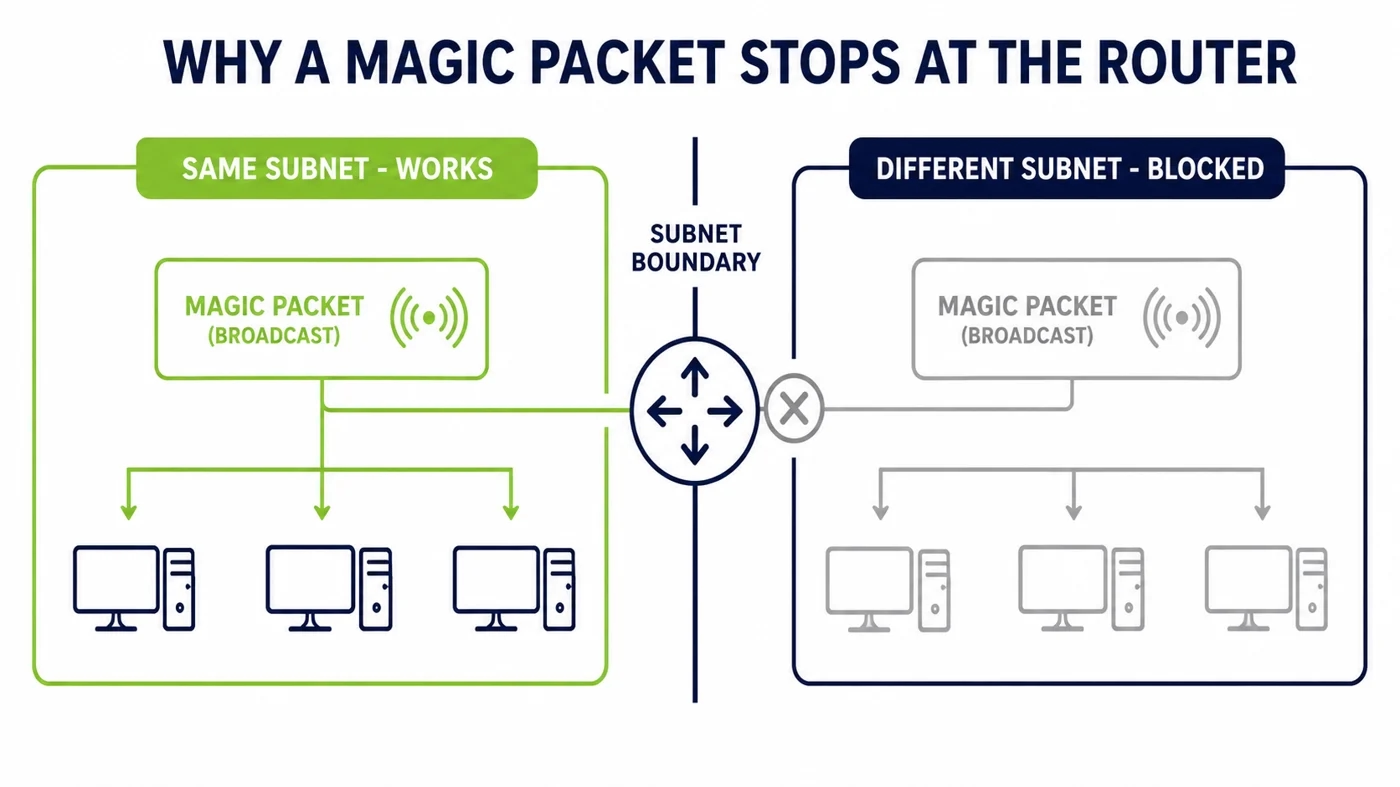
The wake signal is a specifically formed frame, often called a magic packet, that carries the target machine’s MAC address repeated sixteen times. The network card listens for that pattern even while the rest of the computer is powered down, and when it sees its own address it tells the board to start.
Because a powered-down machine has no usable IP presence, the packet is normally sent to the subnet broadcast address so every card on the segment can inspect it. That is why the mechanism is tied to broadcast, and why crossing a router, which is built to contain broadcast, takes deliberate work.
Directed broadcast, and why security pushes back
The first classic method is subnet-directed broadcast. You send the wake packet to the broadcast address of the remote subnet, and you configure the routers along the path to forward it into that segment. It works, and on paper it is elegant because it needs no extra software.
The catch is that enabling directed broadcast on a router reopens a door the industry spent years closing. The same feature was the engine behind older amplification attacks, so most hardened networks disable it globally. Turning it back on for convenience is the kind of change a security review will question, and rightly so. If you go this route, scope it tightly to the exact segments and source addresses involved, and expect to justify it.
IP helper and UDP relay, the network engineer’s route
The second method reuses machinery the network already trusts. An IP helper address, the same feature that forwards DHCP requests across subnets, can relay the wake packet’s UDP port from a central source into a remote segment. Nothing new is installed, and the change lives in configuration the network team already owns.
It is cleaner than opening directed broadcast, but it is not free of effort. Every VLAN you want to reach needs its helper entry, the forwarded ports must be defined carefully so you are not relaying more than intended, and the configuration has to be maintained as the network changes. It scales through discipline rather than through a single switch.
The wake proxy, the approach that actually scales
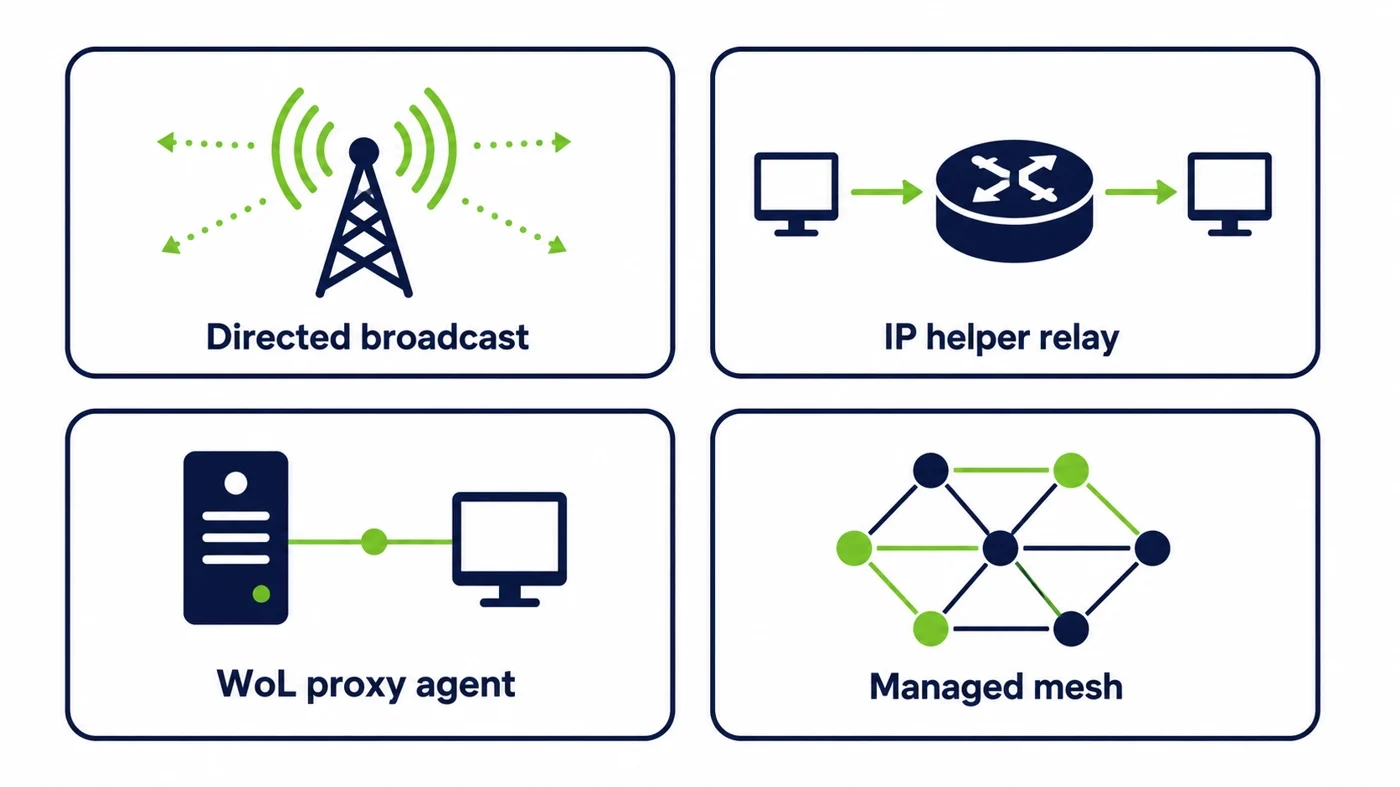
The third method changes the shape of the problem. Instead of forcing one central packet across every boundary, you place a small always-on presence inside each subnet, an agent or a relay on a machine that stays reachable, and let it emit the local broadcast on command. The central console tells the local relay to wake a specific address, and the packet never has to cross a router at all.
This is why a managed platform tends to win at scale. It removes the dependency on router features that security teams dislike, it survives VLAN changes without a config rewrite, and it turns waking a machine into a single action from one place. PowerPlug Pro builds this into its Wake-Up technology so that a machine in any segment comes back in seconds, whether the request comes from a scheduler or an on-call engineer.
Waking across VLANs without breaking segmentation
VLANs exist to keep traffic and risk contained, and any wake design has to respect that. The weakness of the broadcast-forwarding methods is that they punch small holes in exactly the boundaries segmentation is meant to hold. A relay or agent model keeps the wake traffic local to each segment, so the segmentation stays intact and the only thing crossing the boundary is a short authenticated instruction.
That distinction matters to more than the security team. When the wake path does not depend on loosening the network, the design is easier to approve, easier to audit, and far easier to keep working as the estate grows. Segmentation and remote wake are not in conflict when the packet stays where it belongs.
The four cross-subnet wake methods, compared
Each approach reaches the same goal by a different path, and the right choice depends on how large the estate is and how strict the network is. The table sets the trade-offs side by side.
| Method | What it needs | Security posture | Scales to a large estate |
|---|---|---|---|
| Directed broadcast | Routers forward broadcast to remote subnets | Weak, reopens a disabled-by-default risk | Poorly |
| IP helper / UDP relay | A helper entry and forwarded port per VLAN | Moderate, uses trusted config | With ongoing maintenance |
| WoL proxy / agent | A local always-on relay in each segment | Strong, keeps wake traffic local | Yes |
| Managed mesh platform | A platform that coordinates relays centrally | Strong, no router changes | Yes, built for it |
Ports, firewalls, and what to actually allow
The wake packet rides on UDP, most commonly on port nine, sometimes on port seven. Whichever method you choose, the path the packet takes has to permit that traffic, and only that traffic. The goal is a narrow allowance from a known source to the segments that need it, not a broad opening that a review will reject.
Document the source, the destination segments, and the port, and keep the rule as tight as the design allows. A relay or agent model keeps this simple, because the only cross-boundary traffic is the control instruction, and the broadcast stays inside each segment where no firewall rule is needed at all.
Shutdown, sleep, and what the wake signal can reach
Wake-on-LAN can bring a machine back from sleep, from hibernate, and from a full soft shutdown, but only when the network card is configured to keep listening in those states. That setting lives in the firmware and in the operating system’s power configuration, and if either one powers the card fully off, the packet has nothing to land on.
This is where an unmanaged rollout quietly fails. A firmware update, a new hardware model, or a fast-startup setting can switch listening off across a batch of machines, and nobody notices until a wake cycle comes up short. A managed platform checks and holds the correct state, which is the difference between a wake design that works once and one that keeps working.
What breaks quietly: DHCP leases, stale ARP, VLAN moves
A wake setup that worked in a lab often struggles in production for reasons that have nothing to do with the packet. When a machine is off for hours, its DHCP lease can expire and its entry can age out of the router’s address tables, so a method that relied on knowing where the machine lives loses the map. VLAN reassignments move a target into a segment your configuration does not cover.
These are the failures that make cross-subnet wake feel unreliable even when the basics are correct. The methods that anchor to the local segment rather than to a central map are far more resilient here, because the relay that fires the packet lives in the same place as the machine it is waking, whatever the address tables upstream believe.
What an enterprise-grade wake design includes
Sending the packet is the easy part. A design you can rely on across thousands of machines does more than that. It confirms the machine actually woke rather than assuming the packet was enough, it lets an engineer wake a single device on demand as well as a whole group on a schedule, it keeps a record of who woke what and when, and it holds the endpoint settings that keep the card listening.
That is the gap between a script and a platform. PowerPlug’s enterprise Wake-on-LAN solution is built around this reliability, so idle machines can be powered down with confidence and brought back for every maintenance window. Organizations running large estates, from hospitals to universities, use that confidence to turn overnight idle time into a measurable saving rather than a risk. You can see how the platform fits together on the platform overview.
Where the largest estates feel this first
The organizations that hit this wall first are the ones with the most machines spread across the most segments. A hospital runs clinical, administrative, and lab networks that are deliberately kept apart. A university has faculties, halls, and labs on their own VLANs. A national service has sites in different cities behind the same management team. In each case the fleet is large, the segmentation is strict, and the maintenance windows are non-negotiable.
That combination is exactly where the broadcast-forwarding methods struggle and where a coordinated relay model earns its place. When every segment has a trusted local presence that can wake its own machines on command, the size of the estate stops being the obstacle. The same single action wakes fifty machines on one floor or five thousand across a campus, and the network team never has to choose between energy savings and the segmentation they are paid to protect.
A number you can take to a budget meeting
The reason this engineering is worth doing comes down to arithmetic that is hard to argue with. Put a modest figure on the overnight draw of a single idle desktop, multiply it by the size of the fleet and the number of nights those machines sit unused, and the annual waste lands in six-figure territory long before anyone counts weekends or holidays. None of it buys a single unit of useful work.
Reliable cross-subnet wake is what lets you actually claim that saving instead of leaving it as a slide. The machines can be off every night, the patch cycle still completes, and the on-call engineer can still bring any single device back in seconds. That is a rare thing to be able to say in a budget meeting, because the cost comes down with no service reduced and no window missed. The hard part was never the shutdown. It was trusting the wake, and that is precisely the part a managed platform solves.
Frequently asked questions
Can Wake-on-LAN be routed across subnets?
Not on its own, because the wake packet is a broadcast and routers do not forward broadcast between subnets by default. You make it cross a boundary with one of three approaches, directed broadcast, an IP helper relay, or a local proxy or agent, and the proxy model is the most reliable at scale.
Is enabling directed broadcast a security risk?
It can be, which is why it is disabled by default on most hardened networks. The same feature was used in older amplification attacks, so if you enable it you should scope it tightly to the exact segments and sources involved, and expect a security review to question it. A relay or agent model avoids the issue entirely.
Does Wake-on-LAN work from a full shutdown?
Yes, from sleep, hibernate, and a soft shutdown, as long as the network card is set to keep listening in those states in both the firmware and the operating system. If a firmware update or a fast-startup setting powers the card off, the wake packet has nothing to reach, which is why a managed platform holds that setting in place.
Which ports does Wake-on-LAN use?
The wake packet travels over UDP, most often on port nine and sometimes on port seven. Whatever method you use, allow that traffic narrowly from a known source to the segments that need it, and keep the rule as tight as the design permits rather than opening a broad path.
How do you wake thousands of PCs across many subnets for patching?
You use a platform that coordinates a local relay in each segment, so a schedule can bring a whole estate up ahead of a maintenance window without depending on router features or a central address map. That is what keeps a large fleet reliable enough to power down every night and still be ready for every patch cycle.
See how much your organization could save
Tell us how many PCs you run and we will show you the realistic energy and cost savings, along with the payback period.
Talk to us