

Reading time: 11 minutes
A wake packet goes out and nothing happens. That is the moment most Wake-on-LAN troubleshooting begins, usually under time pressure because a patch window is running or a remote worker is locked out. The frustrating part is that a wake can fail at any of half a dozen points, and firing more packets tells you nothing about which one.
This guide is a structured way to find the actual failure instead of guessing. It walks the wake path from the firmware to the network, gives you a fast triage order, and covers the specific traps, shutdown states, subnet boundaries, switch settings, and endpoint quirks, that account for the vast majority of real enterprise failures. Work it in order and most problems resolve quickly.
Why Wake-on-LAN fails more in enterprises
On a flat home network Wake-on-LAN almost always just works, which is why its enterprise failures feel surprising. The difference is that an enterprise adds layers the home network never had. There are routers between segments that stop broadcast, managed switches with their own settings, network access control, a fleet of different hardware models, and machines that sit off for many hours at a stretch.
Each of those layers is a place a wake can die. So enterprise troubleshooting is less about the packet itself and more about finding which layer is blocking it. The good news is that the layers fail in predictable ways, so a methodical pass down the stack finds the culprit far faster than trial and error.
A fast triage order for a failed wake
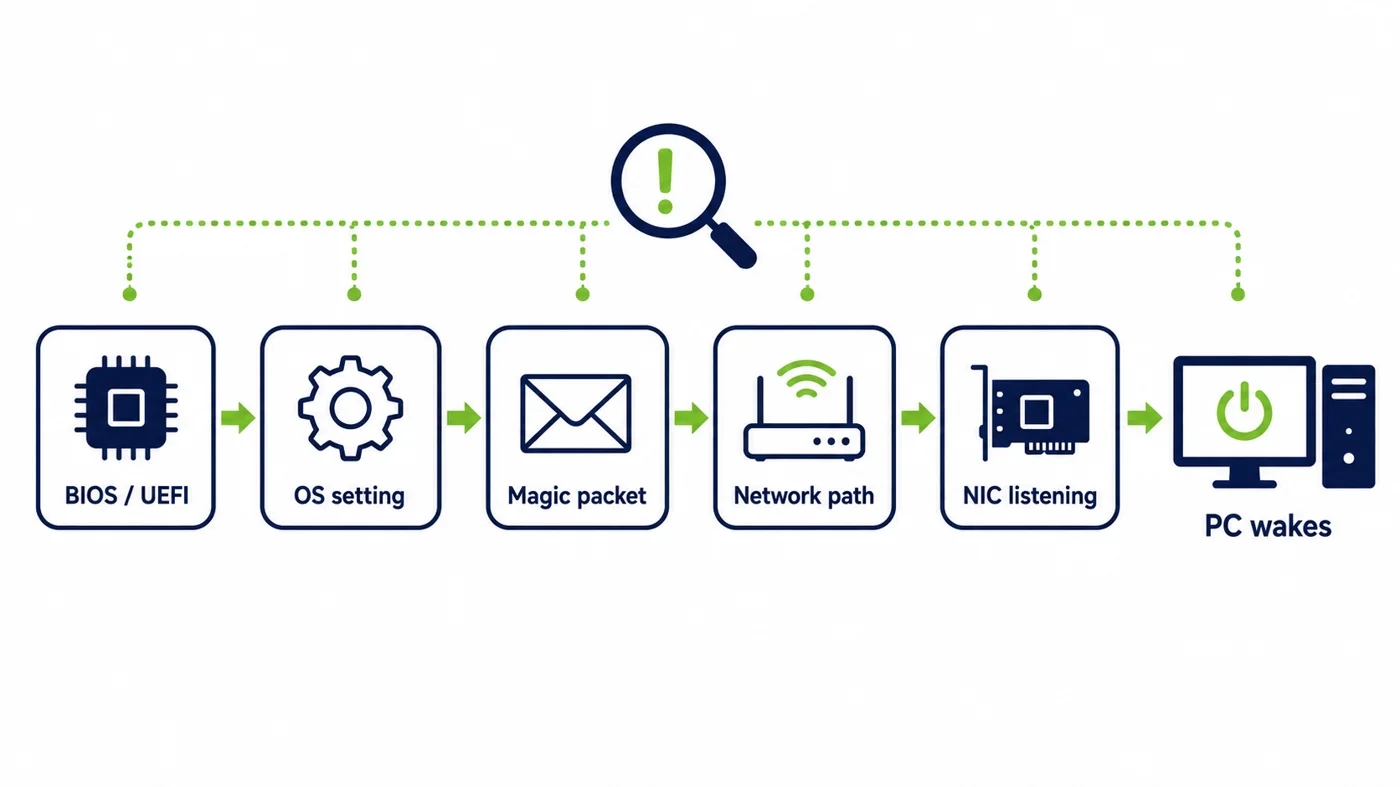
Before diving deep, narrow it down. First, does the machine wake when you send the packet from the same subnet? If yes, the endpoint is fine and the problem is network reach. If no, the problem is on the endpoint or its immediate settings. That single test splits the search space in half in seconds.
From there, check the endpoint’s firmware and operating-system wake settings, confirm the wake packet is well formed, then trace whether it actually reaches the machine’s segment. Working in that order, endpoint first when local wake fails and network next when it does not, keeps you from rebuilding the whole path when only one piece is broken.
Sleep works but shutdown does not
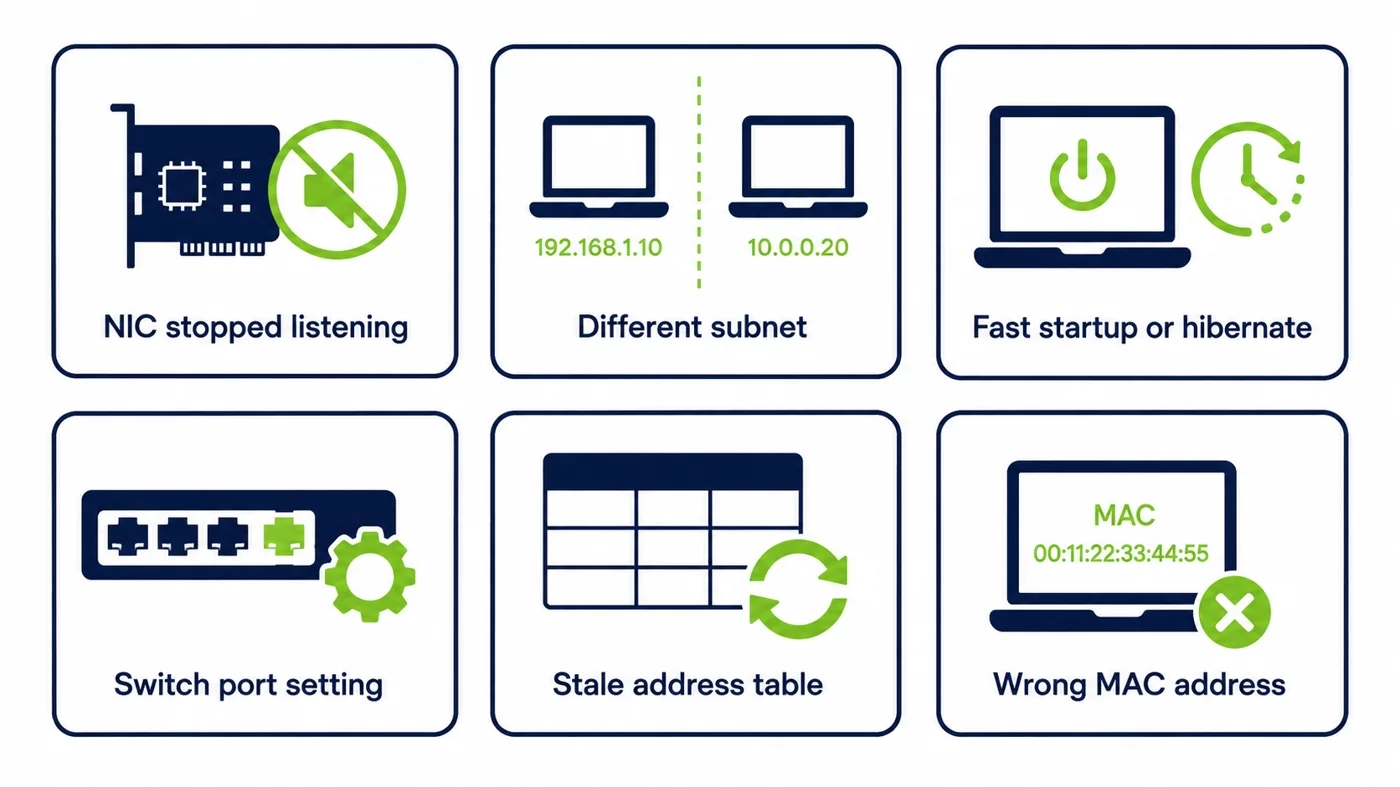
This is the single most common enterprise symptom, and it points straight at one cause. Waking from sleep uses a different, more forgiving power state than waking from a full shutdown, so a machine can wake from sleep while ignoring the packet when it is properly off. Since the energy saving depends on full shutdown, this is exactly the case you need to fix.
The fix lives in two places. The firmware must be set to allow wake from a powered-off state, and the operating system must not cut power to the network card when it shuts down. Get both right and the machine wakes from shutdown as readily as from sleep. Miss either and you get the classic sleep-yes, shutdown-no pattern.
Getting the BIOS and UEFI settings right
The firmware is where wake from shutdown is enabled or denied, and the setting hides under different names on different machines. Look for an option along the lines of wake on LAN, power on by PCI-E, or wake from S5, and make sure it is enabled. If it is off, no operating-system setting will save you, because the card is powered down before the OS ever has a say.
The practical challenge is scale. Setting this by hand on one machine is trivial and on ten thousand is impossible, which is why the firmware default your fleet ships with matters so much. Standardizing the firmware setting through your management tooling, rather than touching machines individually, is the only version of this that works across a real estate.
Verifying the Windows settings
Once the firmware is right, the operating system has to agree. In the network adapter’s power management, the machine must be allowed to be woken by a wake packet, and the option that lets the system turn the card off to save power must not be undoing your work. These two settings quietly conflict on a lot of default builds.
Microsoft documents the adapter and power behavior in its Wake-on-LAN guidance, and it is worth aligning your standard image to it. As with the firmware, the goal is to set this once in your build rather than per machine, so every endpoint ships ready to wake instead of needing a visit.
Wi-Fi, VPN, and the internet
A lot of wasted troubleshooting comes from expecting Wake-on-LAN to do things it was never built to do. Classic wake is a wired, local-network mechanism. Waking reliably over Wi-Fi is inconsistent at best because wireless power states and the wake standard do not line up well. Waking directly across the internet is not how it works at all, since the wake packet is a local broadcast.
If the requirement is to wake a machine from outside the network, the answer is not to force the packet across the internet but to use an authenticated service that delivers the wake locally inside the network. Recognizing this early saves hours spent trying to make a local mechanism behave like a remote one.
What the magic packet is, and checking it
The wake packet, often called a magic packet, carries the target machine’s hardware address repeated in a specific pattern. If that address is wrong, or the machine’s address changed and your records did not, the packet is perfectly valid and simply wakes nothing. A surprising number of stubborn failures are just a stale or mistyped address.
So before blaming the network, confirm you are sending to the right address. Verify the target’s current hardware address against your inventory, and make sure the tool sending the wake is using it correctly. This is a two-minute check that resolves more cases than people expect, because it is the least glamorous thing to suspect.
Using packet capture to see where it dies
When the settings look right but the machine still will not wake, stop guessing and watch the packet. A capture taken on the target’s own segment tells you whether the wake packet is actually arriving there. If it arrives and the machine ignores it, the fault is on the endpoint. If it never arrives, the fault is somewhere in the network path.
That single observation is the most valuable thing in the whole process, because it definitively separates an endpoint problem from a network problem. Everything before this was narrowing down; the capture confirms which half of the path to fix, so you spend your effort in the right place.
Waking across subnets and VLANs
If a local wake works but a wake from the management console does not, you have found the classic cross-subnet failure. The wake broadcast reaches machines on its own subnet and stops at the router, so a packet sent from elsewhere never arrives. This is the single most common reason enterprise wake fails at scale.
The safe fix is not to forward broadcast across the network but to place a relay inside each segment that emits the local wake on command. PowerPlug’s Wake-Up technology does this, so a central request reaches any machine without opening the network up. If cross-subnet wake is your problem, this is the layer that solves it.
When wake fails only after hours off
A particularly maddening pattern is a machine that wakes fine shortly after being shut down but ignores the packet the next morning. This usually is not the endpoint at all. It is the network forgetting where the machine lives, because the switch or router aged the machine’s address out of its tables after a period of silence.
When the network no longer knows which port the machine is on, a unicast-style wake has nowhere to go. A local relay sidesteps this entirely, because it broadcasts inside the segment where the machine physically is, rather than relying on address tables that expire. If your wakes fail after long idle periods, this is the mechanism to suspect.
Switch and port settings that block wake
Managed switches have features that can silently interfere with wake. Aggressive power-saving on a port, certain storm-control or broadcast-suppression settings, and port security that reacts to a machine going quiet can all get in the way of a wake packet reaching its target. These are easy to overlook because they are doing their intended job.
If a packet capture shows the wake arriving on the segment but not on the target’s port, the switch is the place to look. Reviewing the port configuration for anything that suppresses broadcast or powers the port down usually reveals the block, and a small adjustment restores the wake without weakening the switch’s real protections.
Living with 802.1X and NAC
Networks that enforce 802.1X or NAC add a subtlety. A machine that has just woken is not yet authenticated to the network and may sit in a restricted state until it completes that handshake, which can look like a wake failure when the wake actually succeeded. The machine is up, it just is not fully on the network yet.
The way to tell the difference is to check whether the machine powered on at all, separately from whether it reached the network. If it booted but stayed restricted, the issue is the access-control handshake, not the wake. Planning the wake and the network authentication together, rather than treating them as one event, avoids chasing a failure that is not there.
Why certain hardware models fail more
If failures cluster on one make or model, the hardware is telling you something. Different network cards and firmware handle wake differently, and a driver or firmware update to one model can change its wake behavior across every machine that received it. What looks like a random scattering of failures is often one model behaving as a group.
Grouping failures by model turns a confusing list into a clear pattern. Once you see that the failing machines share hardware, you can fix the driver or firmware setting for that model once and clear the whole cluster, rather than treating each machine as an isolated mystery.
Hibernate and fast startup
Two operating-system features quietly cause wake trouble. Hibernate and the fast-startup option both leave the machine in a state that is not the clean powered-off state Wake-on-LAN expects, and depending on the hardware, that can leave the network card in a mode where it no longer listens for the wake packet.
If wakes are inconsistent for no obvious reason, these settings are prime suspects. Standardizing the shutdown behavior across the fleet, so machines reach the state wake actually expects, removes a whole category of intermittent failures that are otherwise very hard to pin down.
When a mesh of relays is the real fix
Many of the failures above share a root cause, which is that a single central packet is being asked to cross a network that was built to contain it. A mesh of relay agents, one inside each segment, removes that whole class of problem by making every wake a local broadcast, coordinated centrally but delivered where the machine actually is.
When you find yourself fighting subnet boundaries, aged address tables, and switch broadcast rules over and over, the mesh is usually the fix that ends the fight rather than the next patch to it. It is the difference between troubleshooting the same failure repeatedly and designing it out.
Standardizing wake across thousands of endpoints
Troubleshooting one machine is a task; troubleshooting ten thousand is a program. At scale the goal shifts from fixing individual failures to preventing them, by standardizing the firmware and operating-system settings in the build, holding those settings against drift, and reaching every segment with a consistent wake mechanism.
A managed platform is what makes that prevention practical. It holds the endpoint listening state in place, delivers the wake locally in every segment, and reports which machines failed and why, so the fleet stays reliable instead of generating a fresh queue of failures every cycle. The wider platform is described on the platform overview, and it anchors PowerPlug’s enterprise Wake-on-LAN solution.
The evidence to gather before you escalate
When a case has to go to a vendor or a network team, the right evidence turns a slow back-and-forth into a quick resolution. Note whether the machine wakes from the same subnet, whether it wakes from sleep versus shutdown, the target’s hardware address, the firmware and operating-system wake settings, and a packet capture showing whether the wake reached the segment.
That package answers the first five questions anyone will ask, so the conversation starts at the real problem instead of the basics. Gathering it as you troubleshoot, rather than after, means you often solve the case yourself before escalation is even needed.
The payoff once wake is reliable
All this troubleshooting has a purpose beyond a working packet. Once wake is dependable across the fleet, the machines can be powered down every night with confidence, and the idle-PC energy that the US ENERGY STAR program has tracked for years stops being spent for nothing.
That is the real reason reliable wake is worth the effort. It removes the last excuse for leaving machines on, so the energy saving and the patch compliance both become achievable, from the same underlying fix. Troubleshooting wake well is, in the end, what makes powering down safe.
Frequently asked questions
Why does Wake-on-LAN work from sleep but not from shutdown?
Waking from a full shutdown uses a stricter power state than waking from sleep, so a machine can wake from sleep while ignoring the packet when properly off. The fix is to enable wake from a powered-off state in the firmware and stop the operating system cutting power to the network card at shutdown.
Does Wake-on-LAN work over Wi-Fi?
Reliably, no. Classic Wake-on-LAN is a wired, local-network mechanism, and wireless power states do not line up well with the wake standard, so Wi-Fi wake is inconsistent. For machines off the wired network the right approach is an authenticated service that delivers the wake locally inside the network.
Why does a machine stop waking after a few hours off?
Usually because the switch or router aged the machine’s address out of its tables after a period of silence, so a wake sent from elsewhere no longer knows which port to use. A local relay avoids this by broadcasting inside the machine’s own segment rather than relying on address tables that expire.
How do I check the magic packet is reaching the machine?
Take a packet capture on the target’s own segment. If the wake packet arrives there and the machine still ignores it, the fault is on the endpoint. If it never arrives, the fault is in the network path. That single observation separates an endpoint problem from a network problem definitively.
How do I wake machines in other subnets?
Do not forward broadcast across the network. Place a relay inside each segment that emits the local wake on command, coordinated by a central service, so a request reaches any machine without opening the network. This is the standard fix for the most common enterprise wake failure.
See how much your organization could save
Tell us how many PCs you run and we will show you the realistic energy and cost savings, along with the payback period.
Talk to us