By Nimrod Yedaya, VP Customer Experience

The feature that saves an organization the most energy is not the one that turns computers off. It is the one that turns them back on.
That sounds backward. It is the whole point, and it is the single idea this entire guide turns on.
Any organization can shut its machines down at night. The reason almost none do it properly is the fear of not getting them back, the night-shift engineer locked out, the patch that skipped a sleeping fleet, the person at home who can’t reach the office PC. Waking a PC remotely is the capability that removes that fear, and once the fear is gone, aggressive shutdown finally becomes safe. This is how remote wake actually works, what it needs, where the naive version quietly fails, and why the capability matters more the larger and more segmented your fleet becomes.
What waking a PC remotely actually requires
Remote wake is not magic, though the mechanism is literally called a magic packet. It is a small, specific set of conditions that all have to be true at once.
The machine has to still receive standby power, so a completely unplugged PC is out. The network adapter and motherboard have to support Wake-on-LAN, which almost all modern hardware does. The feature has to be enabled in BIOS and in the adapter settings, which is where do-it-yourself attempts most often fall down. And a signal has to reach the sleeping machine across the network. Miss any one of these and the wake fails, usually silently.
The conditions, laid out plainly
It helps to see the requirements as a checklist rather than a paragraph, because every one of them is a place a wake can break.
| Requirement | Why it matters | Common failure |
|---|---|---|
| Standby power | The adapter listens while the PC sleeps | Machine fully unplugged |
| Wake-on-LAN capable adapter | Hardware must support the signal | Rare on very old machines |
| Enabled in BIOS and adapter | Feature is often off by default | Reset by a driver update |
| A signal that reaches the machine | The packet has to arrive | Blocked by a subnet or firewall |
The first three are settings you fix once. The fourth is the one that scales into a real problem, and it is worth its own section.
The magic packet, and where it stops
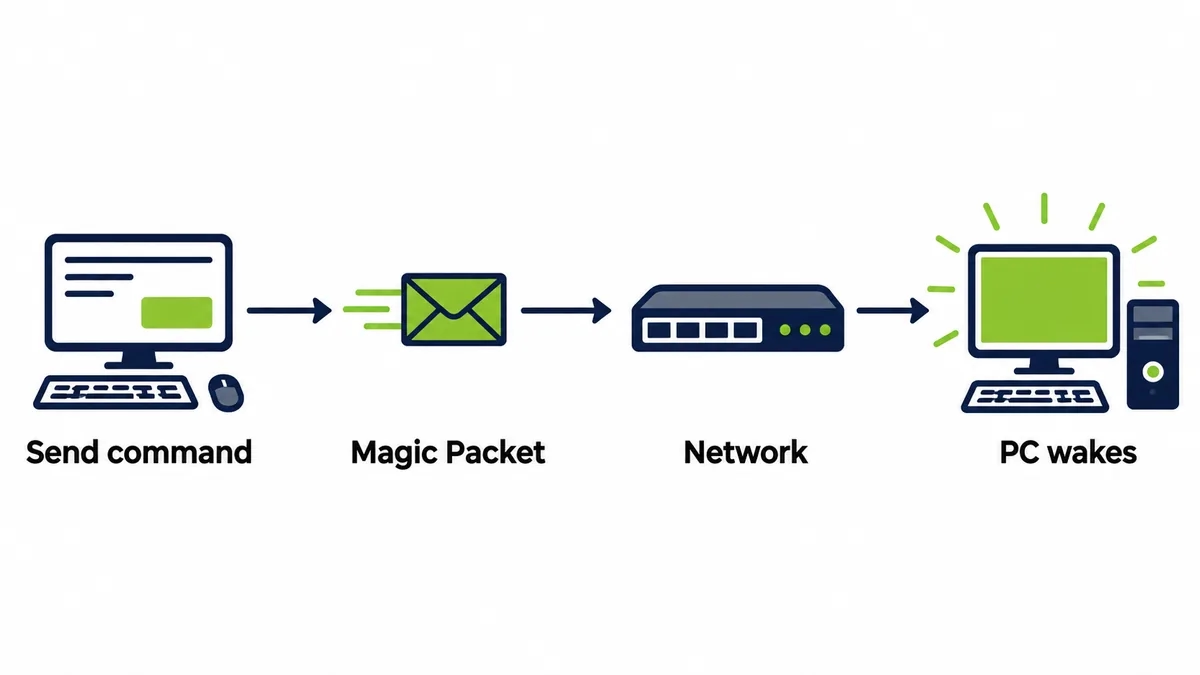
When you wake a PC remotely, a small broadcast called a magic packet goes out on the network, carrying the sleeping machine’s hardware address. The adapter, still listening on standby power, recognizes its own address and brings the machine up. On one flat network this works the first time, every time.
Then the network stops being flat.
The moment it is split into subnets, which every organization does as it grows and secures its systems, that broadcast no longer crosses the boundary. The machine on the other segment never hears its own name called. Understanding how power management works at this level is what separates a wake-up that works in a demo from one that works in a building.
Why remote wake gets harder as you grow
A small office rarely hits the subnet wall. One network, one broadcast domain, and the magic packet reaches everything.
Growth is what breaks it.
Add a second site, split departments onto separate subnets, put a VPN in the path, and the simple wake that worked for fifty machines starts failing for the ones that matter most, the remote ones you cannot walk over to. This is exactly the gap a patented Wake-on-LAN Mesh closes, relaying the wake signal across subnets and complex networks without reconfiguring routers or opening the segmentation that keeps the network secure. The harder your network works, the more that relay matters.
Wake-on-LAN on its own against managed wake
Raw Wake-on-LAN and managed wake are not the same tool with a nicer interface. They solve different sizes of the problem.
| Capability | Standard Wake-on-LAN | Managed remote wake |
|---|---|---|
| Wake a machine on the same subnet | Yes | Yes |
| Wake across subnets and sites | No | Yes |
| Wake by an end user from home | No | Yes, single click |
| Scheduled wake for maintenance | Manual scripting | Built in |
| Record of who woke what | None | Yes |
The left column is a protocol. The right column is a service you can build a policy on.
The person working from home
Most remote-wake conversations are really about one moment. Someone is at home, they need a file or an application that lives on their office PC, and the machine is asleep or off.
Without remote wake, that is a dead end.
With it, a Wake-Up Portal brings the machine back with a single click, from home or a remote office, and the person connects as if they had never left. No ticket, no call to IT, no colleague sent to press a power button. The same capability that lets the organization shut machines down at night is the one that lets a remote worker reach theirs at any hour, and those two needs turn out to be the same need.
The maintenance window nobody is awake for
IT has its own version of the remote-wake problem, and it runs at three in the morning.
Patches, updates, and backups are pushed overnight precisely because nobody is working. But a machine that is off cannot receive them. So either the fleet is left on all night, which wastes the energy this was supposed to save, or a chunk of machines miss the window and stay unpatched until morning. Scheduled remote wake resolves the standoff. The machines wake for the window, take the update, and return to a low-power state before staff arrive, which is the core of proper endpoint power management.
What remote wake finally makes affordable
Here is where the backward-sounding opening pays off.
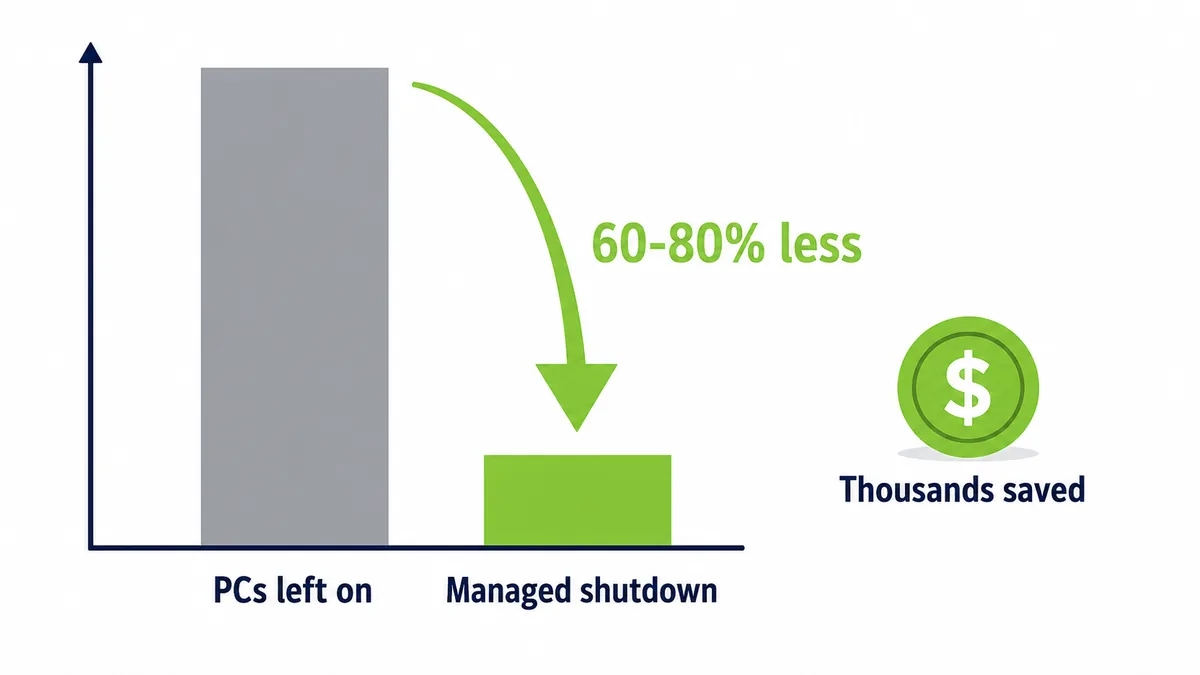
Once you can wake any machine reliably, from anywhere, on schedule or on demand, there is no longer a reason to leave machines on overnight. The whole fleet can be shut down hard, and the energy that used to burn from dusk to dawn simply stops. Office equipment already makes up a real share of commercial electricity use, as the US Energy Information Administration records, so removing the overnight idle load is a large, immediate cut. Managed power built on reliable wake reduces PC energy consumption by up to 60 percent, and the saving begins the first night.
What remote wake does not do
It would be dishonest to sell it as a cure-all. Remote wake does not make a slow machine fast, and it does not replace patch management or security tooling. It makes those things possible on a fleet that is powered down, which is the point.
And it asks for a little work up front.
You confirm Wake-on-LAN is enabled across the estate, set the schedules, and put a reliable relay in place for the subnets a simple broadcast cannot cross. The effort is modest and front-loaded, which is why a full return typically lands in under four months. Strip it down and the finding is simple. Turning machines off is worth real money, and remote wake is the one capability that makes turning them off safe.
Idle is not the same as saving
Leaving a machine idle instead of off feels like a compromise that saves something. It barely does.
An idle desktop draws nearly as much as a working one, because the processor rests while the power supply, memory, and fans keep running. Sleep cuts that sharply, but a sleeping machine is only useful if you can wake it, or people set sleep to never so nothing is ever slow to reach. This is the loop remote wake breaks. Once waking is reliable, the machine can go to a genuinely low state, and the saving stops being theoretical.
The cost of leaving them on instead
Every organization that cannot wake machines reliably makes the same quiet choice. It leaves them on.
That choice has a price that runs all night, every night. A desktop drawing 60 to 100 watts idle, held on for the twelve to fourteen hours nobody is using it, across 250 working nights and the weekends in between, is a standing cost that compounds silently. One machine is a few dollars. A thousand is tens of thousands a year spent so that a handful might be reachable. Remote wake is what lets an organization stop paying that toll without losing the access it was paying for.
The on-call engineer at two in the morning
There is a moment every IT team recognizes. Something breaks overnight, and the machine that could fix it is asleep in a building nobody is in.
Without remote wake, that means a drive across town.
With it, the engineer wakes the exact machine from home, connects, and resolves the issue before most people would have found their car keys. The same capability that powers the fleet down at night is the one that rescues the night, which is why remote wake pays back in incidents avoided as well as in energy saved. The machine you shut down to save money is the machine you can still reach in an emergency.
Run the maintenance math
Picture a security update pushed to 5,000 machines overnight. If a tenth are switched off, 500 miss it and stay unpatched until the next day.
Five hundred exposed machines, every cycle.
Now schedule those machines to wake for the window, take the update, and sleep again before anyone arrives. The patch reaches all 5,000, the network is quiet while it runs, and nobody loses a morning to a reboot they did not choose. Remote wake is the difference between a maintenance window that covers the fleet and one that covers whatever happened to be on.
What growth does to the saving
The saving from remote wake does not just add up as you grow. It accelerates.
A fifty-machine office saves a little and rarely hits the subnet wall. A fifty-thousand-machine enterprise saves enormously, and hits that wall on day one, which is why the ability to wake across subnets and sites is what makes the saving reachable at the scale where it actually matters. The bigger and more segmented the network, the more a machine that can be woken anywhere is worth, and the more the old habit of leaving everything on quietly costs.
Setting it up without weakening the network
A fair worry about remote wake is whether reaching machines across a secure network means loosening it. It does not have to.
A mesh relays the wake signal across subnets without opening the segmentation that keeps the network safe, and permissions control who can wake which machines, with every event logged. So the capability that saves the energy also respects the security the network was built with. You are not trading safety for savings. You are adding a controlled way to reach a machine that is otherwise doing nothing but drawing power.
The cost of the safe-looking choice
Leaving machines on looks like the cautious option. It is the expensive one.
Caution has a running meter. A fleet kept on so that a few machines might be reachable burns power every hour of every night, and the bill arrives whether or not anyone ever needed those machines. Remote wake replaces the blunt caution of leaving everything on with a precise one, reach the machine you actually need and let the rest sleep. The safety is the same. The cost is not.
The number behind it
The arithmetic is what makes the case, not the pitch.
A single desktop wasting a few dollars a year in overnight power is nothing. A thousand of them, held on so a handful stay reachable, is tens of thousands a year for access you could have had anyway. Once waking is reliable, that entire line disappears, and it disappears the first night, not after a long ramp. There is no forecast to argue with, only a meter that stops running when the machines finally do.
Two problems, one capability
Remote wake looks like two separate features, and it is really one.
The energy team wants machines off at night. The support team wants to reach a machine at any hour. The remote worker wants their office PC from home. On the surface these are different requests, and the same thing answers all of them, the ability to wake any machine, anywhere, on demand. That is why remote wake pays back in three currencies at once, lower bills, fewer callouts, and staff who are never blocked by a sleeping machine.
What it does not ask you to give up
The fair question is what you trade for all this. The answer is very little.
You do not give up availability, because any machine can be woken in seconds. You do not give up security, because the wake travels across segmented networks without opening them and every event is logged. And you do not give up your existing hardware, because Wake-on-LAN is already built into it. The main cost is the setup to enable and cover it properly, which is modest against a saving that starts the first night.
The habit that quietly costs the most
Most wasteful IT habits are visible. This one hides in plain sight.
Leaving machines on overnight never looks like a decision, because nobody actively chooses it each evening. It is simply what happens when the alternative feels risky. That is what makes it so expensive and so easy to miss at the same time. Remote wake turns the default from on to off, and once the default flips, the saving accrues quietly, without anyone having to think about it again the following night, or the one after that.
Frequently asked questions
See how much your organization could save
Tell us how many PCs you run and we will show you the realistic energy and cost savings, along with the payback period.
Talk to us
About the author
Nimrod Yedaya
VP Customer Experience
Over 15 years of experience in customer service, technical support, and customer relationships. Nimrod joined PowerPlug in 2012 as Customer Support Manager and was promoted to VP in 2016. He holds an MBA from BIU and a BSc in Communication Systems Engineering from BGU.