Entries by nimrody

Government PC Power Management

By Nimrod Yedaya, VP Customer Experience
Government PC Power Management

A government agency can usually tell you the running cost of its vehicle fleet to the cent. Ask what it spends keeping desktop PCs on overnight, and the room goes quiet.

The number exists. It just never had an owner.

Across dozens of departments, thousands of machines stay powered on through the night so that someone, somewhere, can reach them if the need arises. Most nights nobody does. That standing cost comes straight out of a public budget, and it is one of the very few an agency can cut without touching a service, a post, or a working hour. Government PC power management is the practice of reclaiming it, carefully enough that security, compliance, and availability are never the price of the saving.

Why the machines stay on all night

The overnight habit is not negligence. It is caution.

Ask the IT team and every reason holds up. A night-shift worker needs remote access. A patch job runs at three in the morning. An auditor might request a system at short notice. In a sector where being unreachable can mean missing a legal or a safety obligation, leaving everything on has always felt like the responsible default.

That logic made sense while the alternative meant losing access. It stopped making sense the moment machines could be shut down and woken again on demand, reliably, from anywhere. The caution was never wrong. The constraint underneath it quietly disappeared, and the policy simply never caught up.

The cost hiding across departments

Take a mid-size agency running 4,000 desktops. Each draws somewhere between 60 and 100 watts while it sits idle, which is normal for office hardware. Leave them on for the twelve to fourteen hours a night nobody is using them. Now stretch that across 250 working nights a year, and add the weekends the buildings stand empty.

That is 4,000 machines doing nothing, all night, on the public account.

Public buildings are already energy-intensive by nature, as the US Environmental Protection Agency notes in its work on facility energy, so idle PCs land on top of a bill that is under scrutiny to begin with. Managed power cuts PC energy consumption by up to 60 percent, and unlike most savings it arrives without new hardware, a reorganization, or any reduction in what the public receives.

The secure network problem nobody expects

Public-sector networks are among the most carefully segmented anywhere, and that is exactly what defeats the obvious fix.

Standard Wake-on-LAN sends a broadcast that stops dead at the subnet boundary. Agencies split their networks into subnets and security zones on purpose, department by department and site by site. So the more seriously an agency takes network security, the less a plain wake-up signal can travel across it. The teams that did segmentation properly are the ones for whom ordinary Wake-on-LAN fails first.

This is the gap a patented Wake-on-LAN Mesh closes, carrying the wake signal across subnets and complex networks without configuration changes and without weakening the segmentation that made the network secure. Security and power saving stop pulling against each other.

Why one blanket policy always fails

The tempting shortcut is a single rule for everyone. Shut every machine at seven in the evening, wake every machine at seven in the morning.

It survives about a month.

Then the operations centre that runs around the clock finds its screens dark at midnight. The department that opens at six loses its first hour every day. A team on a legal deadline finds machines asleep in the middle of the work. A blanket policy inside an organization with dozens of different schedules is not simpler than doing nothing. It is just wrong in more places at the same time. The answer is not a cleverer single rule. It is many precise ones, applied per department, which is the core of a real government IT energy management approach.
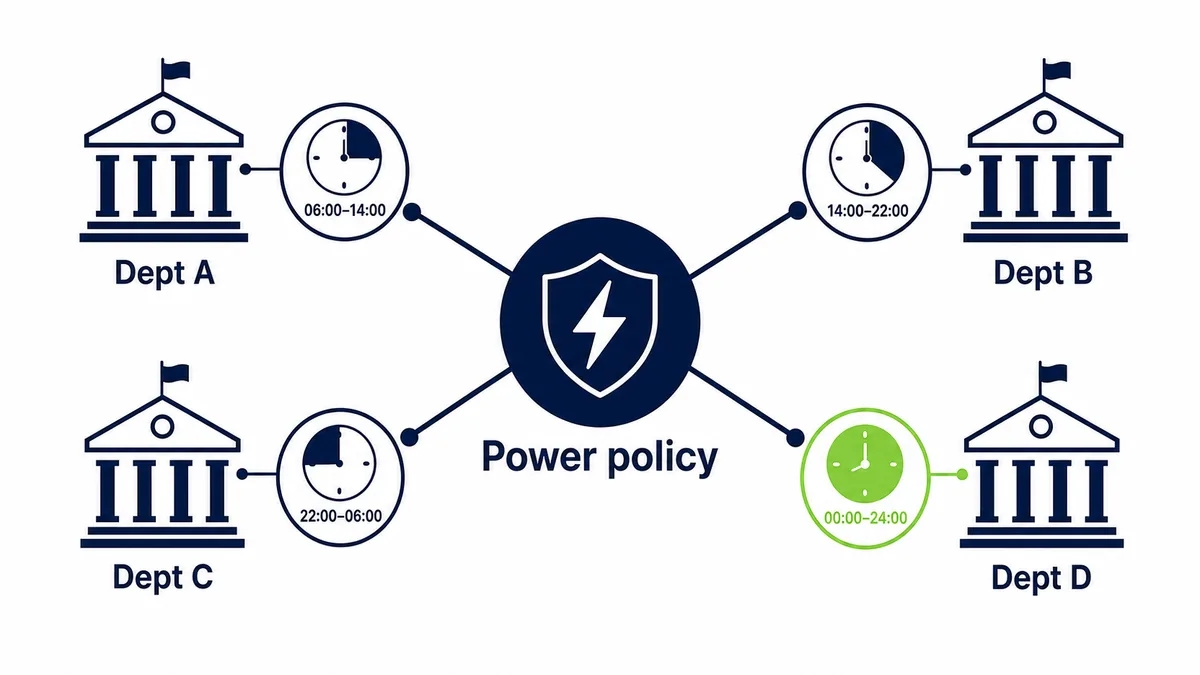
One power policy, tuned to each department
One central power policy, tuned to the real operating hours of each department.

Power plans that match each department

Customized power plans let each department run on a schedule tied to its genuine hours, so machines are fully powered only when the work actually happens. A licensing office and a 24-hour emergency operations centre should never share a policy, and with tailored plans they never have to.

The table below shows how one estate holds several schedules at once.

Department typeReal operating patternSensible power policy
Emergency operationsAround the clockAlways on, always reachable
Standard officeRoughly 8 to 6, weekdaysWake before shift, sleep after hours
Shift-based service deskTwo shifts, no weekendsWake per shift, off overnight and weekends
Seasonal or project teamPeaks, then quietScheduled by period, off when idle

The saving comes entirely from reclaimed idle time. Nobody’s working day is touched.
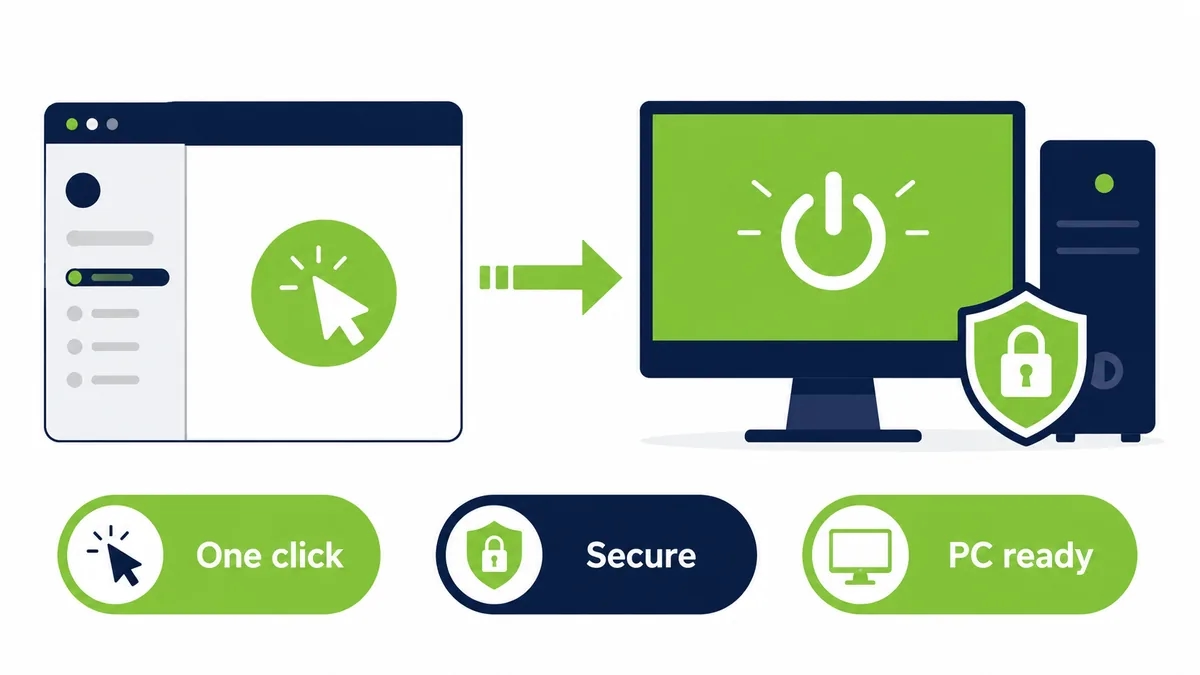
Secure one-click wake through a portal
A secure portal wakes a specific machine with one click, ready to use, off-hours.

Availability without leaving the lights on

So how do you power machines down and still promise availability? You make waking them as dependable as switching them off.

Scheduled wake brings a department up ahead of its maintenance window, so updates and backups run without disrupting the day. When a specific machine is needed off-hours, a Wake-Up Portal brings it back with a single click, from home or a remote office, with no ticket and no technician walking a corridor. Consider a department of 300 machines on a fixed daytime schedule. Every one can be off by eight in the evening, yet any single one can be awake and reachable within seconds if an on-call officer needs it at midnight. Powering down stops meaning giving something up.

Where control and security actually live

For a public body, who can wake what, and the record of it, matters as much as the saving.

Wake schedules and permissions are configured and monitored from one place, access rights are set per user, and security protocols are enforced the same way every time. Powering down and disconnecting an unused machine also shrinks the surface an attacker can reach during the quiet hours, which is why power policy belongs in the same conversation as enterprise IT security rather than in opposition to it. The controls that make the saving safe are the same controls an auditor wants to see.

When the saving becomes a reportable number

There is a second reason this matters now, and it has nothing to do with the electricity bill.

Sustainability and disclosure rules increasingly require public bodies to account for the energy their own operations consume, and a fleet of PCs running all night used to be an invisible line. It is invisible no longer. Because the schedules and wake events are logged, the energy avoided is measured rather than guessed, which is exactly what frameworks like the CSRD expect an organization to be able to show. The reduction was always real. What changed is that it now counts on the record, next to every other operational figure the agency reports.

What government power management does not fix

It would be dishonest to promise this solves everything. It does not speed up an old machine, and it does not replace patch management or endpoint protection. What it does is let those systems work as intended, by making sure the machines are present when the tools reach for them.

It also does not switch itself on for free.

There is setup. You map the estate, define schedules that match each department, and confirm Wake-on-LAN is enabled across every site. The work is front-loaded and modest, and it is the reason the full return typically lands in under four months rather than on the first afternoon. Strip the detail away and the finding is plain. Idle machines cost public money, the only thing keeping them on was the fear of not getting them back, and that fear no longer has a basis.

Idle is not the same as saving

It is tempting to assume a machine left idle is almost free. It is not.

An idle desktop draws nearly as much as a working one, because the processor rests but the power supply, memory, and fans keep running. Sleep helps, yet a sleeping machine still has to be reachable, or it turns into a machine someone has to walk to. That is why “we let them idle overnight” and “we put them to sleep” so rarely describe a real saving. The saving only appears when a machine can drop to a genuinely low state and still wake the instant it is wanted.

The productivity cost that never reaches the bill

The electricity waste is the cost everyone eventually spots. It is not the biggest one.

When machines are off at two in the morning, the overnight patch cycle skips them, so updates land the next day while a caseworker waits. Deployment success rates fall, help-desk queues grow, and any machine that missed a security patch stays exposed a day longer than it should in an environment that holds sensitive public data. None of that shows up as a kilowatt-hour. All of it shows up as time, risk, and citizens waiting a little longer for a service. The energy number is the one you can see. The productivity number is often the larger of the two.

Run the maintenance math

Picture a monthly security update pushed to 4,000 agency desktops overnight. If 15 percent are switched off, 600 of them miss it and sit unpatched until someone logs in the next day.

Six hundred exposed machines, every cycle.

Now schedule those desktops to wake for the window instead. All 4,000 are awake at one in the morning, take the update in a quiet hour, and return to sleep before staff arrive. The patch reaches the whole estate, the compliance position improves, and nobody loses a morning to a forced reboot. The difference was never the patch itself. It was whether the machines were there to receive it.

What changes between fifty machines and fifty thousand

A single department forgives a lot. You can walk to the one machine that did not wake and press the button yourself.

An agency of fifty thousand forgives nothing.

At that scale, a wake method that works 95 percent of the time leaves 2,500 machines dark every morning, each one a person who cannot start or a patch that did not land. The manual workarounds that held a small office together stop scaling, because nobody has the hours to chase the exceptions. Scale does not make the problem bigger in a straight line. It changes what kind of problem it is, from a nuisance a team tolerates into a process that has to run without anyone tending it.

A saving you can defend in a budget meeting

Most cost cuts in the public sector carry a cost of their own. Fewer staff, slower service, a program trimmed.

This one does not.

No post is lost, no service is reduced, and no citizen waits longer because a machine slept overnight while the building stood empty. That is a rare thing to be able to say in a budget meeting, and it is what makes idle-PC energy one of the easiest lines an agency can act on. The hard part was never the justification. It was having a way to power down that did not put availability at risk, and that part is now solved.

The quiet win for the IT team itself

There is a benefit that lands on the people running all this, and it goes past the budget.

Because wake schedules, permissions, and events are handled from one console, the daily overhead of a large fleet drops. Fewer desk visits to wake a machine, fewer tickets from remote staff who cannot reach their PC, and a clear record when someone asks who woke what and when. The team spends less time on the mechanics of access and more on the work that genuinely needs them, which in a stretched public IT department is a saving measured in hours as well as watts.

Where the largest agencies feel it first

The organizations that feel this most are the ones with the most machines and the longest hours.

Hospitals, universities, municipalities, tax and benefits offices, and national services all run large fleets that sit idle for long stretches, and all of them answer to a public that expects careful spending. For them the idle-PC line is not a rounding error. It is a recurring six or seven figure cost hiding in plain sight, and one of the few an agency can cut this quarter without a policy debate, a consultation, or a single reduced service.

The number that surprises the finance team

Finance rarely argues with this one, because the arithmetic is dull and unforgiving.

Put a modest figure on a single idle machine, then multiply by the fleet and the nights. An agency with 4,000 desktops wasting even a few dollars each in overnight power lands in six-figure territory within a year, before anyone counts weekends or holidays. There is no forecast to dispute and no assumption to challenge. The machines were on, nobody was using them, and the meter ran. That is usually the moment a power policy stops being an IT preference and becomes a budget decision.

Why now, and not five years ago

Agencies could have done this years ago. Two things changed that make it pressing now rather than optional.

The first is reliable cross-subnet wake, which removed the availability risk that always killed the idea. The second is disclosure. Public bodies are now asked to report the energy their operations use, so idle machines went from invisible waste to a line someone has to explain. The technology caught up and the accountability arrived at roughly the same time, which is why the overnight fleet is a question agencies are being made to answer today.

Frequently asked questions

Can PC power management meet public-sector security rules?

Yes, when it is built for it. Access rights and wake permissions are enforced and logged centrally, and powering unused machines down can reduce exposure rather than add to it. The controls that make the saving safe are the ones auditors already ask to see.

Does Wake-on-LAN work across separate government networks and sites?

On its own, usually not, because a standard wake packet stops at the subnet boundary. Reaching machines across segmented networks and multiple sites needs a mesh built for that purpose, which relays the signal without loosening the segmentation.

How does this help with sustainability or CSRD reporting?

Because schedules and wake events are logged, the energy a fleet avoids using becomes a measured figure rather than an estimate. That gives an agency an auditable number to place in the disclosures these frameworks require.

What happens if a system is needed outside working hours?

On-demand wake brings any single machine back in seconds through a secure portal, from home or a remote office. The rest of the department stays powered down, so one urgent need does not mean leaving a floor of machines on.

How long before it pays for itself?

It depends on fleet size, idle wattage, and local electricity rates, but managed shutdown with reliable wake-up commonly returns its cost within months. The saving begins the first night the policy runs, which keeps the payback period short.

See how much your organization could save

Tell us how many PCs you run and we will show you the realistic energy and cost savings, along with the payback period.

Talk to us

Nimrod Yedaya

About the author

Nimrod Yedaya

VP Customer Experience

Over 15 years of experience in customer service, technical support, and customer relationships. Nimrod joined PowerPlug in 2012 as Customer Support Manager and was promoted to VP in 2016. He holds an MBA from BIU and a BSc in Communication Systems Engineering from BGU.

Education PC Power Management

By Nimrod Yedaya, VP Customer Experience

Education PC Power Management

A university computer lab is busy for a few hours a day during term. Then term ends. Add the evenings, the weekends, reading weeks, and the long summer, and the average campus machine spends far more of the year switched on and unused than actually working.

That gap is where the electricity bill quietly grows.

Education runs on a dense estate of computers, in labs, classrooms, libraries, and offices, and most of them are idle most of the time. Managing that idle time is the single largest energy saving a campus can make without changing a timetable or asking anyone to work differently. Education PC power management is how you take it, while keeping every machine ready the moment teaching needs it.

The calendar nobody counts

Energy planning on a campus tends to assume machines are used the way the timetable implies. They are not.

A lab PC might see real use for four or five hours on a teaching day. The other nineteen or twenty hours it either sits idle or gets left on so it is ready for the morning. Now overlay the academic calendar. Weekends are quiet. Holidays are quieter. The summer break can leave whole buildings powered on for weeks with almost nobody in them. Our breakdown of how much electricity office PCs use when idle shows how little changes between a working machine and an idle one, which is why those empty hours cost almost as much as the busy ones.

What the idle hours actually cost

Take a modest estate of 1,500 machines across labs and offices. Each draws 60 to 100 watts idle. Assume they average sixteen hours a day powered on but unused, once you fold in evenings, weekends, and breaks.

One machine is a rounding error. Fifteen hundred are not.

That pattern turns into tens of thousands spent every year on computers doing nothing, in a sector where every spare pound is contested. Buildings and their equipment are a major share of global electricity demand, as the International Energy Agency reports, and a campus packed with always-on machines sits right in the middle of that. Managed power cuts PC energy consumption by up to 60 percent, and the saving starts the first night, not the next budget cycle.

Why the reminder email never works

The first fix a school reaches for costs nothing. Send an email. Ask staff and students to shut down before they leave. Put a sign by the lab door.

It works until the first busy week.

Then a student leaves a render running, a lecturer keeps a machine on to reach it from home, and a whole lab stays lit because the last class ran late and nobody wanted to interrupt the person still working. None of them are careless. A policy that depends on hundreds of different people making the same choice every evening is not a policy, it is a hope. The version that holds is the one that needs nobody to remember, because the estate manages itself, which is the point of proper education IT management.

The trap of always ready

Here is the twist that catches campuses out. The pressure to have labs ready for the first class often defeats the saving entirely.

Because a machine that is asleep still has to be reachable, and because standard wake-up is unreliable across a multi-building network, the safe workaround becomes obvious. Set sleep to never. Leave the labs on. That way nothing is ever slow to start. The result is a campus that believes it has a power policy while quietly running most of its machines around the clock. Sleep only becomes a real saving when it is paired with a dependable way to wake the exact machines you need, when the timetable needs them.

Different spaces, different schedules
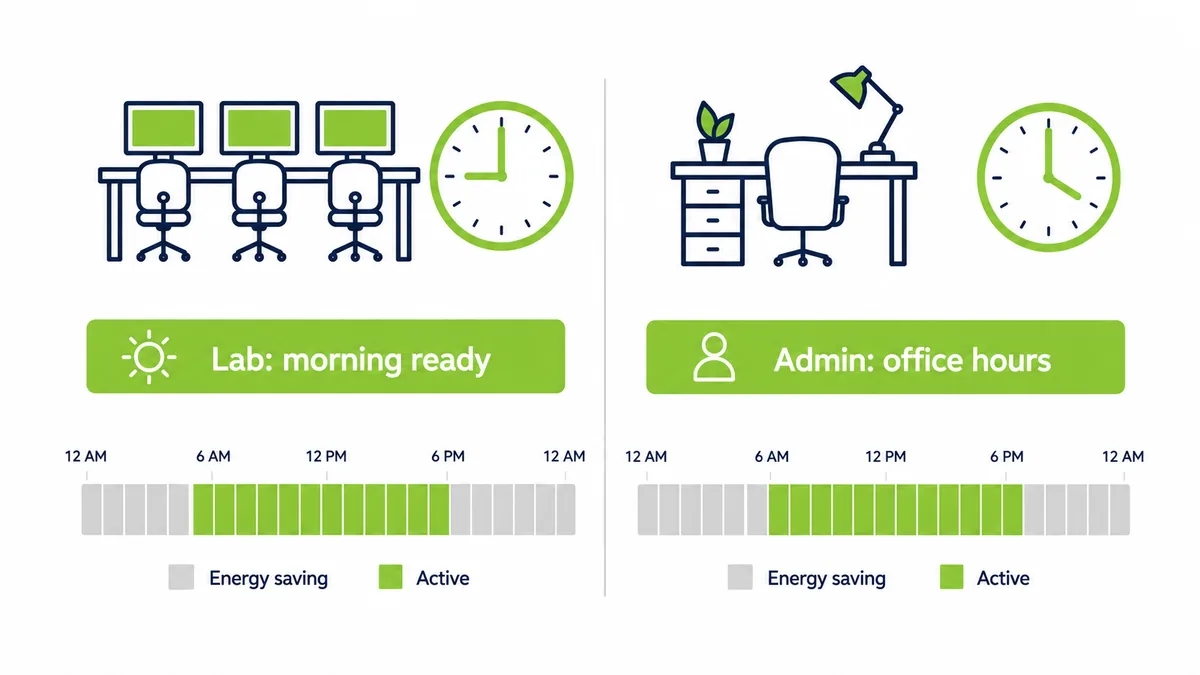
Different spaces, different schedules, a lab ready in the morning, admin on office hours.

Schedules built for labs and offices

Different spaces on a campus behave nothing alike, so the policy should not treat them alike.

Customized power plans let IT set a schedule per group of machines. A teaching lab wakes before the first class and sleeps once the timetable clears. Administrative PCs follow office hours. A 24-hour study space stays available while a seasonal exam hall powers down for most of the year. The table below shows the same estate carrying several rhythms at once.

Campus spaceReal use patternSensible power policy
Teaching labTimetabled classes, term onlyWake before class, sleep between and off in breaks
Open study areaLong hours, most of the yearExtended schedule, low-power overnight
Administrative officeWeekday office hoursWake before shift, off evenings and weekends
Exam or seasonal roomShort intense periodsOn by period, fully off otherwise

No machine burns power in an empty room, and none is asleep when a class walks in.

Waking a multi-building campus

A campus is rarely one flat network. It is a collection of buildings, each with its own subnets and switches, which is precisely where naive wake-up breaks.

A standard Wake-on-LAN packet does not cross the subnet boundary, so a signal sent from central IT never reaches the lab in the building across the quad. A patented Wake-on-LAN Mesh carries the wake signal across those subnets and buildings without reconfiguring the network, so a schedule set centrally actually reaches every machine it is meant to. Coverage across the whole estate is what turns a good intention into a working policy.

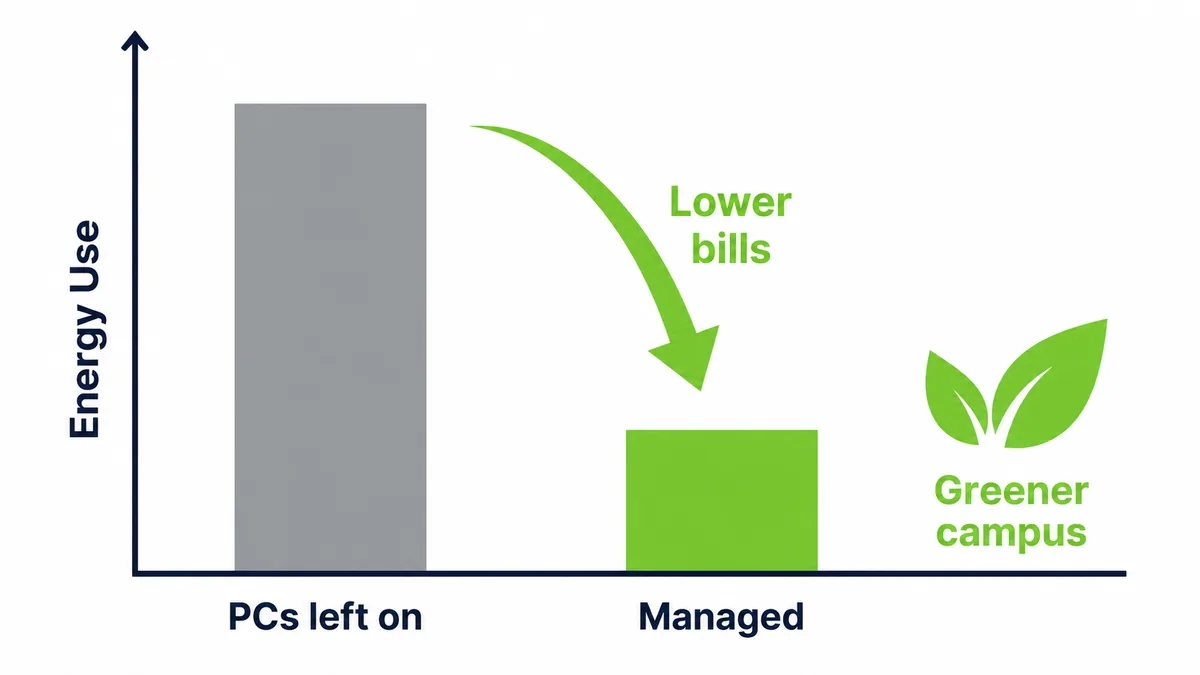
Managed shutdown cuts campus energy use
Managed shutdown cuts campus energy use and extends the life of the hardware budget.

The saving nobody expects: hardware that lasts longer

Energy is the headline, but it is not the only return.

A machine that runs around the clock ages faster than one that rests. Fans, drives, and power supplies all wear on hours of use, so a fleet left on continuously reaches replacement sooner. Cut the needless running hours and each machine lasts longer, which stretches a hardware budget that never stretches far enough and keeps working equipment out of the recycling stream longer. The power policy quietly becomes a procurement policy too, and understanding how power management works across the sleep, wake, and shutdown states is what makes that second saving deliberate rather than accidental.

Ready when teaching needs it

None of this can come at the cost of a lesson. So the wake-up side has to be as dependable as the shutdown side.

Scheduled wake brings labs up before class and pulls updates overnight, so patches land without leaving machines on all night to receive them. When a lecturer needs a specific classroom PC from home, or a technician has to handle an urgent fix, a Wake-Up Portal brings that machine back with a single click. Power saving runs by default, and steps out of the way the instant a person needs something.

Teaching the lesson by living it

There is a softer return that a school, of all places, should not ignore.

A campus that visibly manages its own energy is teaching sustainability by example rather than by slogan. Students see a policy that works, quietly, without anyone being asked to sacrifice access to a machine they need. It is a small thing next to the electricity saving, and it is the kind of small thing an institution built around learning is well placed to make count.

What education power management does not fix

It would be dishonest to claim this removes every problem. It does not upgrade an ageing lab, and it does not replace patch or security tooling. It makes those systems reliable, by guaranteeing the machines are awake when they are needed.

And it does not configure itself overnight.

There is setup. You map the estate, build schedules around the timetable, and confirm Wake-on-LAN is enabled across buildings. The work is modest and front-loaded, which is why the full return typically arrives in under four months. After that it is simply money the institution stops spending, every night, on machines nobody is using.

Idle is not the same as saving

A lab machine left idle feels almost free. It is not.

An idle desktop draws nearly as much as one in active use, because the processor rests while the power supply, memory, and fans keep going. Sleep helps, but a sleeping lab machine still has to be reachable for the morning class, or someone disables sleep to be safe. That is how a campus ends up believing it saves power while quietly running its labs around the clock. Real saving arrives only when a machine can drop to a low state and still wake the moment the timetable calls for it.

The slow morning nobody schedules

Energy is the visible cost. The lost teaching time is the one that stings.

When a lab is powered down without a reliable way to wake it, the first class of the day waits while thirty machines boot, reconnect, and finish the update that skipped them overnight. Multiply that across every lab and every teaching day and it becomes real minutes of instruction lost, plus a queue of tickets from staff who could not get a room ready in time. None of that appears on the electricity bill. All of it lands on the timetable.

Run the maintenance math

Picture a security update pushed to 1,500 campus machines overnight. If a fifth are switched off, 300 miss it and stay unpatched until a student or staff member logs in the next day.

Three hundred exposed machines, every cycle.

Now schedule those machines to wake for the window instead. They come up at one in the morning, take the update, and sleep again before the first class. The patch reaches the whole estate, the labs are protected on time, and nobody arrives to a machine mid-reboot. The update was never the problem. The problem was whether the machines were awake to receive it.

What changes between one lab and a whole campus

A single lab forgives mistakes. A technician can walk in and wake the machine that missed its schedule.

A campus of ten thousand machines does not.

At that size, a wake method that works most of the time still leaves hundreds of machines dark each morning, spread across buildings nobody has time to walk between. The hands-on fixes that kept one lab running stop scaling, because there is no one free to chase the exceptions across a whole estate. Scale changes the nature of the task, from something a technician handles by hand into a process that has to run on its own.

A saving that goes straight back to teaching

Most savings in education come with a sacrifice attached. A cut program, a larger class, a delayed upgrade.

This one does not.

Nobody loses access to a machine they need, no class is disrupted, and no student notices anything except that the lab is ready when they arrive. The money simply stops leaving the building overnight, and it can go where an institution always needs it, into teaching and the tools that support it. For a sector that fights for every pound, a cost you can remove without a trade-off is worth more than its size alone suggests.

The quiet win for campus IT

There is a benefit here for the people who keep the estate running, not just the finance office.

Because schedules, permissions, and wake events sit in one console, the daily overhead of a scattered, multi-building fleet drops. Fewer walks across campus to wake a lab, fewer calls from staff who cannot reach a machine from home, and a clear record of every wake. A small campus IT team spends less time on the mechanics of access and more on the work only they can do, which is a saving counted in hours as much as in energy.

Where institutions feel it most

The campuses that feel this hardest are the ones with the densest computing and the longest calendars.

Large research universities, colleges with open-access labs, and institutions running round-the-clock study spaces all carry fleets that idle for enormous stretches of the year. For them the idle-PC line runs into serious money, and it is one of the few costs they can cut this term without touching a course, a post, or the student experience.

The number that ends the debate

Campus budgets are argued over line by line, so it helps that this line barely needs arguing.

Take 1,500 machines wasting even a small amount each in overnight and holiday power. Across a full academic year the total runs well into five figures, and on a large research campus with many times that many machines it climbs fast. There is no projection to dispute. The machines were on through the summer, nobody was in the building, and the meter kept running. Stated plainly, it moves quickly from a maintenance detail to a decision the finance office wants made.

What the first term of running it looks like

The change is not dramatic to watch, which is the point.

Labs come up before the first class, exactly as they did when they were left on all night, so students and staff notice nothing different at the machine. Behind that, the estate is asleep for the hours it used to be awake, updates are reaching machines that used to miss them, and the electricity curve for the buildings drops on nights and weekends. The only visible sign is on the bill, one term later, which is usually when the policy stops being questioned.

The rooms that pay for the whole rollout

Not every space saves equally, and a couple of them carry most of the return.

The big open-access labs and the exam halls that sit empty for months are where the largest waste hides, so they are where a policy earns back its setup first. Start there, prove the saving on the rooms that idle the most, and the rest of the campus follows on the strength of a number nobody can argue with.

Frequently asked questions

Will power saving disrupt classes or lessons?

No, when schedules are built around the timetable. Labs and classroom machines wake before class and stay ready during teaching hours, and a secure portal gives instant access to any specific machine outside those hours.

Do students and staff have to remember to shut machines down?

No. Power saving runs on schedules and real usage, so it does not depend on hundreds of people making the same choice each evening. That is exactly why it works where reminder emails do not.

Can labs and offices run on different schedules?

Yes. Each group of machines follows its own customized plan, so a teaching lab can be ready in the morning while administrative PCs follow office hours and an exam room stays off for most of the year.

Does this really make hardware last longer?

Fewer running hours mean less wear on fans, drives, and power supplies, which tends to extend a machine’s working life. That defers replacement cost and keeps usable equipment out of the waste stream longer.

How does wake-up work across separate campus buildings?

Standard Wake-on-LAN does not cross subnet boundaries, so it cannot reach a machine in another building on its own. A mesh relays the signal across those subnets, so a schedule set centrally reaches every building it should.

See how much your organization could save

Tell us how many PCs you run and we will show you the realistic energy and cost savings, along with the payback period.

Talk to us

Nimrod Yedaya

About the author

Nimrod Yedaya

VP Customer Experience

Over 15 years of experience in customer service, technical support, and customer relationships. Nimrod joined PowerPlug in 2012 as Customer Support Manager and was promoted to VP in 2016. He holds an MBA from BIU and a BSc in Communication Systems Engineering from BGU.
Healthcare PC Power Management

By Nimrod Yedaya, VP Customer Experience

Healthcare PC Power Management

Tell a hospital IT team to save energy by turning the computers off, and you will get a flat no. They are right to say it.

In healthcare, a machine that is slow to respond is not an inconvenience. It is a risk.

So the instinct to leave everything on is sound, and any honest approach to healthcare PC power management has to start by agreeing with it. The saving does not come from switching off the machines that matter. It comes from the far larger number of machines that do not need to run around the clock, and from waking the critical ones the instant anyone reaches for them. Selectivity, not sacrifice, is the whole discipline, and getting that line right is what lets a hospital cut a real cost without ever going near the machines that keep people safe.

The machine you must never turn off

Some computers in a hospital genuinely cannot sleep. A nurses’ station, an admissions desk, a monitoring workstation, a machine tied to a live clinical process. These run every hour of every day, and they should.

Nobody is proposing to touch them.

The mistake is letting that small, essential group set the rule for everything else. Because a handful of machines must be available at three in the morning, the policy quietly becomes leave everything on, and thousands of computers that see no clinical use overnight get swept up in a caution meant for a few. The first job is to separate the two, honestly, so the machines that must run keep running and the rest stop wasting money.

The hidden majority

Walk a hospital at midnight and count the lit screens that nobody is using.

Most of a healthcare estate is not at the bedside. It is finance, scheduling, records, procurement, administration, training rooms, back offices, and staff PCs that keep strict daytime hours. That majority has no reason to be powered on overnight, and it is where almost all of the saving lives. The clinical machines are the ones everyone worries about. The administrative ones are the ones quietly running up the bill, and they are the easy, safe win a facility keeps overlooking.

What the always-on admin fleet costs

Take a hospital with 3,000 administrative PCs, setting the clinical machines aside entirely. Each draws 60 to 100 watts idle. Assume they are left on the fourteen or so hours a day the offices are closed, across 250 working days, plus weekends.

That is 3,000 machines with no clinical role, running all night, every night.

Hospital buildings are already among the most energy-intensive there are, as the US Environmental Protection Agency notes, so this idle load sits on top of a bill that is heavy before a single PC is counted. Managed power cuts PC energy consumption by up to 60 percent on exactly this kind of fleet, without going near a machine that supports patient care.

Patient-care always on, admin saves off-hours
Patient-care machines stay always on, admin PCs save energy off-hours, availability intact.

Selective policy, area by area

The answer is a policy that reads the building the way the building actually works.

Customized power plans let each area run on settings matched to its real hours and its real criticality. Patient-care machines stay on and instantly reachable. Administrative machines drop into low-power states once their offices close. The distinction is explicit and auditable, not a blunt timer applied to everyone. The table below shows the same estate holding both realities at once.

AreaAvailability needSensible power policy
Patient care and monitoringAround the clockAlways on, always reachable
Emergency and on-callAny hour, unpredictableOn, or instant on-demand wake
Administration and recordsWeekday office hoursWake before shift, sleep after hours
Training and meeting roomsOccasional, scheduledOn by booking, off otherwise

Consumption falls where it safely can, and nowhere it should not.

Where security and power meet

In healthcare, anything that touches the estate has to respect the rules that protect patient data. Power management is no exception, and handled well it helps.

A machine that is powered down and off the network cannot be reached by anything, which reduces the surface exposed during the hours the fewest people are watching. Policies, permissions, and wake events are logged centrally, so there is a record of who woke what and when. That is why power policy sits alongside enterprise IT security rather than against it. The controls that make the saving safe are the same controls a compliance review expects to find.

The maintenance window that only works if machines wake

Hospitals patch and back up overnight for a reason. It is the only quiet time. But that window only works if the machines are awake to use it.

Picture a security patch pushed to 3,000 administrative machines at one in the morning. If a third are switched off, a thousand miss the update and stay exposed until someone logs in the next day. Now schedule those machines to wake for the window, take the patch, and sleep again before staff arrive. The patch reaches the whole fleet, the machines are protected on time, and not one clinical system was involved. Understanding how power management works across sleep, wake, and shutdown is what lets maintenance and saving happen in the same night.

Waking the machine that has to be there now

The hard requirement in healthcare is not saving power. It is never waiting on a machine when it matters.

So the wake-up side has to be instant and certain. A patented Wake-on-LAN Mesh carries the wake signal across the subnets and buildings a hospital network is divided into, so a machine can be reached wherever it sits. A Wake-Up Portal brings a specific PC back from sleep or full shutdown with a single click, from a ward, an office, or home. The machines that were safely powered down are never more than a moment from ready, which is the only condition under which a clinical setting will accept powering anything down at all.

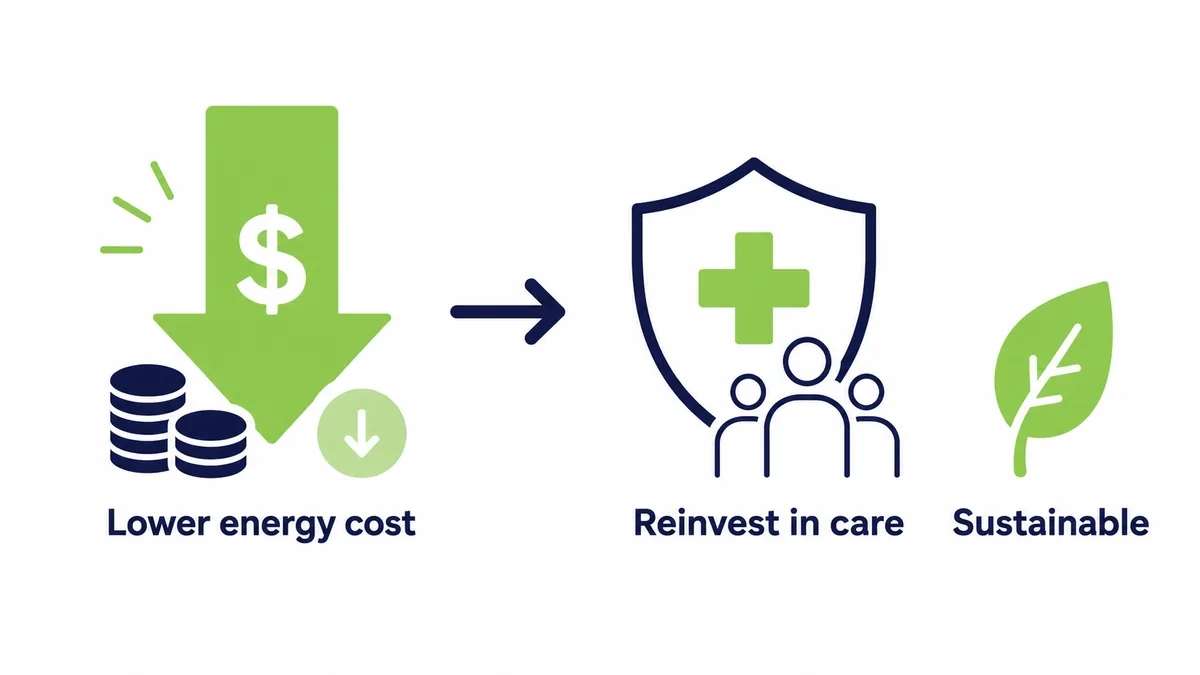
Turning the saving back into care

Lower electricity cost in a hospital reaches further than a tidier budget line.

Money not spent running idle machines is money that can go to patient care, to research, or to the next efficiency that pays for itself again. Reducing recurring operating cost is one of the clearest levers a facility controls, which is the whole premise of serious IT cost reduction. The environmental return rides alongside it, since cutting energy use lowers the facility’s carbon footprint and supports the public-health goals a hospital already stands for. The saving compounds in more than one column.

What healthcare power management does not fix

It would be dishonest to oversell it. This does not make a clinical system faster, and it does not replace the security or patch tooling a hospital runs. It makes those tools dependable, by ensuring the machines are present when they are needed.

And it is not effort-free on day one.

There is setup. You classify the estate into what must stay on and what can sleep, define the policies, and confirm Wake-on-LAN is enabled across the network. The work is careful and front-loaded, which is why the full return typically arrives in under four months rather than at once. Strip it back and the finding is plain. The machines that matter keep running, the ones that do not stop wasting money, and the only thing that ever blurred the line between them was the fear of not getting a machine back in time.

Idle is not the same as saving

An administrative machine left idle looks almost free. It is not.

An idle desktop draws nearly as much as a working one, because the processor rests while the power supply, memory, and fans keep running. Sleep helps, but a sleeping machine still has to be reachable for the overnight patch, or IT quietly disables sleep to be safe. That is how a hospital ends up running its back-office fleet around the clock while believing it manages power. The saving only appears when a machine can drop to a low state and still wake the instant it is needed.

The cost the clinical fear hides

The energy waste is the obvious cost. The hidden one is what the caution conceals.

Because a few machines must never be unreachable, the whole administrative fleet gets left on too, and the patch that skips a sleeping PC, the morning a scheduler waits for a slow boot, the record system exposed a day longer than it should be all get treated as the price of safety. They are not. They are the price of applying a clinical rule to non-clinical machines. Separate the two honestly and the fear protects what it should, while the waste stops.

Run the maintenance math

Picture a security update pushed to 3,000 administrative machines at one in the morning. If a third are switched off, a thousand miss it and stay exposed until someone logs in the next day.

A thousand unpatched machines, every cycle, in a building that holds patient data.

Now schedule those machines to wake for the window, take the patch, and sleep again before staff arrive. The update reaches the whole administrative fleet, the exposure closes on time, and not one clinical system was touched. The patch was never the hard part. Whether the machines were awake to receive it was.

What changes between a clinic and a hospital group

A single clinic forgives a lot. A technician can walk to the machine that did not wake.

A hospital group running tens of thousands of endpoints across many sites does not.

At that scale, a wake method that works most of the time still leaves hundreds of machines dark each morning, scattered across buildings and campuses no one can cover by hand. The manual fixes that held a clinic together stop scaling, because there is nobody free to chase exceptions across a whole network. Scale changes the task itself, from something staff handle in person into a process that must run without them.

Energy savings reinvested in care
Energy savings free budget to reinvest in care, and shrink the facility footprint.

The saving that becomes care

Lower electricity cost in a hospital does more than tidy a budget line.

Money not spent running idle back-office machines is money that can move to patient care, to research, or to the next efficiency that pays for itself again. Reducing recurring operating cost is one of the clearest levers a facility controls, and it compounds, since a saving realized this year funds the improvement that saves again next year. The return shows up in more than one column, and in healthcare the most important column is not the financial one.

The quiet win for hospital IT

There is a benefit for the team that keeps the estate running, alongside the budget.

Because schedules, permissions, and wake events live in one console, the daily overhead of a large, multi-site fleet drops. Fewer visits to wake a machine, fewer calls from staff who cannot reach a workstation, and a clear, auditable record of every wake, which is exactly what a compliance review wants. Hospital IT spends less time on the mechanics of access and more on the work that actually needs it.

Where large providers feel it most

The organizations that feel this hardest are the ones with the most endpoints and the longest hours.

Large hospital groups, HMOs, and networks of clinics run enormous administrative fleets on top of their clinical systems, and every one of those back-office machines left on overnight adds to a bill that is already heavy. For them the idle-PC line is a recurring, serious cost, and one of the few they can cut without going anywhere near patient care.

The estate most of a hospital forgets

Ask where a hospital’s computers are and most people picture wards. Most of them are not there.

Records, billing, scheduling, procurement, human resources, training, and back-office desks make up the bulk of the fleet, and almost none of it needs to run overnight. That forgotten majority is where the saving lives, quietly, on machines nobody worries about because nobody thinks of them as hospital computers at all.

The number that makes the case

In a hospital every budget request competes with clinical need, so a saving has to be undeniable to win attention. This one is.

Take 3,000 administrative machines wasting even a small amount each in overnight power. Across a year the total reaches six figures, and for a large hospital group running many times that number it climbs into serious money, all of it from machines with no clinical role. There is no forecast to challenge. The back-office fleet was on, nobody was using it, and the meter ran. Stated that plainly, it competes well, because the money it frees can go where the hospital actually needs it.

What the rollout actually involves

The care in a healthcare rollout goes into the classification, not the technology.

The real work is deciding, area by area, what must never sleep and what safely can, and getting clinical and IT staff to agree on that line. Once the map is set, the schedules and the wake coverage follow quickly. It is deliberately conservative, because the cost of powering down the wrong machine is unacceptable, and that caution is exactly why the classification comes first and the automation second.

Why the timing matters now

Hospitals could have managed PC power years ago. What changed is that the old objection finally has an answer.

Reliable wake across the subnets a hospital network is divided into removed the fear that a machine might not come back in time, and that fear was the only thing keeping the administrative fleet on. With it gone, the saving that was always sitting in the back offices is finally safe to take, without asking anyone in a clinical role to accept any risk at all.

Frequently asked questions

Will power management affect patient-care systems?

No, when it is set up properly. Patient-care and monitoring machines are classified to stay on and instantly reachable around the clock, and only lower-priority machines with no clinical role drop into energy-saving states.

Can different hospital areas run on different policies?

Yes. Customized policies are matched to each area’s hours and criticality, so a 24-hour ward and a weekday finance office are governed by entirely different rules on the same network.

Does it meet healthcare data and compliance requirements?

Power management applies without weakening the availability and security standards that protect patient data. Permissions and wake events are logged centrally, and powering unused machines down can reduce exposure rather than add risk.

How does overnight maintenance still run if machines are asleep?

Scheduled wake brings the relevant machines up for the patch or backup window, lets the work complete, then returns them to a low-power state. Maintenance reaches the whole administrative fleet without leaving it powered on all night.

How quickly does it pay for itself?

It depends on fleet size, idle wattage, and local electricity rates, but managed shutdown of the non-clinical fleet commonly returns its cost within months. The saving starts the first night the policy runs.

See how much your organization could save

Tell us how many PCs you run and we will show you the realistic energy and cost savings, along with the payback period.

Talk to us

Nimrod Yedaya

About the author

Nimrod Yedaya

VP Customer Experience

Over 15 years of experience in customer service, technical support, and customer relationships. Nimrod joined PowerPlug in 2012 as Customer Support Manager and was promoted to VP in 2016. He holds an MBA from BIU and a BSc in Communication Systems Engineering from BGU.
Wake-Up PC On Lan

In today’s rapid world, efficiency and convenience are paramount, especially when it comes to managing our digital devices. Enter the concept of “PC Wake on Plan,” a revolutionary feature that’s changing the way we interact with our computers. This technology allows users to schedule their PCs to wake up from sleep mode at predetermined times, streamlining work processes and ensuring that the machine is ready when needed.

The allure of PC Wake on Plan lies in its ability to enhance productivity and energy conservation. By allowing PCs to rest when not in use and wake up according to a user’s schedule, it strikes a perfect balance between availability and eco-friendliness. Whether it’s for running updates, backups, or simply being ready for the day’s tasks, this feature is a game-changer in personal and professional computing environments.

wake up pc on lan

What Is Wake on LAN?

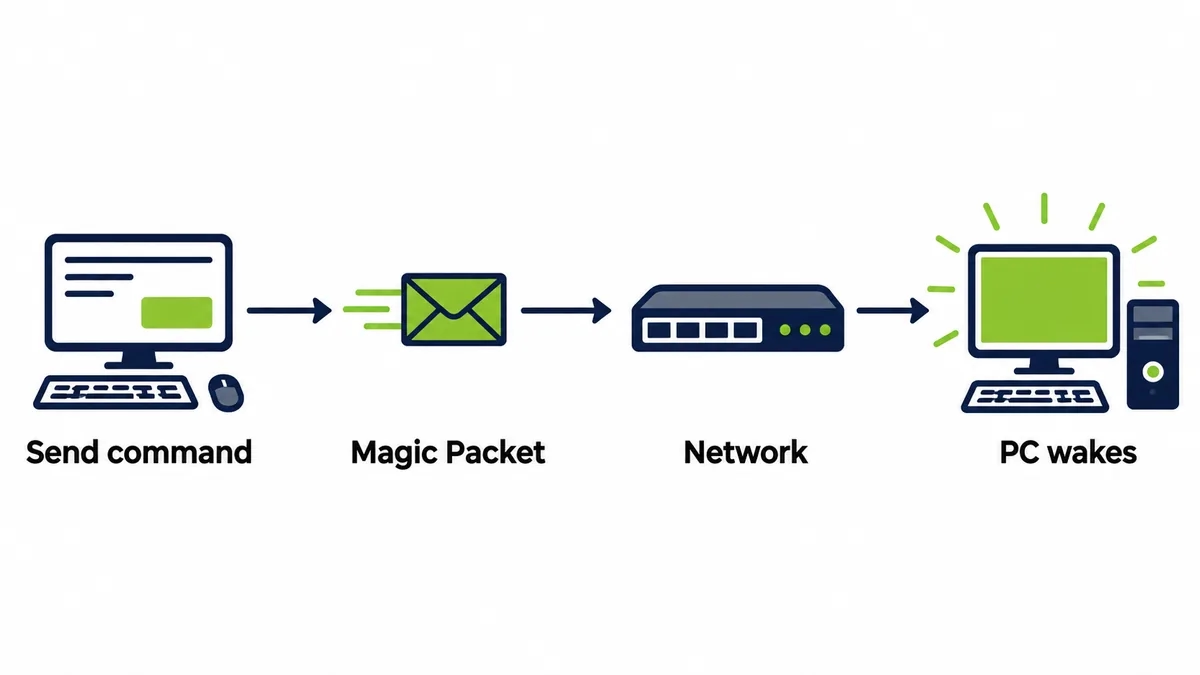
Wake on LAN, or WoL for short, is a network standard that allows a computer to be turned on remotely via a network signal. The basic principle behind WoL is quite simple: when a WoL-enabled computer is turned off (but still connected to a power source), its network card (NIC) remains in a low power consumption state and listens for network traffic.

The special signal that wakes up the computer is called a “Magic Packet.” This packet contains specific information, including the MAC address of the target computer’s network card, and once the network card identifies the packet destined for it, it signals the computer’s motherboard to turn itself on.

What are the Main Advantages of Using Wake on LAN for Modern Organizations?

Implementing Wake on LAN technology in a modern organization has many advantages, from significant cost savings to streamlining critical processes. One of the most prominent advantages is the financial savings in electricity consumption costs.

Many computers in organizations remain on after working hours or on weekends, even when not in active use. This power consumption adds up to significant amounts.

Using WoL, these computers can be proactively turned off when they are not needed, and turned back on remotely only when needed. Thus, organizations can dramatically reduce their electricity bill, with the potential for savings reaching tens of percent.

Beyond the financial savings, WoL is a powerful tool for IT teams. The technology allows for a significant streamlining of routine maintenance processes. Instead of relying on user availability or performing maintenance work during busy working hours, IT personnel can use WoL to turn on computers remotely outside of regular business hours.

This includes performing critical software updates, installing security patches, comprehensive antivirus scans, automatic backups, and various fixes – all without disrupting user work. The ability to schedule these operations for nights or weekends improves operational efficiency and ensures that computers in the organization remain up-to-date and secure.

Simplify the Process

In addition, Wake on LAN supports hybrid and remote work models, which have become so common in recent years. Employees who need to access their physical computer in the office from home or anywhere else can use WoL to turn it on remotely, and then connect to it via a secure connection (VPN, RDP, etc.).

This ensures that employees can be productive and access the organizational resources they need, even when they are not physically present in the office. Solutions like powerplug offer a dedicated portal that simplifies this process for end-users.

Finally, WoL also contributes to increasing organizational network security. By turning off computers that are not in use, organizations effectively reduce the “Attack Surface.” A turned-off computer is less exposed to threats and hacking attempts compared to an active computer connected to the network.

The ability to turn off computers automatically and proactively as part of a comprehensive power management policy, as enabled by solutions like powerplug strengthen the organization’s security posture and reduces potential risks.

How Does the PowerPlug Pro Platform Optimize the Use of Wake on LAN and Help Organizations Save Up to 60% on their Electricity Bill?

While Wake on LAN (WoL) technology has been around for some time, implementing and managing it on a large scale in organizations can be complex and challenging.

This is where the PowerPlug Pro platform comes in, leveraging WoL technology and providing a comprehensive, efficient, and user-friendly solution for IT teams, allowing organizations to maximize their energy-saving potential and streamline operational processes. Powerplug offers a holistic approach to managing the power consumption of personal computers, with a special emphasis on improving efficiency and productivity.

One of the key components of the PowerPlug Pro platform is its dedicated Wake-Up Portal. This portal significantly simplifies the process of turning on computers remotely for end-users. Instead of relying on complex tools or technical knowledge, employees can simply log into the portal from any browser, from anywhere (whether from home or a remote office), and select their personal computer in the office to turn it on.

This allows them to easily and quickly access the resources and applications located on their physical computer, ensuring availability and productivity even in hybrid or remote work. The portal is user-friendly and removes technical barriers that may make it difficult for non-IT users to use WoL.

Integrates Easily

Beyond user-friendliness, PowerPlug Pro excels in seamless integration with existing organizational IT infrastructures. The platform easily integrates with directory services such as Microsoft Active Directory, allowing centralized and efficient management of power consumption policies based on organizational units, user groups, or specific computers.

PowerPlug Pro also integrates closely with common configuration management systems such as Microsoft Configuration Manager (SCCM), which allows IT teams to deploy, manage, and control power consumption policies across thousands of computers easily and efficiently. This integration simplifies deployment and ongoing management processes, and ensures that the system does not add significant overhead to the IT team.

Another critical advantage of PowerPlug Pro is ensuring 24/7 computer availability for IT teams, without leaving them on unnecessarily. The system allows scheduling automatic computer activation before planned maintenance windows, such as installing critical security updates or distributing new software.

By ensuring that computers are active and available when needed, PowerPlug Pro significantly increases the success rates of these tasks and reduces the need for manual intervention or re-execution of failed operations. This saves valuable time for IT teams and ensures that the organizational infrastructure remains up-to-date and secure.

Save up To 60%

The bottom line from a business perspective is the significant savings in energy costs. PowerPlug Pro allows organizations to save up to 60% on their electricity bill resulting from personal computer consumption. For example, an organization with 1,000 computers can save up to $50,000 per year by implementing the platform. This saving stems from a combination of automatic shutdown of computers that are not in use, enforcement of energy-saving policies (such as switching to sleep mode after a short period of inactivity), and the ability to turn on computers only when needed via WoL. The return on investment (ROI) on implementing PowerPlug Pro is particularly fast, often within just a few months, making it a worthwhile and cost-effective investment for organizations of all sizes.

Finally, it is important to emphasize the ease of deployment and low maintenance of PowerPlug Pro. The system is designed to be intuitive and simple to install and configure.

Client deployment across computers in the organization is fast, and the system requires minimal maintenance after the initial implementation. This means that IT teams do not have to dedicate much time to managing the system, and can focus on other critical tasks.

The combination of significant cost savings, streamlining IT processes, supporting hybrid work, improving security, and ease of use makes PowerPlug Pro a leading and ideal solution for organizations looking to realize the full potential of Wake on LAN technology and achieve operational efficiency and significant economic savings.

What Are The Advantages of PowerPlug Pro

In the modern workplace, efficiency and sustainability are paramount. PowerPlug.ai introduces a leading-edge solution to address both, harnessing the power of PC wake on LAN technology. Their service, designed for medium to large organizations, leverages this capability to ensure that IT operations run smoothly and energy consumption is optimized.

  • Energy Efficiency: One of the biggest selling points of using wake on LAN technology is the significant energy savings it offers. By allowing PCs to remain off until needed, organizations can drastically reduce their energy consumption, leading to lower utility bills and a reduced carbon footprint.
  • Operational Efficiency: PowerPlug Pro’s solution streamlines IT operations by automating the wake/sleep cycle of PCs. This automation ensures that computers are awake for scheduled tasks and updates without having to be manually turned on, reducing the workload on IT staff and minimizing disruptions to productivity.
  • Scalability and Reliability: Designed for organizations of all sizes, PowerPlug Pro can manage up to tens of thousands of PCs, providing a scalable solution that grows with the company. Its reliable wake-on-LAN capabilities ensure that even the largest networks can be managed efficiently, without sacrificing performance.
  • Remote Management Made Easy: For companies embracing remote or hybrid work models, the ability to wake up a computer over the internet is invaluable. PowerPlug Pro’s technology bridges the geographical gap, enabling IT departments to maintain and update systems anywhere, anytime.

Compatibility and Integration

PowerPlug Pro prides itself on broad compatibility, supporting a wide range of hardware and operating systems. This inclusiveness ensures that organizations can carry out PowerPlug Pro’s solutions without the need to overhaul their existing IT infrastructure, facilitating a smooth transition to more efficient power management strategies.

Why to Choose PowerPlug?

As we have seen, Wake on LAN technology offers significant benefits to organizations, from huge savings in energy and related costs, through improving the operational efficiency of the IT department, and to a significant strengthening of information security.

However, full realization of this potential requires an efficient central management solution. This is where PowerPlug comes in. Our company, founded in 2009, specializes precisely in this area – helping organizations dramatically reduce their electricity bills through smart management of computer consumption.

We have a proven track record with a wide range of leading clients in various sectors, including hospitals, academic institutions, government authorities, and more. Our PowerPlug Pro platform is designed to provide you with the best tools to effectively utilize WoL and achieve a very fast return on investment.

We invite you to contact our experts today to explore how we can help your organization save money, streamline processes, and be greener.

Organizations face multiple challenges when managing the power state of computers, especially across sprawling corporate networks. PowerPlug.ai directly addresses these concerns with its Wake Up PC on LAN feature.

  • Reliability: PowerPlug Pro ensures PCs wake up as scheduled, eliminating issues of PCs not responding to wake calls.
  • Energy Efficiency: By allowing PCs to remain in low power states until needed, PowerPlug Pro drastically reduces energy consumption across the organization.
  • Ease of Scaling: Designed to manage up to tens of thousands of PCs, PowerPlug Pro can easily accommodate the growth of any organization.
  • Minimal IT Disruption: The system has been engineered to work seamlessly with existing IT operations, ensuring that the wake-up process is smooth and does not disrupt day-to-day activities.

PowerPlug Pro’s Wake on LAN service is packed with features designed to meet the dynamic needs of modern enterprises:

  • Automated wake/sleep schedules based on actual usage patterns
  • Group-based policy management for different departments or teams
  • Comprehensive reporting tools for monitoring energy savings and PC utilization
  • Compatibility with a wide range of hardware and operating systems

PowerPlug.ai’s approach to waking up PCs on LAN offers companies a practical way to enhance their power management strategies. By blending technology with convenience, PowerPlug Pro ensures that organizations can achieve significant energy savings and operational efficiency, all while maintaining a greener footprint.

Wake-Up PC Remotely

By Nimrod Yedaya, VP Customer Experience

How To Wake A PC Remotely

The feature that saves an organization the most energy is not the one that turns computers off. It is the one that turns them back on.

That sounds backward. It is the whole point, and it is the single idea this entire guide turns on.

Any organization can shut its machines down at night. The reason almost none do it properly is the fear of not getting them back, the night-shift engineer locked out, the patch that skipped a sleeping fleet, the person at home who can’t reach the office PC. Waking a PC remotely is the capability that removes that fear, and once the fear is gone, aggressive shutdown finally becomes safe. This is how remote wake actually works, what it needs, where the naive version quietly fails, and why the capability matters more the larger and more segmented your fleet becomes.

What waking a PC remotely actually requires

Remote wake is not magic, though the mechanism is literally called a magic packet. It is a small, specific set of conditions that all have to be true at once.

The machine has to still receive standby power, so a completely unplugged PC is out. The network adapter and motherboard have to support Wake-on-LAN, which almost all modern hardware does. The feature has to be enabled in BIOS and in the adapter settings, which is where do-it-yourself attempts most often fall down. And a signal has to reach the sleeping machine across the network. Miss any one of these and the wake fails, usually silently.

The conditions, laid out plainly

It helps to see the requirements as a checklist rather than a paragraph, because every one of them is a place a wake can break.

RequirementWhy it mattersCommon failure
Standby powerThe adapter listens while the PC sleepsMachine fully unplugged
Wake-on-LAN capable adapterHardware must support the signalRare on very old machines
Enabled in BIOS and adapterFeature is often off by defaultReset by a driver update
A signal that reaches the machineThe packet has to arriveBlocked by a subnet or firewall

The first three are settings you fix once. The fourth is the one that scales into a real problem, and it is worth its own section.

How a Magic Packet wakes a PC
A Magic Packet travels across the network and wakes a powered-down PC in seconds.

The magic packet, and where it stops

When you wake a PC remotely, a small broadcast called a magic packet goes out on the network, carrying the sleeping machine’s hardware address. The adapter, still listening on standby power, recognizes its own address and brings the machine up. On one flat network this works the first time, every time.

Then the network stops being flat.

The moment it is split into subnets, which every organization does as it grows and secures its systems, that broadcast no longer crosses the boundary. The machine on the other segment never hears its own name called. Understanding how power management works at this level is what separates a wake-up that works in a demo from one that works in a building.

Why remote wake gets harder as you grow

A small office rarely hits the subnet wall. One network, one broadcast domain, and the magic packet reaches everything.

Growth is what breaks it.

Add a second site, split departments onto separate subnets, put a VPN in the path, and the simple wake that worked for fifty machines starts failing for the ones that matter most, the remote ones you cannot walk over to. This is exactly the gap a patented Wake-on-LAN Mesh closes, relaying the wake signal across subnets and complex networks without reconfiguring routers or opening the segmentation that keeps the network secure. The harder your network works, the more that relay matters.

Wake-on-LAN on its own against managed wake

Raw Wake-on-LAN and managed wake are not the same tool with a nicer interface. They solve different sizes of the problem.

CapabilityStandard Wake-on-LANManaged remote wake
Wake a machine on the same subnetYesYes
Wake across subnets and sitesNoYes
Wake by an end user from homeNoYes, single click
Scheduled wake for maintenanceManual scriptingBuilt in
Record of who woke whatNoneYes

The left column is a protocol. The right column is a service you can build a policy on.

The person working from home

Most remote-wake conversations are really about one moment. Someone is at home, they need a file or an application that lives on their office PC, and the machine is asleep or off.

Without remote wake, that is a dead end.

With it, a Wake-Up Portal brings the machine back with a single click, from home or a remote office, and the person connects as if they had never left. No ticket, no call to IT, no colleague sent to press a power button. The same capability that lets the organization shut machines down at night is the one that lets a remote worker reach theirs at any hour, and those two needs turn out to be the same need.

The maintenance window nobody is awake for

IT has its own version of the remote-wake problem, and it runs at three in the morning.

Patches, updates, and backups are pushed overnight precisely because nobody is working. But a machine that is off cannot receive them. So either the fleet is left on all night, which wastes the energy this was supposed to save, or a chunk of machines miss the window and stay unpatched until morning. Scheduled remote wake resolves the standoff. The machines wake for the window, take the update, and return to a low-power state before staff arrive, which is the core of proper endpoint power management.

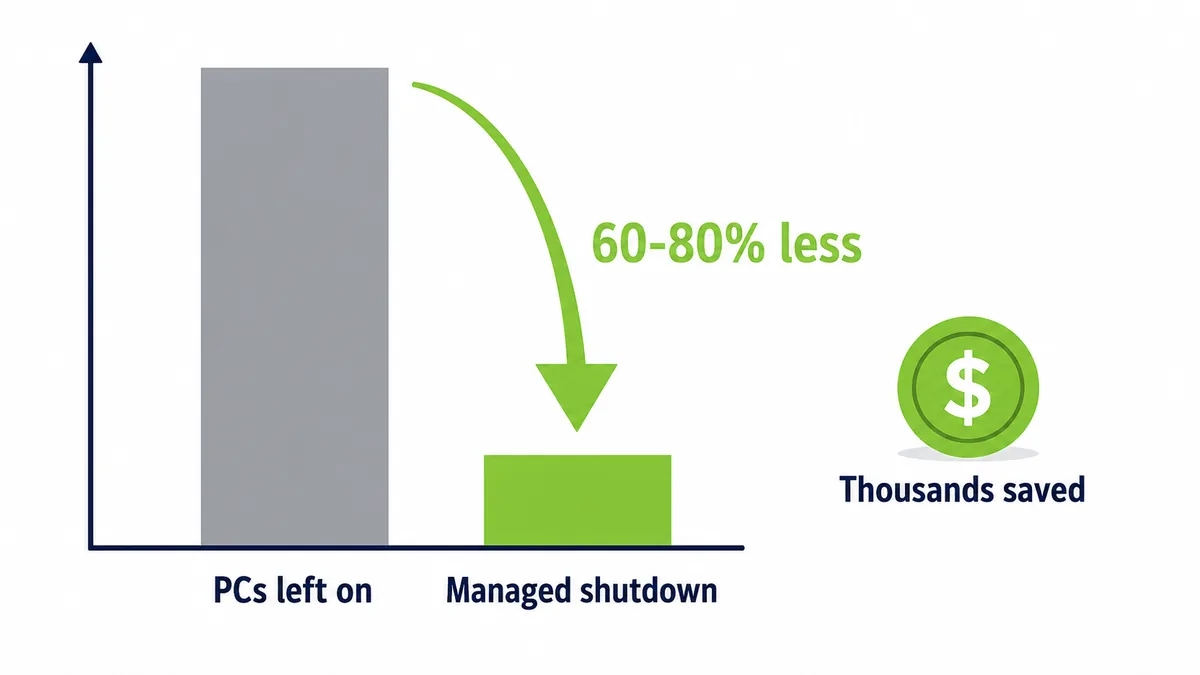
Managed shutdown cuts energy use sharply
Shutting idle PCs down instead of leaving them on cuts their energy use sharply.

What remote wake finally makes affordable

Here is where the backward-sounding opening pays off.

Once you can wake any machine reliably, from anywhere, on schedule or on demand, there is no longer a reason to leave machines on overnight. The whole fleet can be shut down hard, and the energy that used to burn from dusk to dawn simply stops. Office equipment already makes up a real share of commercial electricity use, as the US Energy Information Administration records, so removing the overnight idle load is a large, immediate cut. Managed power built on reliable wake reduces PC energy consumption by up to 60 percent, and the saving begins the first night.

What remote wake does not do

It would be dishonest to sell it as a cure-all. Remote wake does not make a slow machine fast, and it does not replace patch management or security tooling. It makes those things possible on a fleet that is powered down, which is the point.

And it asks for a little work up front.

You confirm Wake-on-LAN is enabled across the estate, set the schedules, and put a reliable relay in place for the subnets a simple broadcast cannot cross. The effort is modest and front-loaded, which is why a full return typically lands in under four months. Strip it down and the finding is simple. Turning machines off is worth real money, and remote wake is the one capability that makes turning them off safe.

Idle is not the same as saving

Leaving a machine idle instead of off feels like a compromise that saves something. It barely does.

An idle desktop draws nearly as much as a working one, because the processor rests while the power supply, memory, and fans keep running. Sleep cuts that sharply, but a sleeping machine is only useful if you can wake it, or people set sleep to never so nothing is ever slow to reach. This is the loop remote wake breaks. Once waking is reliable, the machine can go to a genuinely low state, and the saving stops being theoretical.

The cost of leaving them on instead

Every organization that cannot wake machines reliably makes the same quiet choice. It leaves them on.

That choice has a price that runs all night, every night. A desktop drawing 60 to 100 watts idle, held on for the twelve to fourteen hours nobody is using it, across 250 working nights and the weekends in between, is a standing cost that compounds silently. One machine is a few dollars. A thousand is tens of thousands a year spent so that a handful might be reachable. Remote wake is what lets an organization stop paying that toll without losing the access it was paying for.

The on-call engineer at two in the morning

There is a moment every IT team recognizes. Something breaks overnight, and the machine that could fix it is asleep in a building nobody is in.

Without remote wake, that means a drive across town.

With it, the engineer wakes the exact machine from home, connects, and resolves the issue before most people would have found their car keys. The same capability that powers the fleet down at night is the one that rescues the night, which is why remote wake pays back in incidents avoided as well as in energy saved. The machine you shut down to save money is the machine you can still reach in an emergency.

Run the maintenance math

Picture a security update pushed to 5,000 machines overnight. If a tenth are switched off, 500 miss it and stay unpatched until the next day.

Five hundred exposed machines, every cycle.

Now schedule those machines to wake for the window, take the update, and sleep again before anyone arrives. The patch reaches all 5,000, the network is quiet while it runs, and nobody loses a morning to a reboot they did not choose. Remote wake is the difference between a maintenance window that covers the fleet and one that covers whatever happened to be on.

What growth does to the saving

The saving from remote wake does not just add up as you grow. It accelerates.

A fifty-machine office saves a little and rarely hits the subnet wall. A fifty-thousand-machine enterprise saves enormously, and hits that wall on day one, which is why the ability to wake across subnets and sites is what makes the saving reachable at the scale where it actually matters. The bigger and more segmented the network, the more a machine that can be woken anywhere is worth, and the more the old habit of leaving everything on quietly costs.

Setting it up without weakening the network

A fair worry about remote wake is whether reaching machines across a secure network means loosening it. It does not have to.

A mesh relays the wake signal across subnets without opening the segmentation that keeps the network safe, and permissions control who can wake which machines, with every event logged. So the capability that saves the energy also respects the security the network was built with. You are not trading safety for savings. You are adding a controlled way to reach a machine that is otherwise doing nothing but drawing power.

The cost of the safe-looking choice

Leaving machines on looks like the cautious option. It is the expensive one.

Caution has a running meter. A fleet kept on so that a few machines might be reachable burns power every hour of every night, and the bill arrives whether or not anyone ever needed those machines. Remote wake replaces the blunt caution of leaving everything on with a precise one, reach the machine you actually need and let the rest sleep. The safety is the same. The cost is not.

The number behind it

The arithmetic is what makes the case, not the pitch.

A single desktop wasting a few dollars a year in overnight power is nothing. A thousand of them, held on so a handful stay reachable, is tens of thousands a year for access you could have had anyway. Once waking is reliable, that entire line disappears, and it disappears the first night, not after a long ramp. There is no forecast to argue with, only a meter that stops running when the machines finally do.

Two problems, one capability

Remote wake looks like two separate features, and it is really one.

The energy team wants machines off at night. The support team wants to reach a machine at any hour. The remote worker wants their office PC from home. On the surface these are different requests, and the same thing answers all of them, the ability to wake any machine, anywhere, on demand. That is why remote wake pays back in three currencies at once, lower bills, fewer callouts, and staff who are never blocked by a sleeping machine.

What it does not ask you to give up

The fair question is what you trade for all this. The answer is very little.

You do not give up availability, because any machine can be woken in seconds. You do not give up security, because the wake travels across segmented networks without opening them and every event is logged. And you do not give up your existing hardware, because Wake-on-LAN is already built into it. The main cost is the setup to enable and cover it properly, which is modest against a saving that starts the first night.

The habit that quietly costs the most

Most wasteful IT habits are visible. This one hides in plain sight.

Leaving machines on overnight never looks like a decision, because nobody actively chooses it each evening. It is simply what happens when the alternative feels risky. That is what makes it so expensive and so easy to miss at the same time. Remote wake turns the default from on to off, and once the default flips, the saving accrues quietly, without anyone having to think about it again the following night, or the one after that.

Frequently asked questions

Can you wake a computer that is fully powered off?

Yes, as long as it still receives standby power and Wake-on-LAN is enabled in BIOS and on the adapter. A machine unplugged from power or disconnected from the network cannot be woken, because nothing is left listening for the signal.

Does Wake-on-LAN work over Wi-Fi?

In most cases it relies on a wired connection, because the wake signal is designed for it. Reliable wake for laptops and mixed environments is usually handled through a managed service rather than raw Wake-on-LAN.

Why does remote wake work in testing but fail in production?

Because a standard magic packet stops at the subnet boundary. It succeeds on a flat test network and fails once the real network is segmented, which is exactly when a relay or mesh becomes necessary.

Is waking PCs remotely a security risk?

Managed remote wake enforces who can wake which machines and logs each event. Powering unused machines down and off the network actually reduces exposure during the hours the fewest people are watching.

How much can remote wake and shutdown save?

By making overnight shutdown safe, managed power commonly cuts PC energy use by a large margin, with the saving starting the first night. The exact figure depends on fleet size, idle wattage, and local electricity rates.

See how much your organization could save

Tell us how many PCs you run and we will show you the realistic energy and cost savings, along with the payback period.

Talk to us

Nimrod Yedaya

About the author

Nimrod Yedaya

VP Customer Experience

Over 15 years of experience in customer service, technical support, and customer relationships. Nimrod joined PowerPlug in 2012 as Customer Support Manager and was promoted to VP in 2016. He holds an MBA from BIU and a BSc in Communication Systems Engineering from BGU.
Power Management Software

In today’s tech-driven world, the demand for energy efficiency has never been higher. Businesses and individuals alike are searching for ways to not only cut costs but also reduce their carbon footprint. Enter power management software, a game-changer in the way we consume and manage energy in the digital age.

This innovative software offers a plethora of benefits, from automating energy-saving tasks to providing detailed energy consumption analytics. It’s not just about turning off idle devices; it’s about optimizing energy use to achieve sustainability and efficiency goals. As we investigate deeper, we’ll uncover how power management software is revolutionizing industries and helping to pave the way for a more sustainable future.

The Importance of Energy Efficiency

In today’s era of digital transformation, organizations are increasingly aware of the need for operational efficiency and sustainability. Power management software emerges as a crucial tool for companies aiming to reduce energy consumption, lower costs, and achieve their green initiatives. PowerPlug.ai stands at the forefront of this technology, offering advanced solutions that address these needs effectively.

power management software

Why Choose PowerPlug Pro for Your Company?

PowerPlug Pro is a leading PC Power Management solution designed for medium to large organizations. With the capacity to manage up to tens of thousands of PCs, PowerPlug Pro offers unparalleled efficiency and effectiveness in reducing energy consumption across an organization’s network. Here’s how PowerPlug.ai addresses common issues faced by companies today:

  • Significant Energy Savings: By automating power-saving tasks across all managed PCs, PowerPlug Pro drastically reduces energy use, translating into substantial cost savings over time.
  • Minimized Productivity Impact: One of the key benefits of PowerPlug Pro is its ability to save energy without disrupting employee productivity or day-to-day IT operations. The software smartly schedules power-saving modes during non-work hours or when machines are idle, ensuring that work processes remain uninterrupted.
  • Detailed Energy Consumption Analytics: PowerPlug Pro provides in-depth analytics and reports on energy consumption and savings. This data arms organizations with the insights needed to make informed decisions about their power management strategies and sustainability efforts.
  • Scalability: PowerPlug Pro’s technology is highly scalable, making it suitable for managing a small number of PCs to tens of thousands. This flexibility ensures that as a company grows, its power management solution can grow with it.

How PowerPlug Revolutionizes Power Management?

PowerPlug.ai utilizes state-of-the-art software power management techniques to offer solutions that are both efficient and easy to carry out. The software’s robust framework allows for easy integration into existing IT infrastructure, making it a seamless addition to any organization’s energy efficiency plan.

With a focus on sustainability and cost reduction, PowerPlug’s Power Management software becomes an indispensable tool for companies looking to optimize their energy usage without sacrificing performance. Through intelligent automation and detailed analytics, PowerPlug Pro empowers organizations to not just meet, but exceed their efficiency and sustainability goals.

How Power Management Software Works?

In today’s rapid digital world, ensuring operational efficiency while minimizing energy consumption presents a formidable challenge for businesses. Power management software emerges as a pivotal solution in exploring this world, offering a bridge between energy efficiency and optimized operational performance. Specifically, PowerPlug.ai stands at the forefront of addressing these challenges through its flagship solution, PowerPlug Pro.

Tailored Solutions for Organizations

PowerPlug Pro, a leading-edge power management software, is designed with medium to large organizations in mind. It adeptly manages up to tens of thousands of PCs, showcasing its scalability and robustness. The core of PowerPlug Pro’s efficiency lies in its ability to significantly reduce energy consumption without hindering employee productivity or interrupting daily IT operations. This dual focus on efficiency and non-disruption positions PowerPlug Pro as an essential tool for companies looking to achieve sustainability targets without compromising on performance.

How Powerplug.ai Solves Company Issues?

PowerPlug.ai tackles the complex needs of contemporary organizations by providing a comprehensive PC power management solution that:

  • Automates Energy Savings: Through intelligent power-saving tasks, PowerPlug Pro automatically reduces energy usage during non-peak hours, ensuring savings are maximized without the need for manual intervention.
  • Minimizes Productivity Disruptions: It smartly schedules power-saving modes to occur outside of active business hours or during times of minimal usage, so preserving the work flow.
  • Offers Detailed Analytics: Organizations gain access to in-depth energy consumption analytics, enabling well-informed choice-making about where and how energy savings can be further optimized.
  • Ensures Scalability: As companies grow, their energy management needs evolve. PowerPlug Pro is designed to scale seamlessly, accommodating an increasing number of PCs without loss of performance or efficiency.

By leveraging advanced software power management techniques, PowerPlug.ai equips businesses with the tools necessary to streamline energy usage. In doing so, companies not only see a reduction in operational costs but also make significant strides towards their sustainability goals. PowerPlug Pro so stands as a testament to the power of software in revolutionizing energy management strategies for the digital age.

Benefits of Using Power Management Software?

In the era of digital transformation, power management software plays a pivotal role in optimizing energy consumption and enhancing operational efficiency. Organizations stand to gain substantial benefits by integrating advanced power management solutions like PowerPlug Pro into their IT infrastructure.

Cost Savings Through Energy Efficiency

One of the most compelling advantages of using power management software is the substantial cost savings on energy bills. By automating the shutdown and wake-up of PCs during off-hours, companies can significantly reduce unnecessary energy consumption. For instance, PowerPlug Pro’s ability to manage up to tens of thousands of PCs means even large organizations can achieve efficient energy use at scale, translating into lower operational costs.

Minimal Disruption with Smart Automation

PowerPlug Pro differentiates itself through its smart automation capabilities, ensuring that energy savings are achieved without interrupting employee productivity or day-to-day IT operations. The software is designed to work seamlessly in the background, making adjustments to power usage without disrupting the workflow. This balance between energy efficiency and operational continuity is crucial for maintaining business productivity.

Enhanced Operational Efficiency

Implementing power management software leads to improved operational efficiency by providing IT departments with granular control over the energy consumption of a vast network of PCs. Detailed analytics and reporting tools offered by solutions like PowerPlug Pro give insights into energy usage patterns, enabling data-driven decisions to optimize power management policies further.

Scalability and Flexibility

As organizations grow, so does their IT infrastructure. Power management software offers the scalability needed to handle increasing numbers of PCs without compromising on performance or efficiency. PowerPlug Pro’s capability to manage tens of thousands of PCs is testament to its scalability, ensuring that companies can continue to efficiently manage energy consumption as they expand.

To conclude, the adoption of power management solutions like PowerPlug Pro offers businesses a path to substantial energy savings, operational efficiency, and sustainability. By leveraging software for power management, organizations can not only reduce their carbon footprint but also achieve significant cost savings—making it an essential component in today’s rapid, eco-conscious business environment.
software power management

Industries Revolutionized by Power Management Software

Power management software has become a pivotal tool for various industries, harnessing technology to reduce energy consumption, lower operational costs, and promote sustainability. Industries such as healthcare, education, finance, and IT have seen substantial benefits from integrating power management solutions like PowerPlug Pro into their operations.

Healthcare Sector

In the healthcare industry, hospitals and clinics operate 24/7, relying heavily on computers and digital systems for patient records, diagnostics, and treatment planning. PowerPlug Pro has revolutionized energy management in this sector by automatically shutting down PCs during off-hours without disrupting critical operations, leading to significant cost savings and reduced carbon footprint.

Educational Institutions

Educational institutions, ranging from schools to universities, manage hundreds or even thousands of computers across campuses. Through smart automation and centralized control, power management software enables these institutions to reduce energy waste efficiently by ensuring computers are only operational when needed. This not only cuts down energy bills but also supports their sustainability goals.

Finance Industry

The finance sector, including banks and insurance companies, relies on vast amounts of data processing and transactions, necessitating extensive computing resources. By utilizing granular control and analytics provided by software like PowerPlug Pro, these organizations can optimize their PC power usage, achieving operational efficiency and energy savings without compromising data security or client services.

IT and Technology Firms

Technology firms, known for their extensive use of computing resources, have embraced power management software to achieve scalability and sustainability. As these companies grow, managing energy consumption becomes more challenging. PowerPlug Pro offers a scalable solution that adapts to the expanding infrastructure, ensuring energy efficiency and operational savings are maintained.

In each of these industries, the common theme is the strategic use of power management software to achieve not only financial benefits but also to contribute positively to environmental sustainability. With solutions like PowerPlug Pro, organizations can take a significant step towards minimizing their ecological footprint while optimizing their operational efficiency.

Embracing a Sustainable Future with Power Management Software

In today’s rapidly evolving corporate world, businesses are under increasing pressure to carry out eco-friendly practices while maintaining operational efficiency. Power management software has emerged as a critical tool in this try, providing organizations with the ability to minimize their environmental footprint without compromising on productivity. Among the leaders in this field, PowerPlug Pro stands out for its efficacy in managing energy consumption across vast networks of PCs.

With the rise of digital transformation, enterprises are more reliant on computer systems than ever before, elevating the importance of software power management solutions. PowerPlug Pro, designed for medium to large organizations, addresses this need by optimizing power usage in up to tens of thousands of PCs. This not only results in considerable energy savings but also ensures that daily operations and IT processes remain unaffected.

The implementation of power management software like PowerPlug Pro translates into significant benefits for companies seeking to adopt greener practices. These include:

  • Reduced Energy Costs: By automatically shutting down or transitioning PCs into low-power states during periods of inactivity, PowerPlug Pro drastically cuts energy expenditure.
  • Lower Carbon Footprint: The reduction in energy consumption directly contributes to a decrease in carbon emissions, aligning companies with global sustainability goals.
  • Enhanced IT Efficiency: PowerPlug Pro provides granular control over power management policies, allowing IT departments to tailor settings that best suit the organization’s needs without interrupting user experience.

Besides, PowerPlug Pro’s scalable solution fits seamlessly into existing IT infrastructures, making it an attractive option for companies of various sizes and sectors. Whether in finance, healthcare, education, or IT, organizations benefit from Power Management Software‘s ability to tailor energy usage policies that align with their specific workflow, thereby supporting a more sustainable future without sacrificing efficiency.

As the corporate world continues to move towards greener operations, the role of power management software in facilitating this transition cannot be overstated. Through innovative solutions like PowerPlug Pro, companies are empowered to achieve their environmental objectives while enhancing their operational capabilities, marking a significant step forward in the journey toward sustainability.

Conclusion

Power management software stands at the forefront of technological innovation, offering a bridge between operational efficiency and environmental stewardship. With tools like PowerPlug Pro, industries are finding it easier than ever to reduce energy consumption without sacrificing productivity. This software not only cuts costs and supports sustainability but also adapts seamlessly into various sectors, proving its versatility and effectiveness. As businesses continue to seek ways to minimize their environmental impact, power management solutions emerge as essential allies. They not only contribute to a greener planet but also herald a new era of cost-efficient, sustainable business practices.

Carbon Footprint: What Is It & Why Should Businesses Care?

Our ecological awareness as a global community has been steadily growing over recent decades. In the early 1990’s the term “ecological footprint” was coined, measuring the impact our actions have on Earth’s ecosystems, and from it came the “carbon footprint”. Carbon footprint refers more specifically to the greenhouse gas emissions caused by the actions of an individual, a household, or a corporation. These gas emissions, scientifically known as CO2e, are responsible for global climate changes, and the actions which produce them include the use of electricity, transportation, and basically any form of fuel burning.

Popular and feasible ways to reduce these emissions include:

Carpooling, which cuts the number of fuel burning cars on the road;

Using solar heating resources: to reduce the use of electricity or oil based heating systems;

Purchasing energy-saving models of appliances and office equipment, with the Energy Star seal of approval (computers, LCD monitors, photocopiers and printers carrying this seal are available);

Cultivating a recycling program, within the office (and encouraging employees to do so at home);

Cutting household and organizational electricity consumption by using timers, energy-efficient light bulbs, and implementing an overall “shut down” approach to energy-run appliances and machinery when they are not in use.

Implementing these practices doesn’t only help on a global scale, they are also beneficial to the individuals and organizations implementing them, as saving energy means cutting costs as well. And when we’re talking about businesses, specifically medium to large companies using great amounts of electricity, implementing eco-friendly practices can result in substantial savings.

As mentioned, a general “shut down” approach would be ideal for saving energy and reducing a company’s carbon footprint, but this all-or-nothing approach isn’t always a feasible one. One of the main energy guzzling components within an organization is its computer network, which could include dozens to hundreds of computers. Simply shutting down these computers at the end of the day isn’t an option, as nighttime is the ideal time for IT teams to perform maintenance tasks; in addition, employees may want to be able to access their office desktop computers remotely from home, and so they leave them on at the end of the day. And while nighttime would be the obvious time to shutdown these computers and save electricity, what about during the day? Throughout the workday, a workstation may be unmanned for long periods of time, be it for a lunchbreak or a meeting, and this time also accounts for wasted energy use. For these reasons, implementing a smart PC Power Management system across the network is imperative. An efficient PC Power Management system (like PowerPlug Pro) will not only address the abovementioned scenarios, but also help an organization further optimize its related energy consumption by identifying peaks and usage trends, and enabling the company to power down individual computers at different given times, according to usage history, resulting in lower costs and of course – an important step towards reducing the organization’s carbon footprint.

Top Five Green Tech Solutions to Implement During 2016

Sustainability and green tech solutions are not just buzz words or a passing fad, in recent years the awareness of echo-friendly sustainable efforts on behalf of the corporate world have become common, and even mandatory, practice. Large companies and corporations have many areas in which they can demonstrate environmental awareness and practice green tech – the following are five categories that lead the way for those seeking to implement proper green tech solutions:

1. Green Data Centers: Organizations with large computer networks, processing large amounts of data, have to maintain central data centers. The U.S. Dept. of Energy stated that data centers can consume up to 100 to 200 times more energy than the standard office building. These data centers can easily become environmentally friendly through green design and architectural efforts. Data centers consume large amounts of energy as we’re basically talking about a huge hub of computers working 24/7, so a good place to start would be in managing all the related electricity consumption around these computers. Energy management plans can be set up for the data center’s general electricity and lighting systems, and creative echo-friendly techniques, like utilizing natural air and water cooling systems, can be used to keep the computers from over-heating, delaying the need to turn on electricity powered cooling systems. A popular technique used in green data centers is renewable energy, powered by solar and wind. Another solution is motion sensors paired with LED lighting, set to turn on only as needed, when people arrive on the premises.

2. Green Office Cooling Solutions: The growing awareness of green efforts in the construction sector have led to the adoption of natural heating & cooling solutions in both residential and office buildings, aimed at lowering the use of air conditioning systems. Green heating & cooling systems are categorized as either active or passive. Passive systems are based on solutions that maximize the use of natural resources to heat or cool without using furnaces or air conditioners. These solutions include (i) minimizing the heating affects of solar radiation in the summer by installing absorbing solar panels and specially coated windows; (ii) planting “green roofs” – evaporation from the rooftop vegetation keeps the roof cool and minimizes heat entering the building below; (iii) “evaporative cooling” systems that humidify the air with water and distribute the cooled air with fans, which use less energy than refrigeration cooling systems; (iv) geothermal pumps that take advantage of the constant temperature of underground wells, pumping fluids that absorb the Earth’s heat in order to keep the indoors warm during the winter, or bring down the temperature during the summer; (v) ice! Among the many great new eco-friendly companies of recent years is Ice Energy, offering air cooling units that create ice during the night and use it to cool the warmer air during the day, a process which uses significantly less electricity to cool the premises during peak heat hours.

3. Green IT Storage Services: Cloud-based storage is among the more popular green tech solutions, as it means less on-site equipment and significant savings on the energy that would have been needed to run these additional hardware storage units. Companies that decide to go green by turning to the cloud, often go beyond storage solutions and move many of their computing services to the cloud. Small to large businesses can significantly reduce direct energy consumption and carbon emissions by moving specific on-site applications to the cloud.

4. Green Printing: From eco-friendly ink to paper options, green printing can go a long way if you consider the following: (i) a double-sided printing policy whenever possible can cut a company’s paper consumption by half; (ii) using recycled paper can have a significant positive impact on a company’s environmental footprint; (iii) using refillable ink cartridges; (iv) moving to digitized documents and offering online-first communication procedures to customers and colleagues; (v) implementing internal company workflows based on workflow management software, eliminating paper-based processes; and last but not least, (vi) if your company is willing to go all-out – soy-based ink releases less than 5% Volatile Organic Compounds into the air, helps towards paper recycling as it’s easier to remove from paper than regular ink, and less ink is needed to print the same amount of pages, when compared to petroleum ink.

5. Green PC Power Management Solutions: A major culprit in unnecessary energy consumption is a company’s computer network, which can boast hundreds to thousands of computers that stay powered on overnight, over the weekend, and in general – 24/7. Employees tend to leave their computers on overnight in case they’ll need to access them remotely from home, or in some cases – IT teams request that computers be kept on in order to run maintenance tasks and updates during non-office hours. In cases like these, standard one-size-fits-all power management solutions aren’t useful. If IT managers want to properly manage their network’s power consumption they need to implement a power management solution that is built especially for large scale networks with individual maintenance needs. One of the solutions offered on the market today is PowerPlug Pro, a simple-to-implement software solution that enables smart management and monitoring of thousands of PCs, creates tailored power savings plans, enables remote wakeup of shutdown PCs, and helps companies achieve overall savings of up to 60% on PC network energy costs, without affecting IT productivity. In general, a good PC power management solution will not only cut costs and reduce environmental impact, but will also serve as a crucial resource for IT managers.

Who Should Be Using Network PC Power Management?

Network PC Power Management should be a top priority for any large scale organization with a network of 200 computers or more – it’s not only imperative for monetary reasons, potentially saving thousands of Dollars annually on electricity costs (and more, depending on the size of the network), but it’s also an important tool for IT managers and ongoing maintenance of organizational PCs.

A good PC Power Management software solution can help IT teams schedule maintenance tasks at optimal times without having to leave PCs on 24/7, monitor PC usability and individual PCs power consumption and continuously optimize their tasks and power consumption with the accompanying reporting tools. (And did we mention that these efforts to properly manager power consumption also help reduce an organization’s carbon footprint?)


All Large Scale Organizations Should Be Using Network PC Power Management


So which type of organizations would benefit the most from implementing a network PC power management software?

• Schools & Universities: Higher education campuses usually have a couple of hundred of desktop computers scattered around campus, used for different purposes at different hours – from libraries to research centers, these computers are ideal candidates for power management as they are usually left on at all hours, but used during peak times. BGU cut PC related energy costs by over 50% by installing a PC power management software and implementing tailored power management plans.

• HMOs & Hospitals: Many healthcare service providers have networks that are dispersed across several locations, including head offices, clinics, doctors’ offices, hospitals, and more. One centralized tool overseeing power consumption and distribution across all connected locations can easily save any big HMO (let’s say one with 30,000 desktops computers) over 1 Million Dollars a year. Clalit Health Services is a great example of such an organization.

• Financial Institutions: From banks to investment firms, corporations dealing with highly sensitive networks needn’t be worried about security implications when using a trustworthy professional power management system (and who better than them to appreciate the value of a smart savings program..?) PowerPlug Pro is an example of a secure software than can support the economical maintenance of financial IT networks of this sort.

• Government Agencies, State Departments & Municipalities: Any organization that is funded by tax payers’ Dollars would definitely be gaining brownie points by implementing a system that could save thousands of Dollars a year while also demonstrating environmental awareness.

The Real Benefits of Centralized PC Power Management

If you work at a company that has over 200 PCs, you may be familiar with those IT emails saying “please don’t turn off your computers tonight, we’ll be performing a scheduled maintenance…” or “this is a reminder to please shut down your computers before vacation leave…” Managing a network of hundreds of desktop computers involves many tasks and has several ramifications, which is why finding the right centralized PC power management solution is so important. IT teams really shouldn’t be bothered with asking employees to turn their computers on/off or manually manage tasks which can be centralized (and the employees for that matter shouldn’t be bothered with these sort of requests either.)

So what are the actual benefits a large scale company gets from implementing a proper PC power management program?

• Power Savings: a desktop computer that is always on consumes about 90-100 W/hour – that’s 18 to 33 times more energy than a PC in power-saving mode, which consumes about 3-5 W/hour. For large organizations, energy savings of this capacity can translate into significant savings in electricity costs, but since employees usually leave their PCs on, it’s hard to achieve these savings without any power management program in place. While exact costs may vary (as these are dependent on energy prices in different regions), one desktop PC consumes roughly $150 worth of electricity per year – proper power management can cut that cost in half. At least.

• Uninterrupted Maintenance: one of the reasons organizational computers are usually left on is to enable IT maintenance tasks to run overnight or during general downtime hours. A good PC power management system enables maintenance to be performed even on PCs in power savings modes, as the system can control when to wake them from hibernation, enabling IT teams to define scheduled maintenance tasks as needed.

• Environmental Implications: large organizations have become increasingly aware of their environmental impacts in recent years, and take into account the fact that the extreme amounts of electricity they use take a toll on the environment. By implementing a reliable PC power management plan and making an effort to cut back on related electricity consumption, these companies can significantly reduce their carbon footprint.

• Monitoring & Reporting: implementing a PC power management system can offer additional perks beyond simple power saving; a good professional system will also provide the IT team with extra management tools to oversee their power saving plans, enabling them to optimize & schedule accordingly.

• Customizable Power Plans: not all centralized PC power management tools were created equal, and one of the benefits we offer with PowerPlug Pro (in addition to the abovementioned Reporting) is the ability to create customized power plans, and not settle for a basic one-plan-fits-all. PowerPlug Pro monitors and learns the network’s power consumption habits, enabling IT managers to tailor and implement a power savings plan that will reach optimal results & maximum savings for their organizational network.

In short, centralized PC power management helps organizations cut energy costs, saves IT managers time and tasks, and helps reduce environmental risks – it’s a win-win all around – from the employees, through the corporate level, to a global scale.


Dashboard of Centralized PC Power Management Software PowerPlug Pro

Dashboard of Centralized PC Power Management Software PowerPlug Pro